Primeng: p-treeTable selectionMode="checkbox" - toggle selection propagation
I'm submitting a ... (check one with "x")
[ ] bug report => Search github for a similar issue or PR before submitting
[x] feature request => Please check if request is not on the roadmap already https://github.com/primefaces/primeng/wiki/Roadmap
[ ] support request => Please do not submit support request here, instead see http://forum.primefaces.org/viewforum.php?f=35
StackBlitz Case
You can check this URL, or the PrimeNG TreeTable Checkbox Selection example to see how it is behaving.
Current behavior
In p-treeTable with selectionMode="checkbox", when an item is checked; the check event propagate up, and down through the hierarchy. This will also update the checkbox for its parents and children.
Expected behavior
It would be useful, if there was a toggle to avoid this propagation.
What is the motivation / use case for changing the behavior?
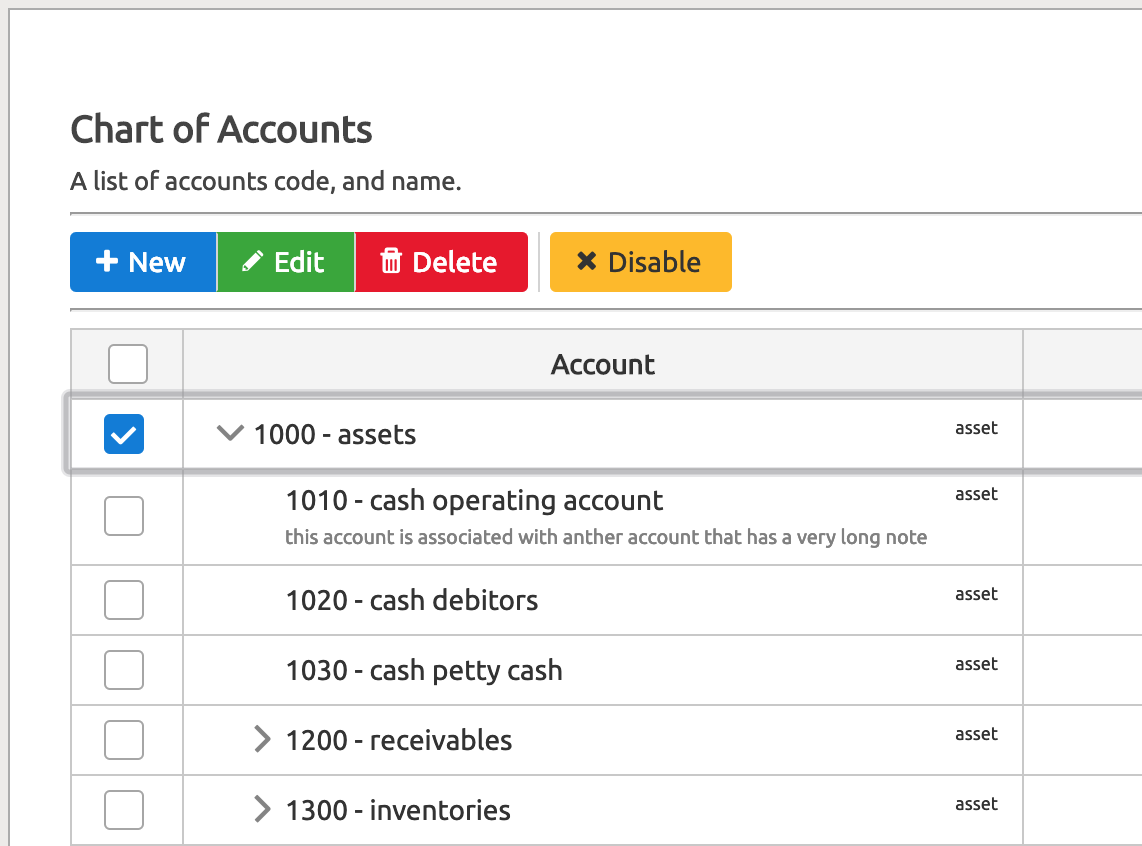
As shown in the picture, when I select the first node [1000 - assets] to perform an operation (eg: edit the record), all its children will be selected.
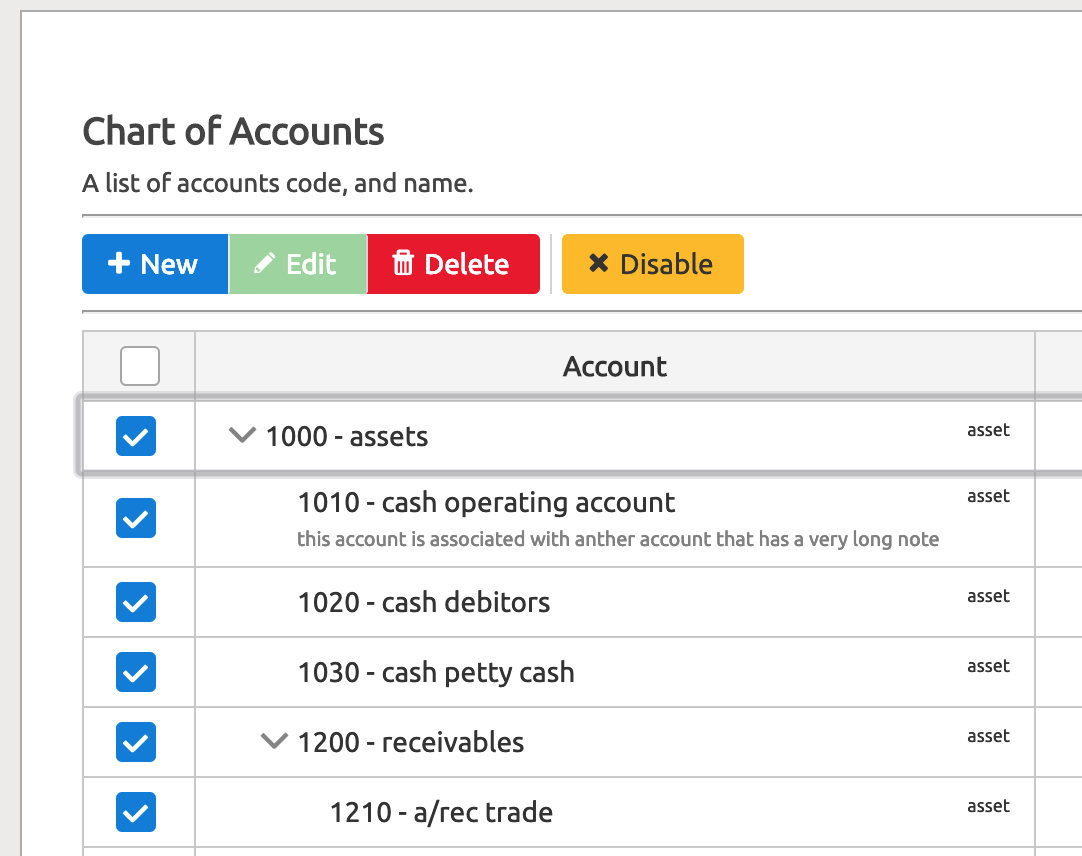
In this scenario, only one record can be edited at a time. The user should select the record, and then press the enter. Both the parents, and child can be edited. I know we can achieve it with other selectionMode but, from end user perspective it is more user friendly to achieve this.
For now, I managed to add this feature in my project, which let me perform single node selection with checkbox. Below is the expected behavior.
- Angular version: 7.1.4
- PrimeNG version: 7.1.0
 jone30rw
All 4 comments
I came up with following solution to solve my issue:
In treetable.js I changed toggleNodeWithCheckbox() function with
this.selection = this.selection || [];
this.preventSelectionSetterPropagation = true;
var node = event.rowNode.node;
var stopCheckPropagation = event.stopCheckPropagation;
var selected = this.isSelected(node);
if (selected) {
this.propagateSelectionDown(node, false, stopCheckPropagation);
if (stopCheckPropagation != true && event.rowNode.parent) {
this.propagateSelectionUp(node.parent, false);
}
this.selectionChange.emit(this.selection);
this.onNodeUnselect.emit({ originalEvent: event, node: node });
}
else {
this.propagateSelectionDown(node, true, stopCheckPropagation);
if (stopCheckPropagation != true && event.rowNode.parent) {
this.propagateSelectionUp(node.parent, true);
}
this.selectionChange.emit(this.selection);
this.onNodeSelect.emit({ originalEvent: event, node: node });
}
this.tableService.onSelectionChange();
and in propagateSelectionDown() function, I added a new param , stopCheckPropagation and changed following lines
// ....
node.partialSelected = false;
if (node.children && node.children.length) {
for (var _i = 0, _a = node.children; _i < _a.length; _i++) {
var child = _a[_i];
this.propagateSelectionDown(child, select);
}
}
with
node.partialSelected = false;
if (stopCheckPropagation != true && node.children && node.children.length) {
for (var _i = 0, _a = node.children; _i < _a.length; _i++) {
var child = _a[_i];
this.propagateSelectionDown(child, select, stopCheckPropagation);
}
}
and in onClick(), I passed the stopCheckPropagation value to the toggleNodeWithCheckbox() function too.
if (!this.disabled) {
this.tt.toggleNodeWithCheckbox({
originalEvent: event,
rowNode: this.rowNode,
stopCheckPropagation: this.stopCheckPropagation
});
}
when using the treetable is control the propagation with [stopCheckPropagation]="true|false".
Note: I added [stopCheckPropagation] to \.
jone30rw
on 2 Aug 2019
Hi!
I have the same issue, but cannot find the file treetable.js Where did you change it?
 aidosz
on 30 Jan 2020
aidosz
on 30 Jan 2020
Hi,
I have changed the compiled treetable file the is located in /node_modules.
However, I resolved my issue by using a simple <p-checkbox>... like this:
In view:
<p-treeTable
        ...
        [(selection)]="selections">
        ...
        <ng-template pTemplate="body" let-rowNode let-row="rowData">
          <tr [ttRow]="rowNode">
            <td>
              <p-checkbox [binary]="true"
                    [ngModel]="isRowSelected(rowNode)"
                    (click)="toggleRowSelection(rowNode)">
              </p-checkbox>
            </td>
            ...
           </tr>
            ...
        </ng-template>
        ...
</p-treeTable>
in component:
  isRowSelected(rowNode: any): boolean {
    return this.selections.indexOf(rowNode.node) >= 0;
  }

  toggleRowSelection(rowNode: any): void {
    if (this.isRowSelected(rowNode)) {
      this.selections.splice(this.selections.indexOf(rowNode.node), 1);
    } else {
      this.selections.push(rowNode.node);
    }

    this.selections = [...this.selections];
  }
I hope this helps.
:)
I close this issue since it can be achieved by using <p-checkbox>.
jone30rw
on 30 Jan 2020
Thank you very much, your solution is nice! Saved my time
aidosz
on 31 Jan 2020
Related issues
 watalberto
·
3Comments
watalberto
·
3Comments
 just-paja
·
3Comments
just-paja
·
3Comments
 SchneMa
·
3Comments
SchneMa
·
3Comments
 markgoho
·
3Comments
markgoho
·
3Comments
 Helayxa
·
3Comments
Helayxa
·
3Comments
Most helpful comment
Hi,
I have changed the compiled treetable file the is located in /node_modules.
However, I resolved my issue by using a simple
<p-checkbox>...like this:In view:
in component:
I hope this helps.
:)
I close this issue since it can be achieved by using
<p-checkbox>.