Primeng: Dropdown menu does not open
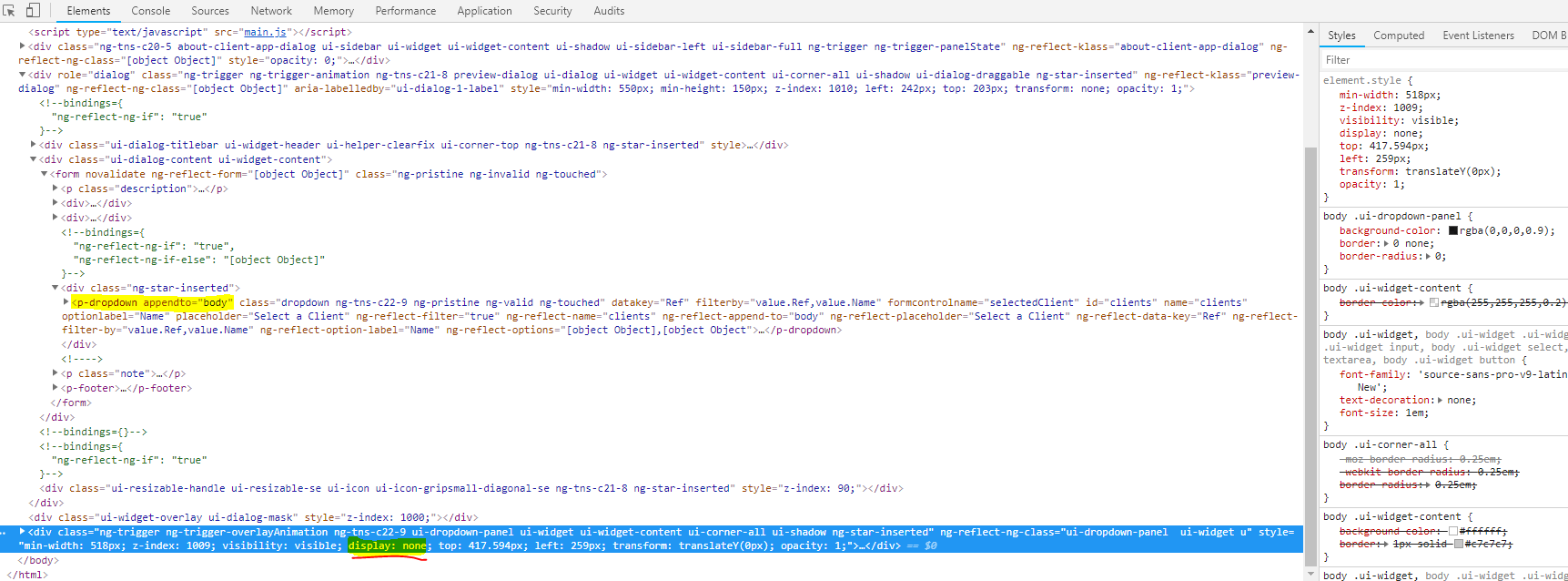
After upgrading to PrimeNG 7, clicking on p-dropdown fails to open the dropdown menu. Close inspection of the html and css shows the display declaration for the dropdown menu panel is set to none by default (display: none), overriding this and setting it to block (display: block) fixes the issue.
I believe this is a bug, unless I'm missing something?
Angular version: 7.0.3
PrimeNG version: 7.0.0-beta.1
Browser: [ Chrome 70.0.3538.77 (Official Build) (64-bit) | Firefox 63.0 (64-bit) | IE 11.345.17134.0 ]
 carlbonsu
All 6 comments
I'm also experiencing this issue. I'm able to reproduce it from 6.0.2 onward. 6.0.1 and before work fine.
 burgertm
on 5 Nov 2018
burgertm
on 5 Nov 2018
Same problem for me.
 neergaard79
on 16 Nov 2018
neergaard79
on 16 Nov 2018
Provide a stackblitz template please, unable to replicate. Live demos seems to be fine;
 cagataycivici
on 27 Nov 2018
cagataycivici
on 27 Nov 2018
Provide a stackblitz template please, unable to replicate. Live demos seems to be fine;
Here you go @cagataycivici : https://stackblitz.com/edit/github-otpuub?file=src%2Fapp%2Fapp.component.html
 roldengarm
on 29 Nov 2018
roldengarm
on 29 Nov 2018
At line 12 of index.html, using;
Replacing this;
<link rel="stylesheet" href="https://unpkg.com/[email protected]/resources/primeng.min.css" />
with
<link rel="stylesheet" href="https://unpkg.com/[email protected]/resources/primeng.min.css" />
Fixes it.
cagataycivici
on 29 Nov 2018
I don't actually package primeNG's stylesheet with our app, because it absolutely obliterates a lot of our other in place styles. Is there no other way around this, or a reason this is set to display: none; to begin with?
I'll look and open a PR later if I get a chance, but it seems strange that this is set at all, and the only acceptable solution is to overwrite the property with CSS.
Also worth noting that this is still "broken" in 7.0.3
 PikaChokeMe
on 15 Dec 2018
PikaChokeMe
on 15 Dec 2018
Related issues
 philly-vanilly
·
3Comments
philly-vanilly
·
3Comments
 watalberto
·
3Comments
watalberto
·
3Comments
 just-paja
·
3Comments
just-paja
·
3Comments
 cyberrranger
·
3Comments
cyberrranger
·
3Comments
 pchristou
·
3Comments
pchristou
·
3Comments
Most helpful comment
I'm also experiencing this issue. I'm able to reproduce it from 6.0.2 onward. 6.0.1 and before work fine.