Primeng: p-calendar popup won't open
I'm submitting a ... (check one with "x")
[x] bug report => Search github for a similar issue or PR before submitting
[ ] feature request => Please check if request is not on the roadmap already https://github.com/primefaces/primeng/wiki/Roadmap
[ ] support request => Please do not submit support request here, instead see http://forum.primefaces.org/viewforum.php?f=35
Current behavior
I've recently upgraded my angular application from version 2 to 6. I also upgraded the primeng to 6.1.3. Nearly all widgets are working correctly. However, this p-calendar does not work. The field exists in dom, but nothing happens when I click inside the field.
Expected behavior
A calendar should open upon clicking on the field.
This basic code won't work. <p-calendar [(ngModel)]="invoiceDate"></p-calendar>
The above snippet generates this html:
<p-calendar _ngcontent-c2="" class="ng-tns-c4-3 ng-pristine ng-valid ui-inputwrapper-filled ng-touched" ng-reflect-model="Thu Sep 06 2018 15:39:46 GMT+0">
<span class="ng-tns-c4-3 ui-calendar" ng-reflect-ng-class="[object Object]"><!--bindings={
  "ng-reflect-ng-if": "true"
}-->
<input autocomplete="off" type="text" class="ng-tns-c4-3 ui-inputtext ui-widget ui-state-default ui-corner-all ng-star-inserted" ng-reflect-ng-class="ui-inputtext ui-widget ui-stat" placeholder="">
<!--bindings={}--><!----><!--bindings={
  "ng-reflect-ng-if": "false"
}-->
</span>
</p-calendar>
Please tell us about your environment:
Operating system: Ubuntu 18.04
Package manager: NPM
Angular: 6.1.6
Angular-cli: 6.1.5
- Browser: [Chrome 68.0.344 | Firefox 61.01 ]
Language: [TypeScript 2.9.2]
Node (for AoT issues):
node --version= v8.11.4
 faisal-zulfiqar
All 14 comments
Hello, i have this problem too. Unfortunately i can not upgrade from v6.0.0 to v6.1.0
 ikiraz18
on 6 Sep 2018
ikiraz18
on 6 Sep 2018
i have this problem too
 EdmarJr
on 7 Sep 2018
EdmarJr
on 7 Sep 2018
Same here, inline mode works but not popup mode (default).
 swaner
on 11 Sep 2018
swaner
on 11 Sep 2018
I have this problem too. Inline works but popoup mode not.
Im using serenety theme.
¡SOLVED FOR ME!
I was using (loading) an incorrect primeng.min.css version.
Sorry!
 Agarcia1967
on 14 Sep 2018
Agarcia1967
on 14 Sep 2018
I had this issue with a custom theme that was applying display: none to the calendar popup, since previous versions of primeng changed that property, but this version is using animations to change the opacity.
I was able to remove display: none from my stylesheets for components such as calendar and dropdown, and then they began showing up like I expected them to.
 jwelker110
on 15 Sep 2018
jwelker110
on 15 Sep 2018
@jwelker110 Thanks for pointing me in the right direction. I had a style-tag that was causing this:
.ui-lightbox-content.ui-lightbox-loading + a { display:none; }
swaner
on 17 Sep 2018
Please make sure you have an up to date theme as well. Older themes have display: none at calendar popup. Since 6.0.2, overlays are implemented differently;
 cagataycivici
on 18 Sep 2018
cagataycivici
on 18 Sep 2018
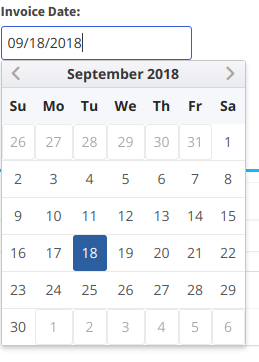
@jwelker110 @swaner as @cagataycivici mentioned above, I checked my codebase and it was using deprecated omega theme, I switched to nova-colored and the now the popup opens. The styles are a bit off, the calendar doesn't look like this in the documentation. Here's the pic:
faisal-zulfiqar
on 18 Sep 2018
@jwelker110 what could be causing this? Any idea?
faisal-zulfiqar
on 19 Sep 2018
@faisal-zulfiqar I'm not too sure without taking a deep dive into the theme itself. I would double check your styles and see whether you might have some custom css that is affecting the border, padding, border-collapse, etc. for tables.
jwelker110
on 20 Sep 2018
calendar ui displays proper but not able to open calendar popup on click. using primeng 8.0.2 version.
This is my code.
HTML FILE
COMPONENT FILE
export class ProfileComponent implements OnInit, OnDestroy, AfterViewInit {
date1: Date;
}
 mayurgujrathi
on 20 Sep 2019
mayurgujrathi
on 20 Sep 2019
@mayurgujrathi Did you get any solution? I am facing same problem where display:none is being applied on calendar popup.
 shreenivasa-desai
on 16 Aug 2020
shreenivasa-desai
on 16 Aug 2020
I am having the same problem p-calendar not showing up after upgrade to Primeng 9. The module was using Omega theme now I switch to nova-colored. Still having the same problem.
As mentioned in this thread - It's appending with inline style "Display: None".
---div class="ng-trigger ng-trigger-overlayAnimation ng-tns-c90-1 ui-datepicker ui-widget ui-widget-content ui-helper-clearfix ui-corner-all ui-shadow ng-star-inserted" style="z-index: 1003; visibility: visible; _display: none_; top: -254px; left: 0px; transform: translateY(0px); opacity: 1;"---
Any advice on how you people resolve this issues?
 GopiRamnath
on 3 May 2021
GopiRamnath
on 3 May 2021
Finally resolved the above-mentioined issue.
This is what I did -- If anyone has a similar problem..
Step1: Wipeout Node_Module folder and reinstall fresh
Step2: Remove Primeng free theme stylesheet from Angular.json reference
Step3: Add the following *.css reference from each components,
"node_modules/primeng/resources/primeng.css",
"node_modules/primeng/resources/components/calendar/calendar.css",
"node_modules/primeng/resources/components/table/table.css",...
Step4: Rebuild the project.. OOOooo... It worked.
The tricky part is - "Display: none" populated as inline style and it's appeared like some auto JS file causing problem which makes the *.css theme the least suspect. But finally, Though *.js populating inline style, *.css theme was the one causing the issue.
Good luck!
GopiRamnath
on 10 May 2021
Related issues
 watalberto
·
3Comments
watalberto
·
3Comments
 just-paja
·
3Comments
just-paja
·
3Comments
 lilling
·
3Comments
lilling
·
3Comments
 papiroca-tm
·
3Comments
papiroca-tm
·
3Comments
 gatapia
·
3Comments
gatapia
·
3Comments
Most helpful comment
calendar ui displays proper but not able to open calendar popup on click. using primeng 8.0.2 version.
This is my code.
HTML FILE
COMPONENT FILE
export class ProfileComponent implements OnInit, OnDestroy, AfterViewInit {
date1: Date;
}