Primeng: p-table horizontal scroll disappears when filtering in a field and no data are shown
When you filter the turbo table and because of that the list will be empty, the horizontal srollbar is disappearing and the overlapping columns can't reached anymore.So you can't clear the filter to show all data and scroll bar again.
 hschindler
All 10 comments
Facing same issue,can someone please look into this.its a blocker.
 MSCapNG
on 17 Jul 2018
MSCapNG
on 17 Jul 2018
This is still an issue in "primeng": "6.1.2". Is anyone working on this?
 tscislo
on 5 Sep 2018
tscislo
on 5 Sep 2018
Suggestion is to use emptyMessage so you can provide feedback to the users as well;
<ng-template pTemplate="emptymessage" let-columns>
    <tr>
         <td [attr.colspan]="columns.length">No Data</td>
    </tr>
</ng-template>
 cagataycivici
on 27 Feb 2019
cagataycivici
on 27 Feb 2019
@cagataycivici Just to clarify- this won't be 'fixed' other than the suggested message display?
 umdstu
on 8 Mar 2019
umdstu
on 8 Mar 2019
Suggestion is to use emptyMessage so you can provide feedback to the users as well;
<ng-template pTemplate="emptymessage" let-columns>
    <tr>
         <td [attr.colspan]="columns.length">No Data</td>
    </tr>
</ng-template>
I do not see how @cagataycivici proposal solves this issue. When a user enters a filter expression that leads to empty results and the filter belongs to a column that is not visible any longer because there's no scrollbar, the user has no chance to remove the filter. Only a reload of the site helps. Or implementing a logic to reset filters inside of the emptymessage template. But the latter looks like a hack to me.
I suggest to reopen this issue.
 ch-k
on 10 Dec 2019
ch-k
on 10 Dec 2019
This CSS solved the issue. It worked for me.
.ui-table-scrollable-wrapper {
overflow: auto !important;
}
.ui-table-scrollable-header, .ui-table-scrollable-body, .ui-table-scrollable-footer {
overflow: visible !important;
}
 himenp
on 24 Jul 2020
himenp
on 24 Jul 2020
The solution from himenp should be added to the core css. It fixes the issue where the user can't scroll to filter controls in the header that are off screen when the table is empty. I always include a Clear Filters button on pages with tables but forcing the horizontal scroll bar is better.
 AlejandroFlorin
on 1 Sep 2020
AlejandroFlorin
on 1 Sep 2020
Workaround for version 11 (this should be implemented in the core css)
.p-datatable-scrollable-wrapper {
overflow: auto !important;
}
.p-datatable-scrollable-header, .p-datatable-scrollable-body, .p-datatable-scrollable-footer {
overflow: visible !important;
}
AlejandroFlorin
on 7 Feb 2021
@AlejandroFlorin @himenp Thanks this was my rescue.
@cagataycivici This is definitely a bug in PrimeNG and should be fixed.
 OPunktSchmidt
on 26 Feb 2021
OPunktSchmidt
on 26 Feb 2021
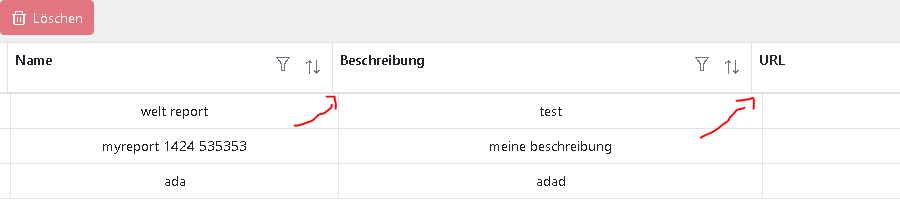
Unfortunately, the table is displayed incorrectly after I applied the CSS style to solve the original problem.
OPunktSchmidt
on 26 Feb 2021
Related issues
 garethlewis
·
3Comments
garethlewis
·
3Comments
 limjoonae
·
3Comments
limjoonae
·
3Comments
 Helayxa
·
3Comments
Helayxa
·
3Comments
 markgoho
·
3Comments
markgoho
·
3Comments
 philly-vanilly
·
3Comments
philly-vanilly
·
3Comments
Most helpful comment
Workaround for version 11 (this should be implemented in the core css)
.p-datatable-scrollable-wrapper {
overflow: auto !important;
}
.p-datatable-scrollable-header, .p-datatable-scrollable-body, .p-datatable-scrollable-footer {
overflow: visible !important;
}