Primeng: Use Ng-Template for Selectbutton options.
I'm submitting a ...
[ ] bug report => Search github for a similar issue or PR before submitting
[ X] feature request => Please check if request is not on the roadmap already https://github.com/primefaces/primeng/wiki/Roadmap
[ ] support request => Please do not submit support request here, instead see http://forum.primefaces.org/viewforum.php?f=35
Is there a way to use ng template like in the dropdown for selectbutton. I want to use my translation pipe in html. So i need a ngTemplate for the options to translate them.
i want to do something like this:
<p-selectButton [options]="setting.options" optionLabel="label" [(ngModel)]="setting.value">
                                            <ng-template let-item pTemplate="item">
                                                <span style="vertical-align:middle">
                                                   {{item.label | translate}}
                                                </span>
                                            </ng-template></p-selectButton>
in the p-dropDown the same code works.
new feature
 MarMic1
👍3
All 3 comments
Available in 5.2.5.
 cagataycivici
on 19 Apr 2018
cagataycivici
on 19 Apr 2018
🎉1
it seems that this feature doesn't really work.
given the following template
<p-selectButton [options]="languages" formControlName="language" [(ngModel)]="selectedLanguage">
        <ng-template let-item>
          <i class="{{item.icon}}"></i>
          <span translate>{{item.label}}</span>
        </ng-template>
      </p-selectButton>
// component
languages: SelectItem[] = [
    {
      label: 'german',
      value: 'de',
      icon: 'flag-icon flag-icon-ch'
    },
    {
      label: 'english',
      value: 'en',
      icon: 'flag-icon flag-icon-gb'
    }
  ];

 ngOnChanges(changes: SimpleChanges): void {

this.formBuilder.group({
      language: 'de'
    });

    this.detailForm.reset({
      language: 'de'
    };, {emitEvent: false});
  }
it won't set the ui-active class to the seelected button initially.
as soon as I manually click a button it works.
If I don't use a custom template everything works as expected.
And why do I have to mix Reactive Forms and Template Driven Forms?
 Arikael
on 25 May 2018
Arikael
on 25 May 2018
👀1
👍1
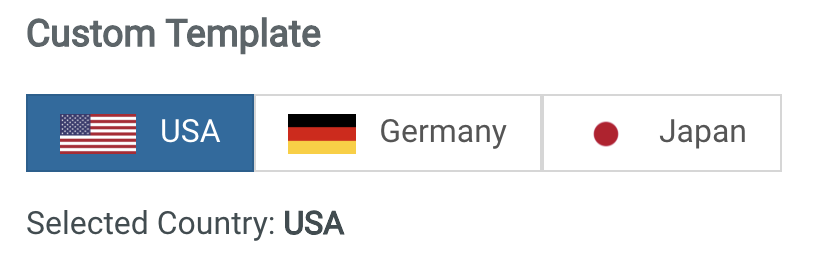
Still I have a problem
When Set "selectedCountry" value, the button is not selected.
 el7lme
on 6 Jun 2018
el7lme
on 6 Jun 2018
Was this page helpful?
0 / 5 - 0 ratings
Related issues
 garethlewis
·
3Comments
garethlewis
·
3Comments
 limjoonae
·
3Comments
limjoonae
·
3Comments
 watalberto
·
3Comments
watalberto
·
3Comments
 miresk
·
3Comments
miresk
·
3Comments
 cyberrranger
·
3Comments
cyberrranger
·
3Comments