Primeng: [ TurboTable ] / p-table sorts values with undefined sortField resulting in unpredictable browser-specific reordering
I'm submitting a ... (check one with "x")
[x] bug report => Search github for a similar issue or PR before submitting
[ ] feature request => Please check if request is not on the roadmap already https://github.com/primefaces/primeng/wiki/Roadmap
[ ] support request => Please do not submit support request here, instead see http://forum.primefaces.org/viewforum.php?f=35
Current behavior
I'm resubmitting this issue as I believe I have found a cause/solution. By default, p-table has sortMode set to 'single' and sortField is undefined. When the p-table value property is set, the setter calls sortSingle() which then calls Array.sort() while sortField is still undefined. The undefined sortField causes the result of Array.sort() to be unpredictable and browser specific, resulting in the unexpected reordering of table rows reported by various users. A simple solution might be to insert a line like below to primeng/src/app/components/table/table.ts @7f8f5ad at line 503:
if (!this.sortField) { return; }
This would address both the situation where no columns are sortable, or where sortable columns exist but the user has not yet selected the column to be sorted. Sorry I can't do this as a PR, but this change certainly solves the problem for me. I guess you'd still have to think whether onSort.emit() should be called when value and first have been updated, even though no actual sorting has occurred.
Expected behavior
Table.sortSingle() should not call Array.sort() while sortField is undefined.
Minimal reproduction of the problem with instructions
View my Plunk in Chrome: https://plnkr.co/edit/eFJqrj9iK5KxrnSvBwW3?p=preview
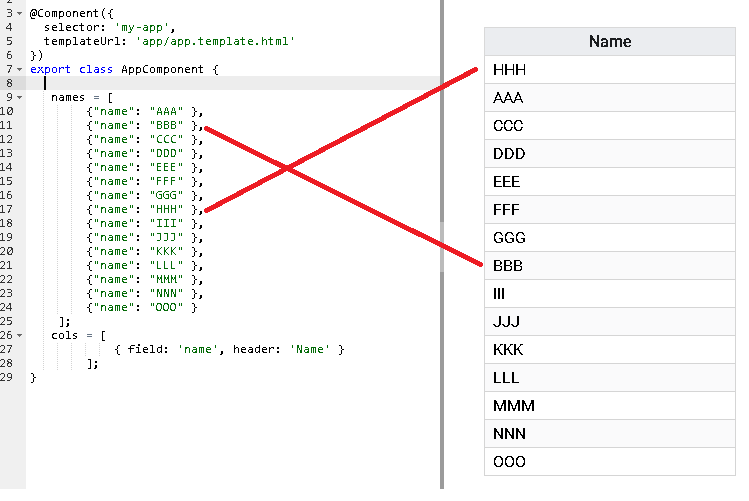
The example table has no sorting applied, so should not change the original order of the data from "AAA", "BBB", "CCC" etc. Viewed in IE this works fine. Viewed in Chrome the order is modified putting "HHH" first because Array.sort() is being called even though no sort parameters have been defined.
What is the motivation / use case for changing the behavior?
A table with no sort parameters should not alter the order of the data.
Please tell us about your environment:
Angular CLI: 1.6.3
Node: 8.9.4
OS: win32 x64
Angular: 5.2.1
Angular version: 5.2.1
PrimeNG version: 5.2.0-rc.2
Browser: [all | Chrome XX | Firefox XX | IE XX | Safari XX | Mobile Chrome XX | Android X.X Web Browser | iOS XX Safari | iOS XX UIWebView | iOS XX WKWebView ]
Chrome: 63Language: [all | TypeScript X.X | ES6/7 | ES5]
Typescript 2.4.2Node (for AoT issues):
node --version=
Node: 8.9.4
 jw61
jw61
All 4 comments
This has been discussed a couple of times, we use browser sorting so it is up to browsers how to handle sorting. If you prefer to take over sorting, you can use customSort feature or use lazy loading, in both cases you can plug-in your own sorting.
 cagataycivici
on 30 Jan 2018
cagataycivici
on 30 Jan 2018
@cagataycivici My point was rather that it shouldn't be sorting the data at all unless the user has requested it. Currently the data gets sorted whether you ask for it or not, and there is no defined way of stopping it other than setting an empty customSort method, which feels like a broken way of doing things.
jw61
on 31 Jan 2018
Workaround to this issue posted to #5050
jw61
on 2 Feb 2018
@cagataycivici Why original array is modified? I am agree with @jw61, data should be sorted only if user is request it. Please reopen this issue.
 ccasallas
on 7 Mar 2018
ccasallas
on 7 Mar 2018
Related issues
 jisqaqov
·
3Comments
jisqaqov
·
3Comments
 just-paja
·
3Comments
just-paja
·
3Comments
 lilling
·
3Comments
lilling
·
3Comments
 limjoonae
·
3Comments
limjoonae
·
3Comments
 philly-vanilly
·
3Comments
philly-vanilly
·
3Comments
Most helpful comment
@cagataycivici My point was rather that it shouldn't be sorting the data at all unless the user has requested it. Currently the data gets sorted whether you ask for it or not, and there is no defined way of stopping it other than setting an empty customSort method, which feels like a broken way of doing things.