Primeng: Built application includes all PrimeNG modules (even unused ones)
I'm submitting a ... (check one with "x")
[x] bug report => Search github for a similar issue or PR before submitting
[ ] feature request => Please check if request is not on the roadmap already https://github.com/primefaces/primeng/wiki/Roadmap
[ ] support request => Please do not submit support request here, instead see http://forum.primefaces.org/viewforum.php?f=35
Current behavior
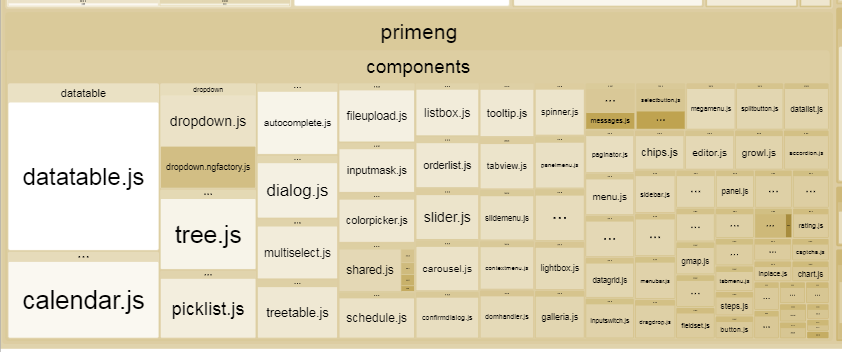
I use Angular CLI (v1.5.0) to build my application. Generated vendor.bundle.js asset is much bigger then previously (before version 5.0.0-RC0), because it includes every single PrimeNG module:
Expected behavior
It should contain only those PrimeNG modules included in the project, in version 4.* for me it was looking like that:

What is the motivation / use case for changing the behavior?
Keeping the application as small as possible.
Angular version: 5.0.0-rc0
PrimeNG version: 5.0.0-RC0
Language: [TypeScript 2.4.2]
Node (for AoT issues):
node --version= 6.11.4
 fibinger
All 9 comments
I “suffered” from the same thing. Turns out if you just import from primeng/primeng the final bundle with include some stuff you haven't used. I fixed that by including directly the components that I was using. Something like
import { DataTableModule } from 'primeng/components/datatable/datatable';
Sure it's a bit more hassle but now I don't include the whole “jungle” :D
You can also refer to this post in the forum.
 dzhavat
on 13 Nov 2017
dzhavat
on 13 Nov 2017
@dzhavat you are absolutely right. It worked! :)
Quite annoying IDEs are suggesting barrel imports by default, so it's necessary to amend those imports manually, but it's worth doing it anyway.
Thanks.
fibinger
on 15 Nov 2017
We'll update the docs import section to include the actual path to avoid future issues.
 cagataycivici
on 17 Nov 2017
cagataycivici
on 17 Nov 2017
hi
i was wondering if with new versions the problem continue or is safe to use what is said in the docs
that way
import {TableModule} from 'primeng/table';
or
import {TableModule} from 'primeng/components/table/table'
Can I use import { TableModule } from 'primeng/primeng'; on ^6.1.4 version or is there the same problem?
 xdavipereira
on 1 Nov 2018
xdavipereira
on 1 Nov 2018
Using version 9, this form of import (import {TableModule} from 'primeng/components/table/table') is no longer implemented, leaving only this form (import {TableModule} from 'primeng/table') that ends up compiling all modules.
Any solution?
 UesleyCarossi
on 27 Mar 2020
UesleyCarossi
on 27 Mar 2020
Using version 9, this form of import (import {TableModule} from 'primeng/components/table/table') is no longer implemented, leaving only this form (import {TableModule} from 'primeng/table') that ends up compiling all modules.
Any solution?
I have the same problem
 fheinz7
on 3 Apr 2020
fheinz7
on 3 Apr 2020
Using version 9, this form of import (import {TableModule} from 'primeng/components/table/table') is no longer implemented, leaving only this form (import {TableModule} from 'primeng/table') that ends up compiling all modules.
Any solution?I have the same problem
i am facing a same problem it tooks 5 mins to compile all of modules ..
 faizangithub-tech
on 14 Jun 2020
faizangithub-tech
on 14 Jun 2020
Hi,
I have the same issue, 5mb bundle size, it's exeed all budget limits.
With Latest primeng and latest angular.
 Olmer1st
on 25 Nov 2020
Olmer1st
on 25 Nov 2020
any news on this?
 KrakenZ
on 11 Feb 2021
KrakenZ
on 11 Feb 2021
Related issues
 watalberto
·
3Comments
watalberto
·
3Comments
 Helayxa
·
3Comments
Helayxa
·
3Comments
 philly-vanilly
·
3Comments
philly-vanilly
·
3Comments
 jisqaqov
·
3Comments
jisqaqov
·
3Comments
 lilling
·
3Comments
lilling
·
3Comments
Most helpful comment
Using version 9, this form of import (import {TableModule} from 'primeng/components/table/table') is no longer implemented, leaving only this form (import {TableModule} from 'primeng/table') that ends up compiling all modules.
Any solution?