Primeng: Float label fails with p-autoComplete
I'm submitting a ...
[ x ] bug report
Current behavior
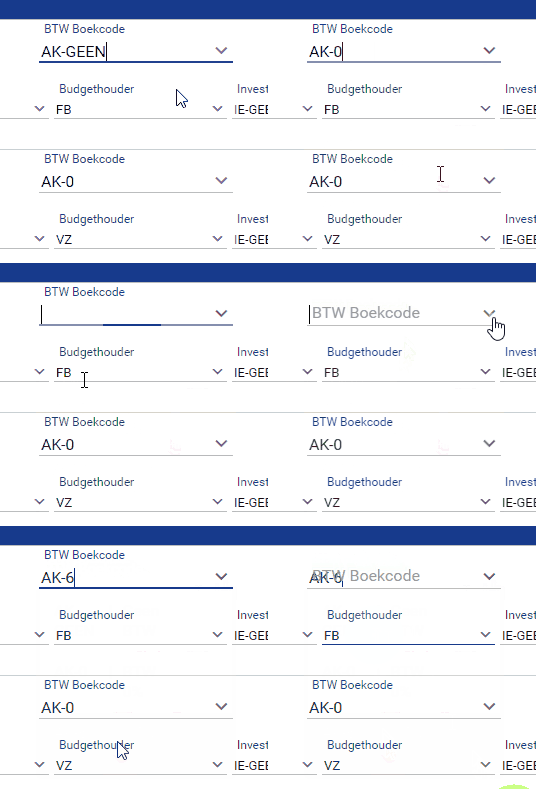
If p-autocomplete component initialize with default string value on ngModel, the label keep floating forever, and if you initialize with null value on ngModel and change your value, the label is going float, but not keep floating while ngModel has value.
Expected behavior
Keep label floating while ngModel has value, same as all others components.
Minimal reproduction of the problem with instructions
http://plnkr.co/edit/68YsfLIBibkBd1XJfmjn?p=preview
What is the motivation / use case for changing the behavior?
Please tell us about your environment:
Angular version: 4.3.6
PrimeNG version: 4.2.2
Browser: all
Language: TypeScript 2.3.3
 sousajunior
All 3 comments
My initial comment on the referenced issue shouldn't have been there.
But I have the same issue as @CarlinhosSousaJunior.
Below you can find a GIF visualizing the issue.
Environment
- Ultima: 4.2.0, commercial
- PrimeNG: 4.1.3
- Typescript: 2.3.4
- Angular: 4.4.3
Edit: added environment-specs
 VNYoeri
on 12 Oct 2017
VNYoeri
on 12 Oct 2017
Duplicate #4011
 cagataycivici
on 20 Oct 2017
cagataycivici
on 20 Oct 2017
@cagataycivici I'm affraid the fix isn't a fix... :(
... or am I doing something wrong here?
Here's what I did:
I updated primeng in my package.json to: "primeng": "~4.3.0" and deleted my entire node_modules folder before I did a npm i.
When I npm ls | grep primeng I get +-- [email protected], as expected.
Here's my autocomplete-component's html:
<span class="md-inputfield">
<p-autoComplete id="autocomplete" [(ngModel)]="value" [size]="35" [minLength]="1" [suggestions]="filterArray" (completeMethod)="filterList($event)" [dropdown]="true" [multiple]="false" [forceSelection]="true" field="code">
<ng-template let-listItem pTemplate="item">
<div class="ui-helper-clearfix">
<div class="ui-grid-col-3">{{ listItem?.code }}</div>
<div class="ui-grid-col-1"> | </div>
<div class="ui-grid-col-8">{{ listItem?.omschrijving }}</div>
</div>
</ng-template>
</p-autoComplete>
<label for="autocomplete">{{ completeLabel }}</label>
</span>
By the way: also, as off 4.3.0, the forceSelection option is blocking me even after I picked one item from my autocomplete-list.... but I'm awaiting a fix on this issue as to be sure it's not me doing something utterly ridiculous here 😆
Specs:
- Browser: Opera 48.0.2685.50 / Chrome 61.0.3163.100
- PrimeNG: 4.3.0
- Ultima: 4.2.0
Edit: confusing typo editted.
VNYoeri
on 31 Oct 2017
Related issues
 lilling
·
3Comments
lilling
·
3Comments
 just-paja
·
3Comments
just-paja
·
3Comments
 Helayxa
·
3Comments
Helayxa
·
3Comments
Helayxa
·
3Comments
Helayxa
·
3Comments
 cyberrranger
·
3Comments
cyberrranger
·
3Comments
Most helpful comment
My initial comment on the referenced issue shouldn't have been there.
But I have the same issue as @CarlinhosSousaJunior.
Below you can find a GIF visualizing the issue.

Environment
- Ultima: 4.2.0, commercial
- PrimeNG: 4.1.3
- Typescript: 2.3.4
- Angular: 4.4.3
Edit: added environment-specs