Primeng: Datatable: editable property not working with selection prperty
If selectionMode is on for datatable, editable is not working.
Please see the below code snippet.
<p-dataTable [value]="roles" [headerRows]="headerRows"
    selectionMode="single" [(selection)]="selectedRole" (onRowSelect)="onRoleSelected()"
    (onRowUnselect)="onRoleUnSelected()" [editable]="true">
    <p-column field="name" [editable]="true"></p-column>
    <p-column field="description" [editable]="true"></p-column>
</p-dataTable>
 vishal3007
All 11 comments
The way I got it worked is by adding an extra column (check box) and setting selectionMode property on it rather than on the dtatable.
 vvvttt
on 6 Oct 2016
vvvttt
on 6 Oct 2016
thanks vvvttt...I am trying to do the same thing but I only want to edit the selected row.
How did you restrict the user to edit the column of non selected row?
vishal3007
on 11 Oct 2016
Hey vishal3007,
I haven't implemented this feature since I am not restricting users
from editing non selected rows.
Thanks.
vvvttt
on 12 Oct 2016
I do have the same issue, Editable is not working, when Selection Mode is Single, As you can edit any Cell, Selection mode single may not required. Hope that is per design.
 GopiAnnan
on 6 Mar 2017
GopiAnnan
on 6 Mar 2017
Same issue for me as well. I want to allow user to select multiple rows to delete in an editable table.
 hiteshanchan
on 13 Mar 2017
hiteshanchan
on 13 Mar 2017
This combination is not supported, better use a radio-checkbox because both bind to click event causing the conflict. Selection with a separate column like radio-checkbox-button will be the better solution. Even if we support it, I see a UX issue down the road.
 cagataycivici
on 6 Jun 2017
cagataycivici
on 6 Jun 2017
Even though this seems like a rare usecase, we have also run into this problem:
In our application we want to highlight the currently selected row (single select), to emphasize which row the user is currently working on. The application will also display additional information of the selected row in the footer (detail section). At the same time the application should allow to edit certain fields.
I would like to ask for your reasons to close this as an unsupported usecase, when the workaround described in https://github.com/primefaces/primeng/issues/1011 works and looks reasonably well:
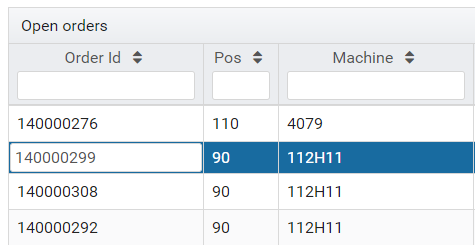
For us this workaround would be sufficient for our usecase to have editable=true and selectionMode=single at the same time.
Please reconsider your decision, if you have some time. Other than that, keep up the great work. :-)
 mniederkofler
on 7 Jun 2017
mniederkofler
on 7 Jun 2017
@mniederkofler I do absolutely agree.
For us it's even a very common usecase having the row selected which is currently being edited. Especially when working in master detail scenarios.
I have seen this in a lot of applications and think it's much better UX than clicking a checkbox or radio somewhere in the datatable.
Would be great to have this feature.
Thanks for your great work!
 fxmfr
on 30 Jun 2017
fxmfr
on 30 Jun 2017
I vote for this.
 SpiderPork
on 25 Jul 2017
SpiderPork
on 25 Jul 2017
My vote as well
 mmlitvin
on 5 Oct 2017
mmlitvin
on 5 Oct 2017
I vote for it
 viswa-optimusprime
on 14 Nov 2017
viswa-optimusprime
on 14 Nov 2017
Related issues
 limjoonae
·
3Comments
limjoonae
·
3Comments
 just-paja
·
3Comments
just-paja
·
3Comments
 philly-vanilly
·
3Comments
philly-vanilly
·
3Comments
 gatapia
·
3Comments
gatapia
·
3Comments
 Helayxa
·
3Comments
Helayxa
·
3Comments
Most helpful comment
Even though this seems like a rare usecase, we have also run into this problem:
In our application we want to highlight the currently selected row (single select), to emphasize which row the user is currently working on. The application will also display additional information of the selected row in the footer (detail section). At the same time the application should allow to edit certain fields.
I would like to ask for your reasons to close this as an unsupported usecase, when the workaround described in https://github.com/primefaces/primeng/issues/1011 works and looks reasonably well:

For us this workaround would be sufficient for our usecase to have editable=true and selectionMode=single at the same time.
Please reconsider your decision, if you have some time. Other than that, keep up the great work. :-)