Prezto: command not found: history-substring-search pmodload: no such module:
Description
I can't load history-substring-search module.
I get this error.
source ~/.zshrc
command not found: history-substring-search
pmodload: no such module:
Also CTRL+r is broken. Is this normal in zsh? (this is my first day using zsh).
This is relevant part of my ~/.zprestorc
zstyle ':prezto:load' pmodule \
  'environment' \
  'terminal' \
  'editor' \
  'history' \
  'directory' \
  'spectrum' \
  'utility' \
  'completion' \
  'prompt' \
  'git' \
  'ruby' \
  'rails' \
  'git' \
  'syntax-highlighting' \     # must come before history-substring-search
  'history-substring-search'
Version that loads without errors is this:
zstyle ':prezto:load' pmodule \
  'environment' \
  'terminal' \
  'editor' \
  'history' \
  'directory' \
  'spectrum' \
  'utility' \
  'completion' \
  'prompt' \
  'git' \
  'ruby' \
  'rails' \
  'git' \
  'syntax-highlighting'      # must come before history-substring-search
  # 'history-substring-search'
Versions
- Prezto commit: 4abbc55
- ZSH version: zsh 5.1.1 (x86_64-ubuntu-linux-gnu)
- OS information: Linux Mint 18.3 (Cinnamon Desktop)
 marko-avlijas
All 12 comments
I've just updated my prezto with the latest commit and everything looks fine.
@marko-avlijas can you share with us the content of your .zshrc?
Because it looks like it is something in it.
There is no "history-substring-search" command indeed, just "history-substring-search-down" and "history-substring-search-up".
Also, can you try running git submodule sync and git submodule update inside your prezto folder?
 diraol
on 8 Jan 2019
diraol
on 8 Jan 2019
I didn't touch .zshrc yet, this is my first day with zsh.
#
# Executes commands at the start of an interactive session.
#
# Authors:
#   Sorin Ionescu <[email protected]>
#

# Source Prezto.
if [[ -s "${ZDOTDIR:-$HOME}/.zprezto/init.zsh" ]]; then
  source "${ZDOTDIR:-$HOME}/.zprezto/init.zsh"
fi

# Customize to your needs...
I ran the commands, nothing much happened:
~/.zprezto ❯❯❯ git submodule sync                                         master ✱
Synchronizing submodule url for 'modules/autosuggestions/external'
Synchronizing submodule url for 'modules/completion/external'
Synchronizing submodule url for 'modules/fasd/external'
Synchronizing submodule url for 'modules/history-substring-search/external'
Synchronizing submodule url for 'modules/prompt/external/agnoster'
Synchronizing submodule url for 'modules/prompt/external/async'
Synchronizing submodule url for 'modules/prompt/external/powerlevel9k'
Synchronizing submodule url for 'modules/prompt/external/powerline'
Synchronizing submodule url for 'modules/prompt/external/pure'
Synchronizing submodule url for 'modules/syntax-highlighting/external'
~/.zprezto ❯❯❯ git submodule update                                       master ✱
~/.zprezto ❯❯❯                                                            master ✱
If I can ask one more thing: I am getting some random stuff now when I start tmux.
For example I open a new pane and I got this:
Q:      Why do WASPs play golf ?
A:      So they can dress like pimps.
This didn't happen in bash.
What is that? How to turn that off?
marko-avlijas
on 8 Jan 2019
Hi @marko-avlijas !
Just noticed now that you wrote it is your first day with zsh and prezto.
So, welcome :tada: ! =)
Just to understand, for the instalation you have followed these instructions?
https://github.com/sorin-ionescu/prezto#installation
If I can ask one more thing: I am getting some random stuff now when I start tmux.
For example I open a new pane and I got this:
....
Not sure where is this coming from... Maybe from the Theme you are using? (I'm using powerlevel9k)
diraol
on 8 Jan 2019
Thanks for the welcome. :)
Theme is default one: sorin. Yes I followed those instructions, only thing I modified were the ln commands. I had stuff in there because I tried omyzsh first and I already had files so I changed every ln -s to ln -sfv to overwrite them.
marko-avlijas
on 8 Jan 2019
Not sure where is this coming from... Maybe from the Theme you are using? (I'm using
powerlevel9k)
It comes as part of .zlogin that prezto installed. It calls fortune which is a command to spout fortune cookies gibberish. It was annoying to figure out what it was and I have no idea why it was put in there by default.
https://github.com/sorin-ionescu/prezto/blob/master/runcoms/zlogin
marko-avlijas
on 8 Jan 2019
If I can ask one more thing: I am getting some random stuff now when I start tmux.
For example I open a new pane and I got this:Q: Why do WASPs play golf ? A: So they can dress like pimps.This didn't happen in bash.
What is that? How to turn that off?
This is part of default ~/.zlogin. See here.
Edit: Nevermind, I now see that @marko-avlijas discovered it already :)
 indrajitr
on 10 Jan 2019
indrajitr
on 10 Jan 2019
It calls
fortunewhich is a command to spout fortune cookies gibberish. It was annoying to figure out what it was and I have no idea why it was put in there by default.
Old school fortune fans actually like this :) FWIW, this has been there right since the beginning of prezto. Apart from innocent fun (and having a humorous start to shell interaction), it also serves as an indicator that ~/.zlogin has been executed and zsh loading process is complete.
We haven't had too many people complain about this. If there are enough complains, we can consider highing it behind a config (although I personally see no reason to do that).
indrajitr
on 10 Jan 2019
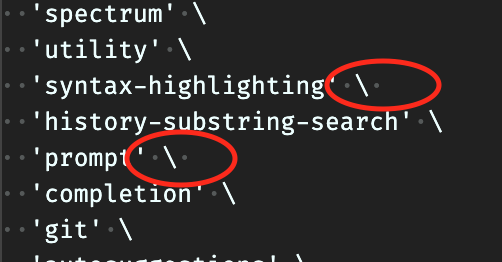
I've had this issue. I found out that this was just a simple appended whitespace after my slashes in ~/.zpreztorc file, see screenshot below. This caused my modules loaded after that line to show this error (in my case history-substring-search and completion). Removing these whitespaces after those slashes fixed the error for me.
 nvaken
on 12 Apr 2020
nvaken
on 12 Apr 2020
I can confirm @nvaken's point, adding a whitespace did muck up my modules and gave me the following error:
/home/s/.zpreztorc:45: command not found: prompt
pmodload: no such module: history-substring-search
@marko-avlijas can you make sure that you don't have any whitespaces in the your .zpreztorc?
 srijanshetty
on 13 Apr 2020
srijanshetty
on 13 Apr 2020
@marko-avlijas I'm closing this issue, if you are still facing issues please open it again.
srijanshetty
on 20 Apr 2020
Also, to be clear, it looks like it may be related to the comment after the continuation:
zstyle ':prezto:load' pmodule \
  'environment' \
  'terminal' \
  'editor' \
  'history' \
  'directory' \
  'spectrum' \
  'utility' \
  'completion' \
  'prompt' \
  'git' \
  'ruby' \
  'rails' \
  'git' \
  'syntax-highlighting' \     # must come before history-substring-search
  'history-substring-search'
Adding # must come before history-substring-search actually breaks the config because it adds spaces after the but before the #.
 belak
on 20 Apr 2020
belak
on 20 Apr 2020
PR #1352 would probably be a cleaner way out of the confusion for good :)
indrajitr
on 20 Apr 2020
Related issues
belak
·
4Comments
 jeffwidman
·
3Comments
jeffwidman
·
3Comments
 hiqua
·
6Comments
hiqua
·
6Comments
 brycekellogg
·
4Comments
brycekellogg
·
4Comments
 ww7
·
4Comments
ww7
·
4Comments
Most helpful comment
I've had this issue. I found out that this was just a simple appended whitespace after my slashes in
~/.zpreztorcfile, see screenshot below. This caused my modules loaded after that line to show this error (in my casehistory-substring-searchandcompletion). Removing these whitespaces after those slashes fixed the error for me.