Prezto: Cursor in the wrong location in Docker
Description
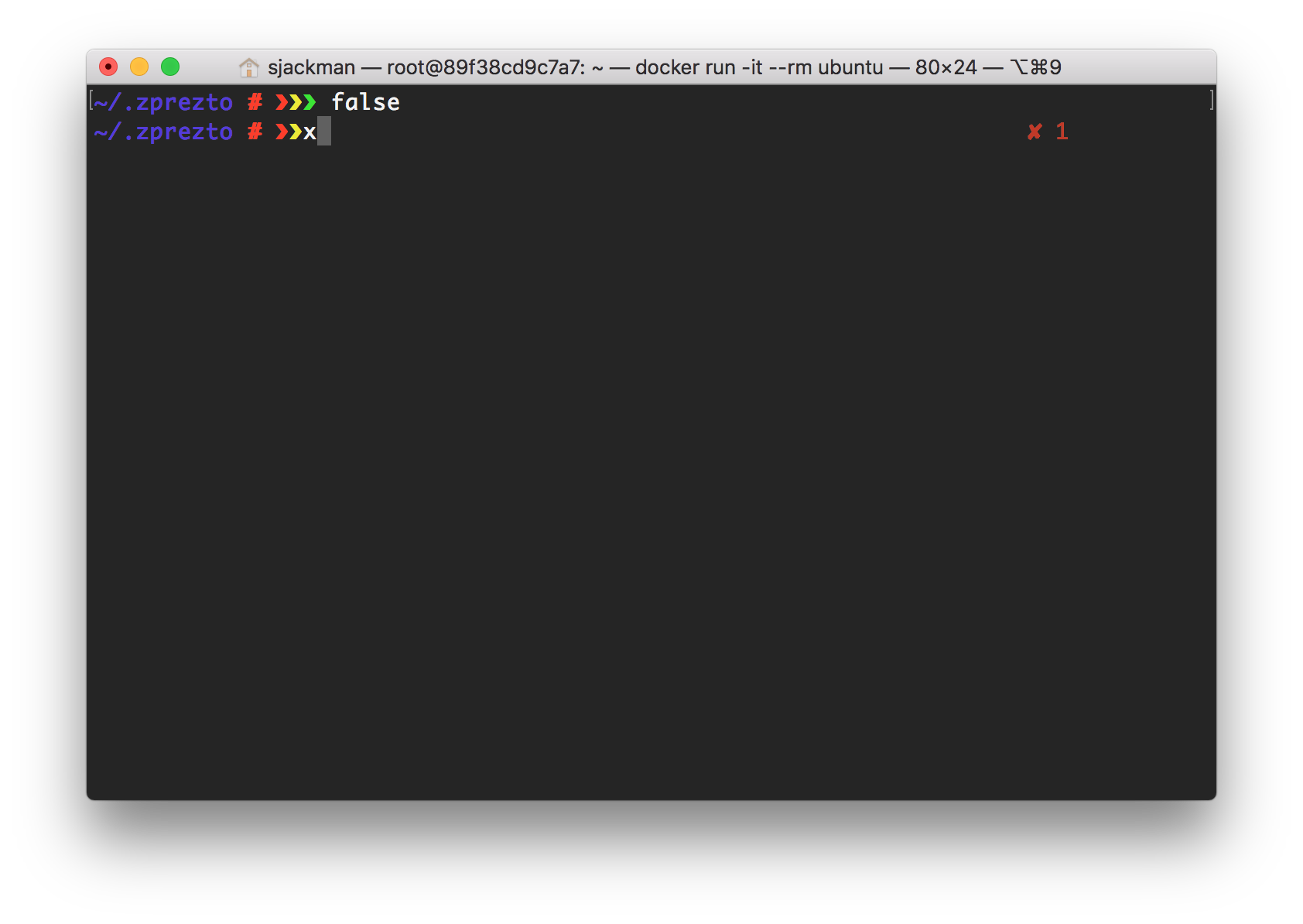
The cursor is in the wrong location after a command exits with a non-zero status. The cursor is on top of the third chevron of the default prompt ~ # ❯❯❯. I see this issue when I use Prezto in the Docker image ubuntu:xenial on macOS. It works as expected when I use it on macOS without Docker being involved.
Expected behavior
After an unsuccessful command, the cursor would be two characters after the last chevron.
Actual behavior
After an unsuccessful command, the cursor is directly on top of the last chevron. The next character that I type replaces the last chevron.
Steps to Reproduce
docker run -it ubuntu:xenial
apt-get update && apt-get install git zsh
git clone --recursive https://github.com/sorin-ionescu/prezto.git "${ZDOTDIR:-$HOME}/.zprezto"
zsh
setopt EXTENDED_GLOB
for rcfile in "${ZDOTDIR:-$HOME}"/.zprezto/runcoms/^README.md(.N); do
  ln -s "$rcfile" "${ZDOTDIR:-$HOME}/.${rcfile:t}"
done
zsh
false
Versions
- Prezto commit: b3c27bb16460c677eabbe3d8e210f79fb5e8189b
- ZSH version: 5.1.1
- OS information: Ubuntu 16.04 LTS (Xenial Xerus) in Docker for Mac 17.12.0-ce-mac55 (23011) on macOS High Sierra 10.13.3
- Apple Terminal Version 2.8 (400)
 sjackman
All 6 comments

Press x
sjackman
on 7 Mar 2018
I had the same issue on various machines with and sometimes without ssh.
I tracked it down to problems with wrongly set LANG variable.
try locale if something only says "C" thats the problem
I fixed it with following lines in .zprofile
# fixes strange cursor position / formating bug
export LC_ALL=en_US.UTF-8
export LANG=en_US.UTF-8
 notjrbauer
on 5 Apr 2018
notjrbauer
on 5 Apr 2018
My locale is set to POSIX. export LC_ALL=en_US.UTF-8 fixed it! Thanks, John! 💯
sjackman
on 5 Apr 2018
On the ubuntu docker images page it says
"Given that it is a minimal install of Ubuntu, this image only includes the C, C.UTF-8, and POSIX locales by default. For most uses requiring a UTF-8 locale, C.UTF-8 is likely sufficient (-e LANG=C.UTF-8 or ENV LANG C.UTF-8)."
For me, setting LANG=C.UTF-8 fixed the issue with the ubuntu:artful and ubuntu:bionic images which i tested this on
 robtandy
on 1 Jun 2018
robtandy
on 1 Jun 2018
Thanks for the updates everyone! It looks like this issue is related to using a non-unicode locale with unicode in the prompt. There isn't a ton we can do about this on the prezto side, so the best fix is setting your locale to one that's unicode compatible.
EDIT: Specifically, if I had to guess, it would be related to wide unicode characters
 belak
on 1 Jun 2018
belak
on 1 Jun 2018
This issue bit my again, but under a different circumstance. This bug started occurring when ssh'ing into a remote Linux machine, and it had been working reliably the day before. I wasn't what had changed. I turns out that I changed the locale of my macOS laptop from 🇺🇸 to 🇨🇦. That caused my locale on the remote Linux machine to change from en_US.UTF-8 to en_CA.UTF-8. It seems that those environment variables are being passed through ssh. export LC_ALL=en_US.UTF-8 fixed it. The remote machine was not have that locale installed.
sjackman
on 11 Oct 2019
Related issues
 adrian-amaglio
·
5Comments
adrian-amaglio
·
5Comments
 stefanosc
·
3Comments
stefanosc
·
3Comments
 michaelaye
·
4Comments
michaelaye
·
4Comments
 EllieRagone
·
4Comments
belak
·
4Comments
EllieRagone
·
4Comments
belak
·
4Comments
Most helpful comment
I had the same issue on various machines with and sometimes without ssh.
I tracked it down to problems with wrongly set LANG variable.
try locale if something only says "C" thats the problem
I fixed it with following lines in .zprofile