Prettier-vscode: Invalid pretterPath returns wrong error message.
message.ts:
warnOutdatedPrettierVersion:
https://github.com/prettier/prettier-vscode/blob/9476a014323f41da7e89a05f133671a97a53ac07/src/NotificationService.ts#L35
The extension keep giving outdated prettier version notification, but I have the latest version 1.19.1 installed.
./node_modules/.bin/prettier --version
1.19.1
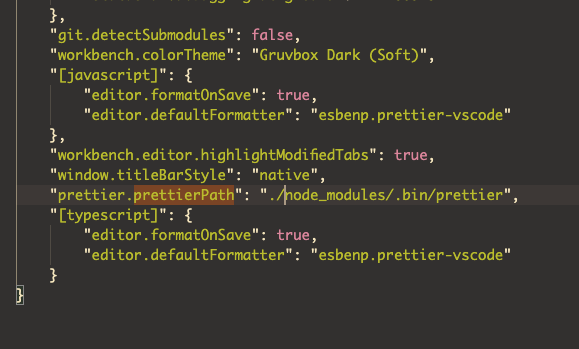
The settings:
 towry
towry
👍1
All 2 comments
The message is wrong. I’ll look into it. The issue though is you set the prettier path to the bin path, not the module. Change it to ./node_modules/prettier and it should work as expected.
 ntotten
on 5 Mar 2020
ntotten
on 5 Mar 2020
👍2
This issue has been automatically locked since there has not been any recent activity after it was closed. Please open a new issue for related bugs.
![github-actions[bot] picture](https://avatars2.githubusercontent.com/in/15368?v=4&s=40) github-actions[bot]
on 4 Aug 2020
github-actions[bot]
on 4 Aug 2020
Was this page helpful?
0 / 5 - 0 ratings
Related issues
 Connorelsea
·
4Comments
Connorelsea
·
4Comments
 PetrykowskiM
·
3Comments
PetrykowskiM
·
3Comments
 finalclass
·
4Comments
finalclass
·
4Comments
 bajtos
·
4Comments
bajtos
·
4Comments
 Glinkis
·
4Comments
Glinkis
·
4Comments
Most helpful comment
The message is wrong. I’ll look into it. The issue though is you set the prettier path to the bin path, not the module. Change it to ./node_modules/prettier and it should work as expected.