Prettier-vscode: prettier.configPath don't work
Summary
prettier.configPath don't work
Steps To Reproduce:
- I create a
.prettierrc.jsfile in~/.prettierrc.js - setting prettier.configPath
"prettier.configPath": "~/.prettierrc.js" - the config don't work.
- I remove the
.prettierrc.jsfile to my project's root path;and delete the setting"prettier.configPath": "~/.prettierrc.js" - the confit work.
VS Code Version:
版本: 1.40.0
提交: 86405ea23e3937316009fc27c9361deee66ffbf5
日期: 2019-11-06T17:09:34.601Z
Electron: 6.1.2
Chrome: 76.0.3809.146
Node.js: 12.4.0
V8: 7.6.303.31-electron.0
OS: Darwin x64 19.0.0
Prettier & Prettier Plugin Version:
Prettier - Code formatter: 3.3.5
OS and version:
mac os
10.15.1
 hezhongfeng
All 6 comments
the out message is this when I format .js file
[INFO - 10:36:31 AM] Formatting /Users/hezf/git/im-server/config/config.default.js.
[WARN - 10:36:31 AM] Falling back to bundled version of prettier.
[INFO - 10:36:31 AM] Resolved ignore file to /Users/hezf/git/im-server/.prettierignore.
[INFO - 10:36:31 AM] File Info:
{
"ignored": false,
"inferredParser": "babel"
}
[ERROR - 10:36:31 AM] Failed to resolve config for /Users/hezf/git/im-server/config/config.default.js. Falling back to the default config settings.
[INFO - 10:36:31 AM] Prettier Options:
{
"filepath": "/Users/hezf/git/im-server/config/config.default.js",
"parser": "babel"
}
[INFO - 10:36:31 AM] Formatting completed in 17.919448ms.
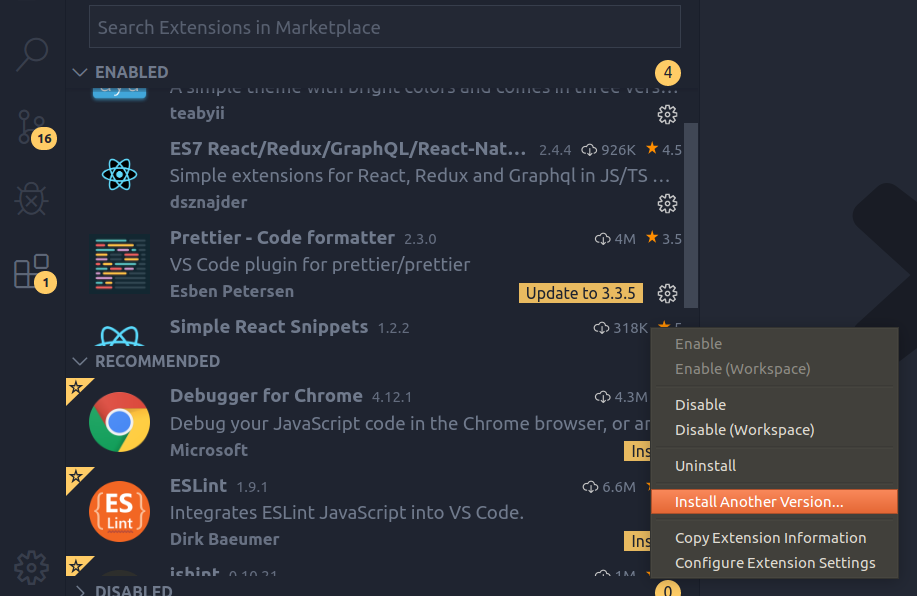
For anyone else having issues, you can click the gear icon in the extension bar to install an older version .
 fazaal97
on 13 Nov 2019
fazaal97
on 13 Nov 2019
Should be fixed in 3.5.0. Plrease reopen if you are still having issues.
 ntotten
on 13 Nov 2019
ntotten
on 13 Nov 2019
Thank you.
I use the VS COde config.
hezhongfeng
on 14 Nov 2019
This seems to be still not working, at least when using in connection with remote extension (remote is linux).
getting the error:
["ERROR" - 6:32:10 PM] Error resolving prettier configuration for /path/to/project/esources/js/app.js
ENOENT: no such file or directory, open '/path/to/project/~/.prettierrc'
Error: ENOENT: no such file or directory, open '/path/to/project/~/.prettierrc'
when setting
"prettier.configPath": "~/.prettierrc",
 MartinP7r
on 17 Jan 2020
MartinP7r
on 17 Jan 2020
This issue has been automatically locked since there has not been any recent activity after it was closed. Please open a new issue for related bugs.
![github-actions[bot] picture](https://avatars2.githubusercontent.com/in/15368?v=4&s=40) github-actions[bot]
on 16 Apr 2020
github-actions[bot]
on 16 Apr 2020
Related issues
 studiojms
·
4Comments
studiojms
·
4Comments
 FlorianWendelborn
·
3Comments
FlorianWendelborn
·
3Comments
 Tanmccuin
·
3Comments
Tanmccuin
·
3Comments
 sebastijandumancic
·
4Comments
sebastijandumancic
·
4Comments
 Glinkis
·
4Comments
Glinkis
·
4Comments
Most helpful comment
This seems to be still not working, at least when using in connection with remote extension (remote is linux).
getting the error:
when setting