Prettier-vscode: Settings globally?
So after Prettier 3 there is no option to use settings globally?
I don't like when something create additional files in my project folder 😥
Is there any solution to create one global file with Prettier settings?
Maybe somewhere in VSCode install folder?
 kanlukasz
All 10 comments
This is bad for me too!
I've used global settings for years (?), and there is like ~60 or so projects that I don't want .prettierrc. Code I do is mostly throwaway WP garbage, with LESS and PHP and HTML, I don't want any of the .prettierrc files there because the prettier in that case is just a helper for myself.
Please, bring back the global settings.
Solution is to install 2.3.0, like this:

Then choose 2.3.0
 Ciantic
on 12 Nov 2019
Ciantic
on 12 Nov 2019
Solution is to install 2.3.0, like this:
...
Then choose 2.3.0
Thank you, this saved me
 mrmokwa
on 12 Nov 2019
mrmokwa
on 12 Nov 2019
You can set the prettier.configPath globally and point it to a shared configuration file. https://github.com/prettier/prettier-vscode#prettierconfigpath
 ntotten
on 12 Nov 2019
ntotten
on 12 Nov 2019
@ntotten one more thing, if it's that easy, the little bubble suggest migrating should say it. The bubble gives an impression that you must now save it to all project directories individually, why else would other people were here too if it's just matter of setting single config.
So the thing is to do this:
Save the given .prettierrc e.g. to ~/.prettierrc, and then in VSCode settings.json:
"prettier.configPath": "C:\\Users\\username\\.prettierrc",
You can set the
prettier.configPathglobally and point it to a shared configuration file.
This way it ignores project-based .prettierrc-files, which makes this solution useless imho. I need something like this:
- Global settings
- If there are local settings in a project, overwrite global settings
Basically exactly how it was done before.
 domvo
on 12 Nov 2019
domvo
on 12 Nov 2019
you can put a config file at the root of all your projects without using prettier.configPath (null)
/
...
- MyProjects
- .prettierrc
- ProjectA
- ProjectB
- Project with prettier
- .prettierrc
- ...
It can even be /.prettierrc I think
A config file is found from the file being processed and up the file system
This wouldn't work if your are developing inside a Container/VM/whatever :smile:
 CiGit
on 12 Nov 2019
CiGit
on 12 Nov 2019
"prettier.configPath": "c:\\Users\\xxxxx\\.vscode\\.prettierrc" works fine.
Thank you for advices
kanlukasz
on 12 Nov 2019
I removed my global settings from VS Code but now files that haven't been saved don't format using the settings from ~/.prettierrc.
 cmckni3
on 13 Nov 2019
cmckni3
on 13 Nov 2019
I removed my global settings from VS Code but now files that haven't been saved don't format using the settings from
~/.prettierrc.
@ntotten
Thx
I got the same problem. I didn't set any vscode prettier config in settings.json. , and ~/.prettierrc(i try~/.prettierrc.js/ ~/.prettierrc.config.js) doesn't work. It seems to be overwritten by the default vscode prettier config in 3.5.0.
When I format code manually:
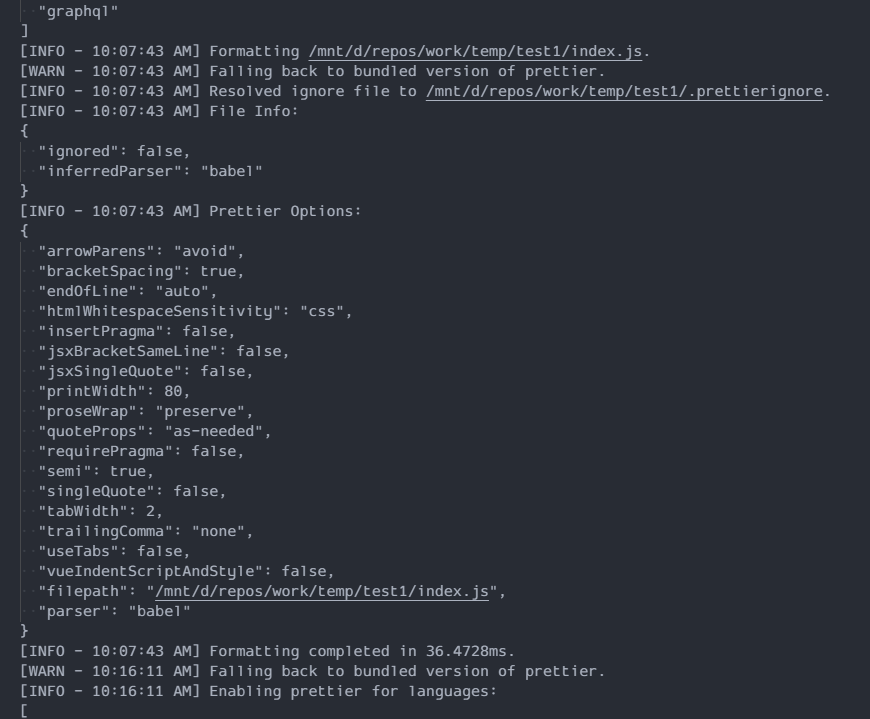
https://github.com/prettier/prettier-vscode/issues/1049#issuecomment-553637060
Is the plan to keep the vscode configuration options or is the intention to remove that in the future?
Thx.
 XiongAmao
on 14 Nov 2019
XiongAmao
on 14 Nov 2019
This issue has been automatically locked since there has not been any recent activity after it was closed. Please open a new issue for related bugs.
![github-actions[bot] picture](https://avatars2.githubusercontent.com/in/15368?v=4&s=40) github-actions[bot]
on 12 Apr 2020
github-actions[bot]
on 12 Apr 2020
Related issues
 paustint
·
38Comments
paustint
·
38Comments
 mvolkmann
·
38Comments
mvolkmann
·
38Comments
 raphi011
·
26Comments
raphi011
·
26Comments
 jimblue
·
41Comments
jimblue
·
41Comments
 lorensr
·
36Comments
lorensr
·
36Comments
Most helpful comment
This is bad for me too!
I've used global settings for years (?), and there is like ~60 or so projects that I don't want
.prettierrc. Code I do is mostly throwaway WP garbage, with LESS and PHP and HTML, I don't want any of the.prettierrcfiles there because the prettier in that case is just a helper for myself.Please, bring back the global settings.
Solution is to install 2.3.0, like this:
Then choose 2.3.0