Prettier-vscode: Remove Prettier in the bottom bar
How do I disable the extra highlighted icon in the bottom bar?
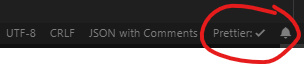
 musm
musm
All 10 comments
@musm why do you want to disable it?
 kachkaev
on 23 Jun 2019
kachkaev
on 23 Jun 2019
Takes up unnecessary space in the status bar.
musm
on 23 Jun 2019
What are you planning to use this space for? How do you turn off other statuses in this part of the footer?
kachkaev
on 23 Jun 2019
without the plugin

with the plugin

It's unnecessary noise to add it to the status bar
musm
on 23 Jun 2019
Can you keep it and actually make it bigger? And with a flashing checkmark?
 Devin-Chaves
on 24 Jun 2019
Devin-Chaves
on 24 Jun 2019
A simple configuration option would be welcome.
musm
on 25 Jun 2019
There is no need, you can hide what you want in the status bar with the latest vs code 1.36
https://code.visualstudio.com/updates/v1_36#_hide-individual-status-bar-items
 David-Else
on 4 Jul 2019
David-Else
on 4 Jul 2019
@musm does @David-Else's solution work for you? Feel free to close this issue if the answer is yes 🙂
kachkaev
on 7 Jul 2019
yep
musm
on 7 Jul 2019
This issue has been automatically locked since there has not been any recent activity after it was closed. Please open a new issue for related bugs.
![github-actions[bot] picture](https://avatars2.githubusercontent.com/in/15368?v=4&s=40) github-actions[bot]
on 13 Apr 2020
github-actions[bot]
on 13 Apr 2020
Related issues
 bardware
·
4Comments
bardware
·
4Comments
 sebastijandumancic
·
4Comments
sebastijandumancic
·
4Comments
 ZiiMakc
·
4Comments
ZiiMakc
·
4Comments
 Tanmccuin
·
3Comments
Tanmccuin
·
3Comments
 finalclass
·
4Comments
finalclass
·
4Comments
Most helpful comment
There is no need, you can hide what you want in the status bar with the latest vs code 1.36
https://code.visualstudio.com/updates/v1_36#_hide-individual-status-bar-items