Prettier-vscode: prettier failing with the new update of vs code (1.33)
With the new version of VS Code my prettier doesn't format any longer.
from my settings:
"[javascript]": {
        "editor.formatOnSave": true,
        "editor.defaultFormatter": "esbenp.prettier-vscode"
    }
The error I get:


EDIT:
It seems to work when I install prettier as a devdependency, of course, I don't want to be doing this on every project.
 timcluyts
All 19 comments
Running into the same issue after updating. Installing prettier as a dev dependency didn't work for me though.
 pcate-fls
on 5 Apr 2019
pcate-fls
on 5 Apr 2019
Actually, might be related to: https://github.com/prettier/prettier-vscode/issues/763
Downgrading eslint to 5.15.1 seems to fix the issue.
pcate-fls
on 5 Apr 2019
Actually, might be related to: #763
Downgrading eslint to 5.15.1 seems to fix the issue.
Doesn't seem to be that for me. I just tried with ESLint 5.16.0 but that works for me on a second pc. Which is totally weird because I just updated this pc to VSCode 1.33.0 and it works on this one.
Just tried removing node_modules and all and it keeps working. So I'm totally confused as to why it works on the one pc and doesn't on the other. I have the same VSCode setup (using settings sync) and the project is the same as well.
timcluyts
on 5 Apr 2019
I have the same VSCode setup
... unless you don't. @timcluyts
Is there any chance, you have two formatters installed and they are in different order on each pc? I'm thinking about https://github.com/Microsoft/vscode/issues/71988...
 burtek
on 9 Apr 2019
burtek
on 9 Apr 2019
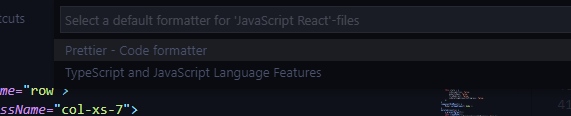
This is what my VSCode says to me. But I didn't install any other formatter except for prettier
timcluyts
on 9 Apr 2019
@timcluyts _TS&JS lang features_ is built-in. Based on the screen I can see that prettier is first on the list, which makes it not work as per issue mentioned above. You can set prettier as default (see vscode 1.33.0 Release Notes) and use Format Document - this will work (I mentioned it as a workaround in issue above)
burtek
on 10 Apr 2019
@burtek I set it as default but got the same error described in my original post. (Also, my initial post already has it set as default).
On the issue mentioned, it seems like 1.33.1 will include a fix for this however.

timcluyts
on 10 Apr 2019
I have the same issue with v.1.33.1
Here's my settings.json
"editor.defaultFormatter": "esbenp.prettier-vscode",
"editor.formatOnSave": true,
"editor.wordWrap": "on",
"editor.autoIndent": true,
None of these work, not even autoIndent
 palmjack
on 14 Apr 2019
palmjack
on 14 Apr 2019
Same issue, 1.33.1
 trcolgrove
on 22 Apr 2019
trcolgrove
on 22 Apr 2019
I have the same issue with v.1.33.1
We have a big file when formatted the diff shows a huge difference, this is messy. So temporary we disabled the prettier at this moment.
 michael-hll
on 29 Apr 2019
michael-hll
on 29 Apr 2019
I also had;
but I uninstall vsc, and remove ~/.vscode
then I install vsc v.1.33.1, it works again.
before you uninstall, backup your config!
 xinshangshangxin
on 29 Apr 2019
xinshangshangxin
on 29 Apr 2019
@xinshangshangxin I tried like your way, seems doesn't work.
michael-hll
on 29 Apr 2019
Same issue here, although it's able to find regular modules just not scoped modules
 TidyIQ
on 26 Jun 2019
TidyIQ
on 26 Jun 2019
This issue seems to be improved by the updates in the VS Code 1.35 release (May 2019):
This update brings TypeScript language improvements, along with tooling enhancements for both JavaScript and TypeScript. It also fixes a number of important bugs, including fixes for performance issues that some users were seeing when working with styled-components.
When running the Format With... command, the default formatter is now pre-selected.
The key to fixing this error and having everything working was to set Prettier as the default formatter.
Here's how I have VS Code and Prettier configured:

Here's the relevant part of my settings.json:
"editor.defaultFormatter": "esbenp.prettier-vscode",
"editor.formatOnSave": true,
"[javascript]": {
  "editor.formatOnSave": true,
  "editor.defaultFormatter": "esbenp.prettier-vscode"
},
"[php]": {
  "editor.defaultFormatter": "fterrag.vscode-php-cs-fixer"
}
With this configuration, JavaScript files will be automatically formatted on save by Prettier.
Tested using VSCode 1.35.1 with Prettier 1.9.0 on macOS 10.14.5 "Mojave".
 ryanjbonnell
on 27 Jun 2019
ryanjbonnell
on 27 Jun 2019
I had this issue on Windows + WSL, the only way I was able to fix it was to edit the settings.json to define a formatter config for Javascript specifically. Setting prettier as the editor's default formatter didn't work. Thanks @ryanjbonnell .
 drewgaze
on 30 Jun 2019
drewgaze
on 30 Jun 2019
Is this still happening in version 2.0.0?
 ntotten
on 24 Aug 2019
ntotten
on 24 Aug 2019
This issue has been automatically closed because there has been no response to our request for more information from the original author. Currently, there is not enough information provided for us to take action. Please reply and reopen this issue if you need additional assistance.
![no-response[bot] picture](https://avatars2.githubusercontent.com/u/26350515?v=4&s=40) no-response[bot]
on 31 Aug 2019
no-response[bot]
on 31 Aug 2019
Had the same issue, @ryanjbonnell's solution worked for me
 aofakore
on 16 Sep 2019
aofakore
on 16 Sep 2019
This issue has been automatically locked since there has not been any recent activity after it was closed. Please open a new issue for related bugs.
![github-actions[bot] picture](https://avatars2.githubusercontent.com/in/15368?v=4&s=40) github-actions[bot]
on 12 Apr 2020
github-actions[bot]
on 12 Apr 2020
Related issues
 antonreshetov
·
36Comments
antonreshetov
·
36Comments
 mvolkmann
·
38Comments
mvolkmann
·
38Comments
 TranquilMarmot
·
26Comments
TranquilMarmot
·
26Comments
 Fenglinwanyue
·
30Comments
Fenglinwanyue
·
30Comments
 joubertvasc
·
26Comments
joubertvasc
·
26Comments
Most helpful comment
This issue seems to be improved by the updates in the VS Code 1.35 release (May 2019):
The key to fixing this error and having everything working was to set Prettier as the default formatter.
Here's how I have VS Code and Prettier configured:
Here's the relevant part of my
settings.json:With this configuration, JavaScript files will be automatically formatted on save by Prettier.
Tested using VSCode 1.35.1 with Prettier 1.9.0 on macOS 10.14.5 "Mojave".