Prettier-vscode: can't format for vue
Here is config
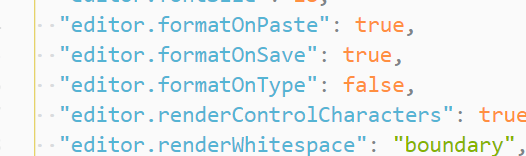

Run normally in version 1.23.
In the 1.27.2 version, you cannot format code for Vue files normally.
hope help thx
 jiang-xiche
All 12 comments
I confirm that this is an issue I am facing too with VSCode 1.27.2
 begueradj
on 1 Oct 2018
begueradj
on 1 Oct 2018
same problem
 binlaniua
on 1 Oct 2018
binlaniua
on 1 Oct 2018
What do you mean by
you cannot format code for Vue files normally
Please try with other extensions disabled.
 CiGit
on 2 Oct 2018
CiGit
on 2 Oct 2018
In the current version, he can format files in. html. JS format, but not files of type. Vue
There are no other formatted extensions.
This is my extension plugin list
akamud.vscode-theme-onedark
alefragnani.Bookmarks
alefragnani.project-manager
christian-kohler.npm-intellisense
christian-kohler.path-intellisense
CoenraadS.bracket-pair-colorizer
cssho.vscode-svgviewer
dariofuzinato.vue-peek
dbaeumer.vscode-eslint
eamodio.gitlens
EditorConfig.EditorConfig
eg2.vscode-npm-script
esbenp.prettier-vscode
formulahendry.auto-close-tag
formulahendry.auto-rename-tag
formulahendry.code-runner
hdg.live-html-previewer
hollowtree.vue-snippets
joelday.docthis
mkxml.vscode-filesize
mrmlnc.vscode-attrs-sorter
MS-CEINTL.vscode-language-pack-zh-hans
msjsdiag.debugger-for-chrome
octref.vetur
PKief.material-icon-theme
Shan.code-settings-sync
teabyii.ayu
techer.open-in-browser
tombonnike.vscode-status-bar-format-toggle
wayou.vscode-todo-highlight
xabikos.JavaScriptSnippets
Zignd.html-css-class-completion
jiang-xiche
on 3 Oct 2018
@jiang-xiche Install vetur and setup it. You can choose formatter separately for css, js, html. But prettier not good at formatting html. Try https://github.com/Prettyhtml/prettyhtml for html.
 ghost
on 4 Oct 2018
ghost
on 4 Oct 2018
@atilkan Thank you. I already know that. and as you see my extension plugin list also have vetur
jiang-xiche
on 8 Oct 2018
@CiGit i tried with other extensions disabled.but it still not work for vue and my extension plugin list is above
jiang-xiche
on 8 Oct 2018
I had the same issue. I was using ESLint & Prettier to format my code but it was only formatting code between <template> and <style> tags – not <script>'s. The following configuration should solve this issue:
- VSCode config:
Update: Removed
"prettier.disableLanguages"
{
  "editor.formatOnSave": true,

  "vetur.validation.template": false,
  "vetur.format.defaultFormatter.scss": "prettier",
  "vetur.format.defaultFormatter.css": "prettier",
  "vetur.format.defaultFormatter.js": "prettier",

  "prettier.eslintIntegration": true,

  "eslint.autoFixOnSave": true,
  "eslint.options": { "extensions": [".html", ".js", ".vue", ".jsx"] },
  "eslint.validate": [
     "javascript",
     "javascriptreact",
     {
       "language": "vue",
       "autoFix": true
     }
  ],

  "javascript.validate.enable": false,
  "javascript.format.enable": false
}
.eslintrc.json:
module.exports = {
  root: true,

  extends: ["plugin:vue/essential", "@vue/prettier"],
  plugins: ["vue"],

  env: {
    browser: true,
    node: true
  },

  parserOptions: {
    parser: "babel-eslint",
    ecmaVersion: 2017,
    sourceType: "module"
  }
};
package.json:
{
  "devDependencies": {
    "@vue/cli-plugin-babel": "^3.0.4",
    "@vue/cli-plugin-eslint": "^3.0.4",
    "eslint": "5.6.1",
    "eslint-plugin-vue": "4.7.1",
    "prettier": "1.14.3"
  }
}
Required VSCode plugins:
- Prettier
- ESLint
- Vetur
 Bartozzz
on 10 Oct 2018
Bartozzz
on 10 Oct 2018
@Bartozzz I did it according to the configuration, but out=>Eslint reported it wrong.
Failed to load plugin vue: Cannot find module'eslint-plugin-vue'
and try npm i eslint-plugin-vue@next --g still report
by the way
Output -> Vue Language Server print
Prettier-Eslint format failed
if i uncheck Prettier Eslint Integration
Prettier will work
jiang-xiche
on 11 Oct 2018
@jiang-xiche I believe you have to install eslint-plugin-vue as a local dev dependency (i.e. without the -g flag) with the following command:
$ npm i --save-dev eslint-plugin-vue
Also, you should install other required modules locally (ex. ESLint, Prettier, …). Check out my updated comment for the list of required npm packages.
Bartozzz
on 11 Oct 2018
Whether I install @vue/eslint-config-prettier locally or globally, it always cannot find module'@vue/eslint-config-prettier'
And is this configuration based on vue-cli3?
@Bartozzz
jiang-xiche
on 15 Oct 2018
This issue has been automatically locked since there has not been any recent activity after it was closed. Please open a new issue for related bugs.
![github-actions[bot] picture](https://avatars2.githubusercontent.com/in/15368?v=4&s=40) github-actions[bot]
on 13 Apr 2020
github-actions[bot]
on 13 Apr 2020
Related issues
 TranquilMarmot
·
26Comments
TranquilMarmot
·
26Comments
 kachkaev
·
29Comments
kachkaev
·
29Comments
 ntotten
·
34Comments
ntotten
·
34Comments
 kdawg1406
·
42Comments
kdawg1406
·
42Comments
 antonreshetov
·
36Comments
antonreshetov
·
36Comments
Most helpful comment
I had the same issue. I was using ESLint & Prettier to format my code but it was only formatting code between
<template>and<style>tags – not<script>'s. The following configuration should solve this issue:.eslintrc.json:package.json:Required VSCode plugins: