Prettier-vscode: Prettier does not consistently respect .prettierrc, .eslintrc nor vscode settings
There are several issues in this repo regarding inconsistent behavior from this extension, so maybe this issue is already posted, but I couldn't know for sure.
I have a .prettierrc file, a .eslintrc file and even vscode settings with the same 80 print-width settings, but the extension just doesn't respect it. It does try to format the line, but not enough (and not like the prettier.io playground).
It has worked in the past, but not today, maybe it is an update, I don't know. I've disabled auto-update from now on.
Is there any way to debug this extension? I don't know whether it ever works and respects all my rules or if it just making things up. It'd be great if I could see what rules prettier is inferring from my setup in every file.
For example:
someFile.js=> "Check inferred prettier settings for this file"
- printWidth: 70 (from /.prettierrc)
- tabWidth: 4 (from vscode settings)
- singleQuote: true (from global prettier config)
I don't know if my config is messed up, or if there is a bug in the extension, or if there is a bug in vscode or if I should restart my machine (I tried).
 Floriferous
All 23 comments
From my experience with issues concerning settings, it's often caused by .editorconfig files.
Having a "config check" command would be a great thing. May avoid us some issues like this one and other you mentioned.
Order is following.
Now add eslint to the mix ...
glancing through prettier-eslint's code, its priority is
.prettierrc.eslintrc- And we provide settings we computed as fallback
Sadly it won't be easy to provide such a command.
With prettier, settings are given already without knowing the source (merged)
With prettier-eslint there is no API to have such information.
 CiGit
on 16 Feb 2018
CiGit
on 16 Feb 2018
And to debug it: https://github.com/prettier/prettier-vscode#running-extension
Settings are computed here: https://github.com/prettier/prettier-vscode/blob/83dde1d597470be2e4d46476df63da9c1a53c073/src/PrettierEditProvider.ts#L37-L63
CiGit
on 16 Feb 2018
I'm experiencing something similar, although I'm not 100% sure it's the same issue -- after a few hours of development, sometimes prettier stops respecting rc's -- i.e. for one rule I have that fomats code as:
const {foo} = bar;
it suddenly starts formatting the whole file as:
const { foo } = bar;
This usually eventually goes away with some restarting. I'm trying to figure out what combinations of actions actually resolves the issue and will post once I know more. I am on the latest version of the plugin.
 mmoutenot
on 16 Feb 2018
mmoutenot
on 16 Feb 2018
I found my problem -- it was when the chrome debugger plugin caused vscode to open a nearly identical (but different file handle) file. When that file was saved the above behavior is observed. Consider my issue resolved :)
mmoutenot
on 16 Feb 2018
I've been having this issue since a few days ago and disabling the chrome debugger plugin didn't fix it for me. So frustrating as I want to stick with VSCode, but eslint/prettier integration seems to have broken
 arrygoo
on 17 Feb 2018
arrygoo
on 17 Feb 2018
Hi, if you are using windows, it's because of lowercase harddrive name management...
eslint will get your user directory as C:\Users\stardisblue (os.homedir()) and vscode will give you the directory as c:\Users\stardisblue causing eslint to crash :/.
https://github.com/eslint/eslint/blob/db1a5828e4a121c19a86dd81a3eda15eb1a23c9a/lib/config.js#L222
Why does it crash because there is no .eslintrc in c:\Users\stardisblue and it will try to open it either way.
So a fallback will be used (https://github.com/prettier/prettier-eslint/blob/master/src/index.js#L240)
Do my answer make sense, do i need to open another issue ?
 stardisblue
on 4 Apr 2018
stardisblue
on 4 Apr 2018
I have same issue here, the extension don't respect .prettierrc or .eslintrc options for style section of vue file, for example indent.
prettier settting:
{
    "printWidth": 120,
    "indent": 4
}
eslint setting:
'indent': [2, 4],
and vscode default setting is "prettier.tabWidth": 2.
test file:
// test.vue
<template><div>test</div></template>
<script></script>
<style lang="scss">
.test {
    font-size: 12px;
}
</style>
content of test file after formate:
// test.vue
<template><div>test</div></template>
<script></script>
<style lang="scss">
.test {
  font-size: 12px;   // <<< indent change to 2
}
</style>
here's screen gif(auto format on save turned on)
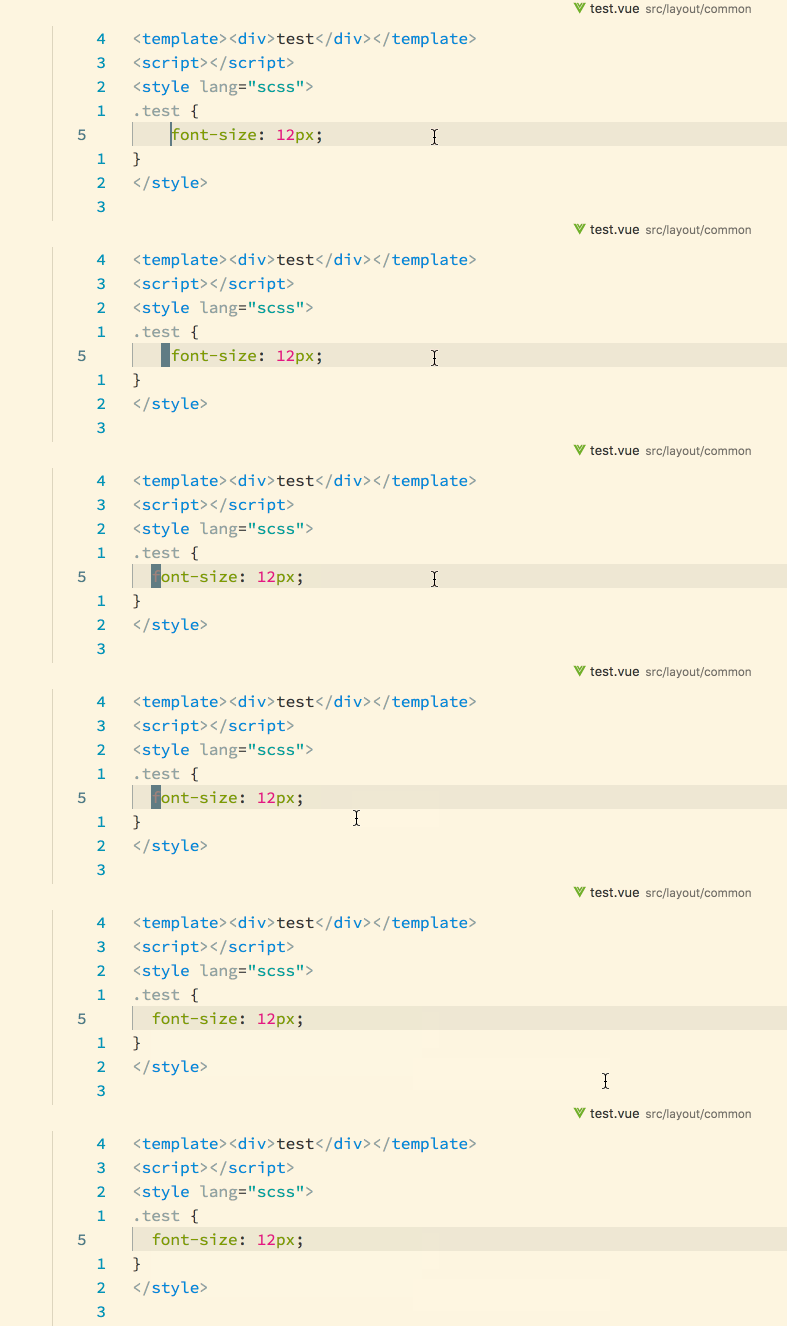
When I change extension config for intent to "prettier.tabWidth": 4, indent will be kept to 4.
env of vscode:
vscode version: 1.22.1
prettier-vscode version: lastest
vue related extension: vetur
 maple-leaf
on 8 Apr 2018
maple-leaf
on 8 Apr 2018
I've only been able to resolve this by restarting several times. There does appear to be some bug here.
 sypl
on 25 May 2018
sypl
on 25 May 2018
Same problem as @maple-leaf but with the html section as well (prettier 1.16)
EDIT: prettier-eslint-cli works just fine.
 bamboozila
on 8 Nov 2018
bamboozila
on 8 Nov 2018
Does which have issue with vue files, there is certainly a problem between this extension's settings and Vetur's settings. We disabled vue by default.
CiGit
on 8 Nov 2018
.prettierrc.js is a valid config name in Prettier, but it does not work with the VSCode extension here.
 meebix
on 13 Dec 2018
meebix
on 13 Dec 2018
.prettierrc.jsis a valid config name in Prettier, but it does not work with the VSCode extension here.
.prettierrc.json works. prettierrc.js and prettierrc.config.js do not work.
 aztack
on 17 Dec 2018
aztack
on 17 Dec 2018
[EDIT: This seems to be a problem with the prettier-eslint tool, I posted an issue [here](https://github.com/prettier/prettier-eslint/issues/200)]
I'm having a similar issue with Prettier and ESLint.
I have in my user settings:
"eslint.autoFixOnSave": false,
"prettier.eslintIntegration": true,
"editor.formatOnSave": true,
I have a my .prettierrc like this:
{
  "requirePragma": true
}
My .eslintrc has the following options:
"extends": ["airbnb", "prettier"],
"plugins": ["prettier", "react", "jsx-a11y"],
"rules": { ... },
This is because we have a large codebase which is not "Pretty" yet and we do not want to format large old files when we save, but only when we add the pragma comment on top of said files.
However, with this configuration Prettier still formats _some_ things on save, even though no pragma comment is added.
If I set "prettier.eslintIntegration": false, then everything works as expected, but then I lose all the benefits of the eslint integration.
 TiredFalcon
on 8 Feb 2019
TiredFalcon
on 8 Feb 2019
So does this basically boil down to the fact that the prettier extension doesn't recognize .prettierrc.js when in fact it should?
 the-nick-wilson
on 14 Mar 2019
the-nick-wilson
on 14 Mar 2019
So does this basically boil down to the fact that the prettier extension doesn't recognize .prettierrc.js when in fact it should?
That's how I understand it. Maybe it should be a separate issue.
About the use-case: As explained here, unlike with babel or eslint, there is no support for an extends field and we _must_ use a js module if we need to extend or reuse prettier configs.
While this works if you format via e.g. eslint --fix with proper configuration, it's disappointing and annoying that VS Code does not format when you save a file having a .prettierrc.js or prettier.config.js.
EDIT:
Hmm, just saw that it _should_ be supported..?
https://github.com/prettier/prettier-vscode/blob/master/src/configCacheHandler.ts#L8-L16
And now I'm really confused :D I moved my .prettierrc.js around a bit, but now it's exactly at the same place as before and it works
(I had a .prettierrc.js inside a nested workspace package and it didn't work, that's the reason I went searching and found this issue. I moved it up into the root of the workspace, restarted VS Code, and it worked. I moved the config back into the package, restarted VS Code, still works...)
 loopmode
on 29 Mar 2019
loopmode
on 29 Mar 2019
restart vscode worked for me.
 Symous
on 5 Jun 2019
Symous
on 5 Jun 2019
I finally got it working. I had to Open Folder instead of Open Workspace.
 jakubrpawlowski
on 6 Jun 2019
jakubrpawlowski
on 6 Jun 2019
Same issue for me. Opening two subprojects in one VS Code window caused the problem. When I open each project as the root folder ESLint started working again.
 elie222
on 19 Jun 2019
elie222
on 19 Jun 2019
TL;DR For me it was operator ignorance, User Settings override Workspace Settings.
Deleting the following lines from my VS Code User Settings settings.json fixed the problem for me:
    "[javascript]": {
        "editor.defaultFormatter": "vscode.typescript-language-features"
    }
Background:
In a different project, "Configure default Formatter..." and "Select a default formatter for JavaScript-files" and choose "TypeScript and JavaScript Language Features (default)"


This may be due to feature addition / tweak in VS Code March 2019 (version 1.33) / May 2019 (version 1.35) releases.
I have been fighting this problem in our Electron-Vue project with ESLint and Prettier.
One example is the space after the function name and before the parenthesis.
VS Code format on save. (Wrong, for us):
        function (response) {
          // ...stuff...
        },
Command line Prettier invocation. (Correct, for us):
        function(response) {
          // ...stuff...
        },
 chrisBosse
on 24 Jun 2019
chrisBosse
on 24 Jun 2019
Interestingly I didn't have this plugin installed, probably forgot when I moved my project to new PC
The formatter VS Code was using was the built-in one, not from Prettier
 NicksonYap
on 26 Jun 2019
NicksonYap
on 26 Jun 2019
If package.json contains any setting, they override those defined in .prettierrc or any other prettier-specific file.
 mathieucaroff
on 12 Jul 2019
mathieucaroff
on 12 Jul 2019
Due to the huge amount of bugs, linting support has been deprecated in version 2.0.0. See the documentation on the recommended configuration: https://github.com/prettier/prettier-vscode#vscode-eslint-and-tslint-integration
See #870 for more details.
 ntotten
on 24 Aug 2019
ntotten
on 24 Aug 2019
This issue has been automatically locked since there has not been any recent activity after it was closed. Please open a new issue for related bugs.
![github-actions[bot] picture](https://avatars2.githubusercontent.com/in/15368?v=4&s=40) github-actions[bot]
on 12 Apr 2020
github-actions[bot]
on 12 Apr 2020
Related issues
 usersaurus
·
68Comments
usersaurus
·
68Comments
 paustint
·
38Comments
paustint
·
38Comments
 yzhang-gh
·
26Comments
yzhang-gh
·
26Comments
 mvolkmann
·
38Comments
mvolkmann
·
38Comments
 jimblue
·
41Comments
jimblue
·
41Comments
Most helpful comment
.prettierrc.jsonworks.prettierrc.jsandprettierrc.config.jsdo not work.