Prettier-vscode: In lastest version vscode, cause semicolon autocomplete problem
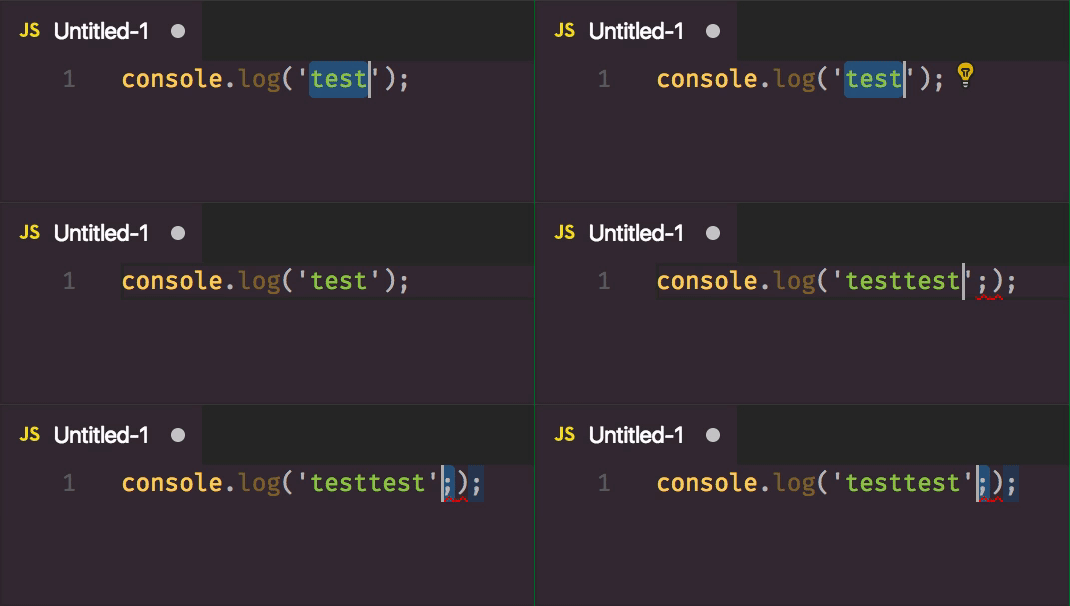
osx: 10.12.6
vscode: 1.17.2 (1.17.2) b813d12980308015bcd2b3a2f6efa5c810c33ba5
After I disable this extension, no longer have this issue
 maqic
maqic
All 8 comments
What are you doing here exactly? Copy paste test
Can you share your settings ?
I can't reproduce that (even with formatOnPaste)
 CiGit
on 7 Nov 2017
CiGit
on 7 Nov 2017
I found out.
I was in a typescript file ...
Format selection is not working here by selecting the string.
Directive vs Literal??
CiGit
on 7 Nov 2017
You can reproduce by this step:
- configuration
"editor.formatOnPaste": true - Open a
.jsfile, write some code likeconsole.log('test'); - Copy paste
test, then you will get a extra semicolon.
@CiGit
maqic
on 7 Nov 2017
Could it be doing a range format on that string as if it were a directive ("use strict";)?
 azz
on 7 Nov 2017
azz
on 7 Nov 2017
It's fixed in prettier 1.8, 1.7 accepted a string as Source Element (JS was mixed with JSON) prettier/prettier#3069
CiGit
on 7 Nov 2017
Strangly it's working with TS and Flow
Edit:
- Babylon - JSON: StringLiteral
- Flow - TypeScript: Literal
CiGit
on 7 Nov 2017
This should be fixed in prettier 1.8 (version we are now bundling)
CiGit
on 21 Nov 2017
This issue has been automatically locked since there has not been any recent activity after it was closed. Please open a new issue for related bugs.
![github-actions[bot] picture](https://avatars2.githubusercontent.com/in/15368?v=4&s=40) github-actions[bot]
on 13 Apr 2020
github-actions[bot]
on 13 Apr 2020
Related issues
 bardware
·
4Comments
bardware
·
4Comments
 peralmq
·
3Comments
peralmq
·
3Comments
 SkeLLLa
·
4Comments
SkeLLLa
·
4Comments
 Connorelsea
·
4Comments
Connorelsea
·
4Comments
 mshehadeh
·
4Comments
mshehadeh
·
4Comments
Most helpful comment
Strangly it's working with TS and Flow
Edit: