Prettier-vscode: Maximum call stack size exceeded on JavaScript file format
VSCode Version: 1.13.1 (379d2efb5539b09112c793d3d9a413017d736f89)
OS : Windows 10 Pro
Steps to Reproduce:
- Open JavaScript file with wrong indentation
- Hit Shift+Alt+F
- Maximum call stack size exceeded
I tried disabling each and every extension in VSCode and then enabling them one by one and the only one that gave me that error is this extension.
 edaloicaro18
All 15 comments
Do you have a deeply nested code?
Can you share the code which produce this error?
 CiGit
on 25 Jun 2017
CiGit
on 25 Jun 2017
Well I don't have a git repo, but I've got this sandbox
edaloicaro18
on 25 Jun 2017
Which file?
I've no trouble with the ones I've tried.
I would prefer If you could copy paste the code in this issue.
Can you share your settings ?
CiGit
on 25 Jun 2017
At first, I thought it had something to do with the JSX in my JS files but then tried to format other types of documents containing pure JS or even HTML and the problem was the same.
You can try with all the files inside the "components" folder
You mean the user settings, right?
{
    "workbench.colorTheme": "Cobalt2",
    "workbench.iconTheme": "vs-seti",
    "window.zoomLevel": 0,
    "emmet.syntaxProfiles": {
        "javascript": "jsx"
    },
    "editor.minimap.enabled": false
}
Yes those settings. Nothing relevant to this extension.
I've no errors at all.
Can you try to uninstall / reinstall the extension (at that point I don't know really)
Can you also try with eslintIntegration true.
CiGit
on 25 Jun 2017
Stalled, closing.
CiGit
on 15 Jul 2017
I also started facing this issue almost randomly. Prettier was working before.
Installing prettier locally fixed it for me.
 anantoghosh
on 30 Sep 2017
anantoghosh
on 30 Sep 2017
Which version did you install locally?
Which file did this error?
What are your settings?
CiGit
on 30 Sep 2017
I think we have 1 recursive call (find package.json) So if your path is 10k folders deep, it may happen Oo
Maybe in prettier if you have deeply nested calls. dunno
Hypothesis: 10k is still the call stack size :-D
CiGit
on 30 Sep 2017
I installed prettier 1.7.3 locally.
Threw error on every file.
After about 3 seconds after calling format document.
Default settings.
I'm currently busy with work and can't throughly examine it right now.
It doesn't seem like many people face this problem. I'll try to help once I'm free 🤞
anantoghosh
on 30 Sep 2017
Maximum call stack size exceeded: RangeError: Maximum call stack size exceeded
    at new fs.Stats (fs.js:133:20)
    at fs.statSync (fs.js:912:18)
    at Object.fs.statSync (ELECTRON_ASAR.js:280:16)
    at typeSync (C:\Users\username\.vscode\extensions\esbenp.prettier-vscode-0.23.1\node_modules\path-type\index.js:18:15)
    at Function.module.exports.sync (C:\Users\username\.vscode\extensions\esbenp.prettier-vscode-0.23.1\node_modules\read-pkg\index.js:38:16)
    at Function.module.exports.sync.opts [as sync] (C:\Users\username\.vscode\extensions\esbenp.prettier-vscode-0.23.1\node_modules\read-pkg-up\index.js:23:16)
    at findPkg (C:\Users\username\.vscode\extensions\esbenp.prettier-vscode-0.23.1\out\src\requirePkg.js:7:27)
    at findPkg (C:\Users\username\.vscode\extensions\esbenp.prettier-vscode-0.23.1\out\src\requirePkg.js:14:16)
    at findPkg (C:\Users\username\.vscode\extensions\esbenp.prettier-vscode-0.23.1\out\src\requirePkg.js:14:16)
    at findPkg (C:\Users\username\.vscode\extensions\esbenp.prettier-vscode-0.23.1\out\src\requirePkg.js:14:16)
Currently I have a project with prettier installed locally where there is no problem.
And for rest I get the error above.
anantoghosh
on 30 Sep 2017
@CiGit I've found my problem:
findPkg is indeed the culprit.
(on Windows)
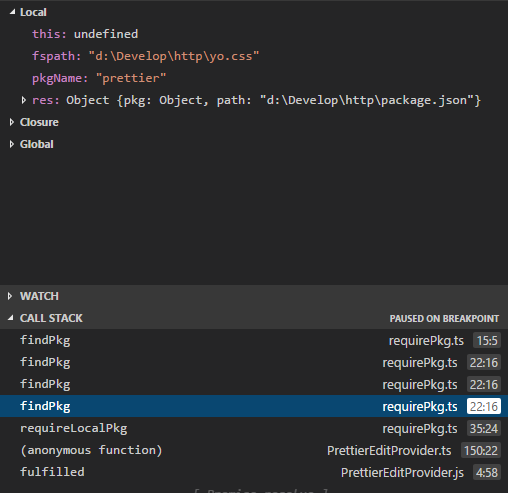
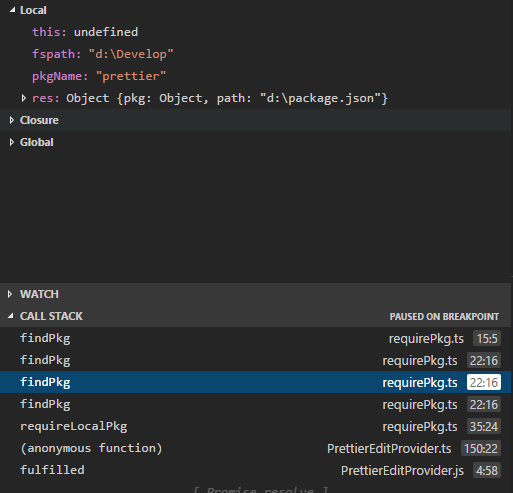
My project folder was D:\Develop\http\
and I had a package.json file in D: which I had just copied from a project.
1st call
2nd call
3rd call (this keeps repeating)
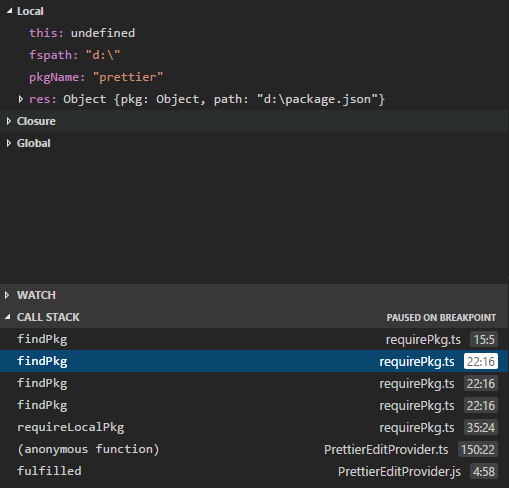
read-pkg-up with fspath D:\ keeps finding D:\package.json. and
path.resolve(path.dirname(res.path), '..')
resolves to D:\ again.
Removing the package.json from the root drive (D:) makes prettier-vscode work again
anantoghosh
on 13 Oct 2017
Thanks @anantoghosh for debugging this. I've opened a PR to fix this at #241
 azz
on 13 Oct 2017
azz
on 13 Oct 2017
@azz That was fast
Thanks 👍
anantoghosh
on 13 Oct 2017
This issue has been automatically locked since there has not been any recent activity after it was closed. Please open a new issue for related bugs.
![github-actions[bot] picture](https://avatars2.githubusercontent.com/in/15368?v=4&s=40) github-actions[bot]
on 13 Apr 2020
github-actions[bot]
on 13 Apr 2020
Related issues
 peralmq
·
3Comments
peralmq
·
3Comments
 bluemoehre
·
3Comments
bluemoehre
·
3Comments
 bardware
·
4Comments
bardware
·
4Comments
 SkeLLLa
·
4Comments
SkeLLLa
·
4Comments
 vesper8
·
3Comments
vesper8
·
3Comments
Most helpful comment
Yes those settings. Nothing relevant to this extension.
I've no errors at all.
Can you try to uninstall / reinstall the extension (at that point I don't know really)
Can you also try with
eslintIntegration true.