Prettier-eslint: Cannot read property 'range' of null
Versions:
prettier-eslintversion: 4.7.1nodeversion: 10.16.0npm(oryarn) version: yarn 1.5.1
Have you followed the debugging tips?
yes
Relevant code or config
.eslintrc
module.exports = {
  extends: [
    'eslint-config-alloy/typescript',
  ],
  globals: {
    _: false
  },
  rules: {
    // 这里填入你的项目需要的个性化配置,比如:
    //
    // 一个缩进必须用两个空格替代
    'indent': [
      'error',
      2,
      {
        SwitchCase: 1,
        flatTernaryExpressions: true
      }
    ],
    // 一个缩进必须用两个空格替代
    '@typescript-eslint/indent': [
      'error',
      2,
      {
        SwitchCase: 1,
        flatTernaryExpressions: true
      }
    ]
  }
};
vscode setting
  "eslint.validate": [
    "javascript",
    "javascriptreact",
    {
      "language": "html",
      "autoFix": true
    },
    // {
    //   "language": "vue",
    //   "autoFix": true
    // },
    {
      "language": "vue-html",
      "autoFix": true
    },
    {
      "language": "typescript",
      "autoFix": true
    }
  ],
  "eslint.options": {
    // "plugins": ["vue"],
    //   "ignorePath": ".eslintignore"
    "extensions": [".js", ".vue"]
  },
  "eslint.autoFixOnSave": false,
  "prettier.eslintIntegration": true,
  "prettier.disableLanguages": [],
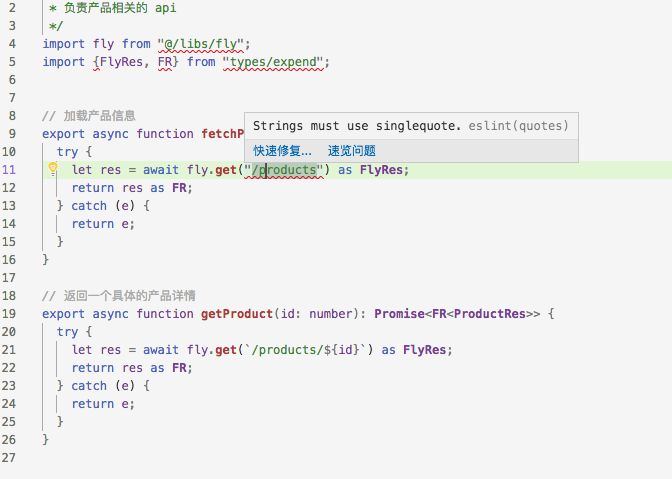
product.ts
/**
 * 负责产品相关的 api
 */
import fly from "@/libs/fly";
import {FlyRes, FR} from "types/expend";


// 加载产品信息
export async function fetchProducts(): Promise<FR<ProductRes[]>> {
  try {
    let res = await fly.get("/products") as FlyRes;
    return res as FR;
  } catch (e) {
    return e;
  }
}

// 返回一个具体的产品详情
export async function getProduct(id: number): Promise<FR<ProductRes>> {
  try {
    let res = await fly.get(`/products/${id}`) as FlyRes;
    return res as FR;
  } catch (e) {
    return e;
  }
}
What I did:
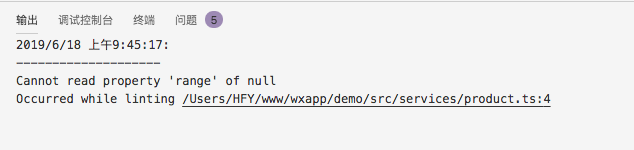
format a typescript file product.ts in vscode cause errors
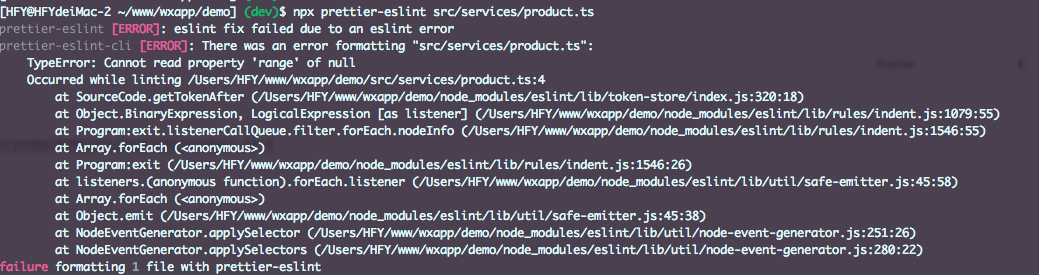
prettier-eslint src/services/product.ts cause errors
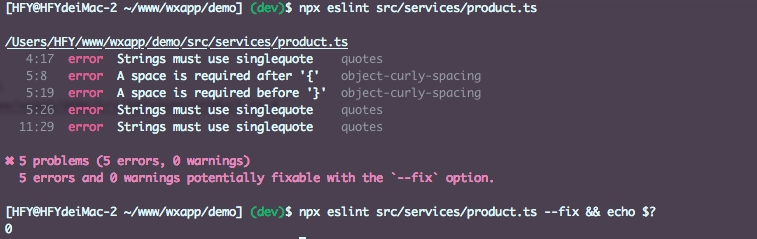
eslint src/services/product.ts is ok
What happened:
Reproduction repository:
Problem description:
Suggested solution:
 tim0991
All 4 comments
Can you try the latest 5.0.0?
 chinesedfan
on 18 Jun 2019
chinesedfan
on 18 Jun 2019
After installed [email protected] [email protected] globally, format product.ts in cli is OK
but format in vscode still cause error
Cannot read property 'range' of null
tim0991
on 18 Jun 2019
Can you try the latest 5.0.0?
Sorry, I mean prettier-eslint-cli@5, which includes the latest prettier-eslint@9.
prettier-eslint is one of prettier-vscode's dependencies. So upgrade to prettier-eslint@9 in prettier-vscode should fix your issue.
chinesedfan
on 18 Jun 2019
it works, thanks a lot @chinesedfan
- ~/.vscode/extensions/esbenp.prettier-vscode-${version}
- yarn add prettier-eslint@9
- restart vscode
tim0991
on 18 Jun 2019
Related issues
 JamieYoungman
·
8Comments
JamieYoungman
·
8Comments
 kentcdodds
·
10Comments
kentcdodds
·
10Comments
 elaijuh
·
3Comments
elaijuh
·
3Comments
 Vadorequest
·
7Comments
Vadorequest
·
7Comments
 sheerun
·
10Comments
sheerun
·
10Comments
Most helpful comment
it works, thanks a lot @chinesedfan