Prettier-atom: Uncaught TypeError: createRequire is not a function
[Enter steps to reproduce:]
1.Try to trigger prettier through save or manually
Atom: 1.45.0 x64
Electron: 4.2.7
OS: Ubuntu 19.10
Thrown From: prettier-atom package 0.58.2
Stack Trace
Uncaught TypeError: createRequire is not a function
At /home/emanuele/Projects/goku-backend/node_modules/prettier/index.js:23267

TypeError: createRequire is not a function
    at Object.<anonymous> (/home/emanuele/Projects/goku-backend/node_modules/prettier/index.js:23267:13)
    at Object.<anonymous> (/home/emanuele/Projects/goku-backend/node_modules/prettier/index.js:50762:3)
    at Module.get_Module._compile (/usr/share/atom/resources/app/static/<embedded>:11:147429)
    at Object.value [as .js] (/usr/share/atom/resources/app/static/<embedded>:11:150977)
    at Module.load (internal/modules/cjs/loader.js:602:32)
    at tryModuleLoad (internal/modules/cjs/loader.js:541:12)
    at Function.Module._load (internal/modules/cjs/loader.js:533:3)
    at Module.require (/app.asar/static/index.js:72:46)
    at require (/usr/share/atom/resources/app/static/<embedded>:11:146745)
    at requireWithFallbackToBundledPrettier (/packages/prettier-atom/dist/helpers/getPrettierInstance.js:21:23)
    at /packages/mjml-preview/node_modules/lodash/lodash.min.js:49:144
    at /packages/mjml-preview/node_modules/lodash/lodash.min.js:49:114
    at /packages/mjml-preview/node_modules/lodash/lodash.min.js:5:89)
    at /packages/mjml-preview/node_modules/lodash/lodash.min.js:97:406
    at /packages/mjml-preview/node_modules/lodash/lodash.min.js:5:89)
    at /packages/mjml-preview/node_modules/lodash/lodash.min.js:63:257
    at HTMLElement.subscriptions.add.atom.commands.add (/packages/prettier-atom/dist/main.js:72:17)
    at CommandRegistry.handleCommandEvent (/usr/share/atom/resources/app/static/<embedded>:11:349290)
    at KeymapManager.dispatchCommandEvent (/usr/share/atom/resources/app/static/<embedded>:11:1254747)
    at KeymapManager.handleKeyboardEvent (/usr/share/atom/resources/app/static/<embedded>:11:1250881)
    at WindowEventHandler.handleDocumentKeyEvent (/usr/share/atom/resources/app/static/<embedded>:11:284496)
Commands
     -0:11.6.0 prettier:format (input.hidden-input)
     -0:10.1.0 core:save (input.hidden-input)
Non-Core Packages
atom-beautify 0.33.4
file-icons 2.1.40
language-mjml 2.1.0
mjml-preview 2.0.1
pigments 0.40.2
prettier-atom 0.58.2
react 0.18.0
stacktrace 0.0.2
teletype 0.13.4
 emanuelet
All 34 comments
Same thing on:
Windows 10 (1909)
Atom 1.45.0 x 64
Electron 4.2.7
Chrome: 69.0.3497.128
Node: v10.11.0
Prettier Version 2.0.4
TypeError: createRequire is not a function
    at Object.<anonymous> (C:\Users\ME\AppData\Roaming\npm\node_modules\prettier\index.js:23267:13)
    at Object.<anonymous> (C:\Users\ME\AppData\Roaming\npm\node_modules\prettier\index.js:50737:3)
    at Module.get_Module._compile (C:\Users\ME\AppData\Local\atom\app-1.45.0\resources\app\static\<embedded>:11:147429)
    at Object.value [as .js] (C:\Users\ME\AppData\Local\atom\app-1.45.0\resources\app\static\<embedded>:11:150977)
    at Module.load (internal/modules/cjs/loader.js:602:32)
    at tryModuleLoad (internal/modules/cjs/loader.js:541:12)
    at Function.Module._load (internal/modules/cjs/loader.js:533:3)
    at Module.require (file:///C:/Users/ME/AppData/Local/atom/app-1.45.0/resources/app.asar/static/index.js:72:46)
    at require (C:\Users\ME\AppData\Local\atom\app-1.45.0\resources\app\static\<embedded>:11:146745)
    at requireWithFallbackToBundledPrettier (C:\Users\ME\.atom\packages\prettier-atom\dist\helpers\getPrettierInstance.js:21:23)
    at C:\Users\ME\.atom\packages\prettier-atom\node_modules\lodash\lodash.min.js:49:144
    at C:\Users\ME\.atom\packages\prettier-atom\node_modules\lodash\lodash.min.js:49:114
    at updateStatusTileScope (C:\Users\ME\.atom\packages\prettier-atom\dist\statusTile\updateStatusTileScope.js:11:53)
    at subscriptions.add.atom.workspace.onDidChangeActiveTextEditor.atom.workspace.onDidChangeActiveTextEditor.editor (C:\Users\ME\.atom\packages\prettier-atom\dist\main.js:50:103)
    at Function.simpleDispatch (C:\Users\ME\AppData\Local\atom\app-1.45.0\resources\app\static\<embedded>:11:1214120)
    at Emitter.emit (C:\Users\ME\AppData\Local\atom\app-1.45.0\resources\app\static\<embedded>:11:1215561)
    at Workspace.didChangeActivePaneItemOnPaneContainer (C:\Users\ME\AppData\Local\atom\app-1.45.0\resources\app\static\<embedded>:11:424807)
    at WorkspaceCenter.paneContainer.onDidChangeActivePaneItem.t (C:\Users\ME\AppData\Local\atom\app-1.45.0\resources\app\static\<embedded>:14:44778)
    at Function.simpleDispatch (C:\Users\ME\AppData\Local\atom\app-1.45.0\resources\app\static\<embedded>:11:1214120)
    at Emitter.emit (C:\Users\ME\AppData\Local\atom\app-1.45.0\resources\app\static\<embedded>:11:1215561)
    at PaneContainer.didChangeActiveItemOnPane (C:\Users\ME\AppData\Local\atom\app-1.45.0\resources\app\static\<embedded>:11:446919)
    at Pane.setActiveItem (C:\Users\ME\AppData\Local\atom\app-1.45.0\resources\app\static\<embedded>:11:455763)
    at Pane.activateItem (C:\Users\ME\AppData\Local\atom\app-1.45.0\resources\app\static\<embedded>:11:457933)
    at TabBarView.onClick (C:\Users\ME\AppData\Local\atom\app-1.45.0\resources\app\static\<embedded>:11:1165207)
 creyD
on 7 Apr 2020
creyD
on 7 Apr 2020
As this occurred to my newly installed system, which I installed today and it didn't happen 4 days ago, when I was using my old system, I suspect that it could have something to do with #724
Dependabot said that it had 100% compatibility, but it could be wrong there...
creyD
on 7 Apr 2020
Hello,
It works fine with prettier 2.0.2 but not with 2.0.3 nor 2.0.4.
(To test, I've reverted one by one a bunch of Dependabot PRs from the last couple of days until it worked)
- Atom: 1.45.0
- prettier-atom: 0.58.2
- Atom-Shell:
- OS: Mac OS X 10.15.3
- Misc
- apm 2.4.3
- npm 6.2.0
- node 10.2.1 x64
- atom 1.45.0
 paoesco
on 7 Apr 2020
paoesco
on 7 Apr 2020
Can confirm, I just installed the 2.0.2 version on my system and everything works as expected.
creyD
on 7 Apr 2020
Hopefully a patched version will be released soon.
 liyasthomas
on 8 Apr 2020
liyasthomas
on 8 Apr 2020
I can confirm also that reverting to 2.0.2 fixed the issue for me also
emanuelet
on 8 Apr 2020
While trying to find the cause, I also found these two issues
https://github.com/prettier/prettier/issues/7949
https://github.com/prettier/prettier-vscode/issues/1289
 BarryThePenguin
on 9 Apr 2020
BarryThePenguin
on 9 Apr 2020
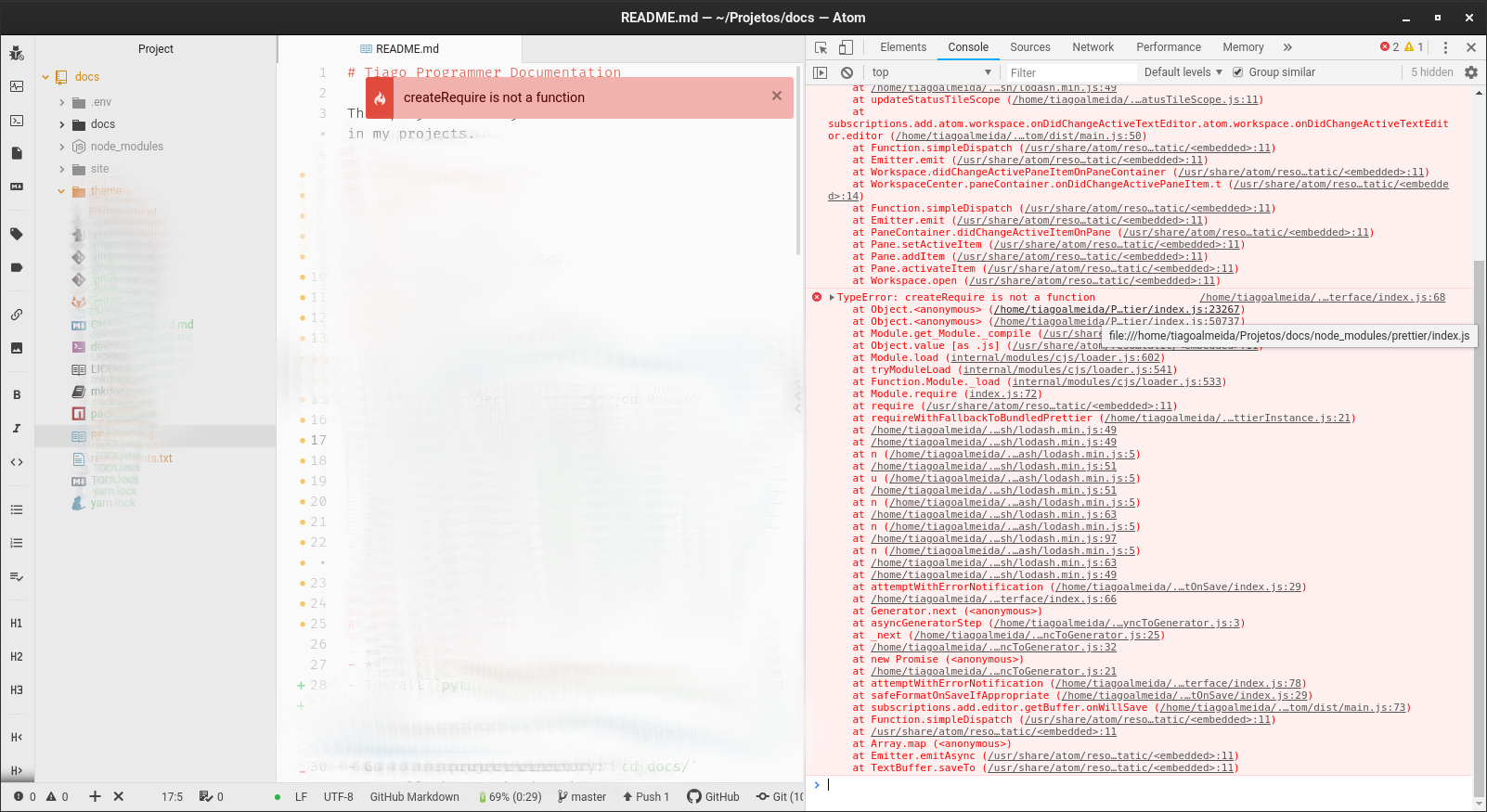
Same here! In my case, it appears that Prettier is running from my node_modules.
 tjapro
on 13 Apr 2020
tjapro
on 13 Apr 2020
I can confirm also that reverting to 2.0.2 fixed the issue for me also
How did you revert? I still get the error when I install 2.0.2 in my project's package.json and restart Atom. I have a .prettierrc file in my ~/Users/MyUserName folder to handle defaults
- Atom: 1.45.0
- prettier-atom: 0.58.2
- OS: macOS 10.14.6 Mojave

 stahlmanDesign
on 13 Apr 2020
stahlmanDesign
on 13 Apr 2020
I can confirm also that reverting to 2.0.2 fixed the issue for me also
How did you revert? I still get the error when I install 2.0.2 in my project's package.json and restart Atom. I have a .prettierrc file in my ~/Users/MyUserName folder to handle defaults
- Atom: 1.45.0
- prettier-atom: 0.58.2
- OS: macOS 10.14.6 Mojave
make sure to specify the dependency without ^ ("prettier": "2.0.2") otherwise npm will install the latest patch version
emanuelet
on 13 Apr 2020
But just a question: why is atom-prettier getting the prettier of the project of instead getting its prettier?
tjapro
on 14 Apr 2020
why is atom-prettier getting the prettier of the project
I think that is how most editor integrations work. If you have the tool installed as part of your project, it will use it. linter-eslint works a similar way
BarryThePenguin
on 14 Apr 2020
Thanks @BarryThePenguin for the explanation. So waiting for Prettier itself, no?
tjapro
on 14 Apr 2020
make sure to specify the dependency without
^("prettier": "2.0.2") otherwise npm will install the latest patch version
Of course, that was it! Not the first time I have made that kind of mistake. Thank you, it now works
stahlmanDesign
on 14 Apr 2020
Sorry about this, we use require.resolve() to resolve external config and plugins since v2.0.0, but somehow the require.resolve in vscode doesn't work as expected, so in v2.0.4 we try another way, unfortunately seems this workaround doesn't play well in atom, that's all the details.
 fisker
on 14 Apr 2020
fisker
on 14 Apr 2020
Prettier 2.0+ requires at least Node 10.13.0. Prettier 2.0.2 might have worked for some of you in older Node, but it was because you didn't use plugins or advanced config resolution, which use Node's new API.
 thorn0
on 14 Apr 2020
thorn0
on 14 Apr 2020
I have this problem also. Atom uses node version 10.11.0 so the only possible fix currently is to downgrade prettier to 2.0.2
 vilvai
on 14 Apr 2020
vilvai
on 14 Apr 2020
[email protected] requires Node.js>=10.13.0 , the required method module.createRequireFromPath() is added in v10.12.0
fisker
on 14 Apr 2020
Ah.. looks like Atom v1.45.0 still uses Node v10.11.0
You can check by running process.versions in the Atom Developer Tools
{
  "http_parser": "2.8.0",
  "node": "10.11.0",
  "v8": "6.9.427.31-electron.0",
  "uv": "1.23.0",
  "zlib": "1.2.11",
  "ares": "1.14.0",
  "modules": "69",
  "nghttp2": "1.33.0",
  "napi": "3",
  "openssl": "1.1.0",
  "electron": "4.2.7",
  "chrome": "69.0.3497.128",
  "icu": "62.2",
  "unicode": "11.0",
  "cldr": "33.1",
  "tz": "2019a"
}
This can be fixed if somebody knows how we can access Node's builtin require.resolve in Atom.
thorn0
on 14 Apr 2020
Access how?
 robwise
on 16 Apr 2020
robwise
on 16 Apr 2020
@robwise In Prettier's code. The problem is that Prettier can't access the builtin require. It's overridden by Electron, Atom, or something else. That's why Prettier falls back to createRequire / createRequireFromPath.
thorn0
on 16 Apr 2020
Prettier 2.0.5 is out. Please confirm that this issue has been fixed there.
thorn0
on 21 Apr 2020
2.0.5 fixed the issue for me. Thanks!
 EvHaus
on 21 Apr 2020
EvHaus
on 21 Apr 2020
This error is still happening for me with Prettier 2.0.5, prettier-atom 0.60.0, macOS 10.15.4.
 cravend
on 1 May 2020
cravend
on 1 May 2020
@cravend Try rm -rf node_modules and then reinstalling them, this seemed to do the trick for me.
robwise
on 1 May 2020
@cravend Prettier 2.0.5 doesn't use createRequire anymore, so it can't cause such a message. You won't find the substring createRequire in node_modules/prettier.
thorn0
on 1 May 2020
Turns out I had a global install of Prettier 2.0.5, but my devDependency was locked at Prettier 2.0.4 — deleting the prettier inside of my project's node_modules worked fine.
Just for my reference, do projects generally include Prettier as a devDependency?
cravend
on 1 May 2020
Prettier is particularly important to install locally to ensure that the formatting by different engineers is consistent. Otherwise you’ll keep reformatting each other’s changes every time the author changes.
_(More broadly, I’d say absolutely everything is better installed locally)_
 denis-sokolov
on 1 May 2020
denis-sokolov
on 1 May 2020
Prettier is particularly important to install locally to ensure that the formatting by different engineers is consistent.
Exactly. For the same reason, Prettier doesn't support any kind of global configuration. We should definitely clarify this point in the docs.
thorn0
on 1 May 2020
It's honestly the best way to do it and I agree. I just have a whole bunch of users who liked the ability to have it work out of the box in Atom without any configuring of their project and now I get so much blowback if I try to remove that support.
robwise
on 6 May 2020
I have resolved this issue via downgrading ESlint 6.x (not latest = 7.x). The version of the prettier package in devDependencies doesn't matter (both v2.0.2 and v2.0.5 work fine). Only for me, but might be helpful for others.
 hojeonggo
on 9 May 2020
hojeonggo
on 9 May 2020
Please close this issue as it's been fixed in Prettier 2.0.5.
thorn0
on 13 May 2020
@Seia-Soto downgrading my global installation of ESlint from 7.0.0 worked for me too. I had tried different versions of prettier-atom, etc.
 allengordon011
on 19 May 2020
allengordon011
on 19 May 2020
Related issues
 kentcdodds
·
5Comments
kentcdodds
·
5Comments
 ZeeCoder
·
6Comments
ZeeCoder
·
6Comments
 vyrruss
·
5Comments
vyrruss
·
5Comments
 ryanpcmcquen
·
3Comments
ryanpcmcquen
·
3Comments
 jjwyse
·
5Comments
jjwyse
·
5Comments
Most helpful comment
2.0.5 fixed the issue for me. Thanks!