I'm curious if there is anything missing in prettier-atom to support plugins. After locally installing prettier and prettier-plugin-elm (which I developed myself 😃 ), the plugin works from the command line, but not in the editor. In particular, pressing control+option+f while editing a markdown file, does not format ```elm code blocks. Running yarn prettier same-file.md from the terminal does this job perfectly.
What could be causing the issue? Can it be that the way prettier is spawned does not let it search for prettier-plugin-* in node_modules?
Prettier: Debug
Atom version: 1.24.1
prettier-atom version: 0.52.0
prettier version: 1.11.1
prettier-eslint version: 8.8.1
prettier-atom configuration: {
  "formatOnSaveOptions": {
    "enabled": true,
    "isDisabledIfNoConfigFile": true,
    "showInStatusBar": true,
    "respectEslintignore": true,
    "excludedGlobs": [],
    "whitelistedGlobs": [],
    "isDisabledIfNotInPackageJson": false
  },
  "silenceErrors": true,
  "useEditorConfig": false,
  "useEslint": false,
  "useStylelint": false,
  "prettierOptions": {
    "singleQuote": false,
    "bracketSpacing": true,
    "semi": true,
    "useTabs": false,
    "jsxBracketSameLine": false,
    "printWidth": 80,
    "tabWidth": "auto",
    "trailingComma": "none",
    "parser": "babylon",
    "arrowParens": "avoid"
  },
  "prettierEslintOptions": {
    "prettierLast": false
  },
  "scopes": {
    "javascript": [
      "source.js",
      "source.jsx",
      "source.js.jsx",
      "source.babel",
      "source.js-semantic",
      "text.html.basic",
      "text.html.vue"
    ],
    "typescript": [
      "source.ts",
      "source.tsx",
      "source.ts.tsx"
    ],
    "css": [
      "source.css",
      "source.less",
      "source.css.less",
      "source.scss",
      "source.css.scss",
      "source.css.postcss"
    ],
    "json": [
      "source.json"
    ],
    "graphQl": [
      "source.graphql"
    ],
    "markdown": [
      "source.md",
      "source.gfm",
      "text.md"
    ],
    "vue": [
      "text.html.vue"
    ]
  }
}
__UPD:__ Same issue in https://github.com/prettier/prettier-vscode/issues/395 (even the same id 😄)
 kachkaev
All 44 comments
wanna push a sample github repo that reproduces your issue? Mine formatted your hello world content just fine.
 olsonpm
on 16 Mar 2018
olsonpm
on 16 Mar 2018
ha nevermind I didn't look at the output correctly. It's gotta do with the executable directory. Note when you do prettier elm.md the plugin isn't grabbed, but if you do npx elm.md it does (I assume yarn <pkg> <args> is doing the same thing as npx)
Anyway, I'd first take this to prettier. Seems to me which executable is used shouldn't matter - what should matter is the filepath being formatted.
example calls from my machine:
❯ npx prettier elm.md    # <--- npx formats as expected
# Hello world in Elm

\`\`\`elm
import Html exposing (text)


main =
    text "Hello, World!"
\`\`\`


❯ prettier elm.md    # <--- global prettier doesn't
# Hello world in Elm

\`\`\`elm
import  Html exposing     (text)

main = text      "Hello, World!"
\`\`\`
There is an upstream problem with detecting global plugins indeed, however, I'm not sure this is the same issue. My expectation is that when prettier and prettier-plugin-XYZ are installed locally, the plugin should successfully pick this bundle and behave exactly the same as ./node_modules/.bin/prettier ./path/to/file.md (which works). However, this does not seem to be happening.
Can it be that a locally installed prettier is given a wrong cwd when plugin launches it? That's the only differences I can think of compared to ./node_modules/.bin/prettier ./path/to/file.md.
kachkaev
on 16 Mar 2018
but we don't search for the plugin, we just tell prettier the filepath and contents. It does the rest. How prettier finds what plugins to apply is up to prettier. Seems to me you first need to understand how prettier finds and applies the plugins.
olsonpm
on 16 Mar 2018
here's another failing test
Edit: Btw prettier-atom uses prettier's 'format' api like below. We don't fire off the cli
// package.json

  "devDependencies": {
    ...
    "prettier": "^1.11.1",
    "prettier-plugin-elm": "^0.1.2"
    ...
  }
// test.js

const prettier = require('prettier')

const content = `
\`\`\`elm
import  Html exposing     (text)

main = text      "Hello, World!"
\`\`\`
`

console.log(prettier.format(content))
outputs
```elm
import Html exposing (text)main = text "Hello, World!"
```;
olsonpm
on 16 Mar 2018
Here's how the plugins are searched:
Plugins are automatically loaded if you have them installed in your
package.json. Prettier plugin package names must start with@prettier/plugin-orprettier-plugin-to be registered.
https://prettier.io/docs/en/plugins.html#using-plugins
That is true when I call ./node_modules/.bin/prettier ./path/to/file.md or yarn prettier ./path/to/file.md in a project that has prettier and prettier-plugin-x – all works as advertised. However, I'm not sure why things are not working in your example above.
🤔
kachkaev
on 16 Mar 2018
might be time to file a prettier issue :)
olsonpm
on 16 Mar 2018
So test.js is a file in the same project where you have prettier and prettier-plugin-x? It just sits in the root, just like package.json? I'll try to reproduce.
kachkaev
on 16 Mar 2018
/test.js
/package.json
Here is one thing that's different! In your test.js you attempt to prettify a string, not a file. Perhaps, this makes Prettier try a default JS parser rather than picking a correct one in case of:
./node_modules/.bin/prettier ./path/to/file.md
./node_modules/.bin/prettier ./path/to/file.elm
What does prettier.getSupportInfo() say inside test.js?
kachkaev
on 16 Mar 2018
The problem is partially in Prettier indeed – see https://github.com/prettier/prettier/issues/4000#issuecomment-374230685.
Despite that, there are still issues with the Atom package. I see at least these, but I'm not sure how best to approach them:
scopeSpecificSettingsselects a parser from a closed list, which does not allow for plugins. When I completely removed...scopeSpecificSettingsand added{filepath: getCurrentFilePath(editor)}, formatting still worked. Delegating the detection ofparserbyfilepathmight be a simple yet a universal solution for the existing languages as well as those from plugins. Perhaps, the only case that when the trick will not work is when someone creates a new file, manually picks a scope before saving the file with an appropriate extension and tries to prettify the text._Format of save_ does not work for files that are supported by external plugins. With the patch above, I can manually trigger _Prettier: Format_ command for an
.elmfile, which is a good sign. However, when I presscmd+s, formatting does not happen. I guess the issue is to do with having a closed list of supported scopes inshouldFormatOnSave():Will there be any harm if Prettier Atom extension simply attempts to format any file when enabled? If
filepathis not supported by any plugin, won't Prettier just silently fail and leave formatting as it is?
kachkaev
on 19 Mar 2018
re: filepath option
@robwise @SavePointSam could you provide input on why we use atom's scopes feature to infer a parser over the filepath option?
Format of save does not work for files that are supported by external plugins
I don't think scopes are your issue here. There are plenty of reasons why something won't format on save, unfortunately. The myriad of options makes sure of this confusion haha. Anyway, if you create a repo which reproduces your 'format on save' issue then I'll look into it.
olsonpm
on 19 Mar 2018
Anyway, if you create a repo which reproduces your 'format on save' issue then I'll look into it.
@olsonpm please see https://github.com/kachkaev/prettier-plugin-elm-mwe. Let me know if you want me to help with anything else!
kachkaev
on 19 Mar 2018
so I'm assuming demo.md is the problematic file for you? It formats on save for me (without the plugin formatting, as expected).
Please check your plugin options under the heading Format On Save. It will hopefully solve your issue. There's also an open unresolved issue that I couldn't reproduce here. If that is your issue then I'd be interested in working with you to squash that bug.
olsonpm
on 19 Mar 2018
The problem is with formatting demo.elm on save, not demo.md. I am expecting this file to be handled by Prettier Atom because I've got prettier + prettier-plugin-elm installed in my project dependencies ad formatting of .elm files works fine via CLI (as well as when manually triggered in Atom).
I could not find any signs of picking scopes from plugins by the Atom extension. _Format on save_ only works from scopes among getAllScopes(), which is a closed list at the moment:
kachkaev
on 19 Mar 2018
Oh then I think you're limited to either
- adding your file extension to one of the scopes found under the Scopes plugin options
- manually specifying your scope in your local prettier config
I don't think this plugin supports custom scopes via the plugin settings, though i'm a new contributor so I could be missing something
olsonpm
on 19 Mar 2018
Should not prettier-atom just work for any scopes and simply pass filepath to an instance of Prettier? I don't see much value in all this config given that prettier can figure out the scope by the file extension:
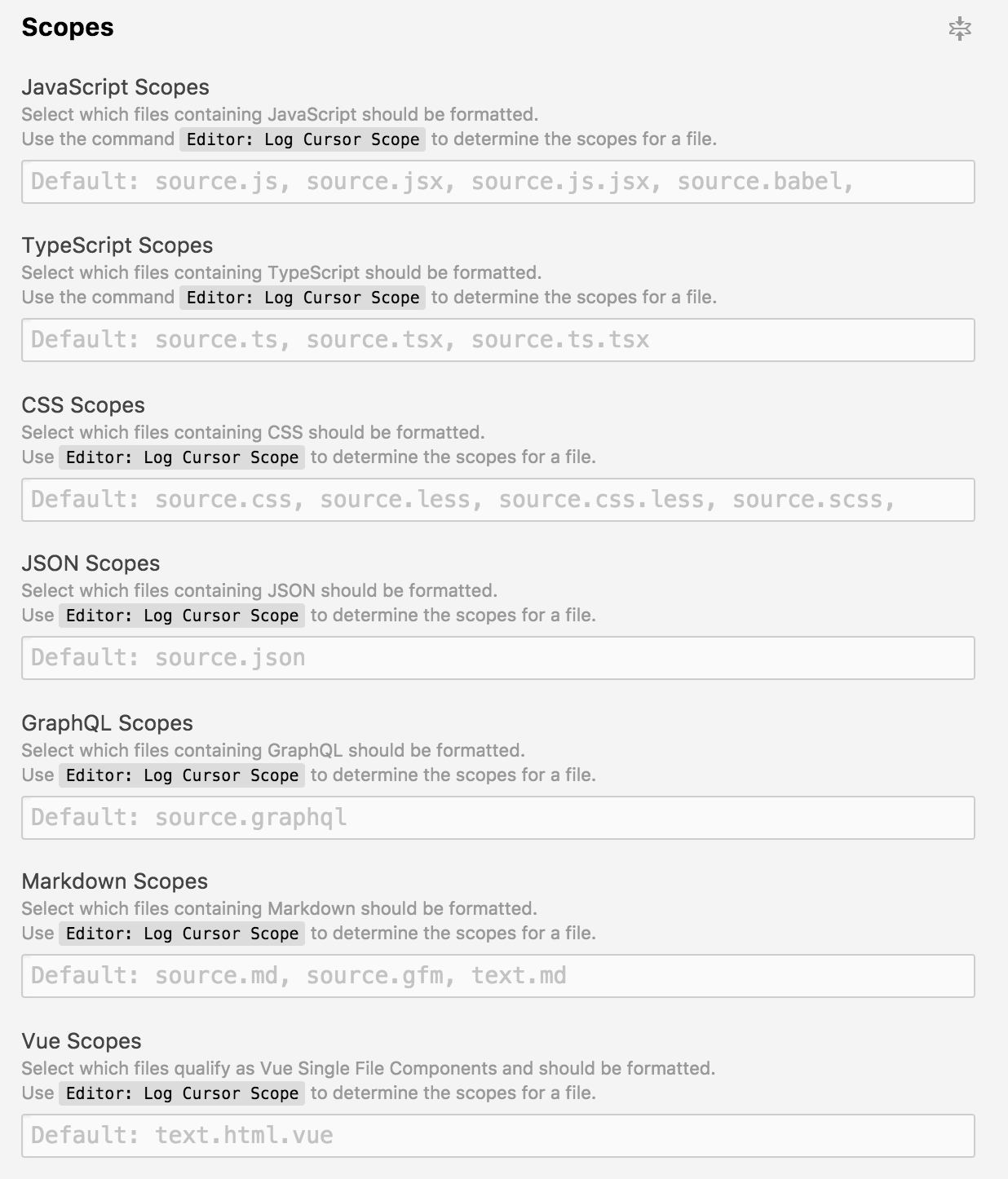
However, I'm not sure I'm not missing anything so it'd be great to hear from @robwise and @SavePointSam.
kachkaev
on 19 Mar 2018
ah - correction, you wouldn't add your file extension to the scopes. You'd add the elm scope particular to atom to one of the hard-coded parsers under the Scopes. I haven't really used this at all and personally think it's more confusing than necessary, but I'd have to read about scopes in atom and why they chose it to have a valid opinion.
I haven't messed with scopes before, so you'll have to do some digging. I quickly used the command log cursor scope as suggested by the atom-prettier documentation and it returned text.plain.null-grammar.
olsonpm
on 19 Mar 2018
text.plain.null-grammar is a scope assigned to a just-created file that has not been saved yet and so does not have an extension. You can assign a custom scope to that unsaved file by clicking _Plain Text_ in the bottom right corner of the window and picking a custom scope:
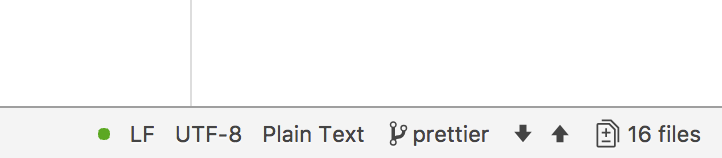
In theory, this allows you to format your _new_ files with Prettier before they are saved for the first time and thus get a corresponding scope based on their extension. However, I'm not sure that this edge case overweights the complexity of the config window I've shown.
I see Prettier Atom package as a wrapper for the command line tool, so I expect is behave the same as running yarn prettier path/to/file, not more not less. No matter what's decided about scopes vs filepath, it'd be great if installing Prettier plugins did not require any tweaking of Atom preferences. I should be able to clone someone's project in language XYZ that has .prettierrc and uses prettier-package-xyz as a dependency and from that just edit files and save them without worrying about anything.
kachkaev
on 19 Mar 2018
There are some fundamental differences to the command line tool vs api needs, I don't remember off-hand but I know I've come across them. Anyway, we'll wait to hear from rob and sam and continue then.
olsonpm
on 19 Mar 2018
@robwise @SavePointSam could you provide input on why we use atom's scopes feature to infer a parser over the filepath option?
@olsonpm Yeah the short answer is basically that prettier-atom came out about a year prior to Prettier itself having this ability via a config, so it's like a legacy functionality now that we never took out. Prior to that point (I think like August 2017 when prettier configs came out), you had to spoon-feed prettier what parser you wanted to use.
In the past, I've suggested ripping out this functionality as well as other functionality that was in any way duplicating what had been added to Prettier over time. Some people voiced concern that we still needed these features, however. So, ultimately, I reverted my commit and kept them.
See https://github.com/prettier/prettier-atom/pull/261 and https://github.com/prettier/prettier-atom/issues/256 for more on that.
Should not prettier-atom just work for any scopes and simply pass filepath to an instance of Prettier?
@kachkaev See above, this functionality didn't exist in Prettier for a long time so it's sort of a holdover from the era when we had to spoon-feed the scope.
I'm still a big proponent of ripping stuff out of prettier-atom to make it simpler where Prettier itself can take over. This seems to be inline with what you're suggesting as this would not only make prettier-atom simpler, but also would solve your plugin problem.
However, there is an issue here when it comes to files that have not yet been saved. Prettier makes no accommodation for this so we'd basically be losing this ability in prettier-atom if we relied on a filepath for Prettier to come up with settings to use.
Furthermore, there seems to be a vocal group of prettier-atom users who just object to the notion that they have to use a prettier config and would rather do everything from the Atom settings. If the parser is inferable from the filepath, that's fine, but they'd have no way to override this otherwise. I guess that's a minor concession though.
I hope that explains some of the reasons for the quirkiness here. As I said, since August I've always sort of been inclined to rip out the scope settings anyway. But I'm just worried about breaking things for existing users because I have no metrics or data by which I can gauge who will be affected.
 robwise
on 20 Mar 2018
robwise
on 20 Mar 2018
wow, thanks much for the thorough explanation. I'll sit on this for a couple days and browse the linked issues
olsonpm
on 20 Mar 2018
Thanks for sharing your thoughts @robwise and for this historic context. Totally on your side with making the Atom extension as thin as possible given that Prettier CLI is much smarter now. That'd be a breaking change indeed, but isn't the support for plugins a feature worth it even for those who got used to configuring Atom? The ecosystem of Prettier plugins is just starting, but my guts say it's going to rock pretty soon!
The only reasonable Prettier option that I see in this hypothetical new design is global prettier.config.js, which people can be given an opportunity to define (either directly or by pointing to a file). This will replace the entire scopes section as well as lots of tickboxes and dropdowns here:
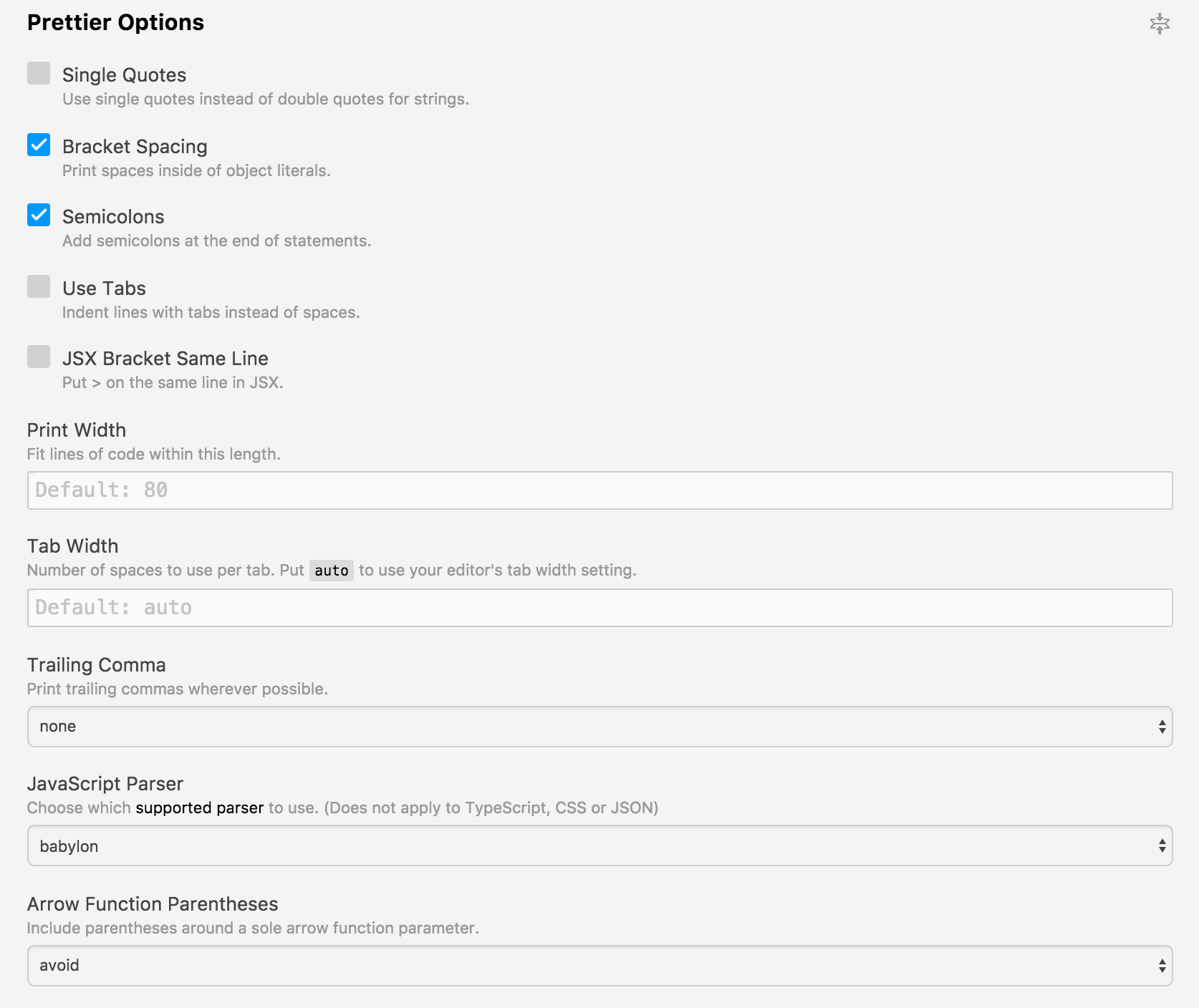
This set of UI elements does not cover all Prettier features anyway, for example I can't declare this:
module.exports = {
  tabWidth: 2,               // <-----------------------------------------
  trailingComma: "all",
  arrowParens: "always",
  overrides: [
    {
      files: "*.md",
      options: {
        tabWidth: 4,         // <-----------------------------------------
      },
    },
  ],
};
Agree that not being able to apply a scope before saving a file for the first time is an issue. What if, as a workaround, prettier-atom checks if filepath exists at all and if not, provides a fake one based on the current scope of the file? The only usecase for this workaround I see is when someone pastes some text into a new Atom tab, then says that it's JS etc. and finally runs Prettier: Format.
kachkaev
on 20 Mar 2018
See https://github.com/prettier/prettier-atom/pull/397 that potentially enables globally installed prettier plugins inside the extension.
kachkaev
on 22 Mar 2018
I think one possible solution is that we just bite the bullet and decide to make a big change here that will potentially break some peoples' stuff in edge case scenarios.
Here's an example of what I mean (each number can be a PR):
- #397 so we can use global prettier builds
- Implement a global prettier config feature that allows defining a global prettier config. Later on, this is what users are going to use instead of trying to duplicate prettier's settings in prettier-atom.
- This is the big one. Remove:
- scopes
- blacklists (a.k.a exclude globs)
- whitelists (a.k.a include globs)
- editorconfig integration
- "Only format if prettier is found in your project's dependencies" option. Users can use the prettier config presence or their global prettier config to whitelist/blacklist certain projects
- All prettier options. These should instead be defined in the global prettier file.
- Unfortunately, we'd lose the prettier status tile (the green check mark thing in the lower left) since prettier-atom would no longer know whether the file was in scope or not. (Unless we did some sort of preliminary lookup or something?)
If users want the ability to format unsaved files or use prettier-atom in projects without prettier configs and still use default settings, they can define these defaults in this new global prettier config we're considering.
This would pretty much eliminate the problem where we get incompatible prettier-atom settings for Prettier when people are using older prettier versions.
Another option that further extends this idea is to go and just implement the global config option over in the Prettier repo itself so that we don't have to do it. Or does that exist already? I don't really check that repo that much believe it or not.
robwise
on 22 Mar 2018
I definitely vote for simplifying this plugin.
@robwise mind clarifying
Users can use the prettier config presence or their global prettier config to whitelist/blacklist certain projects
and
If users want the ability to format unsaved files... they can define these defaults in this new global prettier config
It just made me unsure what you meant by "global prettier config". My below comments assume a prettier config and not a global prettier-atom config.
Implement a global prettier config feature that allows defining a global prettier config
implement the global config option over in the Prettier repo
A couple things
- prettier uses cosmiconfig which searches all the way up to the home directory so there's no need for a global configuration because it's implied as the home directory.
- regarding
.prettierignore, prettier-atom already traverses the current file's directory path (via atom-linter), so it should be compatible with cosmiconfig's current approach. Because cosmiconfig is open to allowing alternative search paths however, I think we should just use cosmiconfig to search for.prettierignoreas well to be consistent (something I think prettier should do. Currently it just allows users to pass in a.prettierignorepath via the cli which doesn't work in our scenario)
remove scopes, blacklists, whitelists, all prettier options
- :+1:
remove editorconfig integration
- I think we unfortunately have to keep this option here because users are unable to opt out of it via the prettier config. Another unfortunate issue to keep in mind is that prettier stops looking for editorconfigs at the project root. This means when users who are confused why their global prettier config and .prettierignore are being respected but not their editorconfig files, we can tell them to create an issue in prettier haha.
Unfortunately, we'd lose the prettier status tile
- Didn't know this existed haha. If users were attached to this tile then we could tell them we would support it if prettier exposed inferParser.
olsonpm
on 23 Mar 2018
It just made me unsure what you meant by "global prettier config". My below comments assume a prettier config and not a global prettier-atom config.
Yeah I meant global prettier config not prettier-atom config. For blacklist/whitelist, yeah I guess we'd do that via a global prettierignore and not the prettierrc.
As far as formatting unsaved files, there is no filepath from which prettier can infer the settings, so I was thinking maybe we could point prettier to the global config or something and try to use the scope to figure out what parser to use?
robwise
on 23 Mar 2018
blacklist/whitelist... we'd do that via a global prettierignore
My thoughts too.
I was thinking maybe we could point prettier to the global config or something and try to use the scope to figure out what parser to use?
As far as having a global config, I think we should either advise users to place their global config in their home directory, or I could work on the cosmiconfig issue to supply alternative search paths. Then we could either work with prettier folk to search ~/.config/prettier or let the user define a global path via plugin settings. (I'm not sure what path would be similar to ~/.config on windows)
re: unsaved file scope
I'm pretty sure an unsaved file will always have text.plain.null-grammar unless the user defines otherwise in their init.js. If that's true, then currently all unsaved files are being parsed using the babylon parser. We can then continue this assumption without breaking user expectations and also use whatever global configuration we decide on above.
olsonpm
on 23 Mar 2018
As far as formatting unsaved files, there is no filepath from which prettier can infer the settings, so I was thinking maybe we could point prettier to the global config or something and try to use the scope to figure out what parser to use?
What if we simply fake this filepath by deriving it from the current scope? Plugins seem to have both, scopes and extensions, e.g.:
There may be a mismatch between Atom's scope and tmScope (what ever that is), but I guess that a mapping between the two is doable.
kachkaev
on 23 Mar 2018
if the current scope is always null, then the parser is always babylon. Not sure we have to deal with any conditions here
olsonpm
on 23 Mar 2018
That could cover most cases, that's true. Here's an example scenario when fake file path generation could be help:
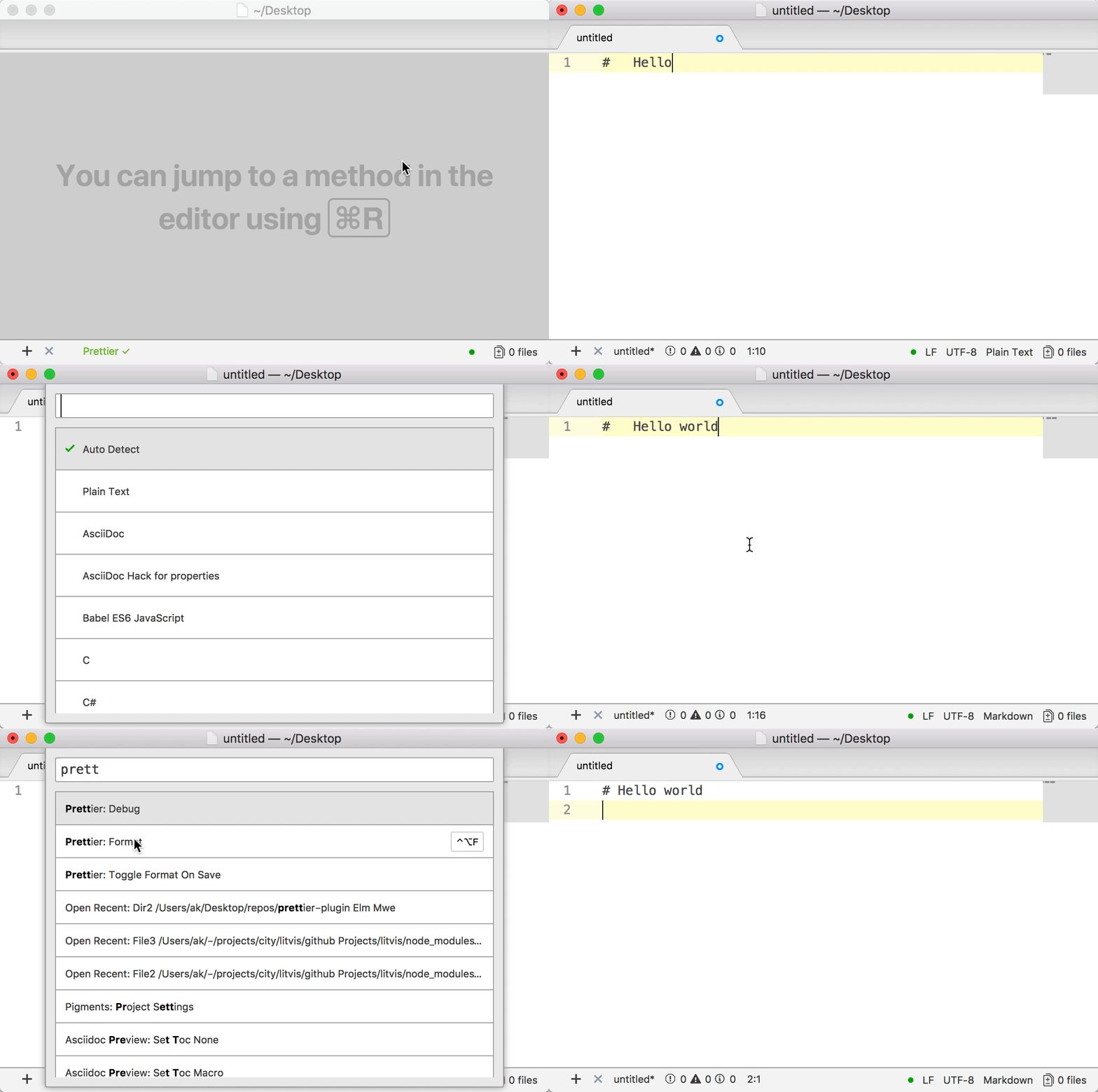
There can be any other scope instead of markdown, assuming it is supported by one of the installed prettier plugins. In any case, this should be a rather rare use case.
kachkaev
on 23 Mar 2018
that's like super edge case, no?
olsonpm
on 23 Mar 2018
It is going to be rare indeed, I just remember myself using it myself a couple of times and so suspect that someone else might do too. Changing scope in a new file and then prettifying it is useful when you have a chunk of code copied from somewhere and you want to make sense of it.
kachkaev
on 23 Mar 2018
Hmm, this new lite design looks similar to https://github.com/t9md/atom-mprettier, which I accidentally discovered just now.
kachkaev
on 23 Mar 2018
Ha I definitely agree with his "no magic" approach. Magic is what made me dislike the microsoft stack so much.
olsonpm
on 23 Mar 2018
I'm going to take a stab at this one
robwise
on 29 Mar 2018
Hmm, after looking at it, I think I will still need to include a "scopes" option, but it would just be a single option instead of having to add a new scope option for every parser. In this option, we'd just list every single scope you want prettier-atom to run on.
robwise
on 29 Mar 2018
@robwise can Prettier simply run for all scopes by default? I guess it'll just silently fail if we give it a file it can't swallow, which is probably what we need 🤔
kachkaev
on 29 Mar 2018
Roger that, I will try that out and see if it works 👍
robwise
on 30 Mar 2018
If filepath is not supported by any plugin, won't Prettier just silently fail and leave formatting as it is?
AFAICT, this is not the case. For example, if I try to format a .yaml file, I get a syntax error instead of Prettier silently not doing anything.
It might be worth it to change Prettier so that it will just return output unchanged if a parser cannot be inferred from the filepath. That way I can get rid of this scopes thing and plugins will automatically just work.
What do you think @kachkaev?
robwise
on 30 Mar 2018
I noticed your PR @robwise, it looks awesome! I’m sorry but i’m really busy today, so can’t look at everything in detail. However, I hope I’ll be able to do so this weekend - really looking forward to try your PR with Elm!
Speaking of scopes and exceptions, can’t we ‘silently fail’ on the Atom’s side, even if prettier itself throws?
kachkaev
on 30 Mar 2018
Speaking of scopes and exceptions, can’t we ‘silently fail’ on the Atom’s side, even if prettier itself throws?
I thought about that, but I'm pretty sure that we can't do this. If I have a true syntax error in my JavaScript code, Prettier throws the same exact error as when I try to run it on a bunch of gobbledygook or on code in an unsupported language.
A lot of people really rely on the error notifications from Prettier when there are syntax errors as a sort of poor man's "smoke check." Additionally, if Prettier all of the sudden stopped formatting my code and I didn't realize it was because of a syntax error, I might just assume something was wrong with Prettier instead of my code.
robwise
on 30 Mar 2018
I finally tried your PR @robwise and it's great! Fewer settings is an awesome thing, which opens lots of opportunities and fixes quite a few bugs!
I think I can agree that an exception from Prettier is a useful feedback for a user – let's leave it! I'm still wondering though if it is possible to overcome manual scope definition somehow.
Imagine I'm about to contribute to two projects, one of which uses prettier/plugin-python and another one relies on prettier/plugin-php. Say, in addition I've got a bunch of Elm projects that I format with a global instance of prettier and prettier-plugin-elm, because I don't want to keep package.json in each of them.
For the Atom package this means that three instances of Prettier are used depending on the folder in which I edit a file, that's two local Prettiers with Python and PHP and a fallback global instance that supports Elm (assuming https://github.com/prettier/prettier/issues/4000 is fixed). If defining extra scopes is a must, I have to go to the plugin settings three times, dig out scope names for PHP, Python and Elm and add these to the list of available scopes. Doing this feels too laborious. Besides, it is hard to share Prettier's config section with colleagues because my list of scopes can be missing some languages others are using Prettier with.
I know that the current version of Prettier tries to parse any unknown file like a JavaScript, which is useful for various .xxxrc files. But perhaps we can still do something to avoid manually adding scopes from plugins? Could there be at least some wildcard option for the list of scopes? Or maybe there is a way to leverage prettier --support-info?
$ prettier --support-info | grep '"\.'
        ".js",
        "._js",
        ".bones",
        ".es",
        ".es6",
        ".frag",
        ".gs",
        ".jake",
        ".jsb",
        ".jscad",
        ".jsfl",
        ".jsm",
        ".jss",
        ".mjs",
        ".njs",
        ".pac",
        ".sjs",
        ".ssjs",
        ".xsjs",
        ".xsjslib"
      "extensions": [".jsx"],
      "extensions": [".ts", ".tsx"],
        ".json",
        ".json5",
        ".geojson",
        ".JSON-tmLanguage",
        ".topojson"
        ".arcconfig",
        ".jshintrc",
        ".babelrc",
        ".eslintrc",
        ".prettierrc",
      "extensions": [".css", ".pcss", ".postcss"],
      "extensions": [".less"],
      "extensions": [".scss"],
      "extensions": [".graphql", ".gql"],
        ".md",
        ".markdown",
        ".mdown",
        ".mdwn",
        ".mkd",
        ".mkdn",
        ".mkdown",
        ".ron",
        ".workbook"
      "extensions": [".vue"],
      "extensions": [".elm"],  <- from prettier-plugin-elm used by the current instance
How about a checkbox saying _Only run Prettier for the files in support-info_? I guess this checkbox would disable setting the list of scopes.
BTW should not the list of scopes to _format on save_ go below the checkbox?
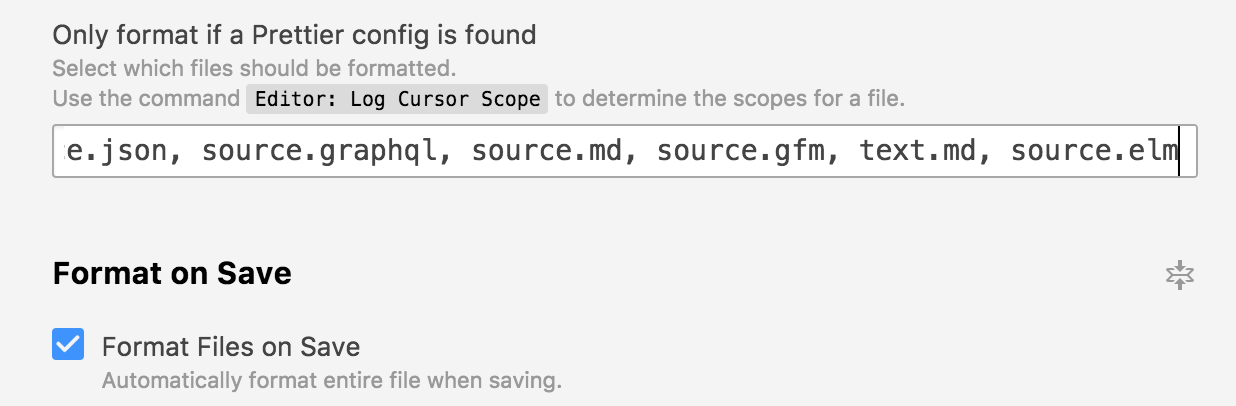
Many thanks for your amazing work on simplifying the plugin!
kachkaev
on 3 Apr 2018
On your points about the prettier scopes thing, I completely agree that it's annoying and ugly. The question I guess at this point is how best to get rid of it. I think the most elegant solutions would probably involve making a change to prettier itself. For example, we could do something similar to that API option --suport-info that you brought up.
Imagine we were able to do something like prettier.isFileSupported(file) to determine whether the file can be formatted or not by the currently-resolved prettier instance?
I'm hesitant to merge the PR until we figure this out as the scopes API as-is in the PR is not so good. I'd rather skip straight to the final solution.
BTW should not the list of scopes to format on save go below the checkbox?
Yes, for some reason I thought it applied to everything, but you're right, it's just relevant for format-on-save.
robwise
on 4 Apr 2018
Related issues
 ZeeCoder
·
6Comments
ZeeCoder
·
6Comments
 saadq
·
3Comments
saadq
·
3Comments
 mgrip
·
5Comments
mgrip
·
5Comments
 zimme
·
6Comments
zimme
·
6Comments
 iamphill
·
5Comments
iamphill
·
5Comments