prettier-atom failed: Cannot read property 'sync' of undefined
using "prettier": "1.3.1" & "prettier-atom": "0.51.0",
 PortableTomb
All 18 comments
@PortableTomb Can you please re-check your prettier version? The latest version is only 1.10.2
 robwise
on 23 Feb 2018
robwise
on 23 Feb 2018
prettier version 1.10.2 & prettier-atom version 0.51.0
PortableTomb
on 23 Feb 2018
- When are you seeing this error?
- Does it happen if you reinstall atom-prettier?
- Please paste the output of the command
Prettier: Debug
 olsonpm
on 23 Feb 2018
olsonpm
on 23 Feb 2018
I am also seeing this error. @olsonpm to answer your questions:
- Anytime I'm on a JS file (React)
- Yes
- See Below:
Atom version: 1.23.3
prettier-atom version: 0.52.0
prettier version: 1.11.1
prettier-eslint version: 8.8.1
prettier-atom configuration: {
  "prettierEslintOptions": {
    "prettierLast": true
  },
  "prettierOptions": {
    "parser": "flow",
    "semi": false,
    "singleQuote": true,
    "bracketSpacing": true,
    "useTabs": false,
    "jsxBracketSameLine": false,
    "printWidth": 80,
    "tabWidth": "auto",
    "trailingComma": "none",
    "arrowParens": "avoid"
  },
  "useEslint": true,
  "useStylelint": false,
  "useEditorConfig": true,
  "formatOnSaveOptions": {
    "enabled": false,
    "respectEslintignore": true,
    "showInStatusBar": false,
    "excludedGlobs": [],
    "whitelistedGlobs": [],
    "isDisabledIfNotInPackageJson": false,
    "isDisabledIfNoConfigFile": false
  },
  "scopes": {
    "javascript": [
      "source.js",
      "source.jsx",
      "source.js.jsx",
      "source.babel",
      "source.js-semantic",
      "text.html.basic",
      "text.html.vue"
    ],
    "typescript": [
      "source.ts",
      "source.tsx",
      "source.ts.tsx"
    ],
    "css": [
      "source.css",
      "source.less",
      "source.css.less",
      "source.scss",
      "source.css.scss",
      "source.css.postcss"
    ],
    "json": [
      "source.json"
    ],
    "graphQl": [
      "source.graphql"
    ],
    "markdown": [
      "source.md",
      "source.gfm",
      "text.md"
    ],
    "vue": [
      "text.html.vue"
    ]
  }
}
 validkeys
on 20 Mar 2018
validkeys
on 20 Mar 2018
@validkeys thanks much. Can you confirm whether prettier is installed local to your project (i.e. does node_modules/prettier exist) and also whether you have a local prettier configuration? Local = not using the plugin's configuration.
I'll try reproducing your problem now. If I'm unable to, the last thing I'll have you do is create a github repo which reproduces your issue. That method has yet to fail :)
olsonpm
on 20 Mar 2018
Yeah I do have prettier in my node modules. Appears to be on version 0.11.0 ... which I'm guessing is way behind
validkeys
on 20 Mar 2018
Nah but there was a bug in that version. I'll test quick and hopefully I can reproduce.
Do you have a local prettier configuration or are you using the plugin config settings?
olsonpm
on 20 Mar 2018
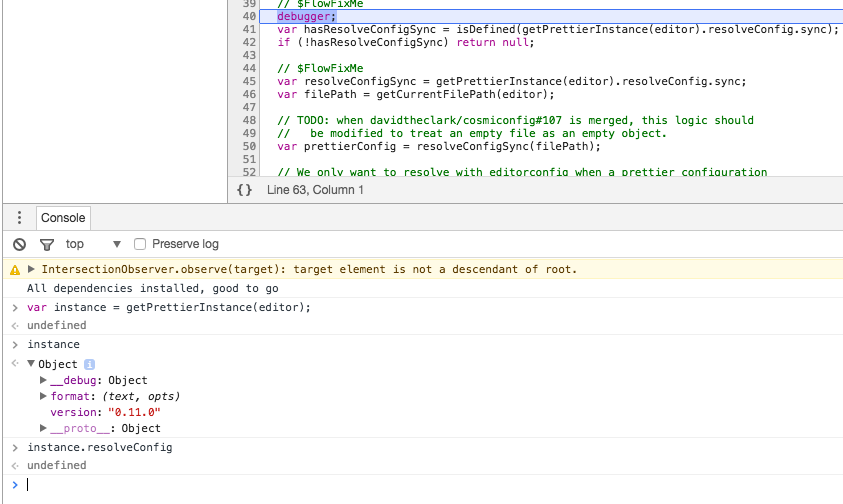
just the plugin config settings. It appears as though the result of:
getPrettierInstance(editor)
does not have a resolveConfig prop.
validkeys
on 20 Mar 2018
oh haha - I was thinking of 1.11.0 which I recently was debugging. 0.11.0 is way behind
olsonpm
on 20 Mar 2018
yeah -- it's not in my package.json so I'm not entirely sure where it came from in the first place. Is it something that prettier-atom auto-installs? And if so, I uninstalled it at one point and re-installed it -- so I would assume it would have installed the new version -- but maybe npm cache or something
validkeys
on 20 Mar 2018
Ok -- well I upgrade my prettier version to 1.11.1 and can confirm that it's working. So I guess the lesson here is to not use a dependency from over 14 months ago.
validkeys
on 20 Mar 2018
that makes sense. There's another pending issue where we would ideally be catching non-compatible versions of prettier, and another (which is my preference) that says we should only be using explicitly depended upon versions of prettier. I assume you don't have "prettier": "0.11.0" as a dependency. To me this is very confusing for folk.
Please add an updated version of prettier as a dependency. If that isn't a solution for your case then I can talk with the other collaborators on a more appropriate solution.
olsonpm
on 20 Mar 2018
thanks so much for helping me debug haha, hard to get that from a lot of people :+1:
olsonpm
on 20 Mar 2018
Yeah i don't have prettier as a dep in my project -- but it's possible that someone had added it at one point and then removed it as it is in my yarn.lock file -- just nowhere else.
validkeys
on 20 Mar 2018
ah - well currently the plugin just grabs prettier if it exists in node_modules. Similar to how you can require('a-dependency)` even if your project doesn't explicitly depend on it. I don't think this is how it should behave but we can't all agree on everything
olsonpm
on 20 Mar 2018
haha yeah for sure -- ok well I guess that was my issue. Thanks for your help!
validkeys
on 20 Mar 2018
I'm assuming OP's issue was the same as validkeys', so closing.
olsonpm
on 20 Mar 2018
I had tried running npm install -g prettier to update to no avail. Realised (through the atom-prettier debug) that it was looking in the Yarn cache which had an older version. Ran yarn global add prettier which fixed my woes.
 kulor
on 12 Apr 2018
kulor
on 12 Apr 2018
Related issues
 IljaDaderko
·
5Comments
IljaDaderko
·
5Comments
 derwaldgeist
·
5Comments
derwaldgeist
·
5Comments
 Andersos
·
6Comments
Andersos
·
6Comments
 erbridge
·
3Comments
erbridge
·
3Comments
 jjwyse
·
5Comments
jjwyse
·
5Comments
Most helpful comment
I had tried running
npm install -g prettierto update to no avail. Realised (through the atom-prettier debug) that it was looking in the Yarn cache which had an older version. Ranyarn global add prettierwhich fixed my woes.