Prettier-atom: possibility of data loss in conjunction with `autosave` plugin
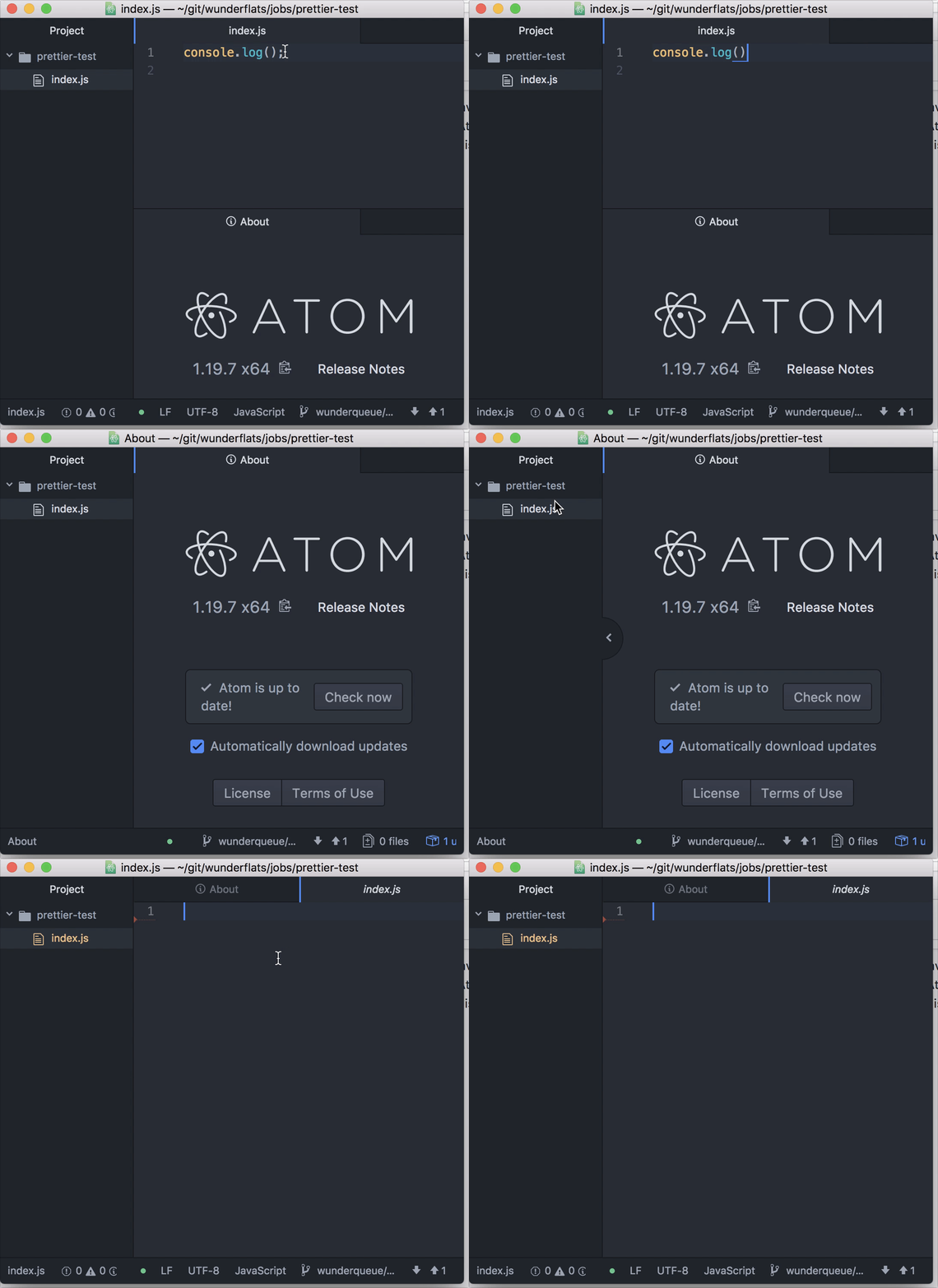
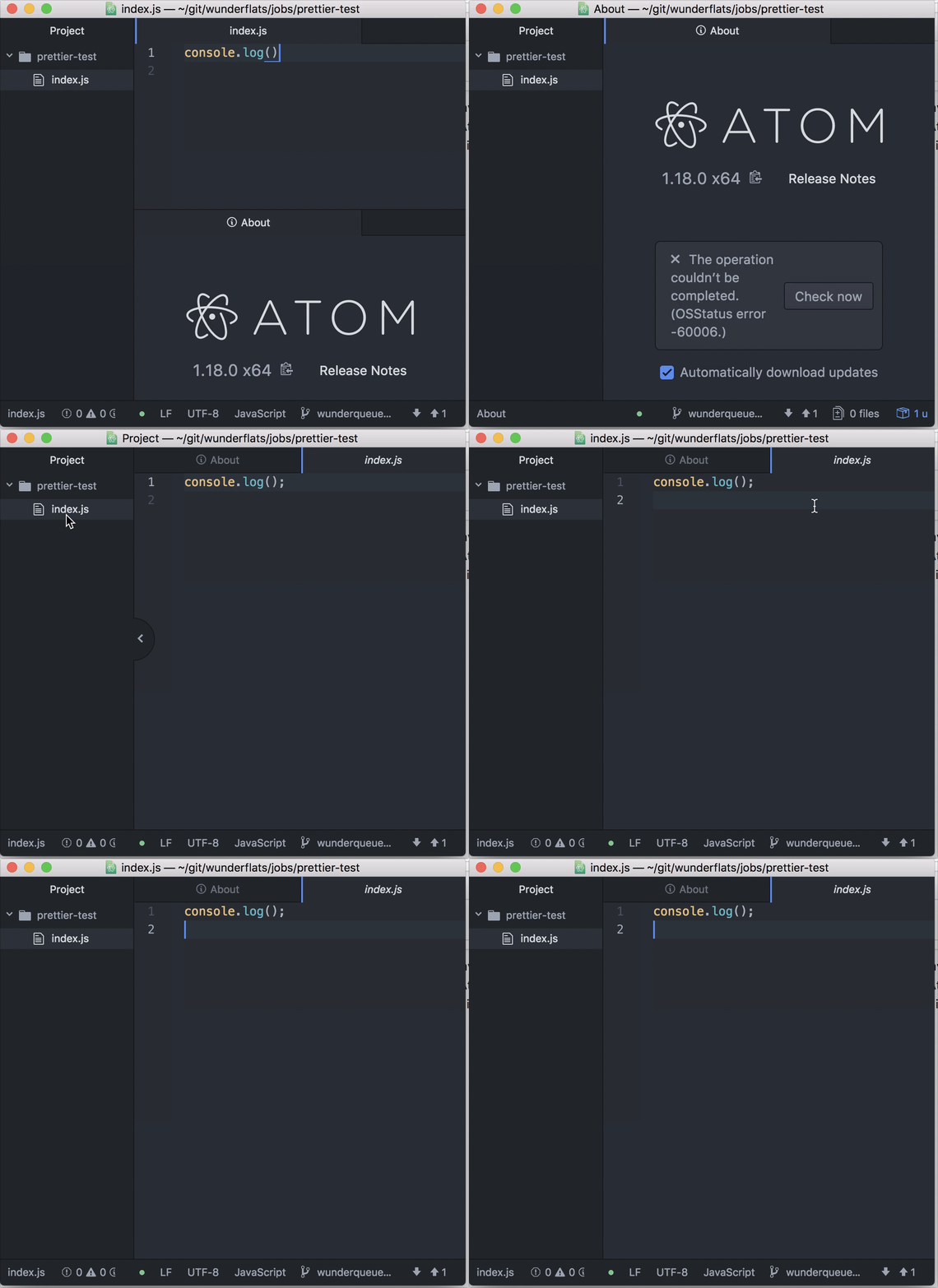
Using formatOnSaveOptions in conjunction with the autosave plugin leads to saving and empty file under some circumstances with the new C++ text buffer implementation (from Atom 1.19.0 on). Particularly this happens when editor.setTextInBufferRange is called while a save is in progress.
I will also open an issue in atom/atom since this seems to be a regression.
Reproduction steps
- Install
prettier-atomand enableformatOnSaveOptions - Open
autosave's settings and enable it - Open a javascript file
- Change it in a way that it needs to be formatted (e.g. remove a semicolon)
- Hit
cmd-wto close the window w/o saving.
What Happens (since Atom 1.19.0)
The file will be saved empty
What Should Happen (used to work in Atom 1.18.0)
The file should be formatted and saved.
Prettier:Debug for Atom 1.19.7 (new C++ text buffer implementation)
Atom version: 1.19.7
prettier-atom version: 0.38.0
prettier version: 1.6.1
prettier-eslint version: 6.4.3
prettier-atom configuration: {
  "formatOnSaveOptions": {
    "enabled": true,
    "showInStatusBar": true,
    "respectEslintignore": true,
    "javascriptScopes": [
      "source.js",
      "source.jsx",
      "source.js.jsx",
      "source.babel",
      "source.js-semantic",
      "text.html.basic",
      "text.html.vue"
    ],
    "typescriptScopes": [
      "source.ts",
      "source.tsx",
      "source.ts.tsx"
    ],
    "cssScopes": [
      "source.css",
      "source.less",
      "source.css.less",
      "source.scss",
      "source.css.scss"
    ],
    "jsonScopes": [
      "source.json"
    ],
    "graphQlScopes": [
      "source.graphql"
    ],
    "excludedGlobs": [],
    "whitelistedGlobs": [],
    "isDisabledIfNotInPackageJson": false
  },
  "prettierOptions": {
    "trailingComma": "all",
    "singleQuote": false,
    "bracketSpacing": true,
    "semi": true,
    "useTabs": false,
    "jsxBracketSameLine": false,
    "printWidth": 80,
    "tabWidth": "auto",
    "parser": "babylon"
  },
  "useEslint": false,
  "useEditorConfig": true,
  "prettierEslintOptions": {
    "prettierLast": false
  }
}
Prettier:Debug for Atom 1.18.0 (old javascript text buffer implementation)
Atom version: 1.18.0
prettier-atom version: 0.38.0
prettier version: 1.6.1
prettier-eslint version: 6.4.3
prettier-atom configuration: {
  "formatOnSaveOptions": {
    "enabled": true,
    "showInStatusBar": true,
    "respectEslintignore": true,
    "javascriptScopes": [
      "source.js",
      "source.jsx",
      "source.js.jsx",
      "source.babel",
      "source.js-semantic",
      "text.html.basic",
      "text.html.vue"
    ],
    "typescriptScopes": [
      "source.ts",
      "source.tsx",
      "source.ts.tsx"
    ],
    "cssScopes": [
      "source.css",
      "source.less",
      "source.css.less",
      "source.scss",
      "source.css.scss"
    ],
    "jsonScopes": [
      "source.json"
    ],
    "graphQlScopes": [
      "source.graphql"
    ],
    "excludedGlobs": [],
    "whitelistedGlobs": [],
    "isDisabledIfNotInPackageJson": false
  },
  "prettierOptions": {
    "trailingComma": "all",
    "singleQuote": false,
    "bracketSpacing": true,
    "semi": true,
    "useTabs": false,
    "jsxBracketSameLine": false,
    "printWidth": 80,
    "tabWidth": "auto",
    "parser": "babylon"
  },
  "useEslint": false,
  "useEditorConfig": true,
  "prettierEslintOptions": {
    "prettierLast": false
  }
}
bug
 despairblue
👍2
>All comments
This is fixed on the master branch of Atom.
 maxbrunsfeld
on 12 Sep 2017
maxbrunsfeld
on 12 Sep 2017
👍2
Was this page helpful?
0 / 5 - 0 ratings
Related issues
 axhamre
·
4Comments
axhamre
·
4Comments
 erbridge
·
3Comments
erbridge
·
3Comments
 vyrruss
·
5Comments
vyrruss
·
5Comments
 Andersos
·
6Comments
Andersos
·
6Comments
 mrmurphy
·
5Comments
mrmurphy
·
5Comments
Most helpful comment
This is fixed on the master branch of Atom.