Presto: Presto UI not showing Live Plan for Index Join enabled queries
It seems like Presto UI is showing an empty Live Plan page for the query that has joins using index join in our custom connector.
Queries without using the index join are working well and I can see the Live Plan rendered.

 neuzrui
All 24 comments
One more thing to note is that EXPLAIN ANALYZE gives me the expected plan and result for the query.
neuzrui
on 12 Dec 2018
@neuzrui Ray, perhaps, look at the output of explain (type distributed, format graphviz) <query> for clues. Please, share the output if you can.
 mbasmanova
on 12 Dec 2018
mbasmanova
on 12 Dec 2018
here is the result from running the command you asked, with our table name and columns sanitized:
presto:data> explain (type distributed, format graphviz) select table_a.id, table_a.quantity, table_a.status, table_b.number from table_a left join table_b on table_a.b_id=table_b.id;
                                                                                        Query Plan
-------------------------------------------------------------------------------------------------------------------------------------------------------------------------------------------
 digraph distributed_plan {
 subgraph cluster_0 {
 label = "SINGLE"
 plannode_1[label="{Output[id, quantity, status, number]}", style="rounded, filled", shape=record, fillcolor=white];
 plannode_2[label="{Exchange 1:N}", style="rounded, filled", shape=record, fillcolor=gold];
 }
 plannode_1 -> plannode_2;
 plannode_2 -> plannode_3;
 subgraph cluster_1 {
 label = "SOURCE"
 plannode_3[label="{Project}", style="rounded, filled", shape=record, fillcolor=bisque];
 plannode_4[label="{SourceOuterIndexJoin|(\"b_id\" = \"id_3\")}", style="rounded, filled", shape=record, fillcolor=orange];
 plannode_5[label="{Project|$hashvalue := \"combine_hash\"(bigint '0', COALESCE(\"$operator$hash_code\"(\"b_id\"), 0))\n}", style="rounded, filled", shape=record, fillcolor=bisque];
 plannode_6[label="{TableScan[owl:OwlTableHandle{schemaTableName=data.table_a}]}", style="rounded, filled", shape=record, fillcolor=deepskyblue];
 plannode_7[label="{Project|$hashvalue_23 := \"combine_hash\"(bigint '0', COALESCE(\"$operator$hash_code\"(\"id_3\"), 0))\n}", style="rounded, filled", shape=record, fillcolor=bisque];
 plannode_8[label="{IndexSource[owl:data.table_b, constraint = ALL]}", style="rounded, filled", shape=record, fillcolor=dodgerblue3];
 }
 plannode_3 -> plannode_4;
 plannode_4 -> plannode_5;
 plannode_5 -> plannode_6;
 plannode_4 -> plannode_7;
 plannode_7 -> plannode_8;
 }

(1 row)

Query 20181212_011259_00001_j88tu, FINISHED, 1 node
Splits: 1 total, 1 done (100.00%)
0:00 [0 rows, 0B] [0 rows/s, 0B/s]
@neuzrui Graphviz gives the following error:
Error: bad label format {TableScan[owl:OwlTableHandle{schemaTableName=data.table_a}]}
I think you need to add OwlTableHandle#toString method that formats the handle as something like owl:data.table_a.
mbasmanova
on 12 Dec 2018
I tried following in our OwlTableHandle#toString
    @Override
    public String toString() {
        return schemaTableName.getSchemaName() + "." + schemaTableName.getTableName();
    }
However, I am still getting the same empty page with the console errors pasted above.
Here is the result for EXPLAIN
presto:data> explain (type distributed, format graphviz) select table_a.id, table_a.quantity, table_a.status, table_b.number from table_a left join table_b on table_a.b_id=table_b.id;
                                                                                        Query Plan
-------------------------------------------------------------------------------------------------------------------------------------------------------------------------------------------
 digraph distributed_plan {
 subgraph cluster_0 {
 label = "SINGLE"
 plannode_1[label="{Output[id, quantity, status, number]}", style="rounded, filled", shape=record, fillcolor=white];
 plannode_2[label="{Exchange 1:N}", style="rounded, filled", shape=record, fillcolor=gold];
 }
 plannode_1 -> plannode_2;
 plannode_2 -> plannode_3;
 subgraph cluster_1 {
 label = "SOURCE"
 plannode_3[label="{Project}", style="rounded, filled", shape=record, fillcolor=bisque];
 plannode_4[label="{SourceOuterIndexJoin|(\"b_id\" = \"id_3\")}", style="rounded, filled", shape=record, fillcolor=orange];
 plannode_5[label="{Project|$hashvalue := \"combine_hash\"(bigint '0', COALESCE(\"$operator$hash_code\"(\"b_id\"), 0))\n}", style="rounded, filled", shape=record, fillcolor=bisque];
 plannode_6[label="{TableScan[owl:data.table_a]}", style="rounded, filled", shape=record, fillcolor=deepskyblue];
 plannode_7[label="{Project|$hashvalue_23 := \"combine_hash\"(bigint '0', COALESCE(\"$operator$hash_code\"(\"id_3\"), 0))\n}", style="rounded, filled", shape=record, fillcolor=bisque];
 plannode_8[label="{IndexSource[owl:data.table_b, constraint = ALL]}", style="rounded, filled", shape=record, fillcolor=dodgerblue3];
 }
 plannode_3 -> plannode_4;
 plannode_4 -> plannode_5;
 plannode_5 -> plannode_6;
 plannode_4 -> plannode_7;
 plannode_7 -> plannode_8;
 }

(1 row)

Query 20181212_014440_00001_gb6wi, FINISHED, 1 node
Splits: 1 total, 1 done (100.00%)
0:00 [0 rows, 0B] [0 rows/s, 0B/s]

presto:data>
I am wondering why the queries without the index join work fine with
label format {TableScan[owl:OwlTableHandle{schemaTableName=data.table_a}]} though
neuzrui
on 12 Dec 2018
@neuzrui I'm looking at LivePlan.jsx, it is fetching JSON from /v1/query/<query-id> URL:
fetch('/v1/query/' + this.props.queryId)
Perhaps, fetching it manually and looking at the contents would provide a clue?
mbasmanova
on 12 Dec 2018
I tried http://localhost:8080/v1/query/20181212_020454_00000_8xjat and it output a lot of information about this query execution. any specific property i should look at?
neuzrui
on 12 Dec 2018
I think I might find the problem, I tried to hit
/v1/stage/20181212_020454_00000_8xjat.0 and /v1/stage/20181212_020454_00000_8xjat.1
for stage information and I am getting
HTTP ERROR 405
Problem accessing /v1/stage/20181212_020454_00000_8xjat.0. Reason:

    Method Not Allowed
That seems conform with the console message
cannot read the property "id" of undefined
neuzrui
on 12 Dec 2018
@neuzrui Ray, there should be a large section that describes the query plan itself. It starts with something like this:
{
    "stageId" : "20181207_160556_27284_z7pub.0",
    "state" : "FINISHED",
    "self" : "http://[2401:db00:1120:208a:face:0:29:0]:7777/v1/stage/20181207_160556_27284_z7pub.0",
    "plan" : {
      "id" : "0",
      "root" : {
        "@type" : "output",
        "id" : "13",
        "source" : {
          "@type" : "tablecommit",
          "id" : "11",
I'd be looking at how index join is represented here and seeing what the code in LinePlan.jsx expects. Any chance you could share this JSON?
mbasmanova
on 12 Dec 2018
so the ui is not able to pull information from the v1/stage API seems like to be a problem. any idea how to fix that ?
neuzrui
on 12 Dec 2018
@neuzrui Ray, I'm not sure that's the problem. My reading of the code in LivePlan.jsx suggests that it only fetches /v1/stage/<query_id> URLs, not /v1/stage/<query_id>.<stage_id> URLs.
Could you look for index join node in the /v1/stage/<query_id> JSON and see if it has the "id" property and whether its children have "id" properties as well?
mbasmanova
on 12 Dec 2018
@neuzrui I do think that the issue is in this piece of code in utils.js. It expects the JSON to have indexjoin node with properties probeSource and filterSource, but I think the properties will be probeSource and indexSource. Hence, nodeInfo.filterSource will be undefined and will trigger cannot read the property "id" of undefined error message.
        case 'indexjoin':
            sources = [nodeInfo.probeSource, nodeInfo.filterSource];
            break;
i tried just /v1/stage/<query_id> without the stage id, it is giving me HTTP 405 as well....
neuzrui
on 12 Dec 2018
i tried just /v1/stage/
without the stage id, it is giving me HTTP 405 as well....
Sorry, it is /v1/query/<query_id>.
You mentioned earlier that you tried fixing utils.js and re-deploying, but the error didn't go away. I'm wondering if it could be that the modified version didn't get deployed properly.
mbasmanova
on 12 Dec 2018
One way to check if changes to utils.js got deployed is to download /ui/dist/plan.js and search for indexjoin.
mbasmanova
on 12 Dec 2018
hmm, interesting, even the UI says 0.214-DIRTY, the /ui/dist/plan.js does not have the change on the sources you suggested ....
I did following for deploying a modified version of utils.js with presto-main:
1) modify the source code in ../main/src/main/resources/webapp/src/utils.js
2) mvn clean install
3) find the newly built jar file presto-main-0.214.jar, and dump it into the /lib folder that the presto server launcher uses.
4) relaunch the presto server
neuzrui
on 12 Dec 2018
@neuzrui Would you double check that utils.js in the modified jar is correct?
unzip presto-main/target/presto-main-0.214-SNAPSHOT.jar "webapp/src/utils.js"
Also, I'd expect the newly-build jar to have -SNAPSHOT in the name, e.g. I'd expect presto-main-0.214-SNAPSHOT.jar and not presto-main-0.214.jar
mbasmanova
on 12 Dec 2018
I checked out the release tag version 0.214 so it has <version>0.214</version>
I looked into the jars and made sure the utils.js is updated.
However, /ui/dist/plan.js is different from utils.js, should I also update the plan.js? There are several files under ../presto-main/src/main/resources/webapp/dist and they all have the same switch block from the utils.js, should I update those .js in the dist folder?
neuzrui
on 12 Dec 2018
ok, I modified all the .js files under the ../dist folder and build the whole project, and deployed the newly built artifact.
../presto/presto-main/src/main/resources/webapp/dist/index.js
../presto/presto-main/src/main/resources/webapp/dist/plan.js
../presto/presto-main/src/main/resources/webapp/dist/query.js
../presto/presto-main/src/main/resources/webapp/dist/stage.js
../presto/presto-main/src/main/resources/webapp/dist/worker.js
Now /ui/dist/plan.js is having
case 'indexjoin':\n sources = [nodeInfo.probeSource, nodeInfo.filterSource];
And the UI is showing the Live Plan properly!
neuzrui
on 12 Dec 2018
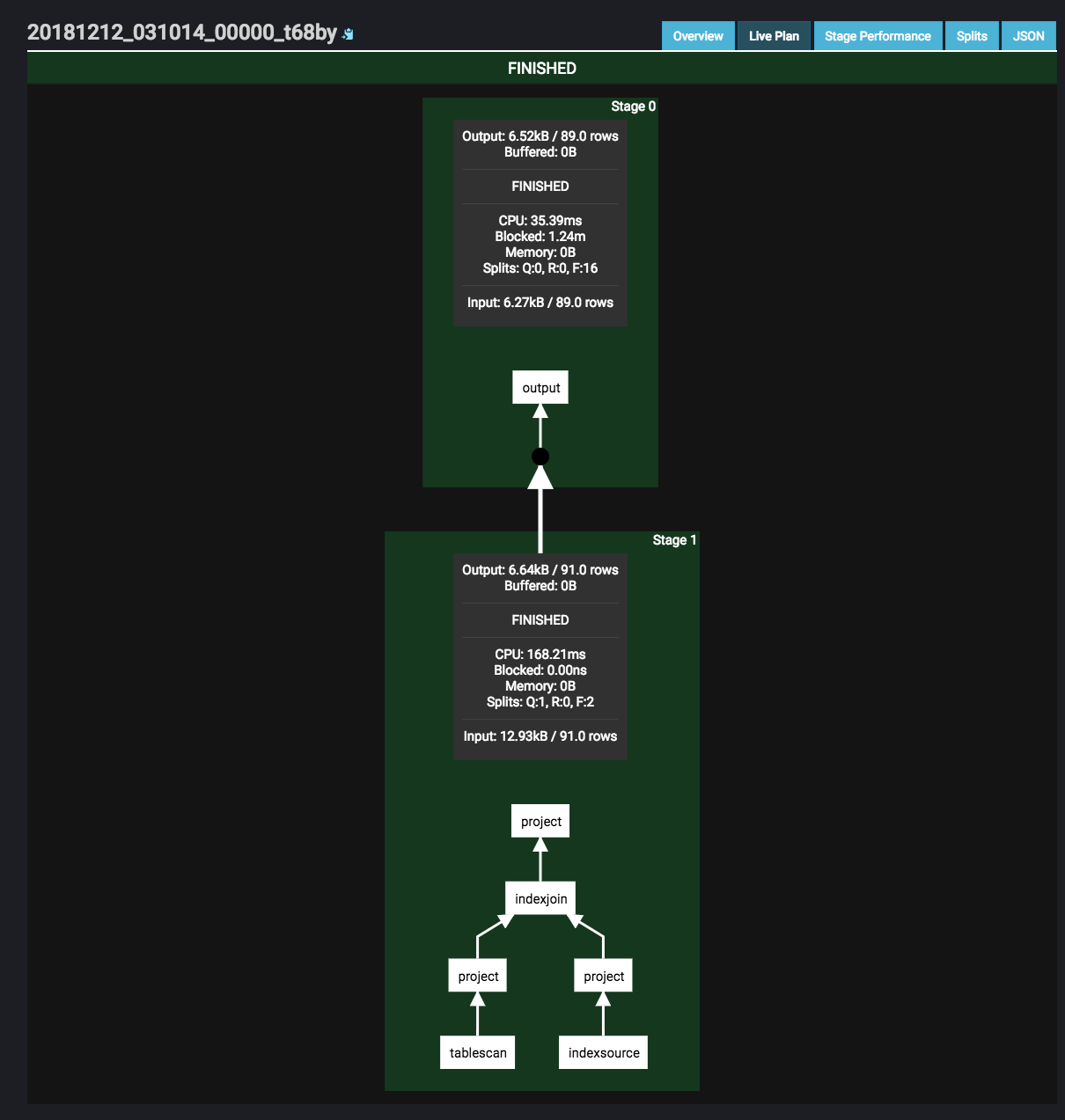
neuzrui
on 12 Dec 2018
@neuzrui Ray, this is so nice!!! Would you like to submit a PR with the fix?
BTW, here are the instruction on building Wed UI from the readme file:
## Building the Web UI

The Presto Web UI is composed of several React components and is written in JSX and ES6. This source code is compiled and packaged into browser-compatible Javascript, which is then checked in to the Presto source code (in the `dist` folder). You must have [Node.js](https://nodejs.org/en/download/) and [Yarn](https://yarnpkg.com/en/) installed to execute these commands. To update this folder after making changes, simply run:

    yarn --cwd presto-main/src/main/resources/webapp/src install

If no Javascript dependencies have changed (i.e., no changes to `package.json`), it is faster to run:

    yarn --cwd presto-main/src/main/resources/webapp/src run package

To simplify iteration, you can also run in `watch` mode, which automatically re-compiles when changes to source files are detected:

    yarn --cwd presto-main/src/main/resources/webapp/src run watch

To iterate quickly, simply re-build the project in IntelliJ after packaging is complete. Project resources will be hot-reloaded and changes are reflected on browser refresh.
Sure, I am happy to submit a PR for that :)
neuzrui
on 12 Dec 2018
Fix merged.
 martint
on 16 Dec 2018
martint
on 16 Dec 2018
Related issues
 synhershko
·
4Comments
synhershko
·
4Comments
 kiranps11
·
3Comments
kiranps11
·
3Comments
 sopel39
·
3Comments
sopel39
·
3Comments
 talnicolas
·
3Comments
talnicolas
·
3Comments
 jeremy-degroot
·
3Comments
jeremy-degroot
·
3Comments