Prestashop: Upgrade to 1.7.7.0 fail at database connection
Same error encountered at autoupgrade and also manual upgrade
PHP Warning: PDO::query(): MySQL server has gone away in /PSROOTFOLDER/classes/db/DbPDO.php on line 165
PHP Warning: PDO::query(): Error reading result set's header in /PSROOTFOLDER/classes/db/DbPDO.php on line 165
PHP Fatal error: Uncaught PrestaShopException: Link to database cannot be established: SQLSTATE[HY000] [2002] Connection refused in /PSROOTFOLDER/classes/db/DbPDO.php:136
Steps to reproduce
- Upgraded to 1.7.7.0 and reverted back twice.
- First time using just autoupdater and the update went through completely with a "completed" message but hit the issue of BO not having menu (#22250)
- Reloaded back the directory and db from backup manually as rollback failed
- Less than 24 hours again, tried to upgrade. Before upgrading I put shop in maintenance mode, made sure files and folder permissions are correct across the whole directory, made sure ownership is correct.
- First attempt using autoupgrade, hit with this issue
- Reloaded manually directory/db.
- Second attempt manually, hit with this same issue.
Additional informations
- PS Ver : 1.7.6.4
- MariaDB : 10.4.8 (AWS 2cpu 4gb. Max connections 308. Peaked connections 43. Timeout 1800)
- Webserver : Nginx
- Php Ver : 7.2.34
- Catalog size : 600 products/sku
 straitskapitan
All 17 comments
Hello @straitskapitan,
your server didn't handle the charge, this is a performance issue.
You need to upgrade it.
Thank you !
 SimonGrn
on 5 Dec 2020
SimonGrn
on 5 Dec 2020
This doesnt make sense.
You are telling me that less than 24 hours ago the upgrade was ok and that my database handled the changes to the database without any issues. Now 24 hours later it fails at this point?
I reverted to 1.7.6.4 due to issue #22250
I am very certain that my DB in AWS is more than sufficient to handle any load thrown at it. Considering it is running at 1% always.
straitskapitan
on 5 Dec 2020
in var/log/prod.log
error is
[2020-12-05 18:55:00] app.ERROR: The addon with id 29992 does not have name. [] []
hmmm
straitskapitan
on 5 Dec 2020
This error log
PHP Warning: PDO::query(): MySQL server has gone away in /PSROOTFOLDER/classes/db/DbPDO.php on line 165
PHP Warning: PDO::query(): Error reading result set's header in /PSROOTFOLDER/classes/db/DbPDO.php on line 165
PHP Fatal error: Uncaught PrestaShopException: Link to database cannot be established: SQLSTATE[HY000] [2002] Connection refused in /PSROOTFOLDER/classes/db/DbPDO.php:136
is definitely indicating a MySQL server not responding. My first impression is then that it is not dimensioned properly. I cannot know before you tell me that you tried an upgrade previously without trouble ?
We usually close issues when people don't bother following the template, but because this is related to the upgrade I'm gonna make an exception. Please think about following the template when you report an issue.
For example, we might need more information about your environment (PHP version, MySQL version), the PS version you started with (before the upgrade), if you tried disabling third-party modules (they are usually problematic when upgrading if the developers didn't follow the good practices for example).
These informations are mandatory in the template.
Thank you for your understanding.
SimonGrn
on 5 Dec 2020
I am very certain that my DB in AWS is more than sufficient to handle any load thrown at it. Considering it is running at 1% always.
As @SimonGrn mentioned, the issue is that your MySQL server either timed out or closed the connection.
Maybe you have a very big shop database and the queries to upgrade are too long so MySQL timeout? You can try increasing MySQL timeout setting. Even if your MySQL service has huge capacity, a bad setting is enough to prevent it from correct behavior 😄
 matks
on 5 Dec 2020
matks
on 5 Dec 2020
This error log
PHP Warning: PDO::query(): MySQL server has gone away in /PSROOTFOLDER/classes/db/DbPDO.php on line 165 PHP Warning: PDO::query(): Error reading result set's header in /PSROOTFOLDER/classes/db/DbPDO.php on line 165 PHP Fatal error: Uncaught PrestaShopException: Link to database cannot be established: SQLSTATE[HY000] [2002] Connection refused in /PSROOTFOLDER/classes/db/DbPDO.php:136is definitely indicating a MySQL server not responding. My first impression is then that it is not dimensioned properly. I cannot know before you tell me that you tried an upgrade previously without trouble ?
We usually close issues when people don't bother following the template, but because this is related to the upgrade I'm gonna make an exception. Please think about following the template when you report an issue.
For example, we might need more information about your environment (PHP version, MySQL version), the PS version you started with (before the upgrade), if you tried disabling third-party modules (they are usually problematic when upgrading if the developers didn't follow the good practices for example).
These informations are mandatory in the template.Thank you for your understanding.
Ok noted and I will follow the template. This is the first time I am opening a bug/issue. Apologies for the confusion and not clear information given.
PS Ver : 1.7.6.4
MariaDB : 10.4.8 (AWS 2cpu 4gb. Max connections 308. Peaked connections 43. Timeout 1800)
Webserver : Nginx
Php Ver : 7.2.34
Catalog size : 600 products/sku
1) Upgraded to 1.7.7.0 and reverted back twice.
2) First time using just autoupdater and the update went through completely with a "completed" message but hit the issue of BO not having menu (#22250)
3) Reloaded back the directory and db from backup manually as rollback failed
4) Less than 24 hours again, tried to upgrade. Before upgrading I put shop in maintenance mode, made sure files and folder permissions are correct across the whole directory, made sure ownership is correct.
4) First attempt using autoupgrade, hit with this issue
5) Reloaded manually directory/db.
6) Second attempt manually, hit with this same issue.
Will try again later tonight
straitskapitan
on 6 Dec 2020
I have tried again and its the same error.
Database max connections is at 308 but only used 3. So it has nothing to do with my database.
Running upgrade.php in the install/upgrade folder will give me
PHP Warning:  PDO::query(): MySQL server has gone away in /ROOTFOLDER/classes/db/DbPDO.php on line 165
PHP Warning:  PDO::query(): Error reading result set's header in /ROOTFOLDER/classes/db/DbPDO.php on line 165
PHP Fatal error:  Uncaught PrestaShopException: Link to database cannot be established: SQLSTATE[HY000] [2002] Connection refused in /ROOTFOLDER/classes/db/DbPDO.php:136
Stack trace:
#0 /ROOTFOLDER/classes/db/Db.php(379): DbPDOCore->connect()
#1 /ROOTFOLDER/classes/db/Db.php(566): DbCore->query('ALTER TABLE `ma...')
#2 /ROOTFOLDER/src/PrestaShopBundle/Install/Upgrade.php(497): DbCore->execute('ALTER TABLE `ma...')
#3 /ROOTFOLDER/src/PrestaShopBundle/Install/Upgrade.php(826): PrestaShopBundle\Install\Upgrade->upgradeDb(Array)
#4 /ROOTFOLDER/install/upgrade/upgrade.php(93): PrestaShopBundle\Install\Upgrade->run()
#5 {main}
  thrown in /ROOTFOLDER/classes/db/DbPDO.php on line 136
I think it has something to do with it not using correct db credentials. I doubt it even connected at all.
straitskapitan
on 6 Dec 2020
I think it has something to do with it not using correct db credentials. I doubt it even connected at all.
It's possible. MySQL error messages are not always accurate 😄 . Also maybe it could be some issue with MariaDB 10.4.8. For example we know MySQL 8 deprecated some mechanisms available in MySQL 5 so a few settings have to be modified to make it work with PrestaShop (default engine is MySQL 5).
matks
on 6 Dec 2020
Just to reconfirm that the file install/upgrade/upgrade.php takes the credentials from app/config/parameters.php?
straitskapitan
on 6 Dec 2020
Hello @straitskapitan
in var/log/prod.log
error is
[2020-12-05 18:55:00] app.ERROR: The addon with id 29992 does not have name.
Do you still get this error? Cause it seems this issue has been fixed #22267
Please check and feedback.
Thanks!
 hibatallahAouadni
on 7 Dec 2020
hibatallahAouadni
on 7 Dec 2020
Hello @straitskapitan
in var/log/prod.log
error is
[2020-12-05 18:55:00] app.ERROR: The addon with id 29992 does not have name.Do you still get this error? Cause it seems this issue has been fixed #22267
Please check and feedback.Thanks!
As of last upgrade attempt, I still get that error. I will attempt the 4th time tonight and will feedback.
straitskapitan
on 7 Dec 2020
I think it has something to do with it not using correct db credentials. I doubt it even connected at all.
It's possible. MySQL error messages are not always accurate 😄 . Also maybe it could be some issue with MariaDB 10.4.8. For example we know MySQL 8 deprecated some mechanisms available in MySQL 5 so a few settings have to be modified to make it work with PrestaShop (default engine is MySQL 5).
I have been running on Maria for last 6 months without any issues ... I really hope its not an issue with MariaDB not being compatible with Prestashop 1.7.7.0
straitskapitan
on 7 Dec 2020

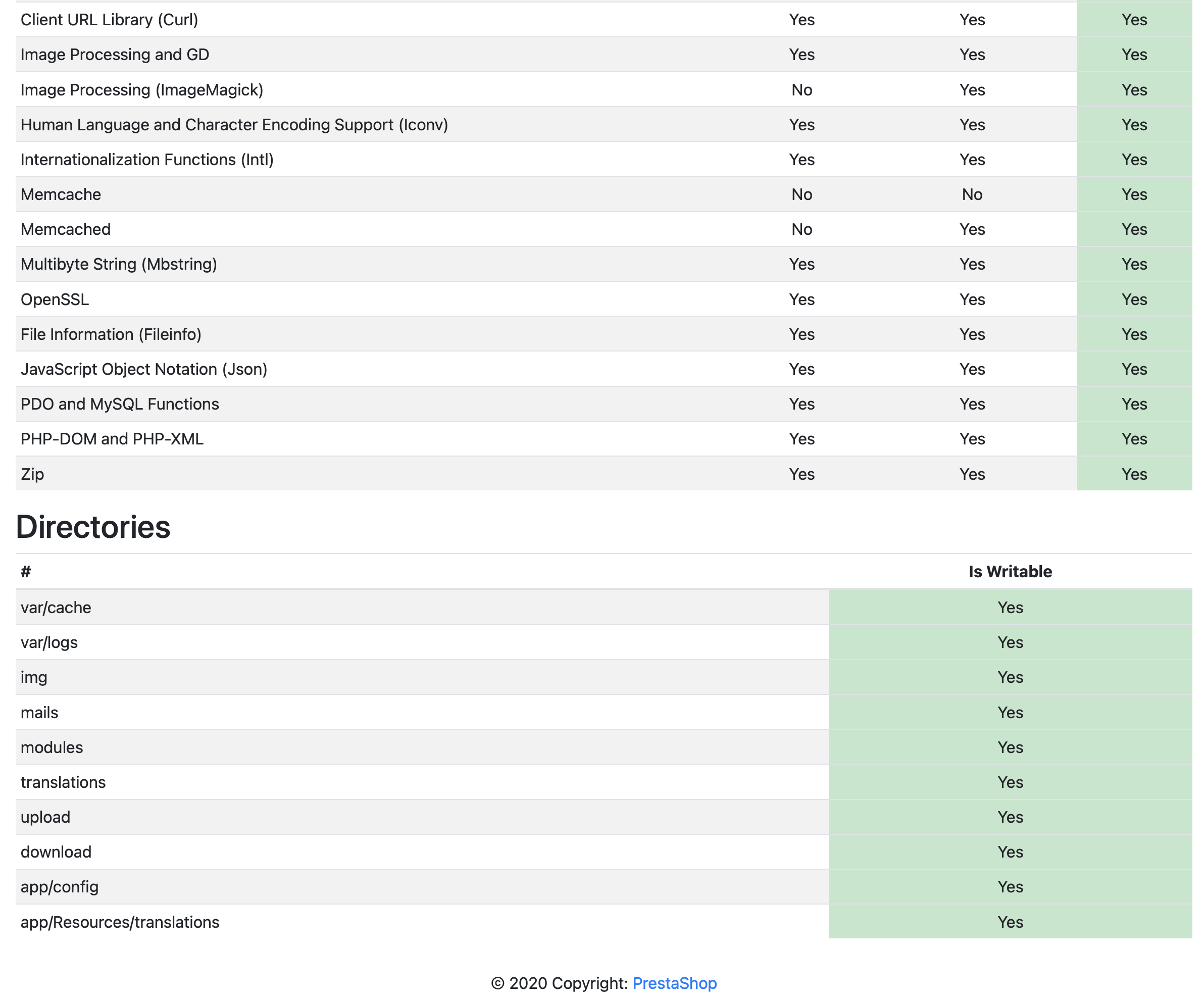
Additional information. Do I need to upgrade php to 7.3?
straitskapitan
on 7 Dec 2020
Hello @straitskapitan
Do I need to upgrade php to 7.3?
I believe you don't need to change it, cause PHP7.2 is compatible with PS1.7.7.0 see our system requirements.
@matks please correct me if I'm wrong :sweat_smile:
Thanks!
hibatallahAouadni
on 7 Dec 2020
Hello @straitskapitan
Do I need to upgrade php to 7.3?
I believe you don't need to change it cause PHP7.2 is compatible with PS1.7.7.0 see our system requirements.
@matks please correct me if I'm wrong 😅Thanks!
Yeah seems all is well. I took the hard route .... updated version by version from 1.7.6.4 to 1.7.6.9 making sure that the database upgrades are done. 1.7.6.6 introduces the two session tables. 1.7.6.5 failed for some reasons.
Now I am at 1.7.6.9. Upgrading to 1.7.7.0 still fail but with new error. I will try again later.
I wont be able to add anymore value/feedback for any upgrades from 1.7.6.4 to this thread.
straitskapitan
on 8 Dec 2020
Hello @straitskapitan
Do I need to upgrade php to 7.3?
I believe you don't need to change it, cause PHP7.2 is compatible with PS1.7.7.0 see our system requirements.
@matks please correct me if I'm wrong 😅Thanks!
Correct 😉 php7.2 is a very good choice
matks
on 8 Dec 2020
Hello @straitskapitan
Do you have any news? do you still get the same error?
We couldn't manage to reproduce your issue. The only problem I encountred while upgrading is #22250
Cause I have a problem with APCu and APCu_bc
PS: usually we close the issue if we don't have any news from the author more than 20 days :wink:
Please check and feedback.
Thanks!
hibatallahAouadni
on 29 Dec 2020
Related issues
 Prestaworks
·
3Comments
Prestaworks
·
3Comments
 Van-peterson
·
3Comments
Van-peterson
·
3Comments
 wikao2
·
3Comments
wikao2
·
3Comments
 marionf
·
3Comments
marionf
·
3Comments
 zuk3975
·
3Comments
zuk3975
·
3Comments