Prestashop: DISCOUNT ERROR invalid date_to field
Describe the bug
I can't change a period for discounts in Cart Rules and Catalog Price Rules.
Expected behavior
Change validity period of discounts.
Steps to Reproduce
Steps to reproduce the behavior:
- Go to BO > Catalog > Discounts
- Create or edit a Cart Rule or Catalog Price Rule
- Change the validity period of the rule by clicking on the date calendar
- Save
- See error : "The date_to field is invalid.
Additional information
- PrestaShop version: 1.7.6.8
- PHP version: 7.2.29
 keosite
All 9 comments
Hello @keosite
I didn't manage to reproduce your issue with PS1.7.6.8, see the attached screen record below:
https://drive.google.com/file/d/10VwvA_afKTyJiqzH8YQTxEqRKKzgchKE/view
Please check and feedback.
Thanks!
 hibatallahAouadni
on 23 Nov 2020
hibatallahAouadni
on 23 Nov 2020
Hello,
Please think about following the template (I specifically asked you to not do that here).
We need at least more information about your exact steps and some screenshots.
 SimonGrn
on 23 Nov 2020
SimonGrn
on 23 Nov 2020
Hello,
Thank you for your responses.
I'm sorry I don't understand what I'm doing wrong with the template.
Here a screenshot when the error appears
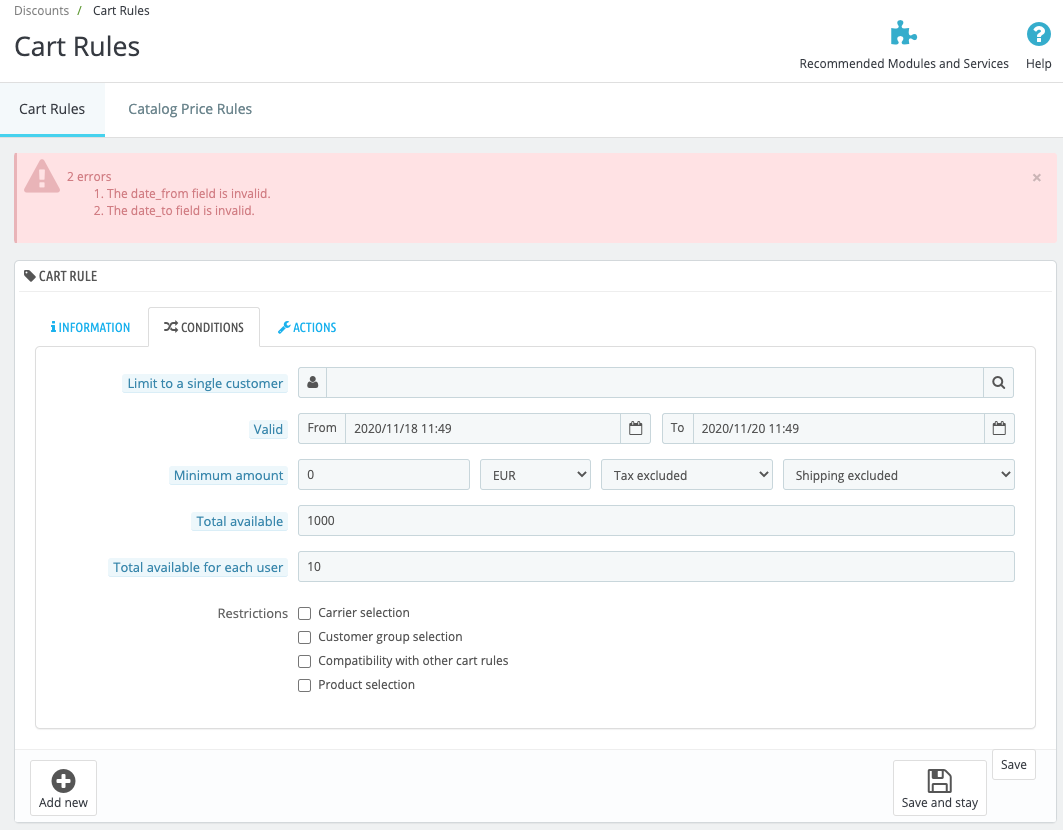
When I change the date of the period the date format changes from
2020-11-25 11:00:00
to
2020/11/25 11:50
keosite
on 25 Nov 2020
Can you please provide a screenshot of the calendar you're using ? As I see here the format is indeed invalid, probably because you didn't use the PrestaShop calendar but a browser calendar, which will then override the format by using your local format.
SimonGrn
on 25 Nov 2020
Here is the calendar I use
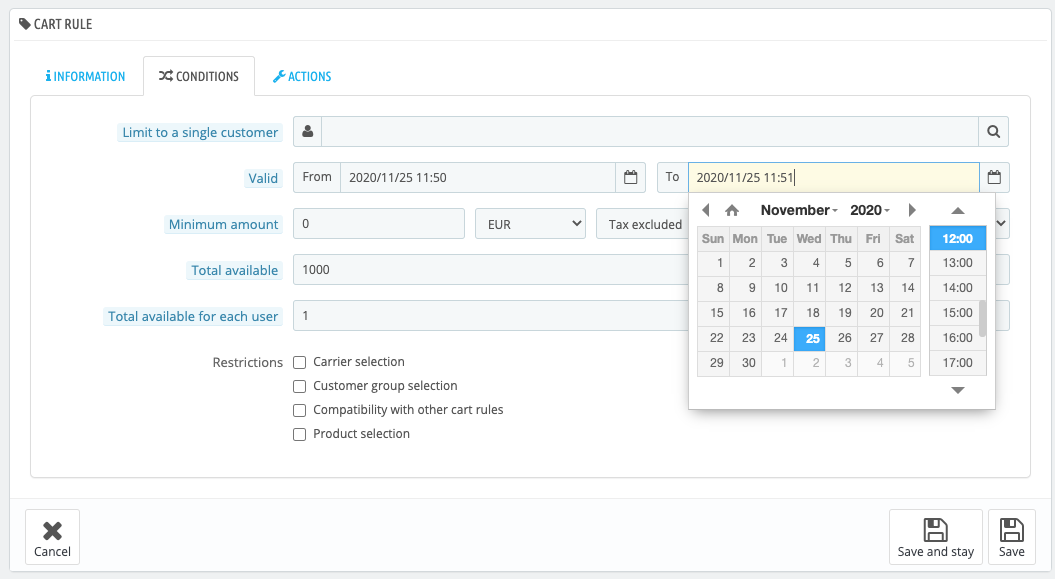
Even if I change the date by writing the number, without using the calendar, the format changes.
keosite
on 25 Nov 2020
What browser and version do you use ? Do you have any extensions ? What is your OS and what language do you use ?
SimonGrn
on 25 Nov 2020
I use :
- Google Chrome v.87.0.4280.67
- I don't have any extension
- OS : maOS Catalina 10.15.7
- Language : french
But it don't work with Firefox, Opera browsers too and with windows 10.
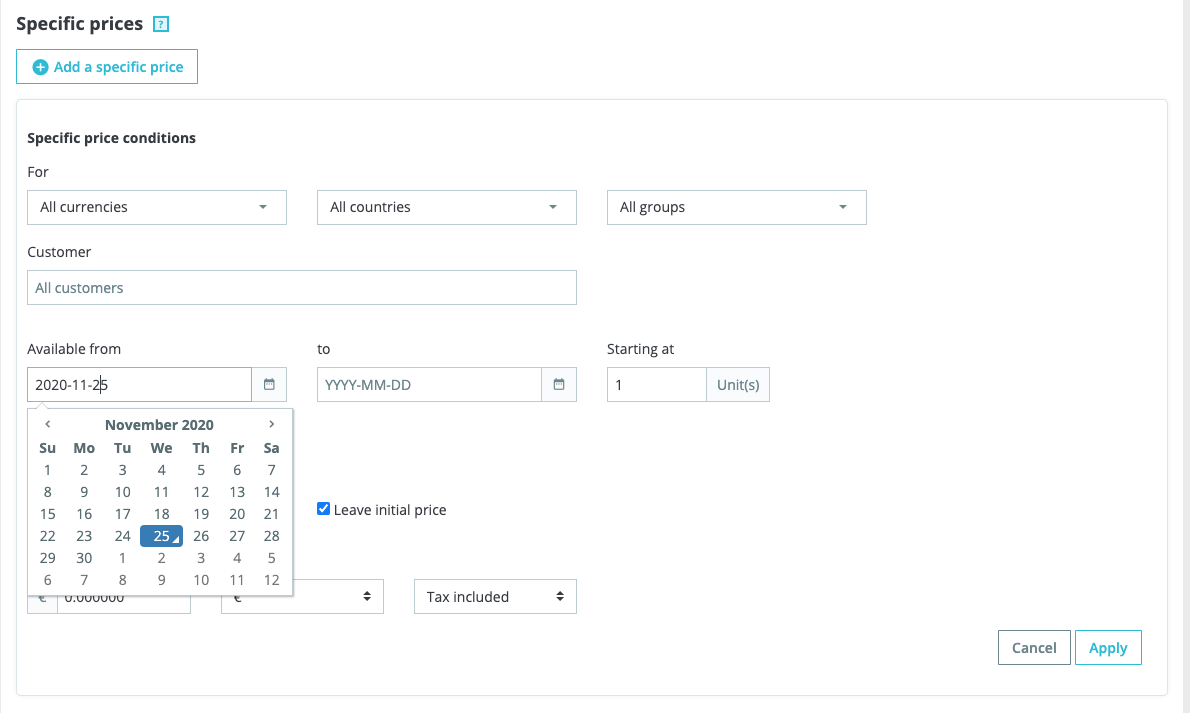
When I add a specific price in a product, it works but the calendar don't look the same as the calendar in discounts page :
keosite
on 25 Nov 2020
It seems something is interfering with the date field and blocking the PrestaShop calendar. What is your Front-Office theme ? Do you use a module that use custom datepicker elements and thus could interfere with the official one ?
This is kind of a weird thing, honestly since we're absolutely not able to reproduce it (even when changing browsers and stuff) I'm afraid the issue might lie in your own configuration.
As you may know we cannot offer support here, this is not the place.
I would suggest to ask for help in the community forums or in the public Slack channel.
SimonGrn
on 25 Nov 2020
All right, thank you for your responses, I'll look into it.
I use avenira theme, I will look for extensions
keosite
on 25 Nov 2020
Related issues
 esistgut
·
3Comments
esistgut
·
3Comments
 hiousi
·
3Comments
hiousi
·
3Comments
 prestonBot
·
3Comments
prestonBot
·
3Comments
 Fabuloops
·
3Comments
Fabuloops
·
3Comments
 Prestaworks
·
3Comments
Prestaworks
·
3Comments