Prestashop: Product combinations not working version 1.7.6.8
To replicate my issue; in the demo version of Prestashop 1.7.6.8; try to delete all the combinations for the product "Hummingbird printed t-shirt" and try to generate the combinations again. It will not be able to generate the combinations table.
The same is happening with my store https://shopnew.fina.org/
Server information Linux #1 SMP Debian 3.16.51-3+deb8u1~bpo70+1 (2018-01-09) x86_64
Server software version: Apache
PHP version: 7.1.0
PrestaShop version: 1.7.6.8
Shop path: /home/clients/8edc3219385ca0159bc89b1de07e7375/sites/shopnew.fina.org
Current theme in use: classic
I try to create a product with combinations using both methods as mentioned in Prestashop documentation
- manual type in the text bar and click on generate
- select all the attribute values from right and click on generate.
On click on generate; i see a message at top right - "Unable to update settings".
I have 7 values for a single attribute called 'Year'.
After using method 2 described above to select 3 of the 7 attribute values; I was able to add these values to the combinations but the table was displayed as we see in the demo mode.
Further, on click on generate button I got the message "Unable to update settings".
When I navigate back to the same combinations page; I see that the "call to action" dropdown for combinations table is disabled as seen in below screen and mouseover to the area shows a blue circle.
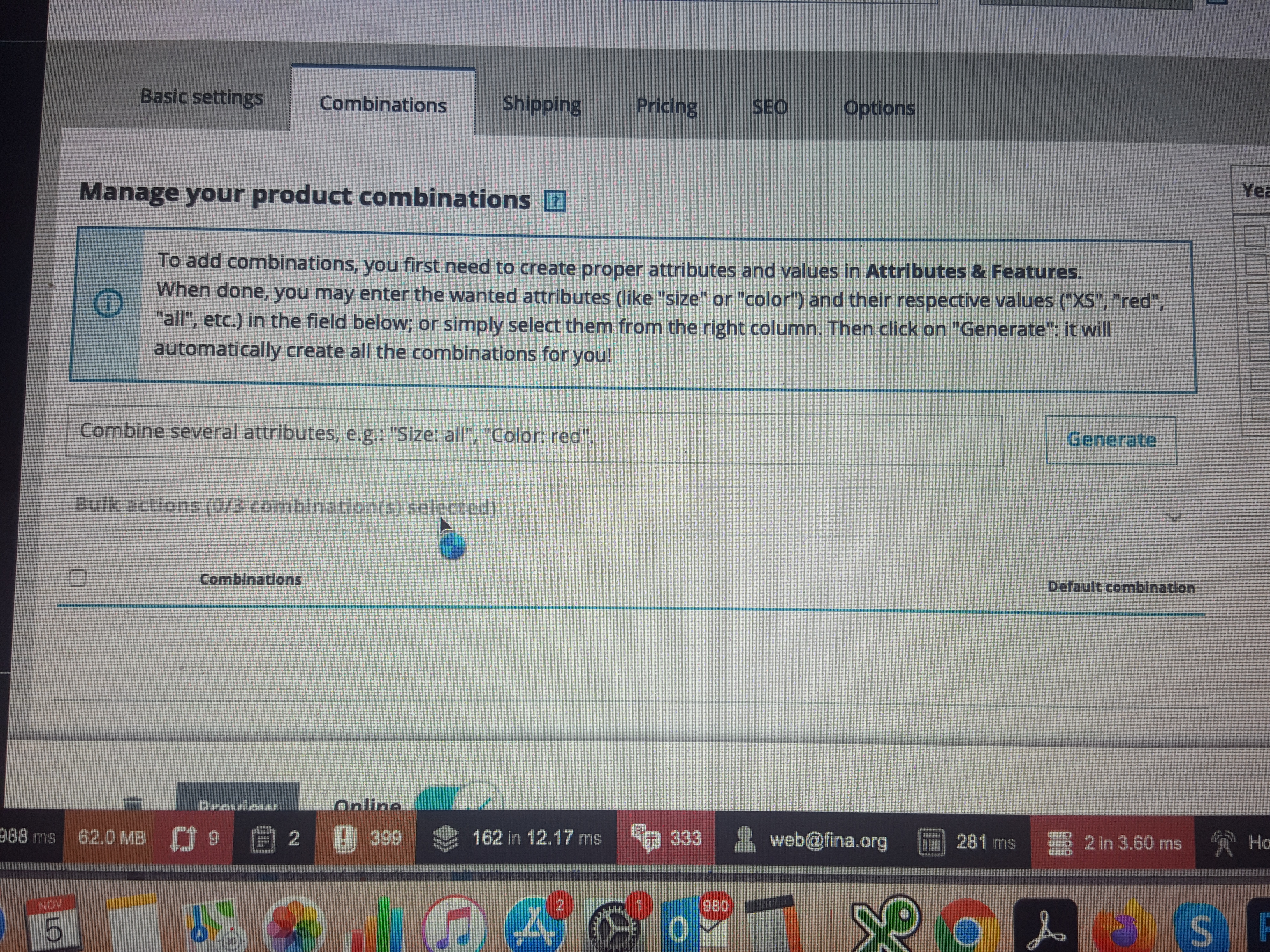
In the debug mode, I see
for @product_admin_form
Controller ProductController :: formAction
Controller class PrestaShopBundle\Controller\Admin\ProductController
POST | xhr | 400
- Path -children[combination_65].children[attribute_ecotax].data
Message - This value should not be blank. - children[combination_65].children[attribute_minimal_quantity].data
Message - This value should not be blank.
Below some more information from debug mode
Class - PrestaShopBundle\Entity\Tab
Mapping errors - The association PrestaShopBundle\Entity\Tab#tabLangs refers to the owning side field PrestaShopBundle\Entity\TabLang#tab which does not exist.
Class - PrestaShopBundle\Entity\TabLang
Mapping errors - The mappings PrestaShopBundle\Entity\TabLang#id and PrestaShopBundle\Entity\Tab#tabLangs are inconsistent with each other.
Please let me know what I did wrong and help me create the product with combination for year number as an attribute value.
 finawebshop
All 15 comments
Hello @finawebshop
I didn't manage to reproduce your issue with PS1.7.6.8 (see screen record below)
https://drive.google.com/file/d/1nT7zFQ0-asbPz-NdsIbn_xOiykN8C4l5/view
Could you please check and feedback.
Thanks!
 hibatallahAouadni
on 5 Nov 2020
hibatallahAouadni
on 5 Nov 2020
Dear Hibatallah,
Thank you for the response and really appreciate the quick response from your end.
Please see the video that I created to show what happens when I create a product with combinations on my shop.
Hopefully, after the video you can help me with my errors.
https://drive.google.com/file/d/1F301DwMVxKsaOumibLyIvYlBTAb_38g9/view?usp=sharing
regards
Pritam
finawebshop
on 5 Nov 2020
Hi @finawebshop
What I have seen in the video, it's not the normal behavior, usually when we click on "generate" button, the created combinations must be showed under the "Bulk actions" select. Did you change the Core files or use a module related to Product management?
Check My new screen record below (I followed your steps and I didin't reproduce the issue):
https://drive.google.com/file/d/1cZaed3qyVZYytGqd52m8t8yQiD6zyAAK/view
Please cehck and feedback.
Thanks!
hibatallahAouadni
on 5 Nov 2020
Thank you again for the quick response. I did not change any of the core files as I don't have a need for it. My shop will have just 7 products in total of which one will be a combination.
I haven't used any product management module yet. This shop is still in development and will be launched next year. I only plan to use a module for payment (this will be from SellXed for datatrans) and a module for shipment (this will be DHL module).
But as of now; nothing in core files is changed nor a new module added to the shop. Just used the modules that comes with default installation.
I see that the version you are using is 1.7.7. Is this still a beta version? I don't see that version as an option during installation. Do you suggest a fresh installation of PrestaShop?
regards
Pritam
finawebshop
on 5 Nov 2020
Hello @finawebshop
I'm really sorry but I didn't manage to reproduce your issue neither with PS1.7.6.8 or with PS1.7.7.0-rc.1+build.4
I attached the screen record testing your issue with PS1.7.6.8 just to make sure that your issue is not related to PrestaShop version (see link below)
https://drive.google.com/file/d/1KCj-0ehnOf7Gn4j3Bz06mhvKFKHsKYqL/view
Please check and feedback.
Thanks!
hibatallahAouadni
on 5 Nov 2020
Thank you for checking the issue with 1.7.6.8. I am really clueless why I don't see the combinations table after clicking on "generate" button.
I am using PHP version 7.1. Believe this should not be a problem. My current hosting solution provides me option for php version 5.6, 7.0 and 7.1. I opted for 7.1
Do you suggest checking something else that I can provide as information to find the root cause here? I mean anything from debug mode that i can provide as information?
Once again, your quick responses are very much appreciated.
finawebshop
on 5 Nov 2020
Hello again,
Please check if your server meets with PrestaShop requirements (click the link to see how)
If there's something missing the phppsinfo.php will show it, so you could fix the problem.
Please check and feedback.
Thanks!
hibatallahAouadni
on 5 Nov 2020
Hello again,
sorry for a delayed response due to scheduled meeting. I checked the page that you sent in link for server configuration and compatibility.
Just for Memcached for which "required" is No and recommended as Yes; my settings displays 'no'. (should not be a problem)

Everything else is just as recommended .
finawebshop
on 5 Nov 2020
@finawebshop Hi ! I checked the video.
As @hibatallahAouadni said, something wrong after you generated the 3 combinations. They should have been displayed below the "bulk update" block.
The problem is that for @hibatallahAouadni and me (I checked) it works :/ so we dont know why it does not work well for you. Something in your setup/shop creates the issue.
One test you can do it to install a new fresh 1.7.6.8 shop __next to your real shop__ and see it you see the issue.
- if the issue appears also in the new fresh 1.7.6.8 shop it means it's related to your environment (server, setup, etc ...) and you might try on another server
- if the issue cannot be seen on the new fresh 1.7.6.8 shop it means something is wrong in your 1st shop
 matks
on 5 Nov 2020
matks
on 5 Nov 2020
thanks you Mathieu for pitching in trying to replicate the issue with Hibatallah. Appreciate it!!
I will try another installation and let you guys know about it.
finawebshop
on 5 Nov 2020
Hello Mathieu and Hibatallah,
I tried to reinstall Prestashop and the product combinations worked fine. However, for the product that required combination, when I visit the 'Options' tab and unchecked the 'Available for order' and selected just 'web only' checkbox; then I lost the combinations table again and the same issue occurred again.
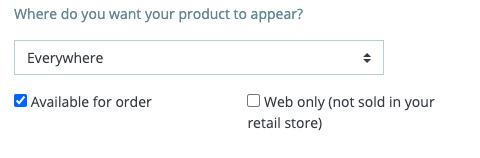
I will unistall and reinstall prestashop again. But it would nice to address this issue to developers. wherein when a product has combination; the option for selecting 'web only' checkbox in the 'options' tab must be disabled or there should be warning before an admin clicks on 'save' button.
finawebshop
on 9 Nov 2020
OK, now created the shop again but this time I kept the product option as " available for order" but still I ran into the same issue as mentioned last week. Please see if you guys can replicate the issue.
finawebshop
on 9 Nov 2020
Hello @finawebshop
I still can't manage to reproduce your issue (see the screen record below)
https://drive.google.com/file/d/1lfXVylss9uWYzwymT5rf0T6JBN2aYGp1/view
By the way, if you uncheck "Available for Order" option, your product won't be for sale, is that what you want?
hibatallahAouadni
on 10 Nov 2020
This product is just a payment fee for different years and not a physical product.
Its strange that I get this issue, wherein when I created the shop and product again with combinations; on selecting the attribute values for combinations, I see a spinning circle on mouse hover to the table area but the combinations table does not appear. i thought may be a browser issue but even that is not the case.
thanks again @hibatallahAouadni for trying to replicate the issue for finding the root cause.
I am now going to reinstall Prestashop and then create individual products instead of combinations :(.
Thank you for all the help. Hope you have a nice day ahead!!
finawebshop
on 10 Nov 2020
Hello @finawebshop
Despite our efforts, we were not able to reproduce your issue with the provided information. It seems that your issue is not a PrestaShop core bug but most likely an external problem.
We will close this issue.
Thanks!
hibatallahAouadni
on 10 Nov 2020
Related issues
 hiousi
·
3Comments
hiousi
·
3Comments
 prestonBot
·
3Comments
prestonBot
·
3Comments
 sandra2n
·
3Comments
sandra2n
·
3Comments
 Prestaworks
·
3Comments
Prestaworks
·
3Comments
 itisco
·
3Comments
itisco
·
3Comments