When you generate url in product > seo tab
If there are special characters in the product title, and the url is generated with the button for creation, these are not removed and the url is wrong, you have to correct it manually.
- PrestaShop version: 1.7.6.6 and above
- PHP version: 7.2
Here are screenshots of the problem


 Betafer
All 17 comments
Thanks for opening this issue! We will help you to keep its state consistent
![prestashop-issue-bot[bot] picture](https://avatars3.githubusercontent.com/in/60395?v=4&s=40) prestashop-issue-bot[bot]
on 7 Jul 2020
prestashop-issue-bot[bot]
on 7 Jul 2020
Hello @Betafer
What do you mean by "the url is generated with the button for creation" ?
If in your product name there is some specials characters non authorized in the URL they are automatically removed of the friendly-url field
 marionf
on 8 Jul 2020
marionf
on 8 Jul 2020
Hello
The button generate friendly url..
, as i tell is not so ....
Betafer
on 8 Jul 2020
In your product page > SEO tab
When you click on "Reinitialize URL" you should see your friendly url with no error.
 florine2623
on 10 Jul 2020
florine2623
on 10 Jul 2020
In your product page > SEO tab
When you click on "Reinitialize URL" you should see your friendly url with no error.
when i click Reinitialize URL the url is with error
Betafer
on 10 Jul 2020
Did you do a migration or is it a fresh install ?
Could you share a screen record and the steps to reproduce your issue please ?
florine2623
on 10 Jul 2020
migration from 1.5, soon i will make the screen record
Betafer
on 10 Jul 2020
 Gipielle
on 10 Jul 2020
Gipielle
on 10 Jul 2020
Ok thanks for the clarification.
It only happens when you are using multilanguage.
I tried on my test shop with EL, FR, LT and I can't reproduce your issue.
Could you take a look at the console ? right-click > inspect element
And check for errors.
florine2623
on 10 Jul 2020
There is another problem with url friendly button, that it changes all languages, so if i change a url manually in one language, and than i change language and set url with the Reinitialize URL, it also change url in the language that i have correct manually
Betafer
on 13 Jul 2020
Hi @Betafer,
I did not manage to reproduce the issue with PS1.7.6.7.
I attached a screen record
https://drive.google.com/file/d/1l8uHDwyGCGrvKD0bGvDtevMb1mpoqibJ/view?usp=sharing
Could you please provide us with more info? We need more details to understand how we can reproduce your issue:
- host
- server setup and configuration
- PrestaShop version (source)
- debug mode report
- PHP error logs
- apache error log
- javascript console log
Don't you know how to get this information? Please read the following article:
http://build.prestashop.com/howtos/misc/how-to-create-bug-report/
Thanks!
 khouloudbelguith
on 14 Jul 2020
khouloudbelguith
on 14 Jul 2020
Hi @Betafer,
Since we had no news from you for more than 20 days, I'll close this ticket. Feel free to open another one if you can give specific details.
Thanks!
khouloudbelguith
on 3 Aug 2020
hi
the problem shown by this ticket is that the Tools::link_rewrite doesn't remove the strange characters
if you seen in the title there is an " but it is not a regular, it is an oblique apex
it should be removed by that function
” is different from "
the first has 226 unicode value the second 34
using ord()
I've seen that it is the
”
https://stackoverflow.com/questions/6931386/how-to-convert-this-to-htmlcharacters-and
they are called fancy or smart quotes
bye
 maofree
on 26 Aug 2020
maofree
on 26 Aug 2020
it is necessary to use this code
$beta_name = htmlentities($beta_name, ENT_QUOTES);
        $beta_name = str_replace(array('”', '“'), '"', $beta_name);
        $beta_name = html_entity_decode($beta_name);
maofree
on 26 Aug 2020
Same problem with prestashop 1.7.6.8 ...
Gipielle
on 18 Oct 2020
Hi @khouloudbelguith and @marionf
can you reopen this topic? now I've inderstood the reason of this problem and it is possible to reproduce it
it is present in all prestashop 1.7 versions

it happens when it is active the option "Accented URLs"
when this option is active the function
Tools::link_rewrite
works well with special characters removing it excepts accented characters, instead from the product page pushing on the button "reset url" from seo tab, it does not work adding the special characters like quotes or ² or ³ ...
so to reproduce it following this steps:
1) active the option "Accented URLs"
2) go in an admin product page and set a name like:
Pantalon de travail multipoches en T/C canvas 260 g/m², empiècements en Oxford, gris - Beta 7900E
3) push on the "reset url" button
this problem is not present with disabled the option "Accented URLs", the "reset url" button remove the special characters

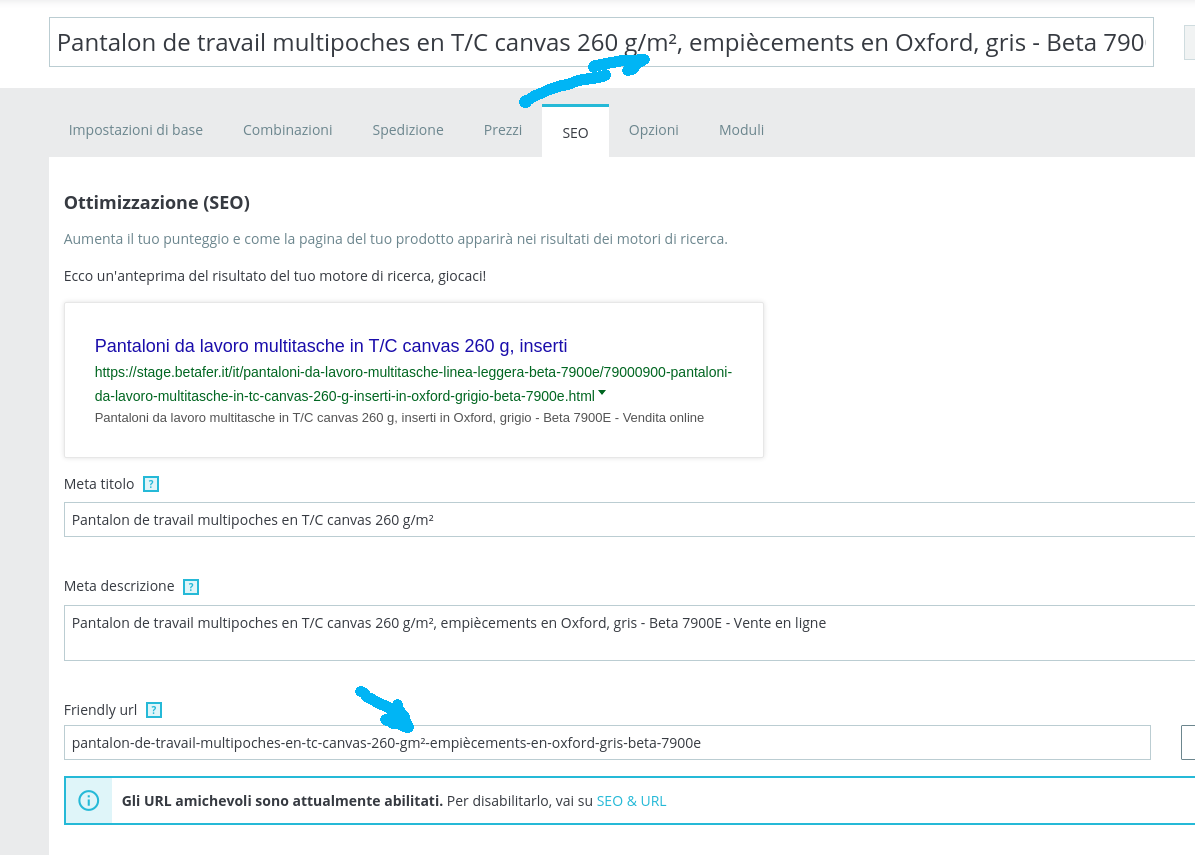
it is a javascript bug, the "reset url" button active a javacript cleaning, it should use an ajax solution to use Tools::link_rewrite
bye
maofree
on 19 Oct 2020
Hi
I've created a new topic to reopen the case
maofree
on 19 Oct 2020
Related issues
 matks
·
3Comments
matks
·
3Comments
 Fabuloops
·
3Comments
Fabuloops
·
3Comments
 wikao2
·
3Comments
wikao2
·
3Comments
 zuk3975
·
3Comments
khouloudbelguith
·
3Comments
zuk3975
·
3Comments
khouloudbelguith
·
3Comments
Most helpful comment
Hi
I've created a new topic to reopen the case
https://github.com/PrestaShop/PrestaShop/issues/21495