Prestashop: Can't use translations on module overrides
Describe the bug
We can't use translations on override files of modules.
According to this documentation, we tried with Module::getInstanceByName('mymodulename')->l().
To Reproduce
Steps to reproduce the behavior:
- Create an override file in a module (inside
overridefolder) - Add a translation with
Module::getInstanceByName('mymodulename')->l() - The translation doesn't appear in BO
Edited by Khouloud
- Override
/ps_facetedsearch/src/Product/SearchProvider.php - Create an override of the module ps_facetesearch in this path
/Project_folder/override/modules/ps_facetedsearch/src/Product/SearchProvider.php
<?php

if (!defined('_PS_VERSION_'))
    exit;
class SearchProviderOverride extends SearchProvider
{

    private function hideUselessFacets(array $facets)
    {
        foreach ($facets as $facet) {
            if ($facet->getWidgetType() === 'slider') {
                $facet->setDisplayed(
                    $facet->getProperty('min') != $facet->getProperty('max')
                );
                continue;
            }

            $usefulFiltersCount = 0;
            foreach ($facet->getFilters() as $filter) {
                if ($filter->getMagnitude() > 0) {
                    ++$usefulFiltersCount;
                }
            }

            $facet->setDisplayed(
                $usefulFiltersCount > 2
            );
        }
        Module::getInstanceByName('Facetedsearch')->l('My text to translate');
    }
}
- Delete the cache manually
- In the BO => Translation pf the module => I couldn't find this translation
Additional information
PrestaShop version: 1.7.x
 micka-fdz
All 18 comments
Hello @micka-fdz ,
We manage to reproduce the issue, it is added to our debug roadmap.
Your ticket is a duplicate of #13392
So, I close it.
 florine2623
on 26 Feb 2020
florine2623
on 26 Feb 2020
Duplicate of #13392
florine2623
on 26 Feb 2020
@florine2623 it's not the same, we're talking about class override, not about tpl.
 jf-viguier
on 26 Feb 2020
jf-viguier
on 26 Feb 2020
@florine2623 my issue is about php files (in override folder), not template files override in theme... Can you reopen it please?
micka-fdz
on 26 Feb 2020
Hello @jf-viguier & @micka-fdz ,
I just reopened the issue.
florine2623
on 26 Feb 2020
A file in override folder is definitely a class override, not a tpl extend. Thanks for reopening.
jf-viguier
on 26 Feb 2020
Hi @jf-viguier ,
It is similar to this issue : https://github.com/PrestaShop/PrestaShop/issues/12300 ?
Thanks to check & feedback!
florine2623
on 26 Feb 2020
@florine2623 not at all, : #12300 uses the new translation system $this->trans()
We're talking about the classic one $this->l()
jf-viguier
on 26 Feb 2020
Hello @jf-viguier ,
Could you send me the demo module you have created, I will test this on my shop ?
Thanks!
florine2623
on 26 Feb 2020
@florine2623 I don't have any demo module for that, but you can use our module generator in fop_console.
jf-viguier
on 26 Feb 2020
Or just create a simple override file in any native module.
micka-fdz
on 26 Feb 2020
Hi @micka-fdz, @jf-viguier,
I am trying to override /ps_facetedsearch/src/Product/SearchProvider.php
I created an override of the module ps_facetesearch in this path /Project_folder/override/modules/ps_facetedsearch/src/Product/SearchProvider.php
<?php

if (!defined('_PS_VERSION_'))
    exit;
class SearchProviderOverride extends SearchProvider
{

    private function hideUselessFacets(array $facets)
    {
        foreach ($facets as $facet) {
            if ($facet->getWidgetType() === 'slider') {
                $facet->setDisplayed(
                    $facet->getProperty('min') != $facet->getProperty('max')
                );
                continue;
            }

            $usefulFiltersCount = 0;
            foreach ($facet->getFilters() as $filter) {
                if ($filter->getMagnitude() > 0) {
                    ++$usefulFiltersCount;
                }
            }

            $facet->setDisplayed(
                $usefulFiltersCount > 2
            );
        }
        Module::getInstanceByName('Facetedsearch')->l('My text to translate');
    }
}
I deleted the cache manually
In the BO => Translation pf the module => I couldn't find this translation
Can you confirm this?
PS: If I edit the /ps_facetedsearch/src/Product/SearchProvider.php directly (without override)
The translation is well displayed
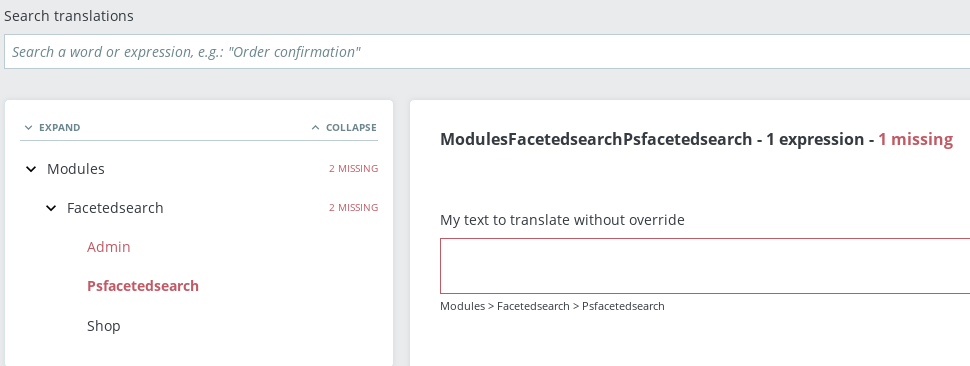
Thanks to check & feedback.
 khouloudbelguith
on 27 Feb 2020
khouloudbelguith
on 27 Feb 2020
Yes @khouloudbelguith, the issue is about override in module folder.
micka-fdz
on 27 Feb 2020
@micka-fdz, thanks for your feedback.
I manage to reproduce the issue with PS1.7.6.3 and PS1.7.5.2
I’ll add this to the debug roadmap so that it’s fixed. If you have already fixed it on your end or if you think you can do it, please do send us a pull request!
Thanks!
khouloudbelguith
on 27 Feb 2020
How is this not fixed?
 boy51
on 25 Jun 2020
boy51
on 25 Jun 2020
New wordings declared in overrides don't show up in the translation interface because only modules and themes can declare new wordings. Wordings don't appear magically in the translation interface, they require static analysis of the source code (aka reading and interpreting code via code), which is terribly slow.
Overrides are meant to progressively disappear as core legacy classes are replaced by services that modules can decorate or replace. As such, I don't think it makes sense to add a "wording discovery" feature there.
If you need to create new wordings and use them in your overrides, just create a simple module containing those wordings. Follow the documentation on how to make your wordings appear in the translation interface. Once translated, you'll be able to use them anywhere in PrestaShop (including in overrides), just by getting the translator instance.
Alternatively, you can just create them in the ps_translations table. Once the cache is rebuilt they should be available for use.
 eternoendless
on 11 Sep 2020
eternoendless
on 11 Sep 2020
I'm assuming this bug is about using new translations in overrides and closing it as won't fix. Feel free to ping me otherwise.
eternoendless
on 11 Sep 2020
It's sad. Actually, there is no other way than override for customizing front module behaviors.
jf-viguier
on 11 Sep 2020
Related issues
 nrcjea001
·
3Comments
nrcjea001
·
3Comments
 centoasa
·
3Comments
centoasa
·
3Comments
 zuk3975
·
3Comments
zuk3975
·
3Comments
 marionf
·
3Comments
marionf
·
3Comments
 Prestaworks
·
3Comments
Prestaworks
·
3Comments