Prestashop: Unclear error while creating a brand's address
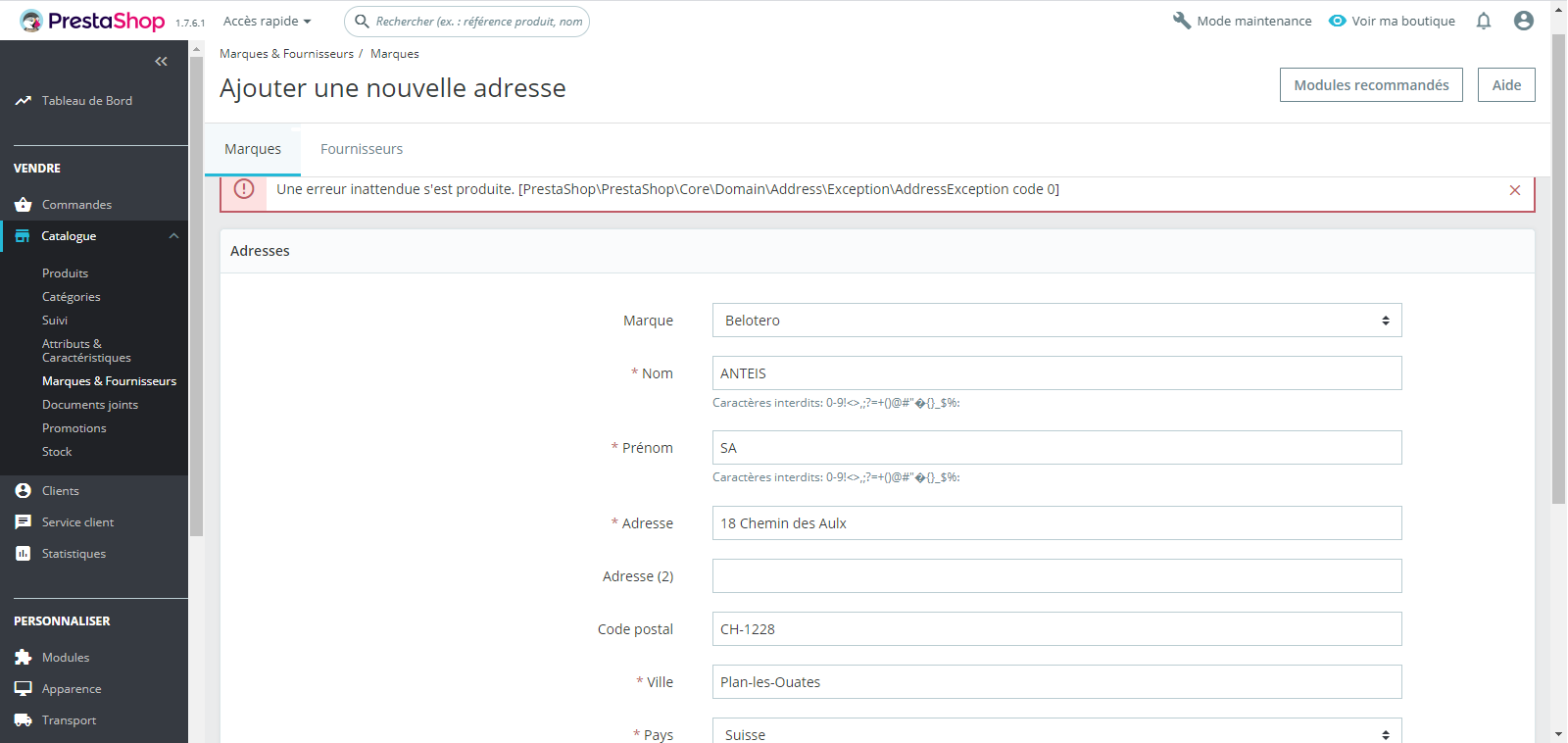
I encounter an error when I add a new address to a brand.
Steps to reproduce :
1 - Go to Catalog -> Brands & Providers
2 - Click on Add a new brand's address
3 - Create it
4 - Save
See error : "Une erreur inattendue s'est produite. [PrestaShop\PrestaShop\Core\Domain\Address\Exception\AddressException code 0]"
Screenshots
Additional information
PrestaShop version: 1.7.6.1
Server :
Informations sur votre serveur Linux #1 SMP Wed May 15 10:40:34 CEST 2019 x86_64
Version du logiciel serveur : Apache
Version de PHP : 7.0.33
Limite de mémoire : 512M
Temps maximal d'exécution : 300
Taille max. pour envoi de fichiers : 128M
 nicoladze
All 21 comments
Hi @nicoladze,
I did not manage to reproduce the issue with PS1.7.6.2.
I tried to set fields similar to yours, but it is OK.
I attached a screen record
https://drive.google.com/file/d/1BI0l_P7PYey9brU8bgrWAWtPh7UcuI_d/view
Thanks to check feedback.
 khouloudbelguith
on 17 Jan 2020
khouloudbelguith
on 17 Jan 2020
Related to:
https://github.com/PrestaShop/PrestaShop/issues/16725
https://github.com/PrestaShop/PrestaShop/issues/16514
khouloudbelguith
on 17 Jan 2020
@khouloudbelguith
I have seen your video, but in my case, even if I fulfill all the * fields
with an A, I got the same error.
What does this error means? Because it's not clean at all.
Regards
Le ven. 17 janv. 2020 à 10:44, khouloudbelguith notifications@github.com
a écrit :
Hi @nicoladze https://github.com/nicoladze,
I did not manage to reproduce the issue with PS1.7.6.2.
I tried to set fields similar to yours, but it is OK.
I attached a screen record
https://drive.google.com/file/d/1BI0l_P7PYey9brU8bgrWAWtPh7UcuI_d/view
Thanks to check feedback.—
You are receiving this because you were mentioned.
Reply to this email directly, view it on GitHub
https://github.com/PrestaShop/PrestaShop/issues/17219?email_source=notifications&email_token=ALG2NFLS5X2ZFOI2QQSG2KTQ6F4YDA5CNFSM4KH3ETQKYY3PNVWWK3TUL52HS4DFVREXG43VMVBW63LNMVXHJKTDN5WW2ZLOORPWSZGOEJHDVXI#issuecomment-575552221,
or unsubscribe
https://github.com/notifications/unsubscribe-auth/ALG2NFJ2OIKFZJ6GDIEFMXLQ6F4YDANCNFSM4KH3ETQA
.
nicoladze
on 17 Jan 2020
@nicoladze, could you please provide the exact expressions set in your case to test them.
Thanks!
khouloudbelguith
on 21 Jan 2020
@khouloudbelguith
You already tested it in your video.
But you did it on 1.7.6.2; as stipulated, I work with 1.7.6.1
Could you please test it on 1.7.6.1 to check if it occurs and then I will know if it is fixed on 1.7.6.2?
Also, can you tell me what does this error mean?
[PrestaShop\PrestaShop\Core\Domain\Address\Exception\AddressException code 0]
Regards
nicoladze
on 22 Jan 2020
@nicoladze, I could not reproduce your issue with the provided information using PS1.7.6.1.
https://drive.google.com/file/d/15pRqvxyUCE7MW96eHt0b-_3FaAdHSAFn/view
You need to enable debug mode in your store and debug request which is sent for Brand address save in your browser, using DevTools, so:
- enable debug mode
- go to the Brand address page
- open up developer tools
- go to Network tab
- save the Brand address
- wait for an error, you should see red request information in Network tab
- click on it, you should see the error message in "Response" or "Preview" tab
Thanks!
khouloudbelguith
on 22 Jan 2020
@khouloudbelguith
Sorry for the long time, I had not receive your answer in my email box.
I did what you have asked for but :
No error or red request in Network tab
Console tab : 1 verbose : [Violation] 'setTimeout' handler took 63ms - main.bundle.js:253
nicoladze
on 6 Feb 2020
@nicoladze, could you please provide the exact expressions set in your case to test them.
- What is the exact country used?
- What is the exact address format of this country? (you can check it in the BO => International => - - Locations => countries => country detail page)
- In the BO => Customers => Addresses page => have you any required fields ?
Thanks!
khouloudbelguith
on 7 Feb 2020
@khouloudbelguith
You have already tested them and provided me with a video
I used Switzerland
Address format in the BO => International => - - Locations => countries => Switzerland
firstname lastname
company
vat_number
address1
address2
postcode city
Country:name
phone
- No required fields in the BO => Customers => Addresses page
nicoladze
on 7 Feb 2020
@nicoladze, I tried again & I did not manage to reproduce the issue with PS1.7.6.3 & PS1.7.6.1.
https://drive.google.com/file/d/1mdbgBoBOdW2R561pbvAOxI3c6VWkppC8/view
Despite our several trials, we could not reproduce your issue with the provided information.
It seems that your issue is not a PrestaShop's core bug but most likely a server configuration or customization problem.
I invite you to contact our support team: http://addons.prestashop.com/en/388-support to help you solve your issue.
Thanks!
khouloudbelguith
on 7 Feb 2020
@khouloudbelguith
I just put "-" in the phone field and it worked, just like it was a required field while it was not one.
nicoladze
on 7 Feb 2020
@nicoladze, Phone field is empty in my case & it is OK.
Thanks!
khouloudbelguith
on 7 Feb 2020
@khouloudbelguith
Could you please try with a spanish address, it does not matter what you fulfill (only the country matters).
When I create a spanish brand's address, the error occurs.
I think this is due to the fact that in "Address format in the BO => International => - - Locations => countries => Spain" a NIF (fiscal number) must be provided.
What do you think about that?
And when it comes to create a spanish provider's address, it is worst, it ends with an error 500 and no way to see the debug bar on providers page (only on brands page).
Regards
nicoladze
on 15 Feb 2020
Hi @nicoladze,
I attached a screen record
https://drive.google.com/file/d/13CXLtGxW0iMXSQ0o7rZleCXgtATPa98H/view
Thanks!
khouloudbelguith
on 17 Feb 2020
@khouloudbelguith
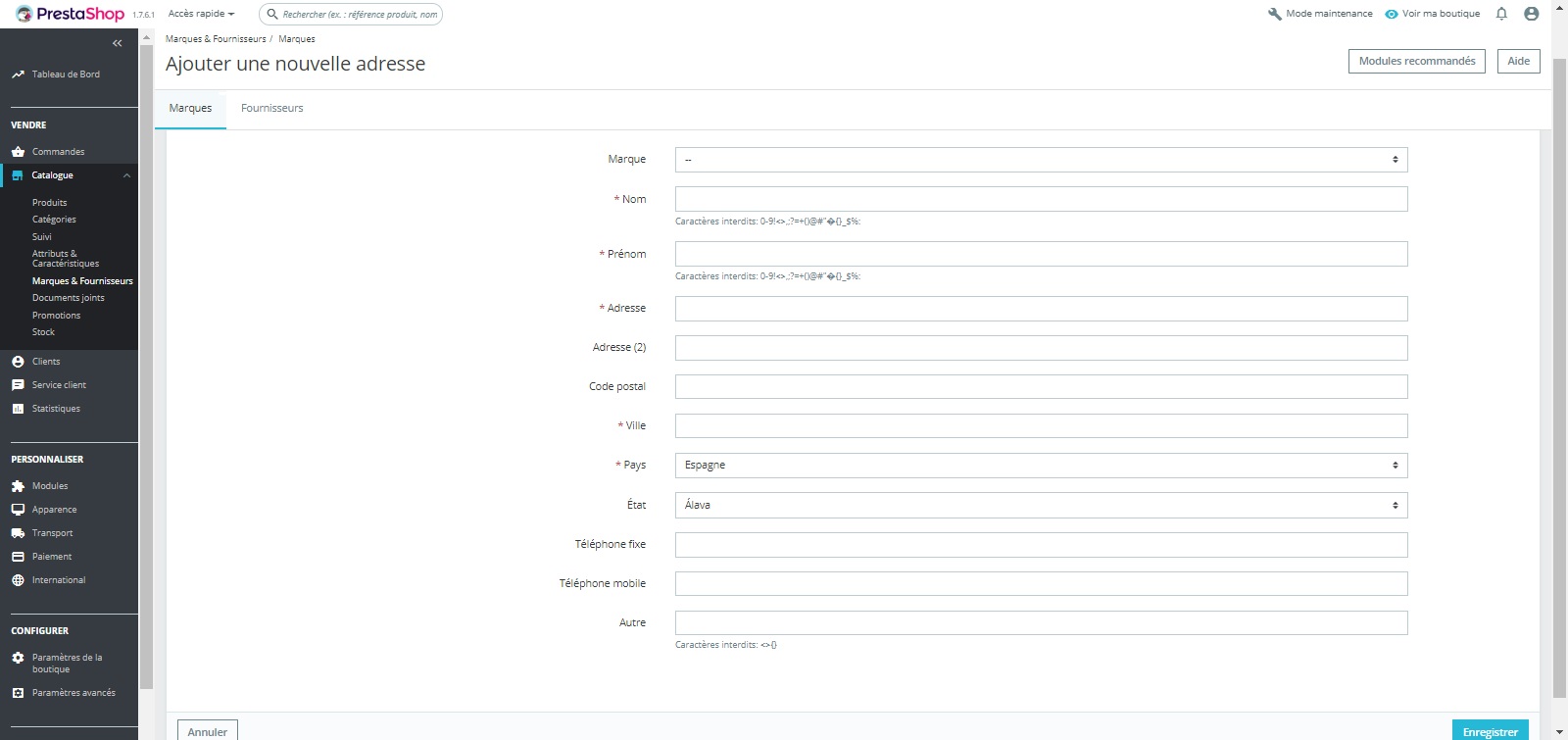
My version is not 1.7.6.3 but 1.7.6.1 and in my case the DNI field does not appear in brand address.
Screenshot attached :
Regards
nicoladze
on 17 Feb 2020
@nicoladze,
What is the exact address format of this country? (you can check it in the BO => International => - - Locations => countries => country detail page)
In the BO => Customers => Addresses page => have you any required fields ?
Thanks!
khouloudbelguith
on 17 Feb 2020
@khouloudbelguith
The exact format of Spain in my BO is :
firstname lastname
company
vat_number
address1
address2
postcode city, State:iso_code, State:name
Country:name
phone
dni
No required field on customers -> adress page
Regards
nicoladze
on 17 Feb 2020
Hi @nicoladze,
I tried with the same address format & it is OK in my case.
https://drive.google.com/file/d/1OoERQ3EGs2q7NUfMqxUDIF_zCoqqopZQ/view
It seems that it is custom issue in your case.
Thanks!
khouloudbelguith
on 18 Feb 2020
@khouloudbelguith
In my prevois screenshot, you can see that DNI field is missing, how do you explain it?
Regards
nicoladze
on 18 Feb 2020
@nicoladze, yes!
This is the exact problem (Spain and DNI).
here is the PR: https://github.com/PrestaShop/PrestaShop/pull/16153 to fix the issue.
It is fixed in the PS1.7.6.2.
Your ticket is a duplicate of #16121
So, I close it.
Thanks!
khouloudbelguith
on 18 Feb 2020
Duplicate of #16121
khouloudbelguith
on 18 Feb 2020
Related issues
 hiousi
·
3Comments
khouloudbelguith
·
3Comments
hiousi
·
3Comments
khouloudbelguith
·
3Comments
 matks
·
3Comments
matks
·
3Comments
 PrestaShark
·
3Comments
PrestaShark
·
3Comments
 marionf
·
3Comments
marionf
·
3Comments