Prestashop: Brand filter faceted search overwritting features as filter 1.7.6.2
Describe the bug
After 1.7.6.2 release, brand default filter from faceted search native module is overwritting custom features product filters.
In my case, I have brand default filter and my own feature filter (Filter_by_feature). If I select one value from this custom filter, it will still show all brand values even there is no products in them.
To Reproduce
Steps to reproduce the behavior:
Structure:
Filter_by_feature => name of my feature
feature_ => value of each feature
Brand_default_filter_from_faceted_search => brand filter, provided in faceted search by default
Tree in my sidebar:
_Filter_by_feature
feature_1 (100)
feature_2 (40)
feature_3 (30)
Brand_default_filter_from_faceted_search
brand_1 (300)
brand_2 (10)
brand_3 (200_)
Information as example to show how to reproduce bug:
_feature_1 only have products with brand_1, not in brand_2 or brand_3_
- I select feature_1, it will display every brand even with no products:
brand_1
brand_2
brand_3
url: ?q=Filter_by_feature-feature_1
- I select brand_2 (where there is NO products at all):
display "no products" (it doesn't filter by feature_1 anymore)
url: ?q=Brand_default_filter_from_faceted_search-brand_2
Overwrite url query for feature_1
But, If I do inverse:
- I select brand_1, only display features with brand_1. Works perfect.
_Filter_by_feature
feature_1 (100)
url: ?q=Brand_default_filter_from_faceted_search-brand_1
- I select feature_1. Works perfect, but strange behaviour in url, change position as I selected (first it should be BRAND, and after, feature)
url: ?q=Filter_by_feature-feature_1/Brand_default_filter_from_faceted_search-brand_1
Additional information
PrestaShop version: 1.7.6.2
PHP version: PHP 7.3.12
 CallejaMotos
All 36 comments
Hi @CallejaMotos,
PrestaShop is not compatible with PHP 7.3, in fact, PrestaShop 1.7.0 to 1.7.3 is compatible with PHP 7.1 and PrestaShop 1.7.4 & 1.7.5 & PS1.7.6 are compatible with PHP 7.2.
For more details, you can follow this link: http://build.prestashop.com/news/prestashop-1-7-is-moving-to-symfony-3-4-and-php-5-6/
Next Major release PS1.7.7 will be compatible with PHP7.3.
Please downgrade your PHP version, check & feedback.
 khouloudbelguith
on 13 Dec 2019
khouloudbelguith
on 13 Dec 2019
Hi @khouloudbelguith,
very glad to heard you.
I will do it right now and get back to leave my comments.
CallejaMotos
on 13 Dec 2019
It is not the solution.
Actually, I am thinking I have my local version with 1.7.6.1 with same php version and works perfect. It has been after upgrade to 1.7.6.2
CallejaMotos
on 13 Dec 2019
@CallejaMotos, what is the exact version of the ps_facetedsearch module did you use?
is it v3.4.0?
Thanks!
khouloudbelguith
on 13 Dec 2019
@khouloudbelguith for both (live and local): v3.4.0
CallejaMotos
on 13 Dec 2019
@CallejaMotos, It will help us if you can attach a screen record.
You are using two filters
- A custom feature filter
- A brand filter by ps_facetedsearch
Thanks!
khouloudbelguith
on 13 Dec 2019
Ok.
I attach images.
Information:
Categoría => my custom feature filter
Precio => Pirce default filter
Marca => Brand default filter

Reproducing error
I select some value from Categoría (feature filter): Baterías (value from feature filter)
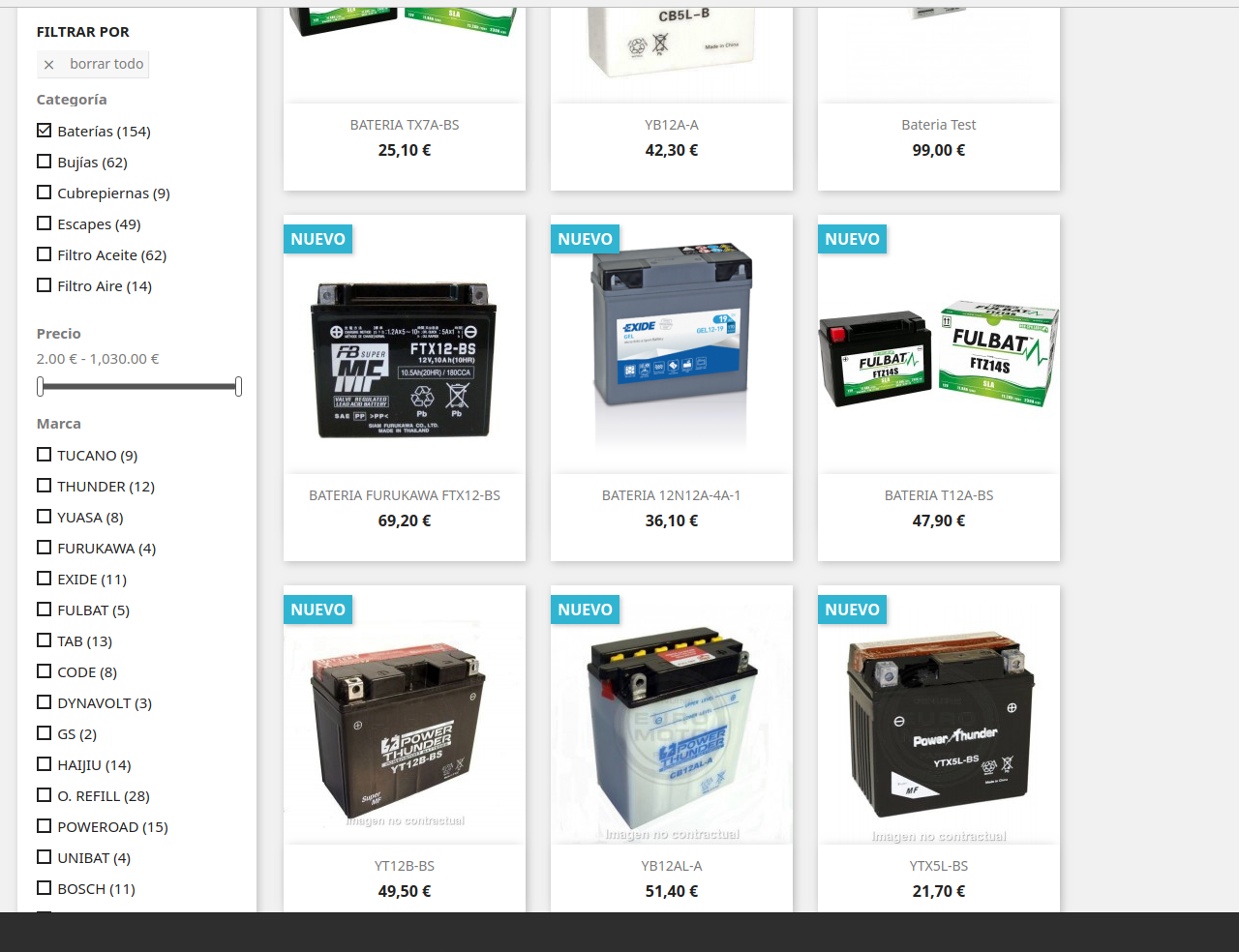
As you can see, Brand default filter doesn't change, all brand values are displayed.
But, if I select first Brand defualt filter, works.
As you can see, it only shows my custom feature filter with products:
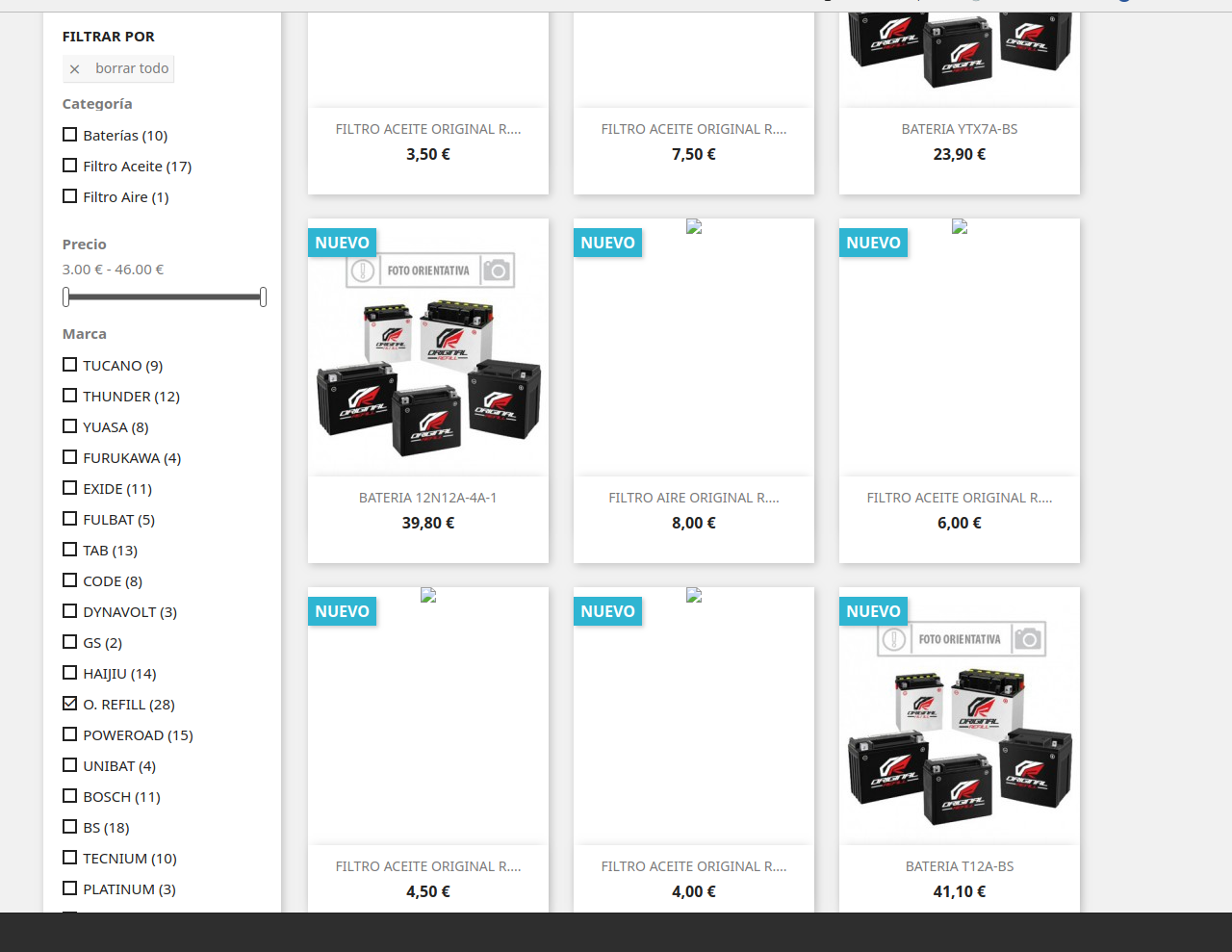
CallejaMotos
on 13 Dec 2019
@CallejaMotos, thanks!
Your custom feature filter is provided by a custom module?
Thanks!
khouloudbelguith
on 13 Dec 2019
no
@khouloudbelguith
I am working in classic theme, only one free module installed:
homecategoriez-last_1.3-1.7
https://github.com/zapalm/homecategoriez
Thanks for your help
CallejaMotos
on 13 Dec 2019
@CallejaMotos, so the feature filter is provided by the ps_facetedsearch module also? isn't?
Thanks!
khouloudbelguith
on 13 Dec 2019
That's right. Sorry if I explained wrongly.
I am working only with facetedsearch module like this:
- I create the feaure filter (not attribute)
- I upload products with this features from .csv import:
Feature:Value:Position
Categoria:Bateria:5
I understand 5 is the position of the value inside Categoria (feature)
CallejaMotos
on 13 Dec 2019
@CallejaMotos, I did not manage to reproduce the issue with PS1.7.6.2 & ps_facetedsearch v3.4.0.
I attached a screen record
https://drive.google.com/file/d/1L5y3BZUNsi7TPH96Dz6klmPu5TtXYfvt/view
Thanks to check & feedback.
khouloudbelguith
on 13 Dec 2019
@khouloudbelguith
something weird in here: check my brand filter sort and yours
mine, is sorted (looks like) by brand ID
yours, by name
I didn't change a line of code, I am just importing .csv files, and local is perfect as you do in your recording
It seems like this filter is doing something wrong over the others, with no control
just to let you know, I have more than 20.000 categories
I really apreciate your help
thank you!
(if you need access to live site or even code just let me know)
CallejaMotos
on 13 Dec 2019
@CallejaMotos,
We need to retrieve the PHP error log and the debug mode report in order to find out what's wrong.
Don't you know how to get this information? Please read the following article:
http://build.prestashop.com/howtos/misc/how-to-create-bug-report/
Thanks!
khouloudbelguith
on 17 Dec 2019
@CallejaMotos,
We need to retrieve the PHP error log and the debug mode report in order to find out what's wrong.
Don't you know how to get this information? Please read the following article:
http://build.prestashop.com/howtos/misc/how-to-create-bug-report/Thanks!
I am out of my country, I don't have my pc, after 5th January I will send info.
Thanks
CallejaMotos
on 27 Dec 2019
@CallejaMotos, thanks!
Waiting for your feedback.
khouloudbelguith
on 30 Dec 2019
Hello @khouloudbelguith,
I only see php error log. I don't know what you mean by "debub mode report". If that is debug mode to find errors when accessing (screen errors), there aren't.
Error.log repeted:
[Tue Jan 07 00:12:20.396938 2020] [core:alert] [pid 10212] [client 127.0.0.1:44538] /var/www/html/calleja-produccion/.htaccess: Invalid command 'Header', perhaps misspelled or defined by a module not included in the server configuration
I think it is not relevant to find what I posted like a bug.
It is very anoying to see my local site working perfect, and my live site not.
If you give my your IP I can provide you access to test it by yourself.
Thanks
CallejaMotos
on 7 Jan 2020
@CallejaMotos, PrestaShop has a debug mode, which can be used to see the non-obvious errors on your shop.
To turn on the Debug mode on PrestaShop 1.7, follow these steps:
- Got to Advanced Parameters > Performance
- In the Debug Mode section, set “Debug Mode” to “Yes”.
- Click the “Save” button.
If you can’t access your dashboard, you can still enable the Debug Move using an FTP client (for instance the free Filezilla tool) to edit the config/defines.inc.php file. Find the following line in the file:
define('_PS_MODE_DEV_', false);
… and change it to:
define('_PS_MODE_DEV_', true);
Thanks!
khouloudbelguith
on 7 Jan 2020
Sure, It is enable, sorry If I didn't explain well.
It is enable, and not throwing any kind of error.
CallejaMotos
on 7 Jan 2020
@CallejaMotos,
[Tue Jan 07 00:12:20.396938 2020] [core:alert] [pid 10212] [client 127.0.0.1:44538] /var/www/html/calleja-produccion/.htaccess: Invalid command 'Header', perhaps misspelled or defined by a module not included in the server configuration.
When working with the headers in Apache 2 directly, it’s possible to run into this error when you do not have mod_headers enabled. It’s a simple fix: you just need to make sure you enable mod_headers in your configuration.
You can check it with your host.
Thanks!
khouloudbelguith
on 7 Jan 2020
@khouloudbelguith do you think that's the bug issue or different one? Just to understand what is happening.
CallejaMotos
on 7 Jan 2020
@CallejaMotos, in your log, you have only this error.
You need to fix it & check.
Thanks!
khouloudbelguith
on 7 Jan 2020
@khouloudbelguith I was looking in wrong folder, sorry for that!
There is no error log registered.
I can see logs when I reproduce this issue/bug, do you need them?
CallejaMotos
on 7 Jan 2020
@CallejaMotos, yes!
Thanks!
khouloudbelguith
on 7 Jan 2020
here:
 - - [07/Jan/2020:13:01:15 +0100] "GET /1025-home_default/BUJIA-NGK-IMR8C-9H.jpg HTTP/2.0" 200 8040 "https://motoscalleja.com/en/2-home" "Mozilla/5.0 (X11; Linux x86_64) AppleWebKit/537.36 (KHTML, like Gecko) Chrome/79.0.3945.79 Safari/537.36"
 - - [07/Jan/2020:13:01:15 +0100] "GET /1009-home_default/BUJIA-NGK-DPR9EA-9.jpg HTTP/2.0" 200 8040 "https://motoscalleja.com/en/2-home" "Mozilla/5.0 (X11; Linux x86_64) AppleWebKit/537.36 (KHTML, like Gecko) Chrome/79.0.3945.79 Safari/537.36"
 - - [07/Jan/2020:13:01:21 +0100] "GET /es/2-inicio HTTP/2.0" 200 339096 "https://motoscalleja.com/en/2-home" "Mozilla/5.0 (X11; Linux x86_64) AppleWebKit/537.36 (KHTML, like Gecko) Chrome/79.0.3945.79 Safari/537.36"
 - - [07/Jan/2020:13:01:27 +0100] "GET /img/p/es-default-home_default.jpg HTTP/2.0" 404 6815 "https://motoscalleja.com/es/2-inicio" "Mozilla/5.0 (X11; Linux x86_64) AppleWebKit/537.36 (KHTML, like Gecko) Chrome/79.0.3945.79 Safari/537.36"
 - - [07/Jan/2020:13:02:29 +0100] "GET /es/2-inicio?q=Categor%C3%ADa-Bater%C3%ADas&from-xhr HTTP/2.0" 200 11800 "https://motoscalleja.com/es/2-inicio" "Mozilla/5.0 (X11; Linux x86_64) AppleWebKit/537.36 (KHTML, like Gecko) Chrome/79.0.3945.79 Safari/537.36"
 - - [07/Jan/2020:13:02:31 +0100] "GET /431-home_default/bateria-gel-dynavolt.jpg HTTP/2.0" 200 10919 "https://motoscalleja.com/es/2-inicio?q=Categor%C3%ADa-Bater%C3%ADas" "Mozilla/5.0 (X11; Linux x86_64) AppleWebKit/537.36 (KHTML, like Gecko) Chrome/79.0.3945.79 Safari/537.36"
 - - [07/Jan/2020:13:02:31 +0100] "GET /447-home_default/bateria-tx20hl-bs.jpg HTTP/2.0" 200 53073 "https://motoscalleja.com/es/2-inicio?q=Categor%C3%ADa-Bater%C3%ADas" "Mozilla/5.0 (X11; Linux x86_64) AppleWebKit/537.36 (KHTML, like Gecko) Chrome/79.0.3945.79 Safari/537.36"
 - - [07/Jan/2020:13:02:31 +0100] "GET /385-home_default/bateria-cb10l-b2-c-a.jpg HTTP/2.0" 200 13682 "https://motoscalleja.com/es/2-inicio?q=Categor%C3%ADa-Bater%C3%ADas" "Mozilla/5.0 (X11; Linux x86_64) AppleWebKit/537.36 (KHTML, like Gecko) Chrome/79.0.3945.79 Safari/537.36"
 - - [07/Jan/2020:13:02:31 +0100] "GET /400-home_default/bateria-ytx12-bs.jpg HTTP/2.0" 404 6855 "https://motoscalleja.com/es/2-inicio?q=Categor%C3%ADa-Bater%C3%ADas" "Mozilla/5.0 (X11; Linux x86_64) AppleWebKit/537.36 (KHTML, like Gecko) Chrome/79.0.3945.79 Safari/537.36"
- - [07/Jan/2020:13:02:35 +0100] "GET /es/2-inicio?q=Categor%C3%ADa-Bater%C3%ADas/Marca-TUCANO&from-xhr HTTP/2.0" 200 3619 "https://motoscalleja.com/es/2-inicio?q=Categor%C3%ADa-Bater%C3%ADas" "Mozilla/5.0 (X11; Linux x86_64) AppleWebKit/537.36 (KHTML, like Gecko) Chrome/79.0.3945.79 Safari/537.36"
@CallejaMotos, there are no errors in this log!
Is it?
Thanks!
khouloudbelguith
on 7 Jan 2020
error log => empty
logs => no errors
that is, thanks
CallejaMotos
on 7 Jan 2020
@CallejaMotos, in your Project_Folder/var/logs/ path, thanks to check if you have prod errors.
Thanks!
khouloudbelguith
on 7 Jan 2020
no, I don't have. That's what I am saying. There is no errors at all...
CallejaMotos
on 7 Jan 2020
@CallejaMotos, did you fixed this issue: https://github.com/PrestaShop/PrestaShop/issues/16796#issuecomment-571536141?
Thanks!
khouloudbelguith
on 7 Jan 2020
@khouloudbelguith it was enable, I sent you a wrong log from another project.
So yes, mod_headers are OK.
CallejaMotos
on 7 Jan 2020
@CallejaMotos, Despite our several trials, we could not reproduce your issue with the provided information.
It seems that your issue is not a PrestaShop's core bug but most likely a server configuration or customization problem.
I invite you to contact our support team: http://addons.prestashop.com/en/388-support to help you solve your issue.
Thanks!
khouloudbelguith
on 7 Jan 2020
@khouloudbelguith thank you for your aid.
But, It looks very weird. I have done same things (exactly and accurate same things) in both environments except the updated in production, and there is where the issue comes.
Anyway, thanks a lot.
CallejaMotos
on 7 Jan 2020
hi @khouloudbelguith,
I saw some threads talking about a wrong brand filter behaviour, where it is working like a OR not like and AND:
if I select filter A, still shows filter B options (as It is my case).
Could be that this issue?
Did you handle problems like that before?
thanks
CallejaMotos
on 8 Jan 2020
@khouloudbelguith,
I realized that it was a new upgrade to faceted search to:
v3.4.1
Now, problem is solved.
No server misconfiguration, no prestashop's core bug.
It was something with prestahsop 1.7.6.2 and faceted_search version v3.4.0 Brand Filter
Actually, order from Brand filter is OK . Also correct behaviour when I select whatever filter options.
Just to let people knows about that, if someone come to here.
I really apreciate your help and answering times! It was great and absolutely helpfull!
Thank you very much
CallejaMotos
on 8 Jan 2020
@CallejaMotos, Great!
Thanks for your feedback.
khouloudbelguith
on 8 Jan 2020
Related issues
 zuk3975
·
3Comments
zuk3975
·
3Comments
 matks
·
3Comments
matks
·
3Comments
 rGaillard
·
3Comments
rGaillard
·
3Comments
 hiousi
·
3Comments
khouloudbelguith
·
3Comments
hiousi
·
3Comments
khouloudbelguith
·
3Comments