Prestashop: Installer is consistently failing with NTS PHP on Windows
Describe the bug
When PHP uses only 1 thread, i.e. CGI or CLI, it should produce exactly the same output with TS AND NTS build, right?
But after days of trouble shooting I finally find the issue with PrestaShop installer. The issue is NTS PHP on Windows.
The PrestaShop install always fail with NTS PHP (with error Template "C:\wamp64\www\ps\mails\themes\modern\core\account.html.twig" is not defined.), but always succeed when run with TS PHP.

To Reproduce
Steps to reproduce the behavior:
- download NTS PHP for Windows, for ex. download https://windows.php.net/downloads/releases/php-7.2.25-nts-Win32-VC15-x64.zip
- download the latest version of PrestaShop https://github.com/PrestaShop/PrestaShop/releases/download/1.7.6.2/prestashop_1.7.6.2.zip and, unzip it
- a) install it from CLI using admin/index_cli.php
b) OR install thru web using PHP CGI
Additional information
PrestaShop version: 1.7.6.2 rel or git develop branch
PHP version: 7.2.25, 7.3.9, 7.3.12
OS: Windows 10 x64
I tested it on multiple Windows 10 systems/PCs and with multiple versions of PHP. The install always completes with the TS version of PHP, but always fail with the NTS one.
Can you please reproduce and fix?
 mvorisek
All 22 comments
Hi @mvorisek,
PrestaShop is not compatible with PHP 7.3, in fact, PrestaShop 1.7.0 to 1.7.3 is compatible with PHP 7.1 and PrestaShop 1.7.4 & 1.7.5 & PS1.7.6 are compatible with PHP 7.2.
For more details, you can follow this link: http://build.prestashop.com/news/prestashop-1-7-is-moving-to-symfony-3-4-and-php-5-6/
Next Major release PS1.7.7 will be compatible with PHP7.3.
I will try to prepare this environment, check & feedback.
Thanks!
 khouloudbelguith
on 9 Dec 2019
khouloudbelguith
on 9 Dec 2019
Issue isolated, see https://bugs.php.net/bug.php?id=78939 .
The different results acrosss TS and NTS PHP builds are an issue related with PHP reproducible with single file_exists call.
The issue here itself is related with PrestaShop installer, as it tries to operate on "C:data/ps_dev/ps_17/mails/themes/modern/core/account.html.twig" path and after the issue in PHP is fixed, I expect that the current PrestaShop installer will always fail on Windows.
Notice a missing slash after "C:". Paths like this are not valid in Windows explorer.exe and PrestaShop should never use this path format. For more details see the PHP issue report.
mvorisek
on 10 Dec 2019
The related Symfony PR should be merged in the next Symfony release.
Hovewer the root cause of this/PrestaShop issue is the use of absolute name/path which is deprecated in Symfony and in Symfony 4.0 or higher the support for absolute names is removed.
Please verify.
Help wanted to fix the absolute name/path.
mvorisek
on 11 Dec 2019
Hi @mvorisek,
I tried to install PrestaShop with Window 10 & it is OK (php NTS dowloaded)
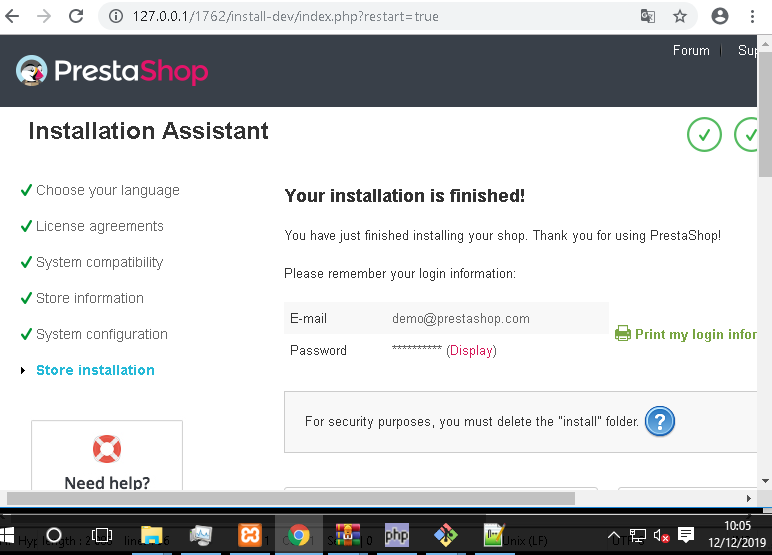
Here's my configuration
phpinfo().pdf
I tried to install with CLI on windows, but I have issues.

Thanks to check & feedback.
khouloudbelguith
on 12 Dec 2019
Did you run the installer with native NTS Win32 PHP?
Can you please download https://windows.php.net/downloads/releases/php-7.2.25-nts-Win32-VC15-x64.zip and retry?
It is also important to run the PHP CLI from cmd/PowerShell with cwd changed to something like C:/xxx (but not C:/ only or other drive letter (not tested)). See the PHP issue for more info.
mvorisek
on 12 Dec 2019
@mvorisek,
Did you run the installer with native NTS Win32 PHP?
Yes! & it is well configured as you can see in my screenshot
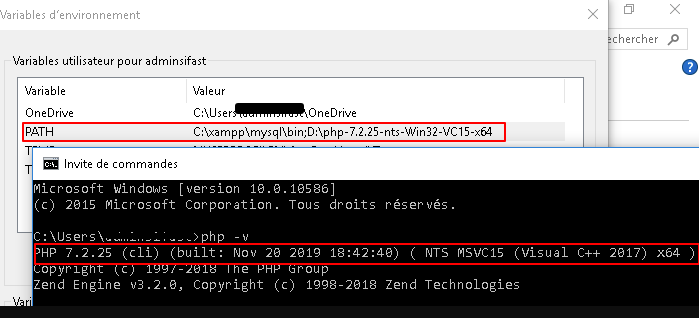
Thanks!
khouloudbelguith
on 12 Dec 2019

here it seems that you have used MinGW and the paths there do not start with C:. The issue has been identified in PHP and it is only presented when native Windows paths are used, i.e. paths starting with drive letters like C:/.
So please:
- open WIndows command line (
cmd.exe) - navigace to the PrestaShop installer folder (using
cd "<PrestaShop root path>/install-dev") - run
cd"D:\php-7.2.25-nts-Win32-VC15-x64/php.exe" --version"D:\php-7.2.25-nts-Win32-VC15-x64/php.exe" ./install_cli.php ...(PHP configuration might be needed to be tweaked to load extensions required by PrestaShop in php.ini)
mvorisek
on 12 Dec 2019
@mvorisek, unfortunately same issue
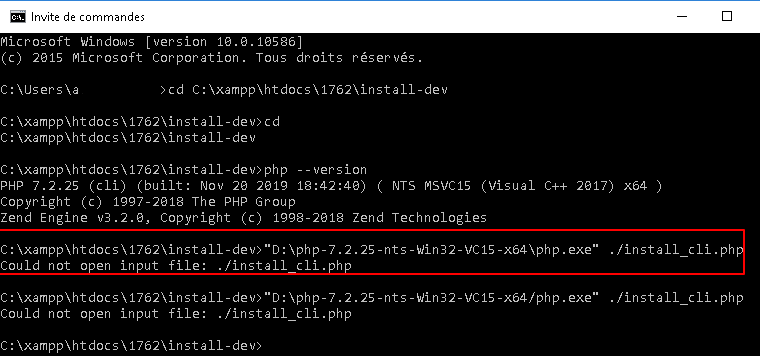
Thanks for your help!
khouloudbelguith
on 12 Dec 2019
@khouloudbelguith You have used install_cli.php in you screenshot and I later too... Retry with index_cli.php.
And also use "D:\php-7.2.25-nts-Win32-VC15-x64/php.exe" --version instead of php --version (updated in my comment too).
mvorisek
on 12 Dec 2019
@mvorisek, new issue

The OpenSSL extension is well configurated.
Thanks!
khouloudbelguith
on 12 Dec 2019
@khouloudbelguith I have never faced a similar issue.
Try to:
- copy the PHP to somewhere in the
C:drive, change cwd to it and then run php from there to use libraries from this folder (see https://www.php.net/manual/en/openssl.installation.php ) - pass an absolute path to the "index_cli.php" file
mvorisek
on 12 Dec 2019
@mvorisek, finally issue solved, but another error during the install
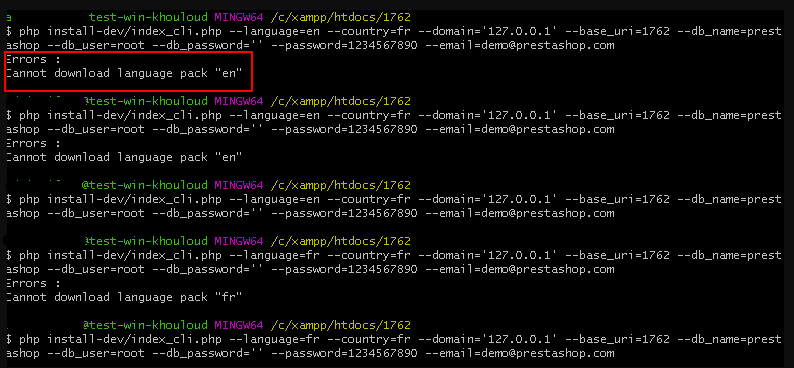
Only when using CLI, this issue occurs.
Thanks!
khouloudbelguith
on 13 Dec 2019
Hi @mvorisek,
Now, it is OK
And the issue is well reproduced

I’ll add this to the debug roadmap so that it’s fixed. If you have already fixed it on your end or if you think you can do it, please do send us a pull request!
Thanks!
khouloudbelguith
on 13 Dec 2019
@khouloudbelguith Great job!
I have already submited a PR to Symfony (see link above) and it has been reviewed today, so I expect it to be merged in the next Symfony 3.4 release.
Btw. this issue in PS is mainly due to usage of absolute template name/path which has been already deprecated in the Symfony 3.4 and in later versions of Symfony the support for absolute paths has been removed. I am not sure if this is the only usage of absolute path in PS, but it should be verified and fixed by a PR in PrestaShop - help wanted.
mvorisek
on 13 Dec 2019
@mvorisek, I have the same issue with PS1.7.6.0

It was ok with PrestaShop1.7.5.2

So, it is a regression.
Thanks!
khouloudbelguith
on 16 Dec 2019
@khouloudbelguith The issue is with /mails/themes/modern. If you delete this folder, the installation will also pass on 1.7.6.x.
But the source of the issue is - as described above - the usage of absolute template path / name:
mainly due to usage of absolute template name/path which has been already deprecated in the Symfony 3.4 and in later versions of Symfony the support for absolute paths has been removed. I am not sure if this is the only usage of absolute path in PS, but it should be verified and fixed by a PR in PrestaShop - help wanted.
So the code where the absolute path is created needs to be isolated and changed to a relative one.
mvorisek
on 16 Dec 2019
@khouloudbelguith do you know if this was working in previous versions of PrestaShop (ex: 1.7.5.2) ?
 colinegin
on 18 Dec 2019
colinegin
on 18 Dec 2019
Hi @colinegin,
I tried with PS1.7.5.2 & it is OK

I check with another Previous PrestaShop version like PS1.7.5.1?
Thanks!
khouloudbelguith
on 18 Dec 2019
Ok thanks I just wanted to know if this was working in 1752 ! :)
colinegin
on 18 Dec 2019
@mvorisek thanks for the PR https://github.com/symfony/symfony/pull/34915 😉
On our side, @Progi1984 is still working on this issue to fix it 😉
 matks
on 17 Jan 2020
matks
on 17 Jan 2020
@matks Thank you for the info.
@Progi1984 The only subject to fix is to use relative paths for templating across the whole PrestaShop project only. It is important, as 3.4 Symfony version will be fixed by my PR in next 3.4 Symfony release, but following versions of Symfony has no support for absolute paths at all.
mvorisek
on 17 Jan 2020
khouloudbelguith
on 28 Jan 2020
Related issues
 sandra2n
·
3Comments
sandra2n
·
3Comments
 vincent-dp
·
3Comments
matks
·
3Comments
matks
·
3Comments
vincent-dp
·
3Comments
matks
·
3Comments
matks
·
3Comments
 Van-peterson
·
3Comments
Van-peterson
·
3Comments