Prestashop: Admin page not working after 1.7.6.0 -> 1.7.6.1 upgrade
Describe the bug
Tried to update Prestashop via the autoupgrade module 4.9.0, checked the option to disable all third part modules, all went well (backup + upgrade without errors shown), the mantainance page works but the backend login throws HTTP response code 500 logging in /var/log/apache2/error.log only
[Thu Sep 12 10:04:22.963585 2019] [proxy_fcgi:error] [pid 2278:tid 140646052509440] [client 79.9.37.39:51741] AH01071: Got error 'PHP message: PHP Fatal error: Uncaught Symfony\\Component\\Debug\\Exception\\FatalThrowableError: Cannot use object of type Symfony\\Component\\HttpFoundation\\ParameterBag as array in /var/www/html/src/Adapter/Security/Admin.php:91\nStack trace:\n#0 /var/www/html/modules/gamification/vendor/symfony/event-dispatcher/EventDispatcher.php(212): PrestaShop\\PrestaShop\\Adapter\\Security\\Admin->onKernelRequest(Object(Symfony\\Component\\HttpKernel\\Event\\GetResponseEvent), 'kernel.request', Object(Symfony\\Component\\EventDispatcher\\ContainerAwareEventDispatcher))\n#1 /var/www/html/modules/gamification/vendor/symfony/event-dispatcher/EventDispatcher.php(44): Symfony\\Component\\EventDispatcher\\EventDispatcher->doDispatch(Array, 'kernel.request', Object(Symfony\\Component\\HttpKernel\\Event\\GetResponseEvent))\n#2 /var/www/html/vendor/symfony/symfony/src/Symfony/Component/HttpKernel/HttpKernel.php(127): Symfony\\Component\\EventDispatcher\\EventDispatcher->dispatch('kernel.request', Object(Symfony\\Component\\HttpKernel\\Event\\GetRe...'
when requesting the admin main page via the browser.
Tried with Firefox in both normal / anonymous mode and Google Chrome.
NB: this Prestashop installation has been already upgraded from almost all version 1.7.4.x to 1.7.5 and later to 1.7.6: it could be possible that this does not manifest by installing 1.7.6.0 and upgrading it to 1.7.6.1
To Reproduce
Steps to reproduce the behavior (unsure they are exactly these):
- Install Prestashop 1.7.4.0 and autoupgrade module (last version available when released this Prestashop version)
- Upgrade autoupgrade module (last version available when released this Prestashop version) and later Prestashop to 1.7.4.1
- Upgrade autoupgrade module (last version available when released this Prestashop version) and later Prestashop to 1.7.4.2
- Upgrade autoupgrade module (last version available when released this Prestashop version) and later Prestashop to 1.7.4.3
- Upgrade autoupgrade module (last version available when released this Prestashop version) and later Prestashop to 1.7.4.4
- Upgrade autoupgrade module (last version available when released this Prestashop version) and later Prestashop to 1.7.5.0
- Upgrade autoupgrade module (last version available when released this Prestashop version) and later Prestashop to 1.7.5.1
- Upgrade autoupgrade module (last version available when released this Prestashop version) and later Prestashop to 1.7.5.2
- Upgrade autoupgrade module (last version available when released this Prestashop version) and later Prestashop to 1.7.6.0
- Upgrade autoupgrade module (last version available when released this Prestashop version) and later Prestashop to 1.7.6.1
- See error
Screenshots
Additional information
PrestaShop version: 1.7.6.0
PHP version:
php -v
PHP 7.3.3-1+0~20190307202245.32+stretch~1.gbp32ebb2 (cli) (built: Mar  7 2019 20:22:46) ( NTS )
Copyright (c) 1997-2018 The PHP Group
Zend Engine v3.3.3, Copyright (c) 1998-2018 Zend Technologies
    with Zend OPcache v7.3.3-1+0~20190307202245.32+stretch~1.gbp32ebb2, Copyright (c) 1999-2018, by Zend Technologies
Gamification module version: 2.3.1
 linuxatico
All 6 comments
Hi @linuxatico,
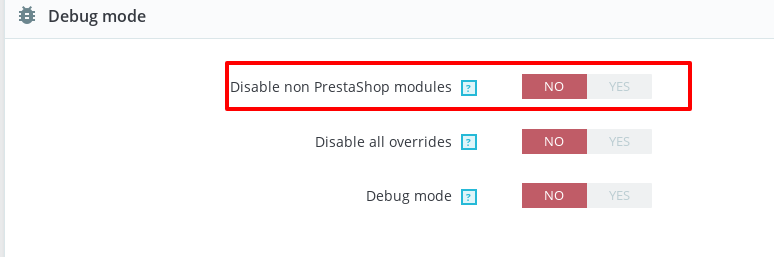
checked the option to disable all third part modules
Did you enabled this option from the auto-upgrade configuration page
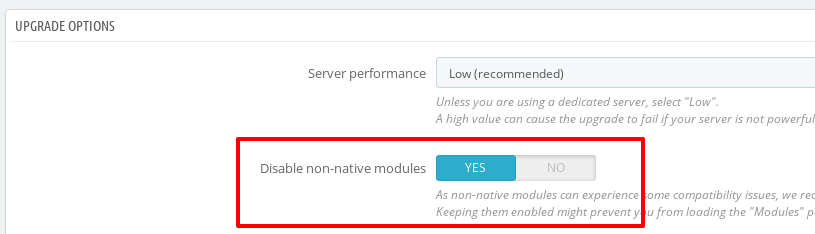
Or from the BO => Advanced Parameters => Performance page?
Can you please provide us the log of your upgrade? It can be found in the log.txt file, available in <admin folder>/autoupgrade/tmp/log.txt
Thanks!
 khouloudbelguith
on 12 Sep 2019
khouloudbelguith
on 12 Sep 2019
I chosed "YES" from the "UPGRADE OPTIONS",
Here is the requested file attached, actually there's written the first Prestashop version is 1.7.5.1 and not 1.7.4.x
log.txt.zip
linuxatico
on 12 Sep 2019
@linuxatico, Could you please try to clear cache manually by deleting all the folder into var/cache (prod & dev) & enable the debug mode to show if there is any exception displayed?
but the backend login throws HTTP response code 500
Thanks to check and feedback.
khouloudbelguith
on 12 Sep 2019
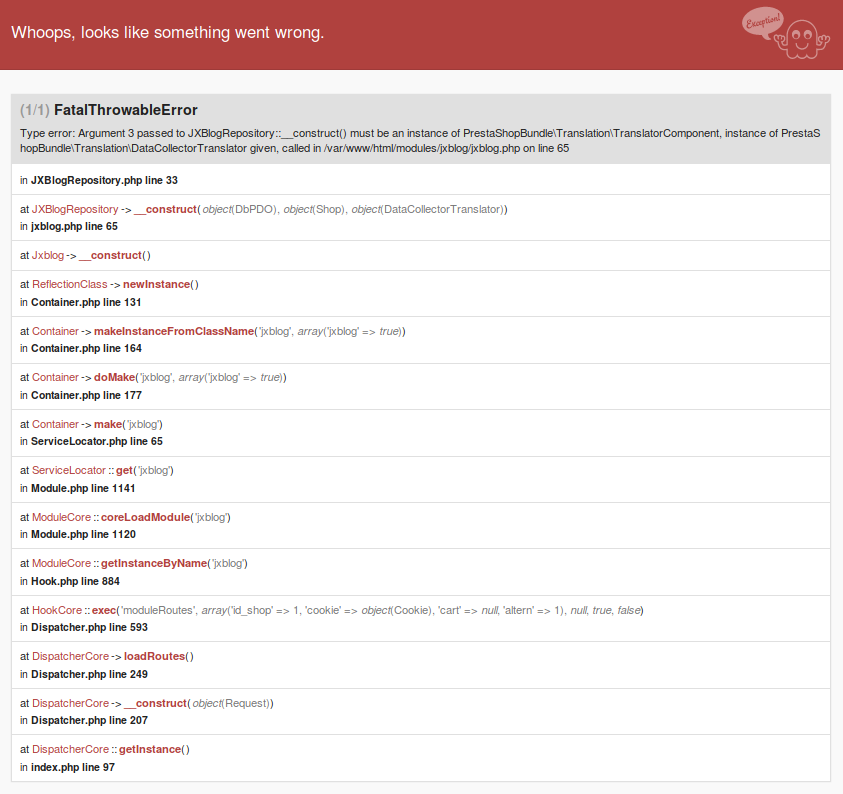
@khouloudbelguith I did the two actions you wrote and I think I found the real cause: a third part module.....
[Thu Sep 12 11:35:42.246175 2019] [proxy_fcgi:error] [pid 2278:tid 140645909833472] [client 79.9.37.39:59012] AH01071: Got error 'PHP message: PHP Fatal error: Uncaught Symfony\\Component\\Debug\\Exception\\FatalThrowableError: Cannot use object of type Symfony\\Component\\HttpFoundation\\ParameterBag as array in /var/www/html/src/Adapter/Security/Admin.php:91\nStack trace:\n#0 /var/www/html/modules/gamification/vendor/symfony/event-dispatcher/Debug/WrappedListener.php(115): PrestaShop\\PrestaShop\\Adapter\\Security\\Admin->onKernelRequest(Object(Symfony\\Component\\HttpKernel\\Event\\GetResponseEvent), 'kernel.request', Object(Symfony\\Component\\HttpKernel\\Debug\\TraceableEventDispatcher))\n#1 /var/www/html/modules/gamification/vendor/symfony/event-dispatcher/EventDispatcher.php(212): Symfony\\Component\\EventDispatcher\\Debug\\WrappedListener->__invoke(Object(Symfony\\Component\\HttpKernel\\Event\\GetResponseEvent), 'kernel.request', Object(Symfony\\Component\\HttpKernel\\Debug\\TraceableEventDispatcher))\n#2 /var/www/html/modules/gamification/vendor/symfony/event-dispatcher/EventDispatcher.php(44): Symfony\\Component\\EventDispatcher\\EventDispatcher->doDi...'
linuxatico
on 12 Sep 2019
@linuxatico, yes!
It is jxblog module.
As it's not a module provided by Prestashop, we can't do anything with this.
You should contact the module author via your addons.prestashop.com account, they are the only ones to help you with it.
Thanks!
khouloudbelguith
on 12 Sep 2019
There is a way to update PS to version 1762
- Before upgrading, we switch to the default template
- Go to FTP -> modules
We change the name of the modules to another one (e.g. we add "_" to the name):
_jxblog
_jxblogcomment
_jxblogpostposts
_jxblogpostproducts
_jxfeaturedpostsThe update does not release errors.
Of course, we lose functionality from the modules with the changed name.
 presciak
on 12 Dec 2019
presciak
on 12 Dec 2019
Related issues
 sandra2n
·
3Comments
sandra2n
·
3Comments
 nrcjea001
·
3Comments
nrcjea001
·
3Comments
 Van-peterson
·
3Comments
Van-peterson
·
3Comments
 esistgut
·
3Comments
esistgut
·
3Comments
 zuk3975
·
3Comments
zuk3975
·
3Comments