Hi
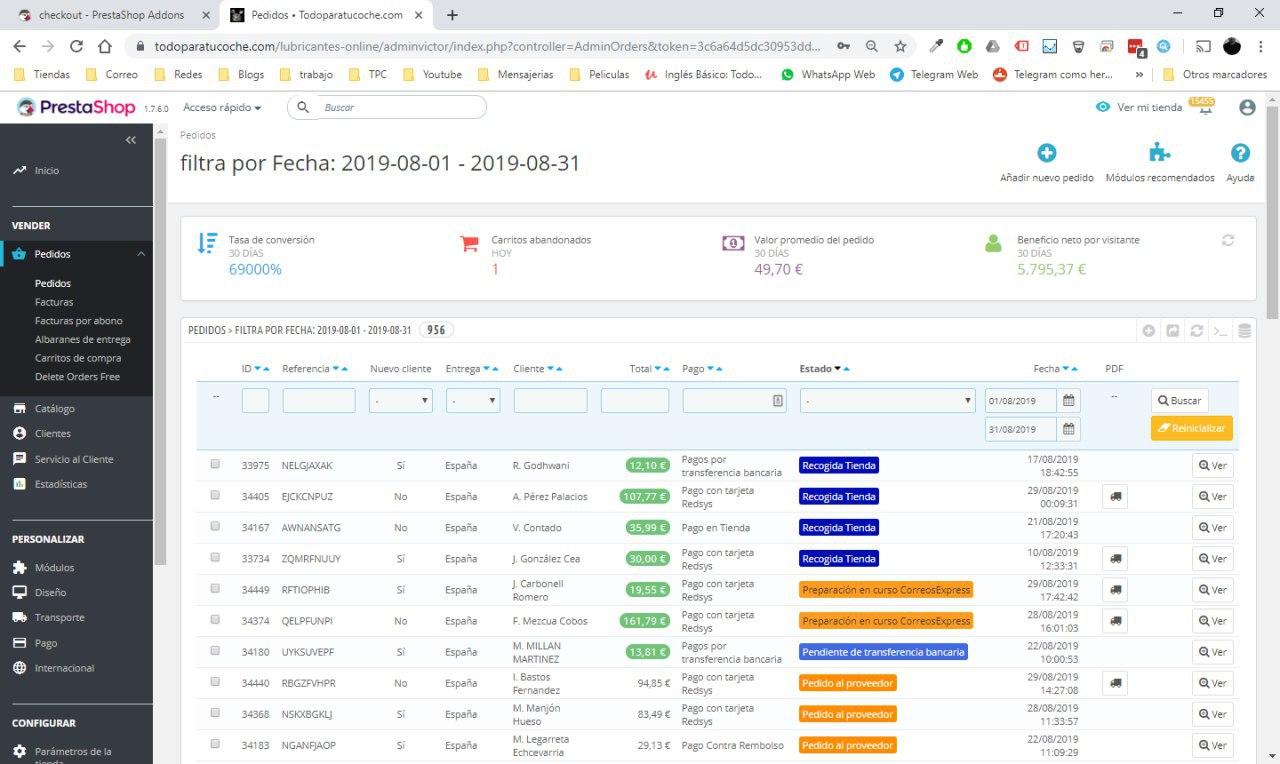
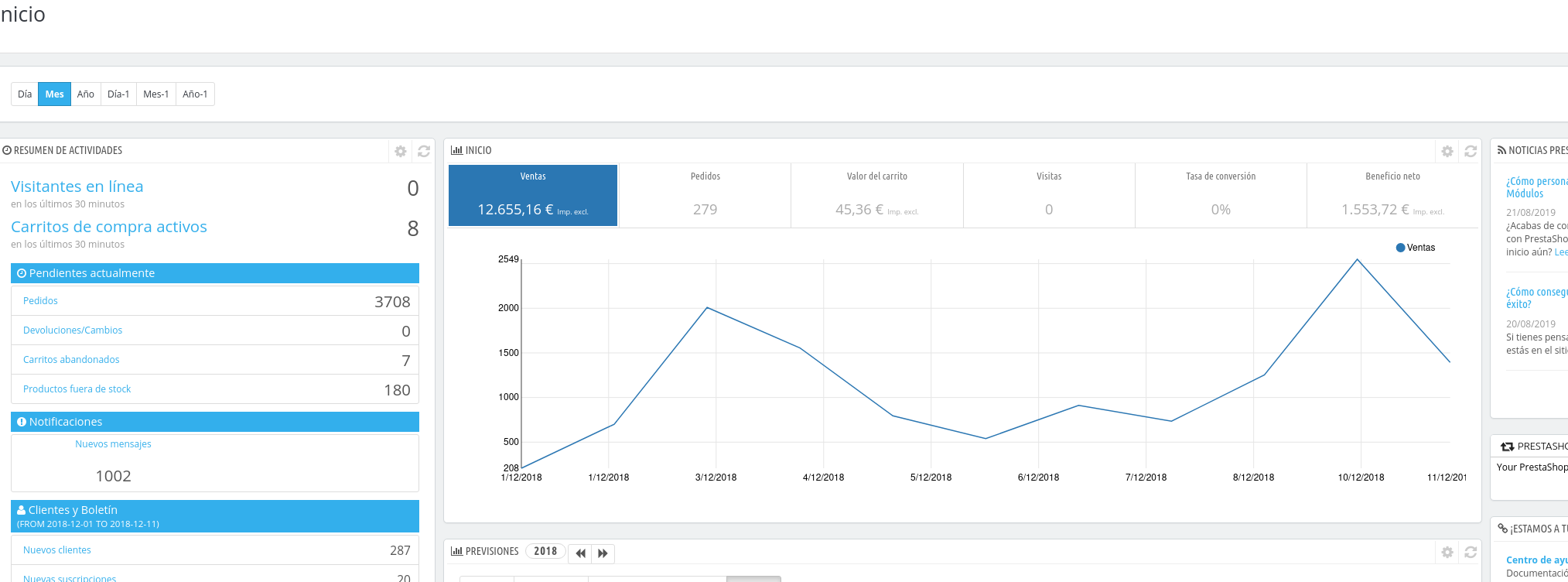
my customer said me that the statistics on the start page of dashboard report sells only of the order with invoices. but the invoice is a document for finance, if you do not have to declare making the invoices or the client does not require an invoice you do not have to generate an invoice. I believe it depends on the states of order, they are activated only with a certain condition. But if you know how many orders you have made, the actual profit and sales, I think it is a major flaw when it comes to seeing sales and products sold.
I can give you the access of this site if you need it
thanks
Screenshots
Additional information
PrestaShop version: 1.7.6.1
PHP version: 7.0
 maofree
All 17 comments
HI
I have discussed this problem with my Maofree programmer, I have seen that we cannot see the reality of the sales made as well as the orders that have been made or the profit margin of our sales because all the orders that have not generated an invoice do not count them and I think that should not be so since it is not always necessary to generate an invoice since that corresponds to the taxation of each country. But if we must have the most accurate information on how many sales we have made and orders or the profit margin that our online store is giving us since it is a critical point to know that we are doing a good job or on the contrary we are carrying a bad strategy of sales, if we are selling with the commercial margin that we earn money or on the contrary if we are losing money because we are selling cheaper. I think it is a very important factor for all online store administrators to have exact control of all orders, products sold and the profit margins that we are having
A greeting and thanks in advance
 Vicdetailer
on 29 Aug 2019
Vicdetailer
on 29 Aug 2019
Hi @maofree, @Vicdetailer,
About the dashtrends module (Dashboard widget), it is necessary to regenerate invoices so the statistics will be displayed, if you don't regenerate an invoice for an order, it will not be taken in consideration for the statistics.
here's a quick solution to generate invoices for all orders.
You need to:
- Navigate to BO => Shop Parameters => Order Settings => Status Tab
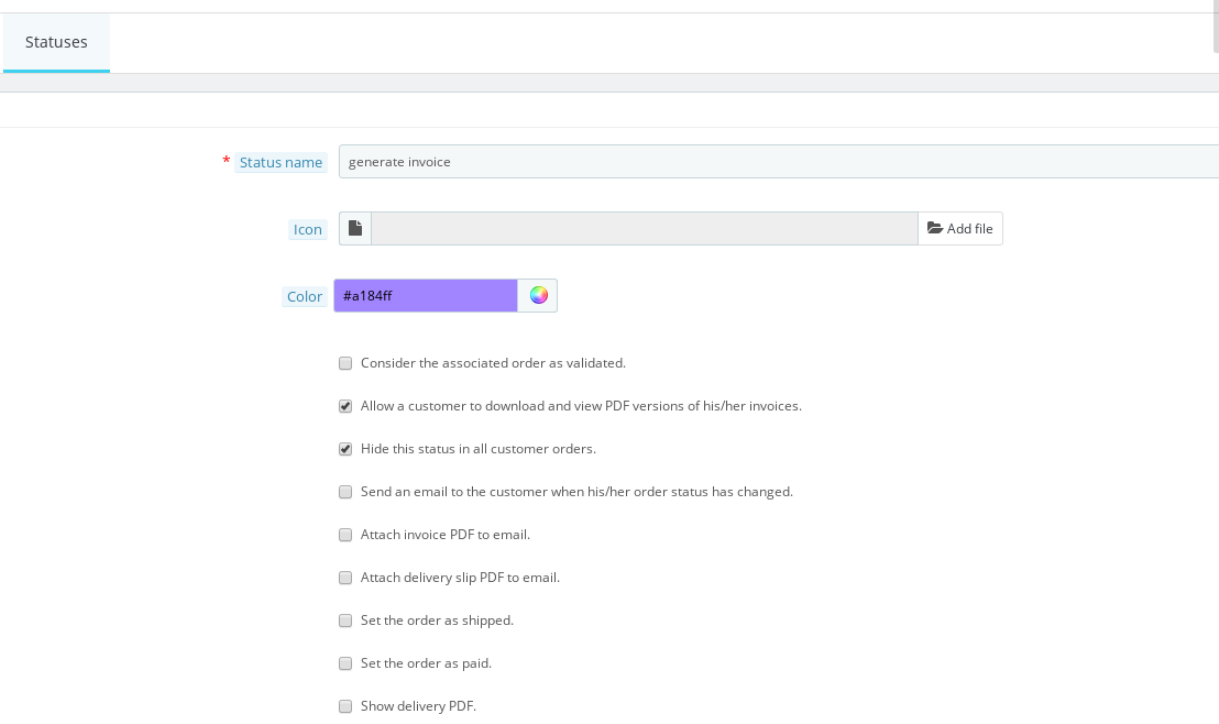
- Create a new order status( for example "generate invoice")
- In this order status created
3.1 Check "Allow a customer to download and view PDF versions of his/her invoices."
3.2 Check "Hide this status in all customer orders."
3.3 Save
- In the BO => Orders => Select all orders => Change Order Status with Bulk actions =>

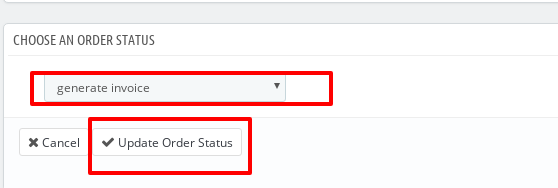
So, all invoices will be generated for all orders without notifying the customer.
You can make a test before applying this solution.
Thanks!
 khouloudbelguith
on 30 Aug 2019
khouloudbelguith
on 30 Aug 2019
hi
the problem is that if you create invoices then you have to register them
maofree
on 30 Aug 2019
@maofree, it is the generating of an invoice for your order. isn't?
Thanks!
khouloudbelguith
on 30 Aug 2019
not for all orders it is necessary to generate an invoice, only if requested, in the other cases Victor will do a receipt to add in the pack before to send it. In this cases he doesn't use order status with that option active
maofree
on 30 Aug 2019
@maofree, thanks for this clarifications.
Ping @marionf, @colinegin what do you think?
Is it possible to have the dashtrends module with statistics independent of the generation of invoices?
It could be a good improvement for this module.
Thanks!
khouloudbelguith
on 30 Aug 2019
Hi @khouloudbelguith
Exactly what @maofree says, the dastrends would have to give exact information of the sales made independently if invoices are generated or not, since the invoices in a document for finance but does not affect when giving the real sales data, Orders or profit margin.
We look forward
Greetings
Vicdetailer
on 30 Aug 2019
@maofree @Vicdetailer Hi, a month ago I made this pull request #14215 that I think it might help you solve your problem.
 hacchus
on 30 Aug 2019
hacchus
on 30 Aug 2019
Hi @khouloudbelguith
About the dashtrends module (Dashboard widget), it is necessary to regenerate invoices so the statistics will be displayed, if you don't regenerate an invoice for an order, it will not be taken in consideration for the statistics.
here's a quick solution to generate invoices for all orders.
Are you sure about the temp solution you provided above? I am asking this because the staus "Payment received" already has "Allow a customer to download and view PDF versions of his/her invoices." checked and still the dashboard data is incorrect.
So I am thinking that regenerating the invoice won't help.
I am using v1.7.5.1 BTW.
Thank you.
 hitinder
on 6 Jan 2020
hitinder
on 6 Jan 2020
@hitinder For each order created, there are different order statuses enables you to easily manage your orders and returns, and keep your customers informed of the evolution of their purchase.
The variously available statuses are visible and editable in the "Statuses" page, under the "Order settings" menu.
In the Statuses page, there are different options:
- Consider the associated order as validated. If enabled, this status marks all associated orders as "paid", and puts them in this same status.
- Allow a customer to download and view PDF versions of their invoice. If disabled, you will have to send customers their invoice yourself.
- Hide this state in all customer orders. This enables you to create internal statuses, for you and your team. Customers will never see this in their order status page.
- Send an e-mail to customer when his/her order status has changed. When enabled, a drop-down menu appears to let you choose which mail template to use.
- Attach invoice PDF to email. Send an email to the customer with the invoice in PDF format attached.
- Attach delivery slip PDF to email. Send an email to the customer with the delivery slip in PDF format attached.
- Set the order as shipped. Be careful: once an order is set as "shipped", it cannot be set back to the previous status.
- Set the order as paid. Same here: once an order is set as "paid", it cannot be set back to the previous status.
- Show delivery PDF. Displays the delivery PDF.
In conclusion, to enable the generations of invoices, in the order status you should have this option "Allow a customer to download and view PDF versions of his/her invoices." checked.
In the dashboard, to get exact stats, we must have two options selected:
- Consider the associated order as validated.
- Allow a customer to download and view PDF versions of his/her invoices.

About my first solution, we just regenerate invoices to valid orders.
Thanks!
khouloudbelguith
on 7 Jan 2020
@khouloudbelguith I understand how the order status works. What I am trying to tell you is that invoice generation is not working or it doesn't work for the dashtrends in the BO the way you explained below.
About the dashtrends module (Dashboard widget), it is necessary to regenerate invoices so the statistics will be displayed, if you don't regenerate an invoice for an order, it will not be taken in consideration for the statistics.
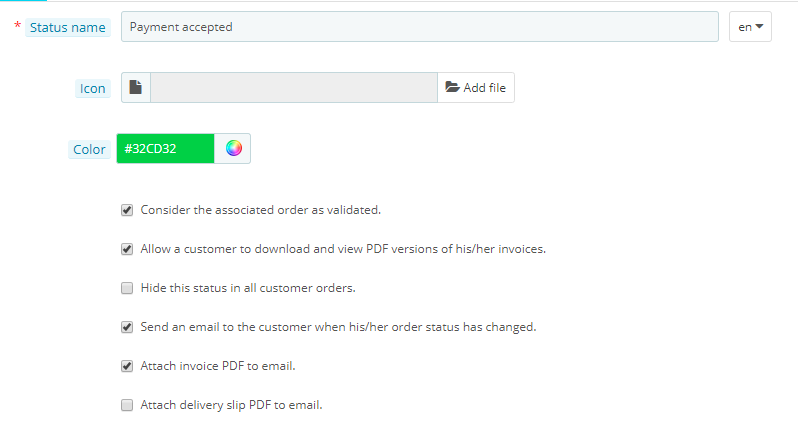
Check this below screenshot from my BO. You can see below that I have both the below options checked. However, in the BO it is still showing the wrong data for me. It doesn't consider discount values.
Consider the associated order as validated.
Allow a customer to download and view PDF versions of his/her invoices.
hitinder
on 7 Jan 2020
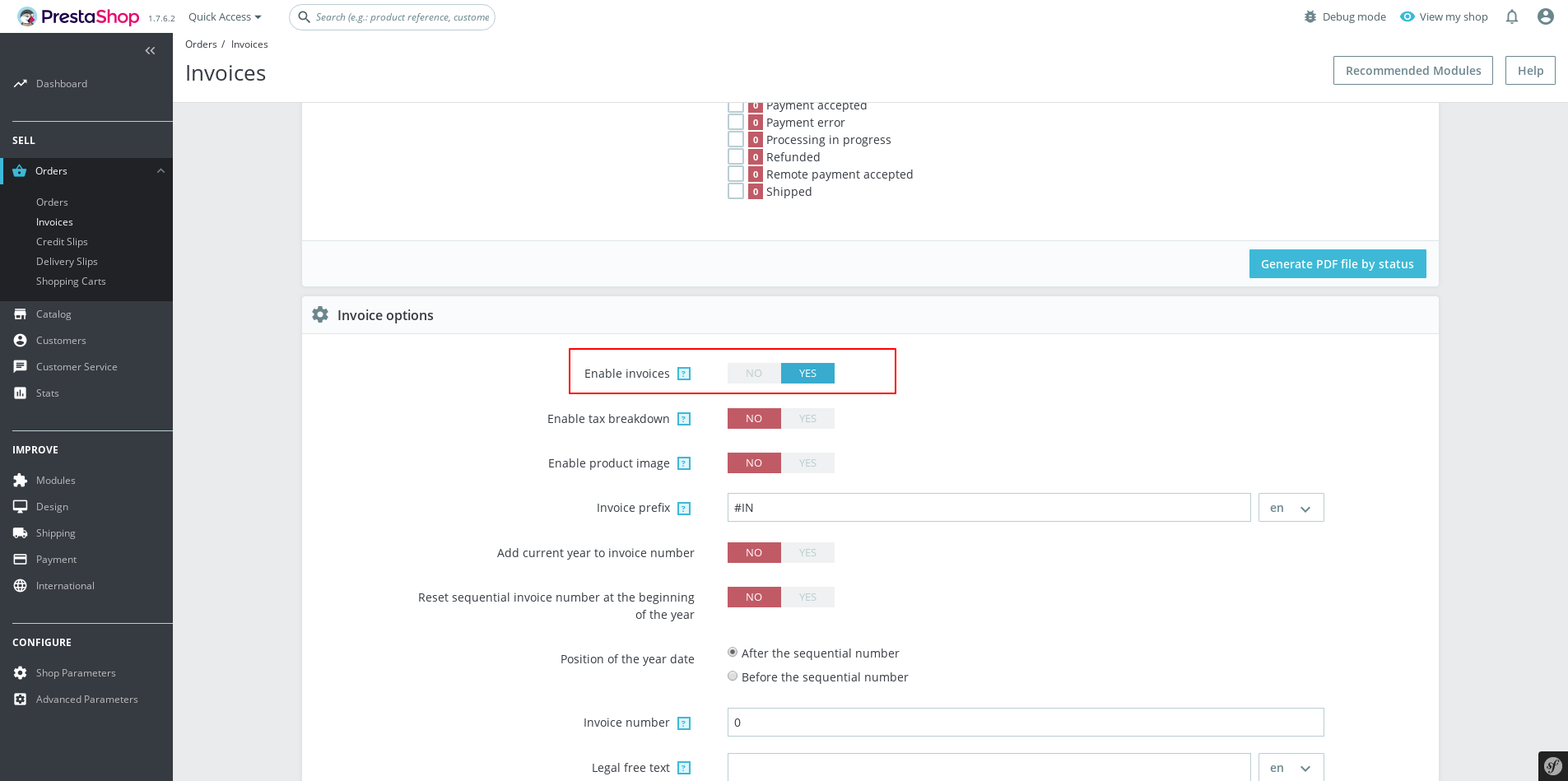
@hitinder, in the BO => Orders => Invoices page The option "Enable invoices" is enabled?
Thanks!
khouloudbelguith
on 7 Jan 2020
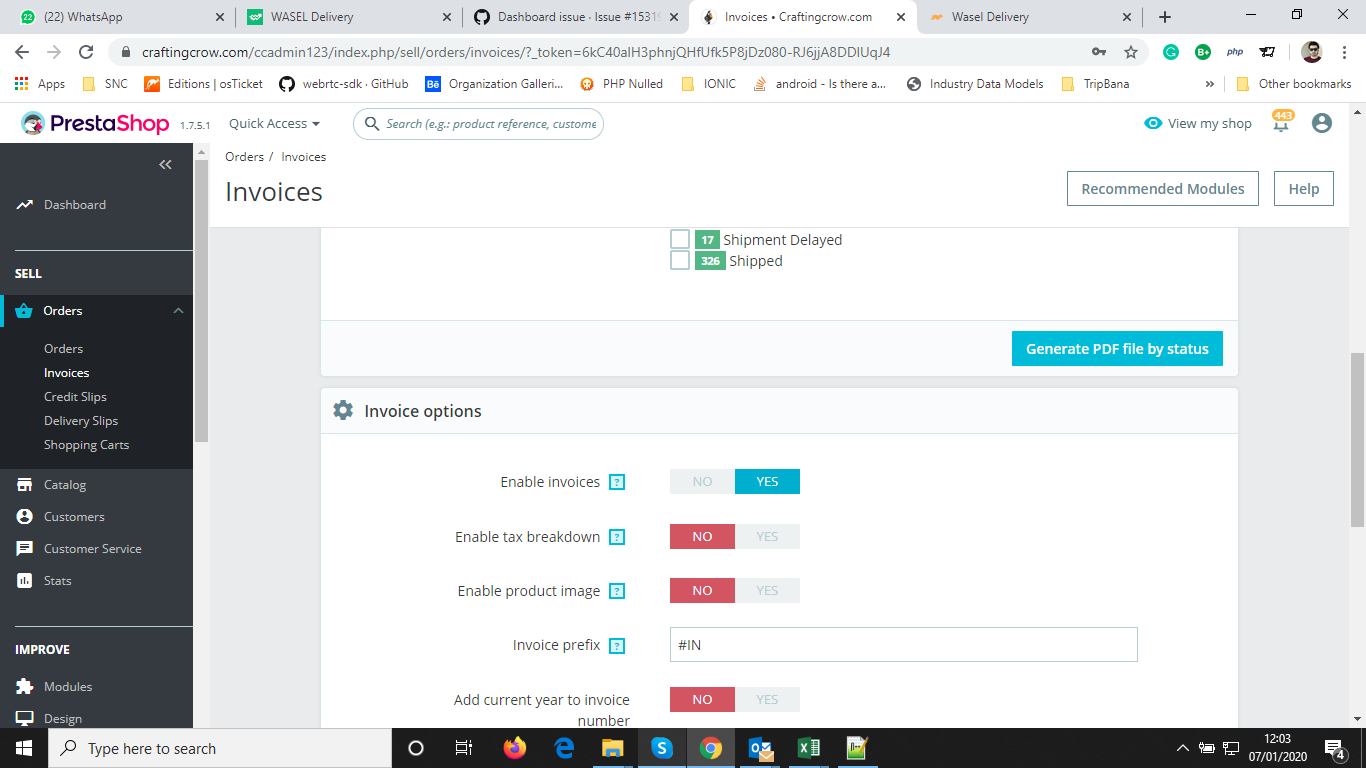
@khouloudbelguith yes it is enabled in the BO for me.
hitinder
on 7 Jan 2020
@hitinder, it is ok in my case with PS1.7.6.2
https://drive.google.com/file/d/1yVfF4DGAe-LxgRHi-ISRBen3k2Jy0jLX/view
Thanks to check & feedback.
khouloudbelguith
on 7 Jan 2020
@khouloudbelguith I am not saying that dashtrends is not working. What is wrong with it is that it's not considering the discount amount.
Example: An item worth $20 and cost $5 in an order with 50% discount should show sales amount as $10 and the profit will be $5. Which is not the case at present.
If you don't mind, please make a new order, apply a 50% discount to it and show how does it come up on the chart.
hitinder
on 7 Jan 2020
@hitinder, this is another issue.
It is added to our bug roadmap, you need to follow this issue: https://github.com/PrestaShop/PrestaShop/issues/15114
Thanks!
khouloudbelguith
on 7 Jan 2020
@khouloudbelguith okay got you! I mixed up the two issues.
hitinder
on 7 Jan 2020
Related issues
 matks
·
3Comments
matks
·
3Comments
 Prestaworks
·
3Comments
khouloudbelguith
·
3Comments
Prestaworks
·
3Comments
khouloudbelguith
·
3Comments
 centoasa
·
3Comments
centoasa
·
3Comments
 esistgut
·
3Comments
esistgut
·
3Comments