Prestashop: 404 error on quick view and adding multiple products to cart
Hello,
It is about this website under 1.7.5.2: https://www.lightpainting-shop.com/
. If you try to use the quick view button on a product, nothing happens and you got a 404 error in the console log
. On a product page, if you change quantities then add to cart, you got the message "An error occurred while processing your request", with a 404 in the console log too
Same problem with the dev website under 1.7.6 and the classic theme: https://www.lightpainting-shop.co.uk/
Does anyone has a solution?
Additional information
PrestaShop version: 1.7.5.2 AND 1.7.6
PHP version: 7.0.27
 sunnmagic
All 20 comments
Hi @sunnmagic,
I did not manage to reproduce the issue with PS1.7.6.0.
https://drive.google.com/file/d/1ydXVeDw9V8kCJRydRShbcinBtyHxhW6p/view
Could you please provide us with more info? We need more details to understand how we can reproduce your issue:
- host
- server setup and configuration
- PrestaShop version (source)
- debug mode report
- PHP error logs
- apache error log
- javascript console log
Don't you know how to get this information? Please read the following article:
http://build.prestashop.com/howtos/misc/how-to-create-bug-report/
Thanks!
 khouloudbelguith
on 30 Jul 2019
khouloudbelguith
on 30 Jul 2019
Hi!
Thanks for your answer. What is the "debug mode report", where can I find a report?
sunnmagic
on 30 Jul 2019
@sunnmagic, when debug mode is enabled, in the FO, when you click on the "Quick view" there is no exception displayed?
Thanks!
khouloudbelguith
on 31 Jul 2019
Nothing at all... actually https://www.lightpainting-shop.co.uk/fr/ is in debug mode.
So, I've collected all the necessary informations:
- host : syntis.net
- server setup and configuration : Linux CentOS 6.10 x64 / Apache 2.2 / PHP : 7.0.27 / MySQL/MariaDB : 5.5.55
- PrestaShop version : 1.7.6
- debug mode report : none
- PHP error logs : none
apache error log : apache.txt
javascript console log:
addtocart.log
quickview.log
Thanks :)
sunnmagic
on 31 Jul 2019
@sunnmagic, Could you please try to regenerate the file .htaccess
- Rename the old file to .htaccess_old
- Disable friendly URL
- Enable friendly URL
Thanks!
khouloudbelguith
on 31 Jul 2019
Done, but same problem :(
sunnmagic
on 31 Jul 2019
@sunnmagic, could you please try to restart your server & clear cache.
Thanks!
khouloudbelguith
on 31 Jul 2019
Server rebooted and Prestashop cache cleared, but same problem :(
sunnmagic
on 31 Jul 2019
@sunnmagic, did make any changes in your project or did you installed any custom module before this issue occurs?
Thanks!
khouloudbelguith
on 31 Jul 2019
Some modules are installed, but all came from Addons.
sunnmagic
on 31 Jul 2019
@sunnmagic, did you installed them before having this issue?
Thanks!
khouloudbelguith
on 31 Jul 2019
Impossible to remember...
sunnmagic
on 31 Jul 2019
@sunnmagic,
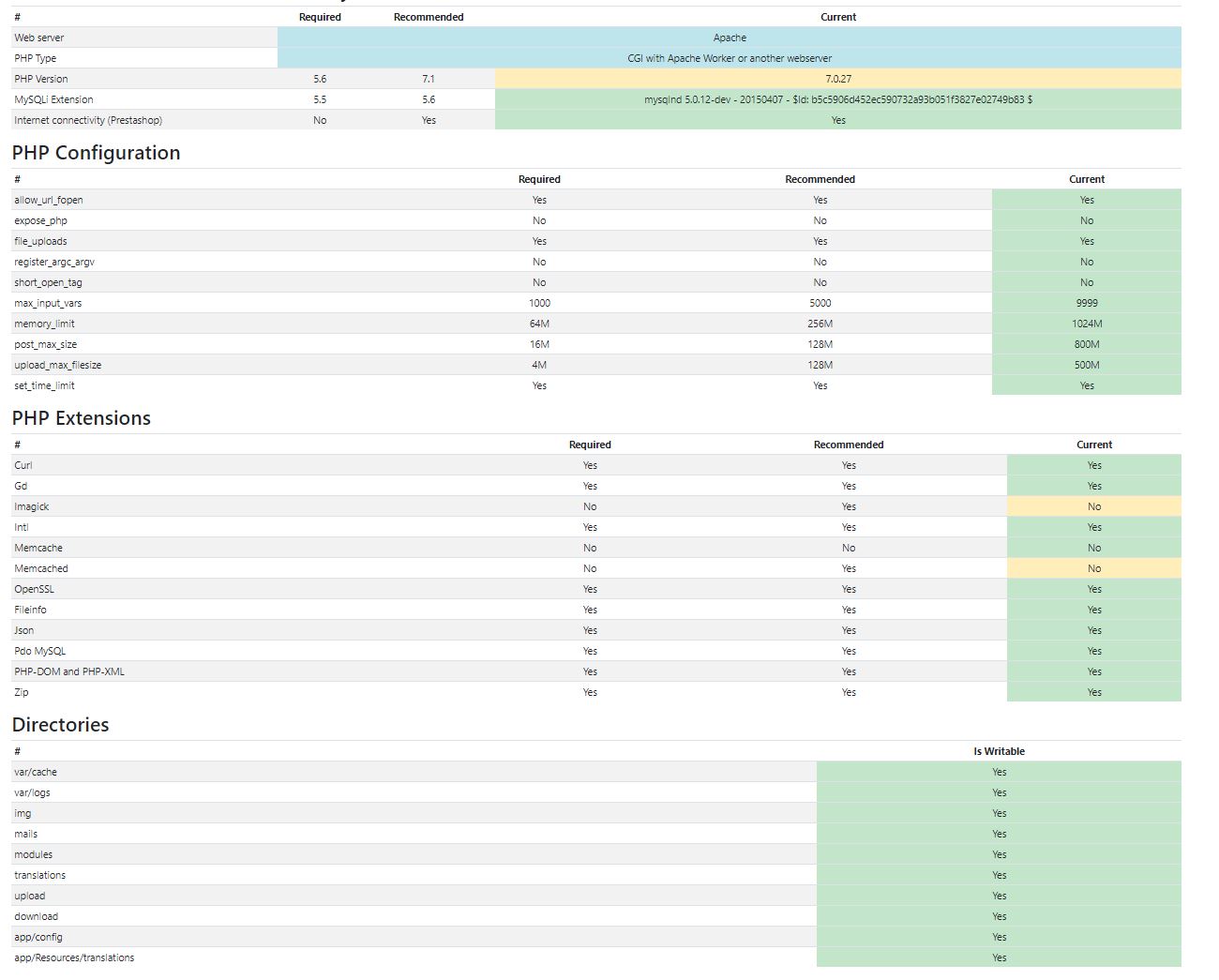
Could you please follow this link: https://github.com/PrestaShop/php-ps-info
phppsinfo file provides an equivalent to the phpinfo() function that reports PrestaShop Requirements information about the PHP/MySQL/Apache environment and offers suggestions for improvement.
- Upload the file to the server. You should upload your file to the exact directory you want to test. Typically, this will be your httpdocs (/var/www/vhosts/example.com/httpdocs/) directory, although you can upload it to any subdirectory on your server as well. Use FTP to upload the file.
- Visit the page in your browser. If you uploaded it to your html directory, you should now visit http://www.example.com/phppsinfo.php, replacing example.com with your own domain name.
- Now you can view all of the information about PHP for your server for that particular directory.

Thanks to check and feedback.
khouloudbelguith
on 31 Jul 2019
FYI I've tried with "Disable non PrestaShop modules" and "Disable all overrides" to "YES", then cache cleared, but nothing changed.
Here are the results of this file:
sunnmagic
on 31 Jul 2019
@sunnmagic, those options don't work as reported in this ticket: https://github.com/PrestaShop/PrestaShop/issues/9965 and here: https://github.com/PrestaShop/PrestaShop/issues/14596
In the BO => Shop Parameters => Traffic & SEO => you don't have any alerts about friendly URL?
Thanks!
khouloudbelguith
on 31 Jul 2019
I got "URL rewriting (mod_rewrite) is not active on your server, or it is not possible to check your server configuration. If you want to use Friendly URLs, you must activate this mod."
But URL rewriting is working, so the mod seems fine.
sunnmagic
on 31 Jul 2019
@sunnmagic, yes, this is the exact issue.
You have an issue on your server with mod rewrite, you need to check with your host about this issue.
PS: if you disable the option friendly URL => No error.
Thanks!
khouloudbelguith
on 31 Jul 2019
Weird... but thanks, I will talk with my host!
Thank you very much for your help :)
sunnmagic
on 31 Jul 2019
@sunnmagic, thanks!
Despite our several trials, we could not reproduce your issue with the provided information.
It seems that your issue is not a PrestaShop's core bug but most likely a server configuration or customization problem.
Thanks!
khouloudbelguith
on 31 Jul 2019
Good to know, I will let you know what the solution is, we never know, if someone has the same problem!
sunnmagic
on 31 Jul 2019
Related issues
 zuk3975
·
3Comments
zuk3975
·
3Comments
 matks
·
3Comments
matks
·
3Comments
 Van-peterson
·
3Comments
Van-peterson
·
3Comments
 vincent-dp
·
3Comments
vincent-dp
·
3Comments
 Prestaworks
·
3Comments
Prestaworks
·
3Comments