Prestashop: how can i get the why slow
PrestaShop version: PrestaShop version: 1.7.5.1
PHP version: 7.2.19
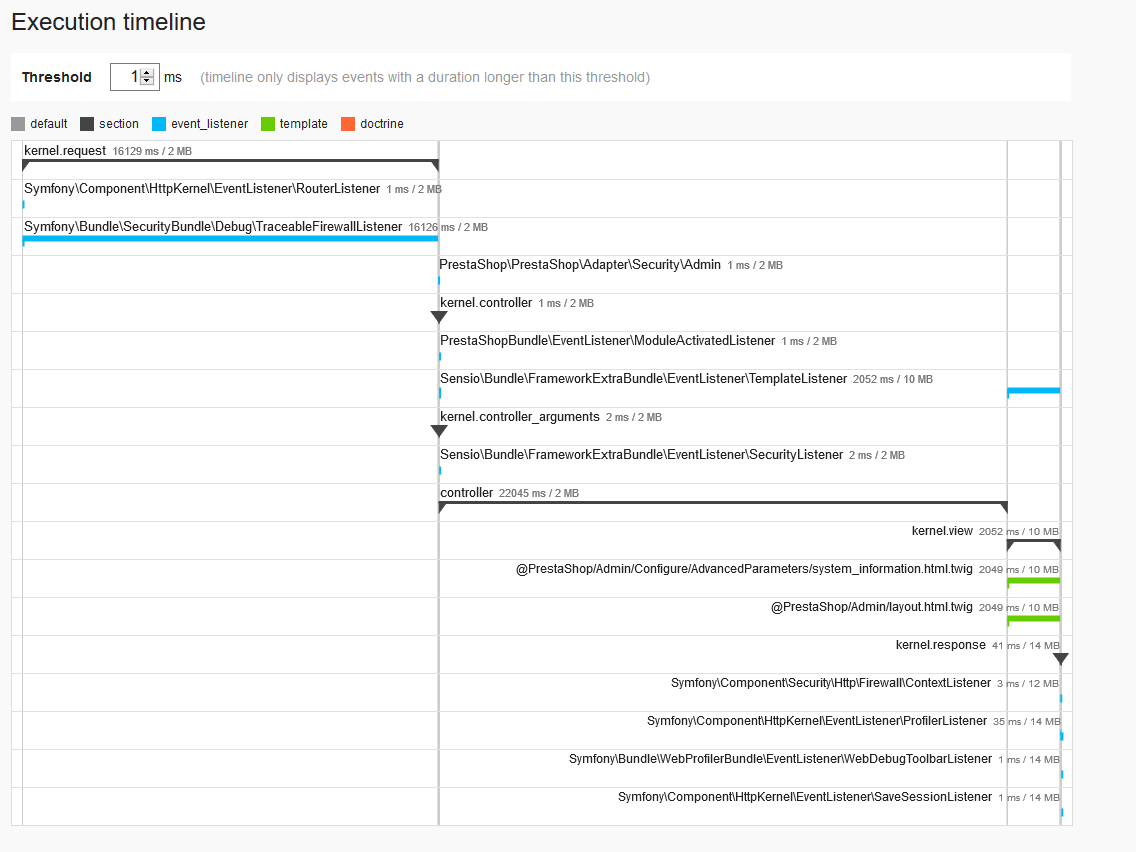
index.php/configure/advanced/system-information/
 langziyang
All 14 comments
Hi @langziyang,
Could you please try to enable profiling mode
In your Projetc_Folder/config/defines.inc.php, you need to replace this
if (!defined('_PS_DEBUG_PROFILING_')) {
    define('_PS_DEBUG_PROFILING_', flase);
}
by this
if (!defined('_PS_DEBUG_PROFILING_')) {
    define('_PS_DEBUG_PROFILING_', true);
}
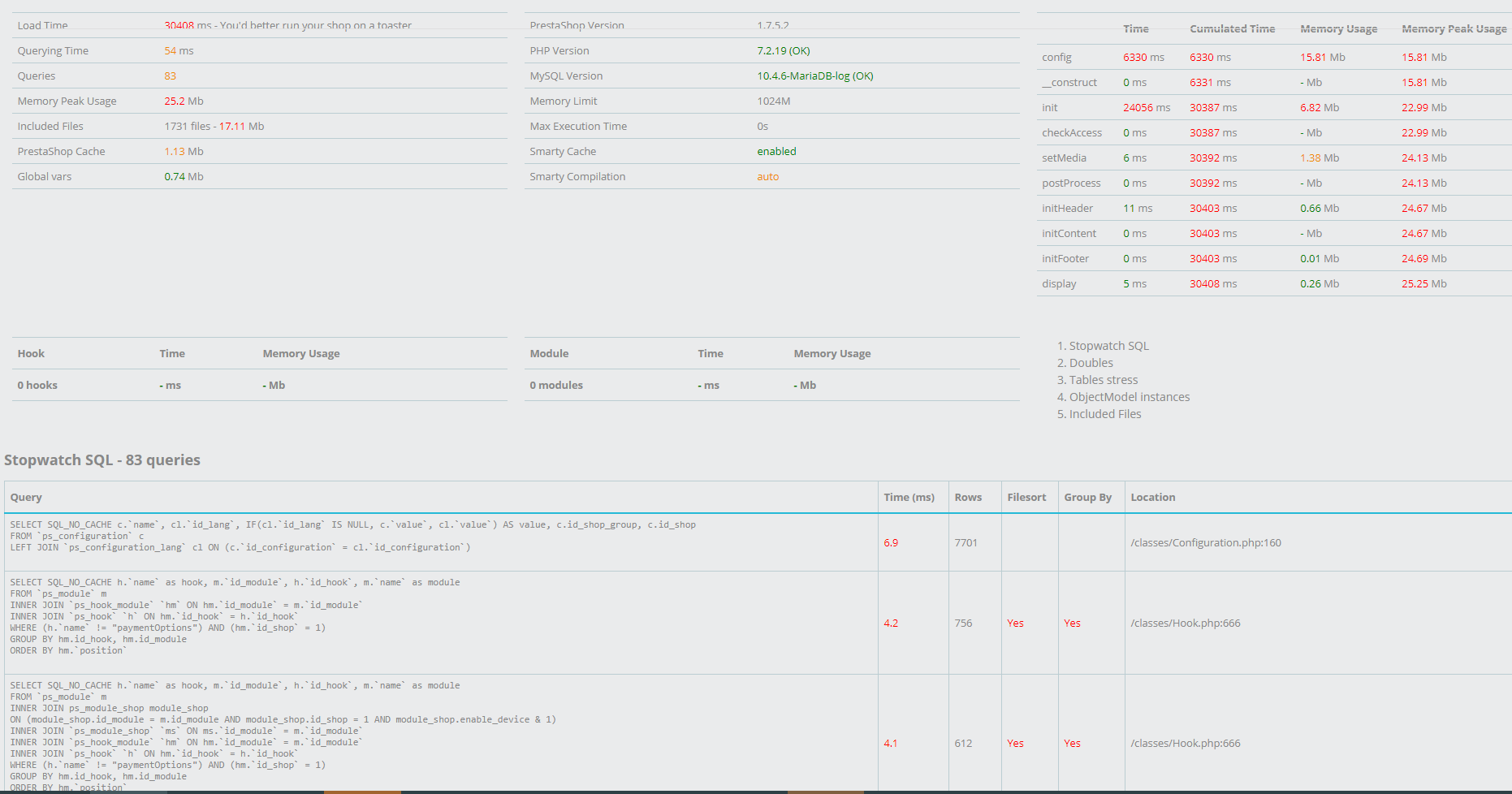
When profiling mode is enabled, you should have information about the time needed to run queries.
Thanks to check & feedback.
 khouloudbelguith
on 18 Jul 2019
khouloudbelguith
on 18 Jul 2019
Hi @langziyang,
Could you please try to enable profiling mode
In your Projetc_Folder/config/defines.inc.php, you need to replace thisif (!defined('_PS_DEBUG_PROFILING_')) { define('_PS_DEBUG_PROFILING_', flase); }by this
if (!defined('_PS_DEBUG_PROFILING_')) {
    define('_PS_DEBUG_PROFILING_', true);
}
When profiling mode is enabled, you should have information about the time needed to run queries.
Thanks to check & feedback.
you can see on https://demo.518global.com/zh/ i upgrade to 1.7.5.2
langziyang
on 18 Jul 2019
Hi @langziyang,
Could you please try to enable profiling mode
In your Projetc_Folder/config/defines.inc.php, you need to replace thisif (!defined('_PS_DEBUG_PROFILING_')) { define('_PS_DEBUG_PROFILING_', flase); }by this
if (!defined('_PS_DEBUG_PROFILING_')) {
    define('_PS_DEBUG_PROFILING_', true);
}
When profiling mode is enabled, you should have information about the time needed to run queries.
Thanks to check & feedback.
and the backoffice is
langziyang
on 18 Jul 2019
@langziyang,
- Do you have any additional cache? for example opcache?
- Try to implement this fix: https://github.com/PrestaShop/PrestaShop/pull/12940/files
- Some performance issues have been detected on our side and have been solved with #11559.
It is added in the PS1.7.6.0, try to implement this fix also.
Thanks to check & feedback.
khouloudbelguith
on 18 Jul 2019
@langziyang,
- Do you have any additional cache? for example opcache?
- Try to implement this fix: https://github.com/PrestaShop/PrestaShop/pull/12940/files
- Some performance issues have been detected on our side and have been solved with #11559.
It is added in the PS1.7.6.0, try to implement this fix also.Thanks to check & feedback.
1、yes,i use opcache
ok,i will try other thing,thanks
langziyang
on 18 Jul 2019
@langziyang, Could you please try to disable any type of caching extensions, check & feedback.
PS: you can follow our documentation to optimize your shop: https://devdocs.prestashop.com/1.7/scale/optimizations/
Thanks!
khouloudbelguith
on 18 Jul 2019
@langziyang, Could you please try to disable any type of caching extensions, check & feedback.
PS: you can follow our documentation to optimize your shop: https://devdocs.prestashop.com/1.7/scale/optimizations/
Thanks!
i already do this documentation
langziyang
on 18 Jul 2019
@langziyang, any news?
Did you try to implement fixes?
Thanks!
khouloudbelguith
on 18 Jul 2019
@langziyang, any news?
Did you try to implement fixes?Thanks!
yes,i did
langziyang
on 18 Jul 2019
@langziyang, your shop is still slow?
Thanks!
khouloudbelguith
on 18 Jul 2019
@langziyang, your shop is still slow?
Thanks!
i am try up gto 1.7.6.0
langziyang
on 18 Jul 2019
@langziyang, thanks!
Waiting for your feedback.
khouloudbelguith
on 18 Jul 2019
@langziyang, thanks!
Waiting for your feedback.
i upgrade, look like better, https://demo.518global.com/zh/
thank you
langziyang
on 18 Jul 2019
@langziyang, great!
I close the issue, feel free to open a new one when needed.
Thanks!
khouloudbelguith
on 18 Jul 2019
Related issues
 nrcjea001
·
3Comments
nrcjea001
·
3Comments
 hiousi
·
3Comments
hiousi
·
3Comments
 esistgut
·
3Comments
esistgut
·
3Comments
 Prestaworks
·
3Comments
Prestaworks
·
3Comments
 PrestaShark
·
3Comments
PrestaShark
·
3Comments