Prestashop: GDPR isn't working if the module have multiple form on same page.
Describe the bug
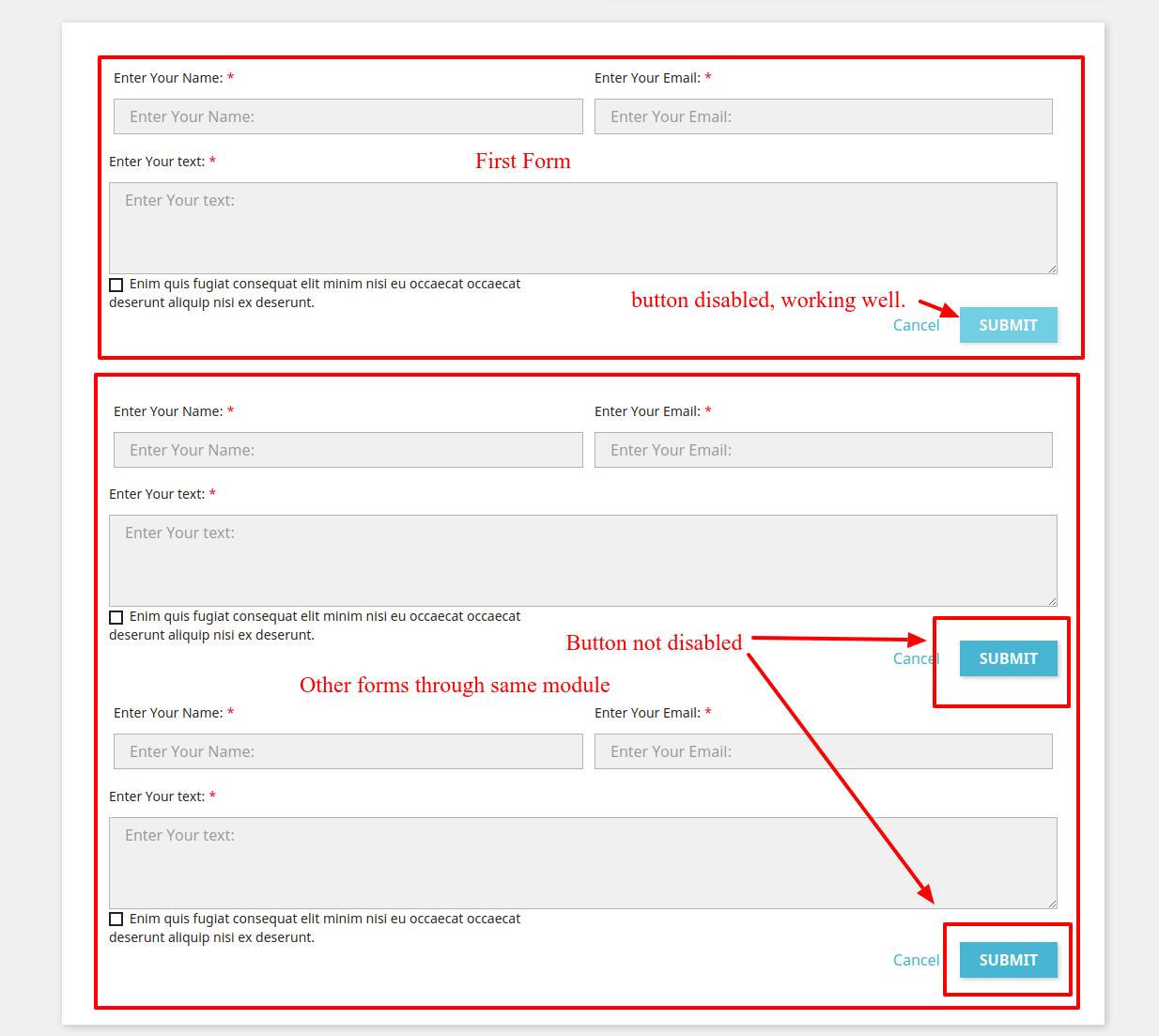
If the module which has multiple forms on the same page at the same time on DOM then the GDPR module consent box doesn't work. The submit button of the forms doesn't get disable except the first form on page load.
To Reproduce
To reproduce the issue, need to create a tpl file with multiple forms in a single module and add the "displayGDPRConsent" hook to add consent box.
Steps to reproduce the behavior:
- On Prestashop install GDPR module
- Now in any module add a tpl file which has multiple forms on a single page (like using this hook displayFooterProduct)
- And also add the "displayGDPRConsent" hook to display the consent box on each form.
- Now check the front end, it will disable only first form submit button instead of all forms submit button.
Screenshots
Additionnal information
PrestaShop version: 1.7.5.2
PHP version: 7.0.33
 PeeyushAgrawalWebkul
All 15 comments
Hi @PeeyushAgrawalWebkul,
Thanks for your report.
Could you please provide me your demo module to test it.
This is a public space.
You can provide me the module by email.
My address mail: khouloud.[email protected]
Let's be safe!
In my case, I tried with "ps_emailsubscription" module, but only one form is always displayed.
Thanks!
 khouloudbelguith
on 1 Jul 2019
khouloudbelguith
on 1 Jul 2019
Hello @khouloudbelguith ,
Yes, I'll provide a test module soon.
Thanks!
PeeyushAgrawalWebkul
on 11 Jul 2019
@PeeyushAgrawalWebkul, thanks!
Waiting for your feedback.
khouloudbelguith
on 11 Jul 2019
@PeeyushAgrawalWebkul, any news?
Thanks!
khouloudbelguith
on 9 Aug 2019
Hello @khouloudbelguith
I have emailed a test module on your email id. Please check and let me know I'll create the PR for this issue solution.
Thanks.
PeeyushAgrawalWebkul
on 10 Aug 2019
@PeeyushAgrawalWebkul, sorry for the late answer.
But, I did not receive any mail yet.
Thanks to re-send me again the module.
khouloudbelguith
on 20 Aug 2019
@khouloudbelguith
Please check the attachment (Test module) to check this issue.
Uploading testgdpr.zip…
Thanks.
PeeyushAgrawalWebkul
on 20 Aug 2019
@khouloudbelguith
Please check the attachment (Test module) to check this issue.
testgdpr.zip
Thanks.
PeeyushAgrawalWebkul
on 20 Aug 2019
@PeeyushAgrawalWebkul, thanks for your feedback.
I tried with your module with PS1.7.6.0 & PS1.7.5.2
- No checkbox is checked => All "Submit" buttons are disabled => OK
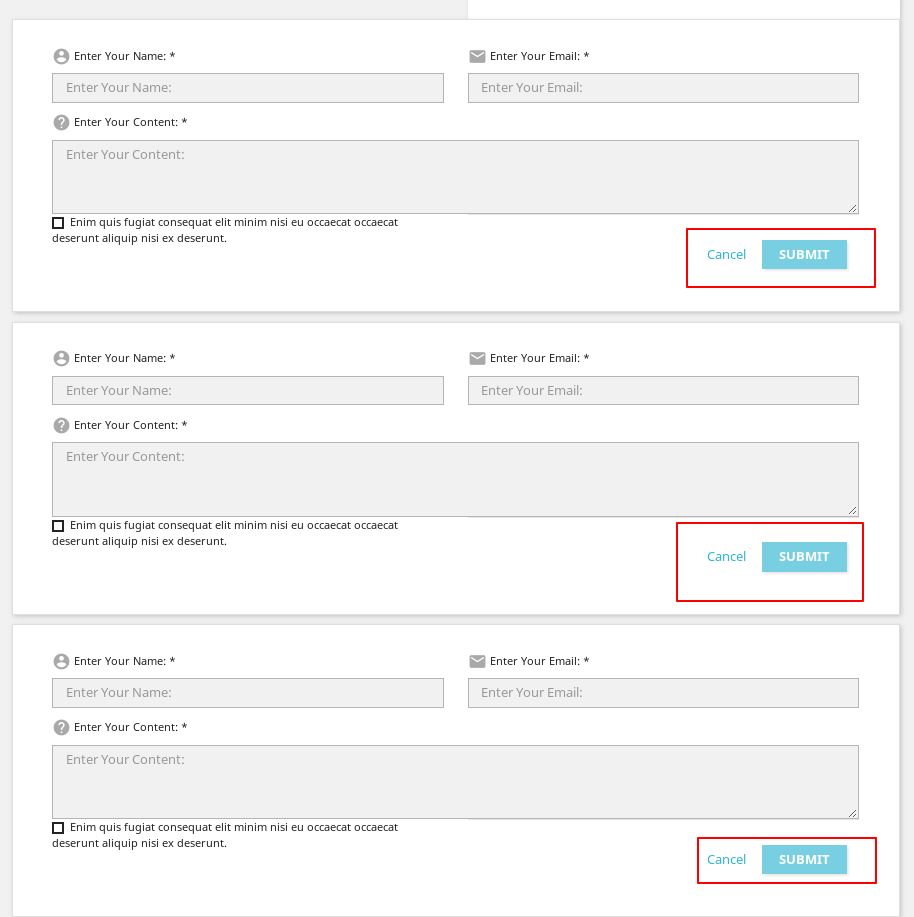
Thanks to check & feedback
khouloudbelguith
on 20 Aug 2019
Hello @khouloudbelguith
Now please try to check the third or second checkbox, it will not enable the corresponding submit button , it will enable the first form button.
PeeyushAgrawalWebkul
on 20 Aug 2019
@PeeyushAgrawalWebkul, if I check the second & the third checkbox => no "Submit" button is enabled.
If I check the first one => all the other "Submit" buttons are enabled.
https://drive.google.com/file/d/1K4M4pS0KikmcjW0Nx7Ss6I8wvtVV4jh8/view
Thanks!
khouloudbelguith
on 20 Aug 2019
@khouloudbelguith
Yes, that's the issue. I have a solution for this issue.
Please once confirm that the issue is clear so that I can create the PR for the solution of this issue.
Thanks
PeeyushAgrawalWebkul
on 20 Aug 2019
@PeeyushAgrawalWebkul, thanks for your feedback.
I have the same issue with PS1.7.5.2 & PS1.7.6.0.
I’ll add this to the debug roadmap so that it’s fixed. If you have already fixed it on your end or if you think you can do it, please do send us a pull request!
Thanks!
khouloudbelguith
on 20 Aug 2019
Hello @khouloudbelguith @Darmona
As the issue is related to the GDPR module that's why I have raised a pull request on GDPR repository.
Please check - https://github.com/PrestaShop/psgdpr/pull/64
If any changes need to done then please let me know.
Thanks.
PeeyushAgrawalWebkul
on 21 Sep 2019
Fixed by PrestaShop/psgdpr#64
 Progi1984
on 3 Apr 2020
Progi1984
on 3 Apr 2020
Related issues
 itisco
·
3Comments
itisco
·
3Comments
 vincent-dp
·
3Comments
vincent-dp
·
3Comments
 centoasa
·
3Comments
centoasa
·
3Comments
 zuk3975
·
3Comments
zuk3975
·
3Comments
 matks
·
3Comments
matks
·
3Comments