Prestashop: Error Faceted Search Module
Hi, I have found other issue with new version of Faceted search module. When I active the faceted search module the default combination of products is not showed in product list.
I am working in a multistore PS 1.7.4.4
To Reproduce
- Set a combination of a product with a discount price.
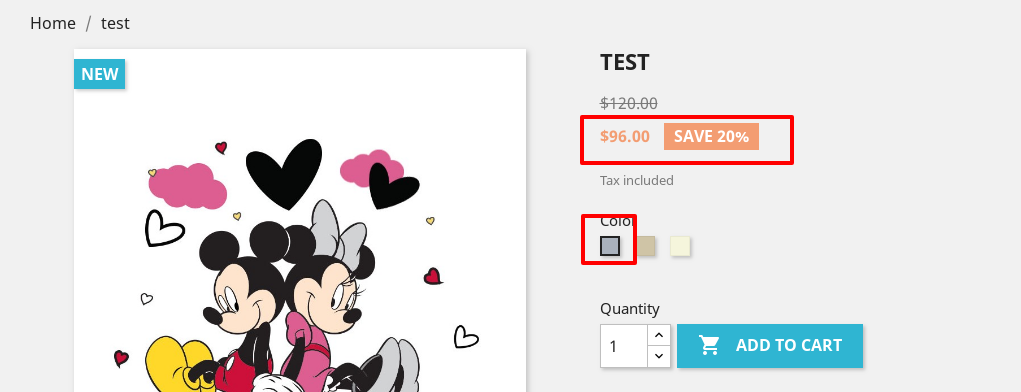
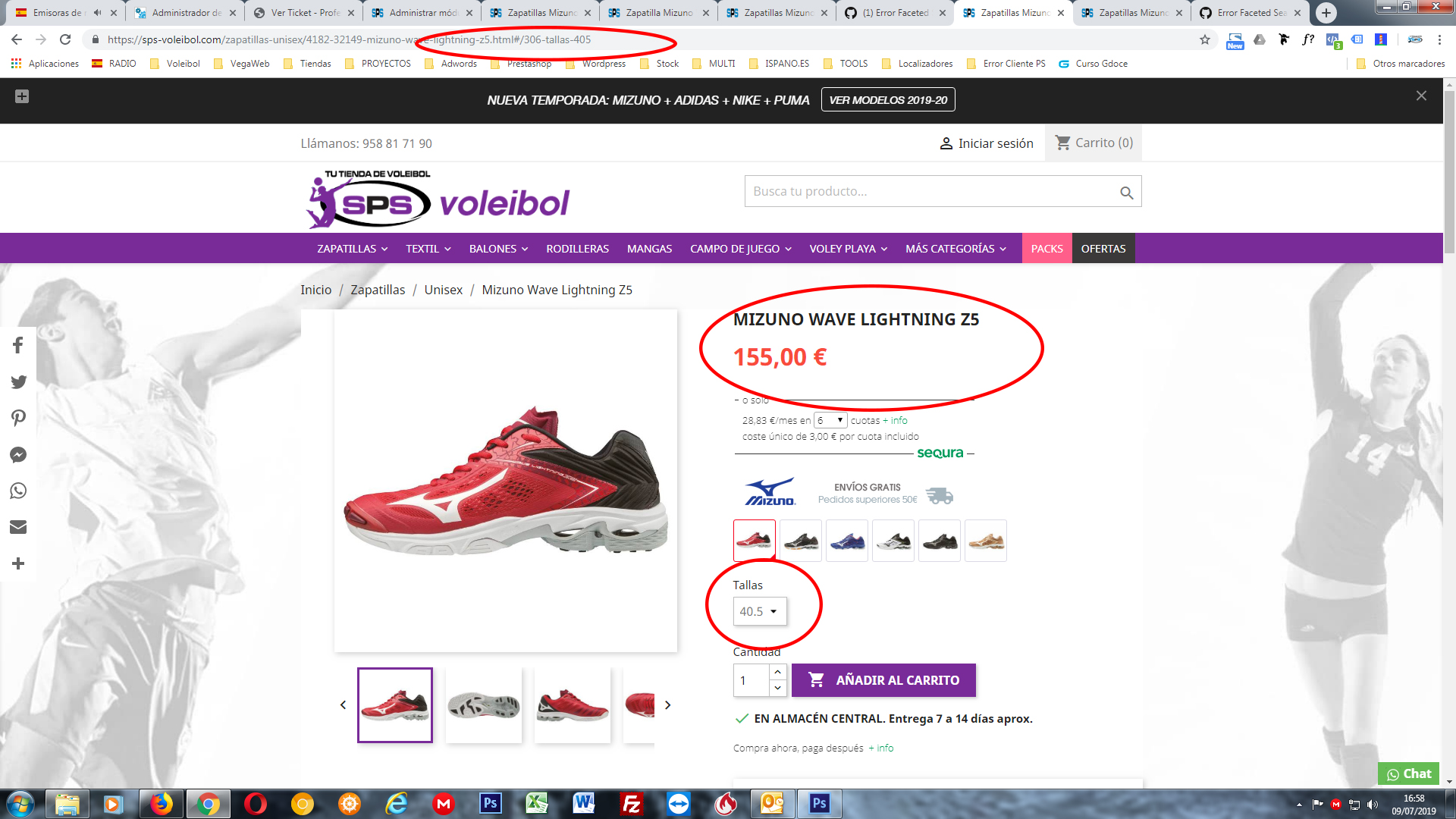
- Set that combination as default (see screenshot 1).
- Go to product list and see the product, the default combination is not showed (price is the clue to know the error, see screenshot 2).
- Click in the product and see that not open the deault combination (see screenshot 3).
If I deactive the faceted search module everything is working fine.
PHP version: 7.0.33
PS version: 1.7.4.4
Multistore Shop
 frankymartinES
All 48 comments
Hi @frankymartinES,
We just released a new version of the module ps_facetedsearch.
It is v3.0.5, https://github.com/PrestaShop/ps_facetedsearch/releases/tag/v3.0.5
Could you please try with this version and feedback.
Thanks!
 khouloudbelguith
on 19 Jun 2019
khouloudbelguith
on 19 Jun 2019
Could I to update from backoffice? or Do I need to upload the zip? and After upload Do I need to change any file?
frankymartinES
on 19 Jun 2019
@frankymartinES, could you please try with this zip folder.
ps_facetedsearch.zip
Thanks!
khouloudbelguith
on 19 Jun 2019
@khouloudbelguith I have updated from backoffice and the error is still here :-(
frankymartinES
on 21 Jun 2019
@frankymartinES, thanks for your feedback.
I did not manage to reproduce the issue with PS1.7.6.0beta1 & PS1.7.5.2 & ps_facetedsearch v3.0.5.
I attached a video record
https://drive.google.com/file/d/1QplgmBOCtFq4Mx-2lzt4yrmGsFyNJLGJ/view
Thanks to check & feedback.
khouloudbelguith
on 21 Jun 2019
@khouloudbelguith I see the error hapen in all products added before the first update of the module. Maybe the error is in relation with data base or cache?
frankymartinES
on 21 Jun 2019
@frankymartinES, Could you please try to clear cache manually by deleting all the folder into var/cache (prod & dev).
You can also Click on "Rebuild entire price index", "Build attributes and features indexes" & "Clear cache" button in the ps_facetedsearch configuration module.
Thanks to check and feedback.
khouloudbelguith
on 21 Jun 2019
@khouloudbelguith I have renamed the folders prod and dev into var/cache and "Rebuild entire price index", "Build attributes and features indexes" & "Clear cache" in one of the shops of my multistore but nothing change. Any idea?
frankymartinES
on 21 Jun 2019
@frankymartinES, We need to retrieve the PHP error log and the debug mode report in order to find out what's wrong.
Don't you know how to get this information? Please read the following article:
http://build.prestashop.com/howtos/misc/how-to-create-bug-report/
Thanks!
khouloudbelguith
on 21 Jun 2019
Hi, I have updated to last version v3.0.6 but the error continue. And I found another, en 2 shops of my multistore the module is not showed in the right column after activate. I have check that the module is set in that hook. Could i give you acces to my backoffice?
frankymartinES
on 3 Jul 2019
@khouloudbelguith forgot about the second error!! It is solved. But the main problem is that the default combination is not showed in few products.
frankymartinES
on 3 Jul 2019
@frankymartinES, in the BO => Shop Parameters => Product Settings => the option "Display unavailable product attributes on the product page" is enabled or disabled?
Thanks!
khouloudbelguith
on 4 Jul 2019
@khouloudbelguith it is enabled because if I disable it the client can´t change the combination in product page. But I test it and after disable that option the error continue.
frankymartinES
on 4 Jul 2019
@frankymartinES, I tried with PS1.7.5.2 again & the ps_facetedsearch module v3.0.6 => but it is OK.
The default combination is well displayed.
We need to retrieve the PHP error log and the debug mode report in order to find out what's wrong.
Thanks!
khouloudbelguith
on 4 Jul 2019
Hi @khouloudbelguith, in new products the module es working great, but in prodcuts before the first update the error exist. I am going to try to send you the error log details.
frankymartinES
on 4 Jul 2019
@khouloudbelguith I can´t find any file;
PHP error log:
Apache: /var/log/apache/php_error.log
Nginx: /var/log/php-fpm/default/error.log
IIS: %SystemDrive%\inetpub\logs\LogFiles
frankymartinES
on 4 Jul 2019
@frankymartinES, If you don't have it, you should ask your hosting provider.
Thanks!
khouloudbelguith
on 5 Jul 2019
Hi @khouloudbelguith, I have found the log reports. I have attached the file.
error_log.zip
frankymartinES
on 5 Jul 2019
@frankymartinES, you a lot of errors related to your cache
[Fri Jul 05 12:58:56.245923 2019] [proxy_fcgi:error] [pid 24423] [client 66.249.76.120:41046] AH01071: Got error 'ts_layout_full_width_tpl/53/3f/be/533fbe986c31be55065d3e4e3c50e4af66ee45a1_2.file.footer.tpl.php on line 195\nPHP message: PHP Notice: Undefined index: base_dir in /var/www/vhosts/sps-sport.com/httpdocs/var/cache/prod/smarty/compile/layouts_layout_full_width_tpl/53/3f/be/533fbe986c31be55065d3e4e3c50e4af66ee45a1_2.file.footer.tpl.php on line 199\nPHP message: PHP Notice: Trying to get property of non-object in /var/www/vhosts/sps-sport.com/httpdocs/var/cache/prod/smarty/compile/layouts_layout_full_width_tpl/53/3f/be/533fbe986c31be55065d3e4e3c50e4af66ee45a1_2.file.footer.tpl.php on line 199\nPHP message: PHP Notice: Undefined index: base_dir in /var/www/vhosts/sps-sport.com/httpdocs/var/cache/prod/smarty/compile/layouts_layout_full_width_tpl/53/3f/be/533fbe986c31be55065d3e4e3c50e4af66ee45a1_2.file.footer.tpl.php on line 203\nPHP message: PHP Notice: Trying to get property of non-object in /var/www/vhosts/sps-sport.com/httpdocs/var/cache/prod/smarty/compile/layouts_layout_full_width_tpl/53/3f/be/533fbe986c31be55065d3e4e3c50e4af66ee45a1_2.file.footer.tpl.php on line 203\nPHP message: PHP Notice: Undefined index: base_dir in /var/www/vhosts/sps-sport.com/httpdocs/var/cache/prod/smarty/compile/layouts_layout_full_width_tpl/53/3f/be/533fbe986c31be55065d3e4e3c50e4af66ee45a1_2.file.footer.tpl.php on line 207\nPHP message: PHP Notice: Trying to get property of non-object in /var/www/vhosts/sps-sport.com/httpdocs/var/cache/prod/smarty/compile/layouts_layout_full_width_tpl/53/3f/be/533fbe986c31be55065d3e4e3c50e4af66ee45a1_2.file.footer.tpl.php on line 207\n'
This error is related to the ps_facetedsearch module but it is in the cache files.
Could you please try to run those command lines to remove the cache:
rm -fR /Projet_PrestaShop/var/cache/*
php -d memory_limit=-1 ./bin/console cache:clear
php -d memory_limit=-1 ./bin/console cache:clear --env=prod
Thanks!
khouloudbelguith
on 5 Jul 2019
Hi, I rename the cache directory in var but nothing change :-(
frankymartinES
on 8 Jul 2019
Hi @frankymartinES,
Despite our several trials, we could not reproduce your issue with the provided information.
It seems that your issue is not a PrestaShop's core bug but most likely a server configuration or customization problem.
I invite you to contact our support team: http://addons.prestashop.com/en/388-support to help you solve your issue.
Thanks!
khouloudbelguith
on 8 Jul 2019
Hi @khouloudbelguith Sorry but ti must be in relation with the module, no with my server configuration or customization because the error star after update the faceted module and if I disactive the module the error dissapear. So, It is problem with the faceted module for sure!!!
frankymartinES
on 8 Jul 2019
@frankymartinES, I tried with a diferent versions of the module ps_facetedsearch but I did not manage to reproduce the issue.
The default combination is well displayed in the FO.
Thanks!
khouloudbelguith
on 8 Jul 2019
Hi, I am going to show you 3 pages in the same domain, 2 without faceted module and 1 with the faceted module. In the 2 firsts no error and in the thirs one ERROR (look for MIZUNO WAVE LIGHTNING Z5 red and black):
https://sps-sport.com/busqueda?controller=search&s=lightning+z5
https://sps-sport.com/7_mizuno
https://sps-sport.com/351-balonmano?q=Marca-Mizuno
frankymartinES
on 8 Jul 2019
Hi @frankymartinES,
I tried with the 3 shops => the red & black combinations are well displayed.
I attached a screen record
https://drive.google.com/file/d/1U2-muYimQB779zGtHXb4JyG4kkPu9spR/view
Thanks!
khouloudbelguith
on 9 Jul 2019
I think I did not explain me very vell, sorry!! But the combination are not well displayed, in the producto Mizuno Wave lightning Z5 (red and black) the default combination is the size 42, but with the faceted module active the first combination showed is the 40.5. You can see it in your video, only in your firs test the default combination is showed with the discount because that page has not sidebar with facetes module. I hope you can understand me now, sorry again. Help me please
frankymartinES
on 9 Jul 2019
@frankymartinES, In my case, I did not manage to reproduce the issue.
https://drive.google.com/file/d/1VVs4bLqqzO_cr-A6eiKO1rjwUrKyvCaA/view
But, in your shop: https://sps-sport.com/351-balonmano?q=Marca-Mizuno
The product MIZUNO WAVE LIGHTNING Z5 has a combination by default this one: https://sps-sport.com/zapatillas-unisex/4180-32121-mizuno-wave-lightning-z5.html
And not this one: https://sps-sport.com/zapatillas-unisex/4180-32121-mizuno-wave-lightning-z5.html
Thanks!
khouloudbelguith
on 9 Jul 2019
Hi @khouloudbelguith you must see the product MIZUNO WAVE LIGHTNING Z5 (red/black ref: V1GA190062), because there are more products with that name but diferent colors. In product page you are changing the product, not color combination, it is a new module I have installed yesterday.
You have to focus in the product MIZUNO WAVE LIGHTNING Z5 (red/black ref: V1GA190062)
No error: https://sps-voleibol.com/busqueda?controller=search&s=lightning+z5
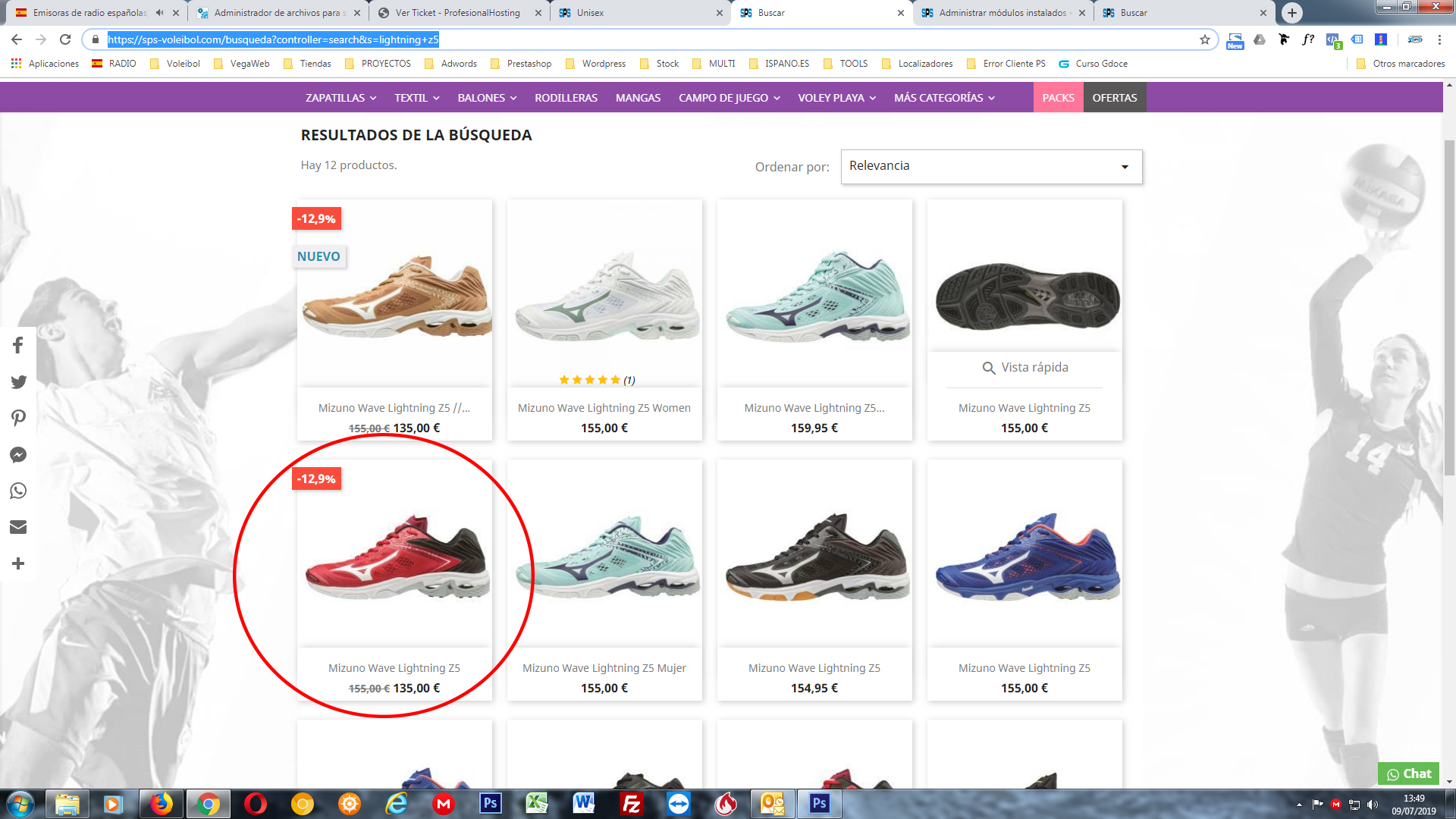
Error: https://sps-voleibol.com/13-zapatillas-unisex?q=Marca-Mizuno
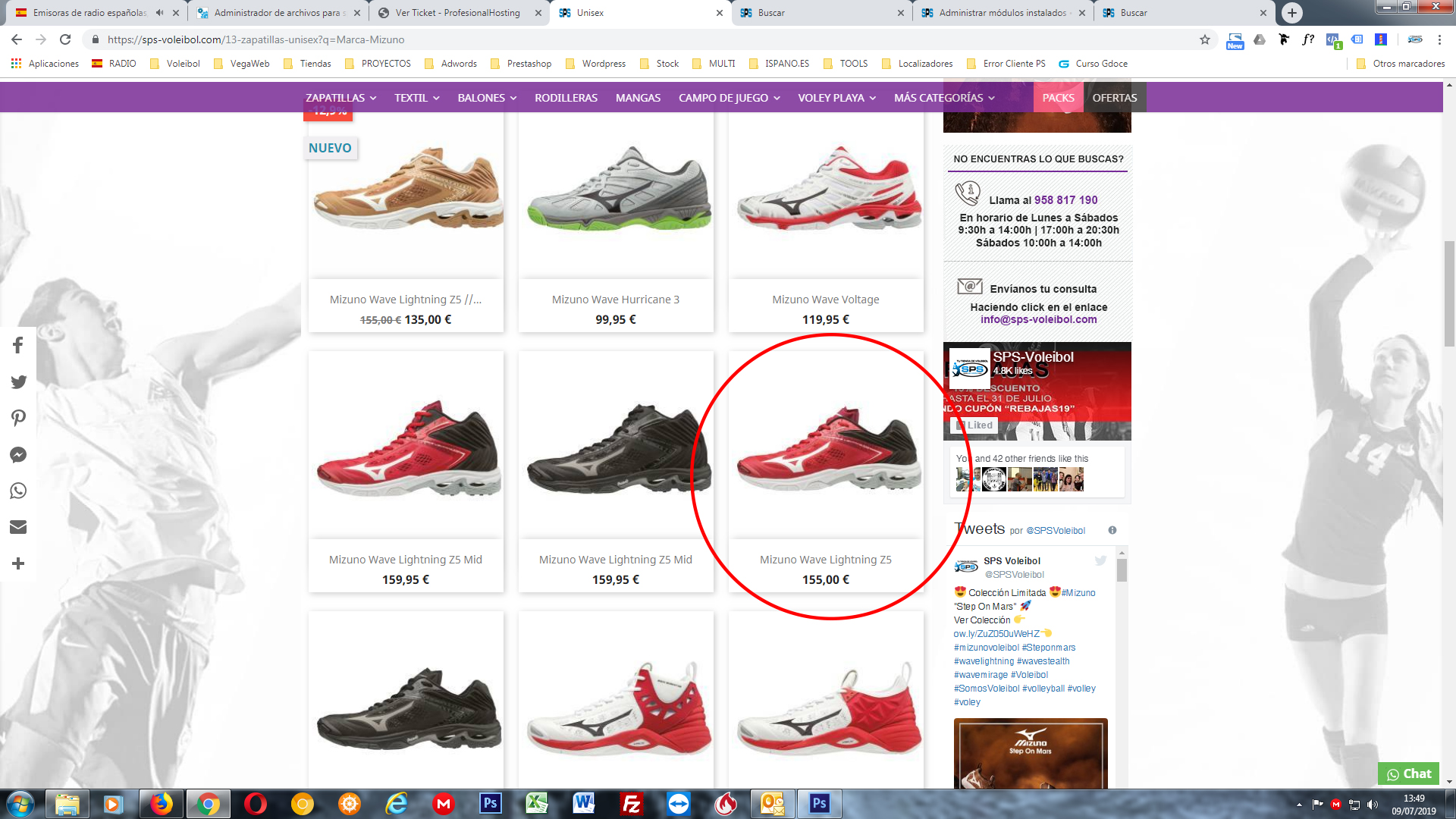
frankymartinES
on 9 Jul 2019
@frankymartinES, In your second shop, could you please provide me a screenshot from your Product page "MIZUNO WAVE LIGHTNING Z5" => Combination Tab.
Thanks!
khouloudbelguith
on 9 Jul 2019
@khouloudbelguith , if I click in the first option I send you before (https://sps-voleibol.com/busqueda?controller=search&s=lightning+z5) the product page opened is the good one;
https://sps-voleibol.com/zapatillas-unisex/4182-32151-mizuno-wave-lightning-z5.html#/309-tallas-42
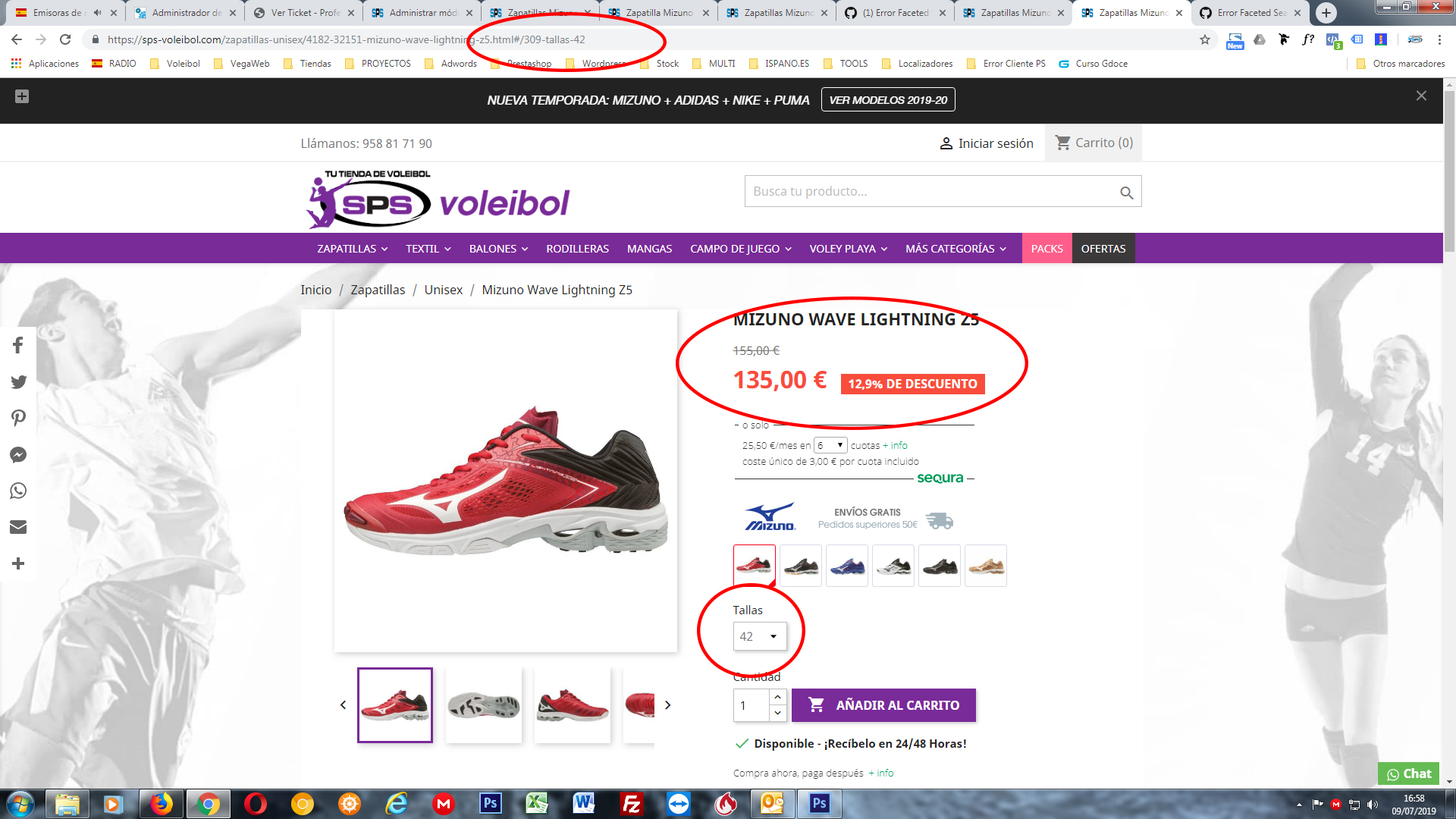
But if I click in the second situation (https://sps-voleibol.com/13-zapatillas-unisex?q=Marca-Mizuno) the producd page opened has the error.
https://sps-voleibol.com/zapatillas-unisex/4182-32149-mizuno-wave-lightning-z5.html#/306-tallas-405
frankymartinES
on 9 Jul 2019
@khouloudbelguith Could I try to reindex all the products in the "Search" section (
advanced parameters)?
frankymartinES
on 9 Jul 2019
@frankymartinES, Do you need to Re-build the entire index in the Search page?
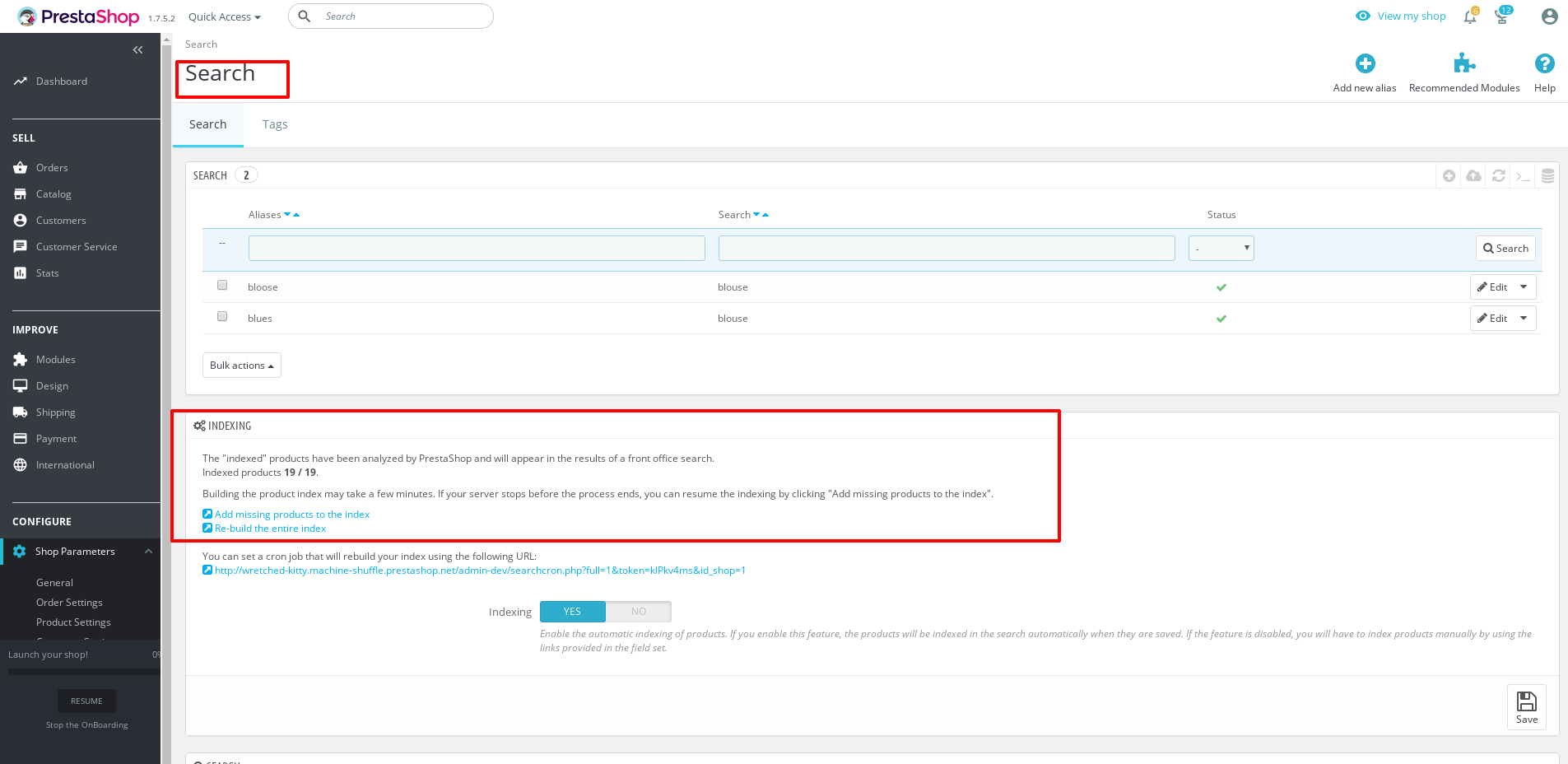
Thanks!
khouloudbelguith
on 9 Jul 2019
Could be a solution? Now all my products are indexed but maby that action can be usefull. What do you think?
frankymartinES
on 9 Jul 2019
@frankymartinES, you need to rebuild the entire index, clear cache & check the issue again.
Thanks!
khouloudbelguith
on 9 Jul 2019
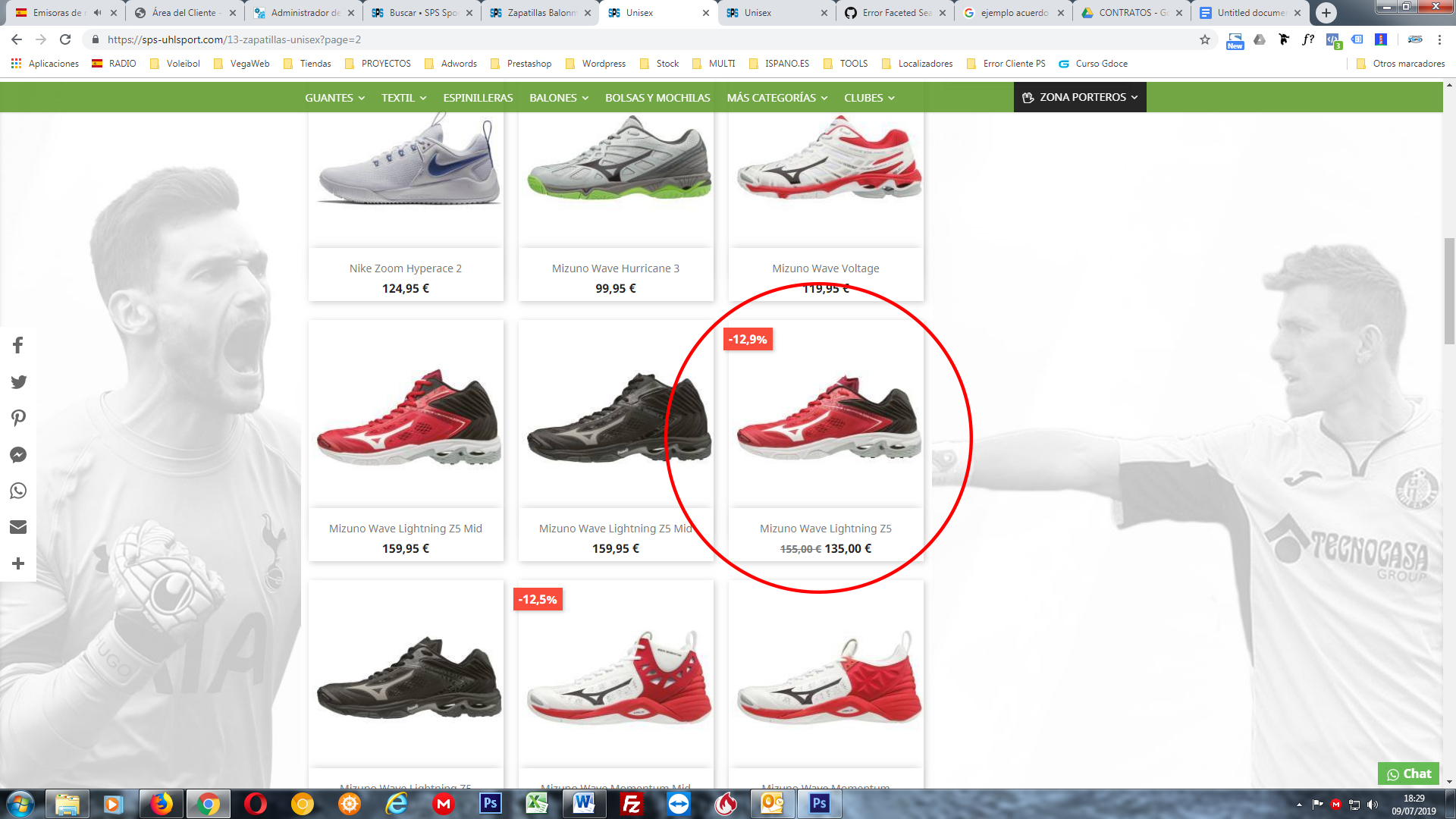
@khouloudbelguith I have rebuilted the entire index and clen cache but the error continue. You can see that the error must be in the faceted module because when I desactive the module the error disapear.
https://sps-uhlsport.com/13-zapatillas-unisex?page=2
frankymartinES
on 9 Jul 2019
@frankymartinES, thanks for your feedback.
In my case it is OK => there is no issue.
Ping @PierreRambaud what do you think of this issue?
Set a combination of a product with a discount price.
Set that combination as default
Go to the product list and see the product, the default combination is not showed (price is the clue to know the error)
Click on the product and see that not open the default combination.
If I disable the faceted search module everything is working fine.
Thanks!
khouloudbelguith
on 10 Jul 2019
Hi @khouloudbelguith , sorry but in your video I can see the issue prefectly. Check it again please!!
In the first part of your video you can see that after click in the black product and open the product page, you change to red color and the combiantion opened is the 40.5 size and the default combination is the 42 size.
And also in the third part you can see in the product list that the red color shoe Mizuno Wave Lightning Z5 is showed without the discount because is not showing the default combination.
frankymartinES
on 10 Jul 2019
@frankymartinES, I just created a product following your steps & it is OK.
https://drive.google.com/file/d/1zy2xDr6MK-wIWg3s8OH5VK69vGdn1JmV/view
In your Back office => Shop Parameters => Product Settings => "Quantity discounts based on" is setted to "Combinations?
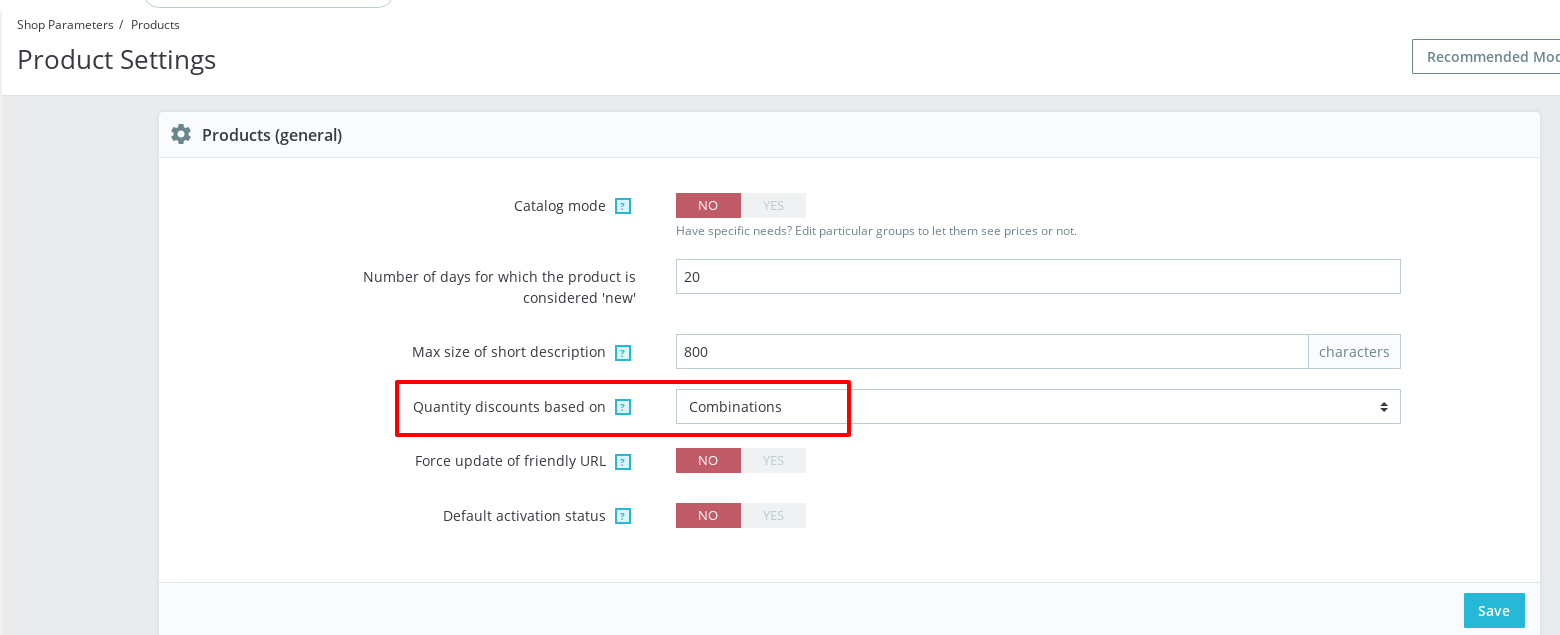
Thanks!
khouloudbelguith
on 10 Jul 2019
@khouloudbelguith I have setted to Cambinations the "Quantity discounts based on" option but the error still here. I think that is not the problem because before update the "faceted search module" the error did not exist.
You did the test in PS 1.7.6, I have PS 1.7.4.4 and tha error appear after update the module, maby you are working in a new installation.
I think the problem could be the database or cache after update the module.
frankymartinES
on 10 Jul 2019
Hi @frankymartinES,
I tried with PS1.7.4.4 & the ps_fecetedsearch before & after the upgrade.
I attached a screen record
https://drive.google.com/file/d/1O5wMqBQaX0sY2t6jXWbCEnyyUCT0SEoq/view
Thanks!
khouloudbelguith
on 10 Jul 2019
@khouloudbelguith so I have not solution for that problem. How I could to go back to old version of the faceted module?
frankymartinES
on 10 Jul 2019
@frankymartinES, you can check in this link the releases of the ps_facetedsearch module https://github.com/PrestaShop/ps_facetedsearch/releases
Also, you need to run composer install inside it.
Thanks!
khouloudbelguith
on 10 Jul 2019
@khouloudbelguith Could you explain how to do it please? Sorry for all your time waste in this issue. Thanks again
frankymartinES
on 10 Jul 2019
@frankymartinES, you are welcome!
For example, you need to download the release v2.2.1.
- You need to follow this link: https://github.com/PrestaShop/ps_facetedsearch/releases/tag/v2.2.1
- Click on the Source code (zip) link: https://github.com/PrestaShop/ps_facetedsearch/archive/v2.2.1.zip. => zip file will be downloaded.
- Unzip this file.
- Run the command
composer installinside the folder - Compress the folder
- Upload it from the Module catalog page
Thanks!
khouloudbelguith
on 10 Jul 2019
@khouloudbelguith Sorry, but I did not do it before, so Could you explain me how to do step 2?
frankymartinES
on 10 Jul 2019
Sorry, I mean step 4
frankymartinES
on 10 Jul 2019
@frankymartinES, Composer is a tool for dependency management in PHP. It allows you to declare the libraries your project depends on and it will manage (install/update) them for you.
Using console command, you need to run composer install
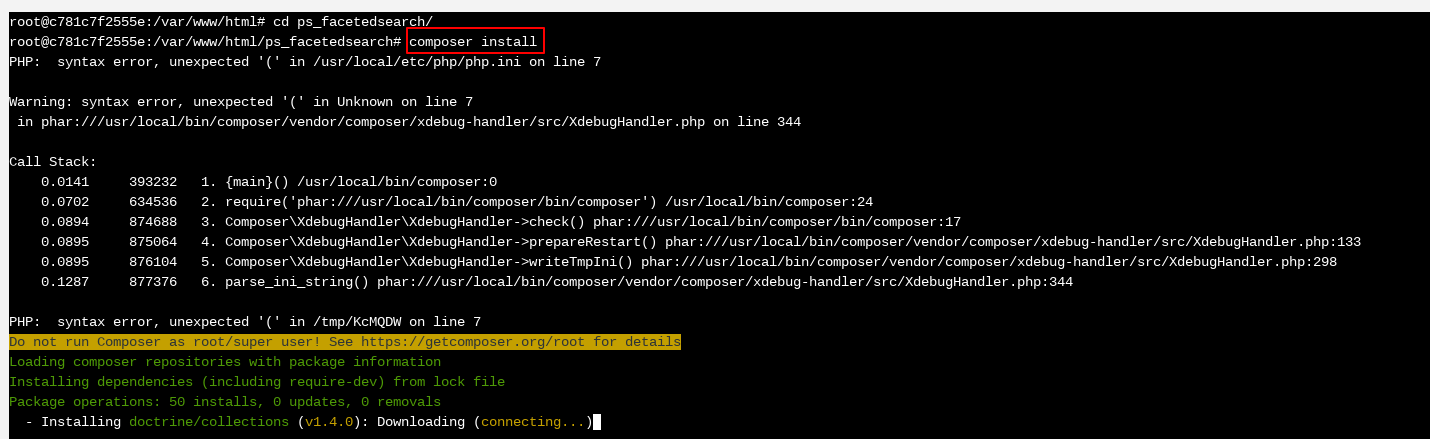
Thanks!
khouloudbelguith
on 10 Jul 2019
Hi @khouloudbelguith finally I have bak to old version of the module and everithing is working fine again. It means that the problem come from the update of the module. Thanks for your help and time!!!
frankymartinES
on 12 Jul 2019
Related issues
 hiousi
·
3Comments
hiousi
·
3Comments
 PrestaShark
·
3Comments
PrestaShark
·
3Comments
 itisco
·
3Comments
itisco
·
3Comments
 Prestaworks
·
3Comments
Prestaworks
·
3Comments
 prestonBot
·
3Comments
prestonBot
·
3Comments