Prestashop: Prestashop 1.7.5.2 work very slow - TTFB problem
We have a problem with front-office prestashop 1.7.5.2 - it's work very slow! We use multistore and have shops such as www.shop.spacetronik.eu, www.ergoline.spacetronik.eu, www.air.spacetronik.eu and more and more. When we checked our website in https://developers.google.com/speed/pagespeed/insights/ - we got poor results. Time to first bite (TTFB) is 5 sec. and we know, that is too slow.
What we try?
- We checked our database - clear everything what isn't important
- clear FTP folder ( delete unnecessary product photos)
- Check server info (We use PHP 7.0.33; server Apache/2; mySQL 10.1.33-MariaDB)
- We set max_execution_time=300,
memory_limit=512M and upload_max_filesize = 64M - We set THEME COMPILATION > never recompile template files on optimalization page in BO
- We turned on cache
- We set Cache type > File System
- We set Cache Clearing > Clear cache everytime sth has been modified
- We turn on every CCC setting: Intelligent cache for CSS, Intelligent cache for JS and Apache optimalization
- We have turn off Cache from last step from optimalization because we don't have memcached / APC / Xcache on our server.
- We installed module prestaspeed for optimalization: https://addons.prestashop.com/pl/wydajnosc-strony/17953-prestaspeed-image-site-database-optimization.html
- We used prestaspeed to optimalization images, theme, database, set cache, generate .htaccess (We tried make everything what we can with that module)
- We checked theme translations
- We made manual optimalization photos - we've reduced size of photos
- We bought theme from addons.prestashop and after installation we try to turn on basic theme but this doesn't work too.
Screen from back-office:
https://dmtrade.pl/katalogi/prestashop/server-info.jpg
https://dmtrade.pl/katalogi/prestashop/optimalization1.jpg
https://dmtrade.pl/katalogi/prestashop/optimalization2.jpg
https://dmtrade.pl/katalogi/prestashop/optimalization3.jpg
What else could we do? thanks for the help in advance!
 Spacetronik
All 41 comments
Hi @Spacetronik,
Never recompile template files: this option is to be chosen for maximum performance.Cache enabled (YES): makes pages fastest.Smart cache for CSS (YES): brings together in a single file, compresses and caches CSS files.Smart cache for Javascript (TES): brings together in a single file, compresses and caches JS files.Minify HTML (YES): removes all the white space from the HTML code.Apache Optimization (YES): allows to further increase site performance.
In your BO => Modules Manager page => configure the statsdata module & check if Save page views for each customer is enabled, try to disable it because it uses a lot of CPU resources and database space.
Thanks to check & feedback
 khouloudbelguith
on 23 May 2019
khouloudbelguith
on 23 May 2019
@Spacetronik we had same problem, we decided to change our hosting and move to VPS server, on SSD and with strong CPU and with more RAM
Before that we had shop on simple hosting and we had same problem, and they had overload server and they must moved our shop to other machine and this fixed problem for 1-2 months, but after some time TTBF wil still worst.
 Tomskor
on 23 May 2019
Tomskor
on 23 May 2019
@khouloudbelguith unfortunatly without any change, but thanks! @Tomskor We have dedicated server, it's very good server - we have old shops on prestashop 1.6 and work fast - for example http://spacetronik.eu . We have shops on other platforms - www.dmtrade.pl , www.warsztatowski.com - everything work very good. Only this one is very slow.
Spacetronik
on 23 May 2019
@Spacetronik, We need to retrieve the PHP error log and the debug mode report in order to find out what's wrong.
Don't you know how to get this information? Please read the following article:
http://build.prestashop.com/howtos/misc/how-to-create-bug-report/
Thanks!
khouloudbelguith
on 23 May 2019
@Spacetronik
few qs
- have you tried to use PrestaShop profiler? what does it show?
- gamification enabled? cron module enabled? if so, disable them
- do you have any additional cache? for example opcache?
- try to implement this fix: https://github.com/PrestaShop/PrestaShop/pull/12940/files
 kpodemski
on 23 May 2019
kpodemski
on 23 May 2019
@kpodemski
- Yes, it's off,
- Yes, it's off too,
- No, we don't have any additional cache. You recomend add sth?
- I implemented but nothing change.
Spacetronik
on 23 May 2019
@Spacetronik
- about that, in config/defines.inc.php you should enable dev mode and profiler, set
falsetotruein two constants, this will show for you PrestaShop profiler while visiting front-office
kpodemski
on 23 May 2019
@khouloudbelguith - in debug mode I can see info like in attachments.


Spacetronik
on 23 May 2019
@Spacetronik debug mode will not show anything, use Profiler on front-office...
kpodemski
on 23 May 2019
@Spacetronik, In order to activate profiling, change a file. The path is this, from your installation directory:
/config/defines.inc.php
In this file, look for this entry:
define(‘_PS_DEBUG_PROFILING_’, false);
Set this value to “true”, and save.
Thanks!
khouloudbelguith
on 23 May 2019
Profiling is enable, what's now?
Spacetronik
on 23 May 2019
Look at your front-office, you should have information about time needed to run queries etc.
Overall it's not a PrestaShop issue that your TTFB is so high, i've worked on many 1.7 installations and TTFB was never an issue, except two scenarios and problems with translations
kpodemski
on 23 May 2019
Hi, we probably found error. We got error log like below. What could it be?
Fatal error: Uncaught Symfony\Component\Debug\Exception\FatalThrowableError: Cannot use object of type Symfony\Component\HttpFoundation\ParameterBag as array in /home/spacetronikeu/domains/spacetronik.eu/public_html/p75/src/Adapter/Security/Admin.php:91 Stack trace: #0 /home/spacetronikeu/domains/spacetronik.eu/public_html/p75/vendor/symfony/symfony/src/Symfony/Component/EventDispatcher/EventDispatcher.php(212): PrestaShop\PrestaShop\Adapter\Security\Admin->onKernelRequest(Object(Symfony\Component\HttpKernel\Event\GetResponseEvent), 'kernel.request', Object(Symfony\Component\EventDispatcher\ContainerAwareEventDispatcher)) #1 /home/spacetronikeu/domains/spacetronik.eu/public_html/p75/vendor/symfony/symfony/src/Symfony/Component/EventDispatcher/EventDispatcher.php(44): Symfony\Component\EventDispatcher\EventDispatcher->doDispatch(Array, 'kernel.request', Object(Symfony\Component\HttpKernel\Event\GetResponseEvent)) #2 /home/spacetronikeu/domains/spacetronik.eu/public_html/p75/vendor/symfony/symfony/src/Symfony/Component/Http in /home/spacetronikeu/domains/spacetronik.eu/public_html/p75/src/Adapter/Security/Admin.php on line 91
Spacetronik
on 24 May 2019
Hi @Spacetronik,
Just to let you know, some performance issues have been detected on our side and have been solved with #11559.
It is added in the PS1.7.6.0
Thanks!
khouloudbelguith
on 27 May 2019
Hi @khouloudbelguith ,
we have applied the patch/commit from #11559, but it doesn't help. We tried to disable also all modules and changing theme to default (classic). The problem is at initContent - it always take over 5 seconds to process, even on "contact" site. On main/products site SQL quering time is ok (<150ms). Today we also installed memcached, but it doesn't help in any way.
Load Time | 5102 ms - You'd better run your shop on a toaster
-- | --
Querying Time | 3 ms
Queries | 10
Memory Peak Usage | 11.6 Mb
Included Files | 528 files - 7.68 Mb
PrestaShop Cache | 0.47 Mb
Global vars | 0.37 Mb
PrestaShop Version 1.7.5.2
PHP Version 7.1.27 (OK)
MySQL Version 10.1.33-MariaDB (OK)
Memory Limit 512M
Max Execution Time 0s
Smarty Cache enabled
Smarty Compilation auto
Time | Cumulated Time | Memory Usage | Memory Peak Usage
-- | -- | -- | --
config | 24 ms | 24 ms | 4.55 Mb | 5.78 Mb
__construct | 3 ms | 27 ms | 0.08 Mb | 5.78 Mb
init | 9 ms | 36 ms | 1.40 Mb | 6.05 Mb
checkAccess | 0 ms | 36 ms | - Mb | 6.05 Mb
setMedia | 1 ms | 37 ms | 0.02 Mb | 6.07 Mb
postProcess | - ms | 37 ms | - Mb | 6.07 Mb
initHeader | 0 ms | 37 ms | - Mb | 6.07 Mb
initContent | 5047 ms | 5084 ms | 3.70 Mb | 9.85 Mb
initFooter | 0 ms | 5084 ms | - Mb | 9.85 Mb
display | 18 ms | 5102 ms | 1.06 Mb | 11.56 Mb
Hook | Time | Memory Usage
-- | -- | --
Module | Time | Memory Usage
-- | -- | --
Spacetronik
on 27 May 2019
@Spacetronik, thanks for your feedback.
You must be careful with some options in the statsdata module because storing page views uses a lot of resources and database space. We advise you to enable page views only if your server can handle it.
In fact, it takes a very huge space in the database because it collects statistics from connections.
you can delete data from ps_connections, ps_connections_page & ps_connections_source.
When profiling is enabled, what is time executed to each module?
Thanks!
khouloudbelguith
on 28 May 2019
We are experiencing the same issue. CPU is up like crazy. RAM first to, but I turned of all modules. To get the site running " normal " we temporary upgraded our server. I hope 1.7.6 stable will be released soon and solve this issue. Any ideas when this will be released?
 01park
on 31 May 2019
01park
on 31 May 2019
Hi @01park,
We are close to releasing 1.7.6.0.
Thanks!
khouloudbelguith
on 31 May 2019
@khouloudbelguith I know its off topic, but when you relase 1.7.6.0. the facate search and sorting will be work in 100% without any bugs?
Tomskor
on 31 May 2019
@Tomskor, We are currently refactoring the module ps_facetedsearch, which is a really big refactoring with a lot of bug fix.
You can find the last releases here: https://github.com/PrestaShop/ps_facetedsearch/releases
About the PS1.7.6.0, you can find the beta release here: http://build.prestashop.com/news/prestashop-1-7-6-0-beta-release/
Thanks!
khouloudbelguith
on 31 May 2019
I tried to install the beta version with one click, but do not get the option to download it. Also tried to manually put it on my server, but also then not working.
I think its best to wait for the stable version
01park
on 31 May 2019
@01park, you can follow this link to download it.
Thanks!
khouloudbelguith
on 31 May 2019
Do you btw know if the problems is fixed 1.7.6 with entering the values into the features for all languages. I opened a case on this and you reported it
01park
on 31 May 2019
@01park, sorry this issue: https://github.com/PrestaShop/PrestaShop/issues/13751 is not fixed yet.
It is added to our bug roadmap.
Thanks for your understanding!
khouloudbelguith
on 31 May 2019
Thanks for that update.
I also reported an other issue regarding generating sitemaps with Gsitemap with multistore on. Once a cron job is set up for each store only shop 1 gets update. when the cron task for shop 2 is execute, shop 1 gets updated. Any idea?
01park
on 31 May 2019
@01park, what the exact ticket of this issue?
Thanks!
khouloudbelguith
on 31 May 2019
01park
on 31 May 2019
@01park, I will check it.
Thanks!
khouloudbelguith
on 31 May 2019
Hi @Spacetronik,
Since we had no news from you for more than 30 days, I'll close this ticket. Feel free to open another one if you can give specific details.
Thanks!
khouloudbelguith
on 1 Jul 2019
Hey @Spacetronik , your shops seams quite fast now, how did you manage to fix all that ?
 tameroski
on 11 Jul 2019
tameroski
on 11 Jul 2019
follow
 cartomatica73
on 12 Jul 2019
cartomatica73
on 12 Jul 2019
HI we fixed it by case, earlier we turn off all module and nothing change but this time we check some functions with RODO and Cookies module and one function in this module was wrong and do this problem couple monts and many many hours was wasted
Spacetronik
on 15 Jul 2019
Which module for RODO did you use?
kpodemski
on 15 Jul 2019
can you illustrate your solution?
cartomatica73
on 15 Jul 2019
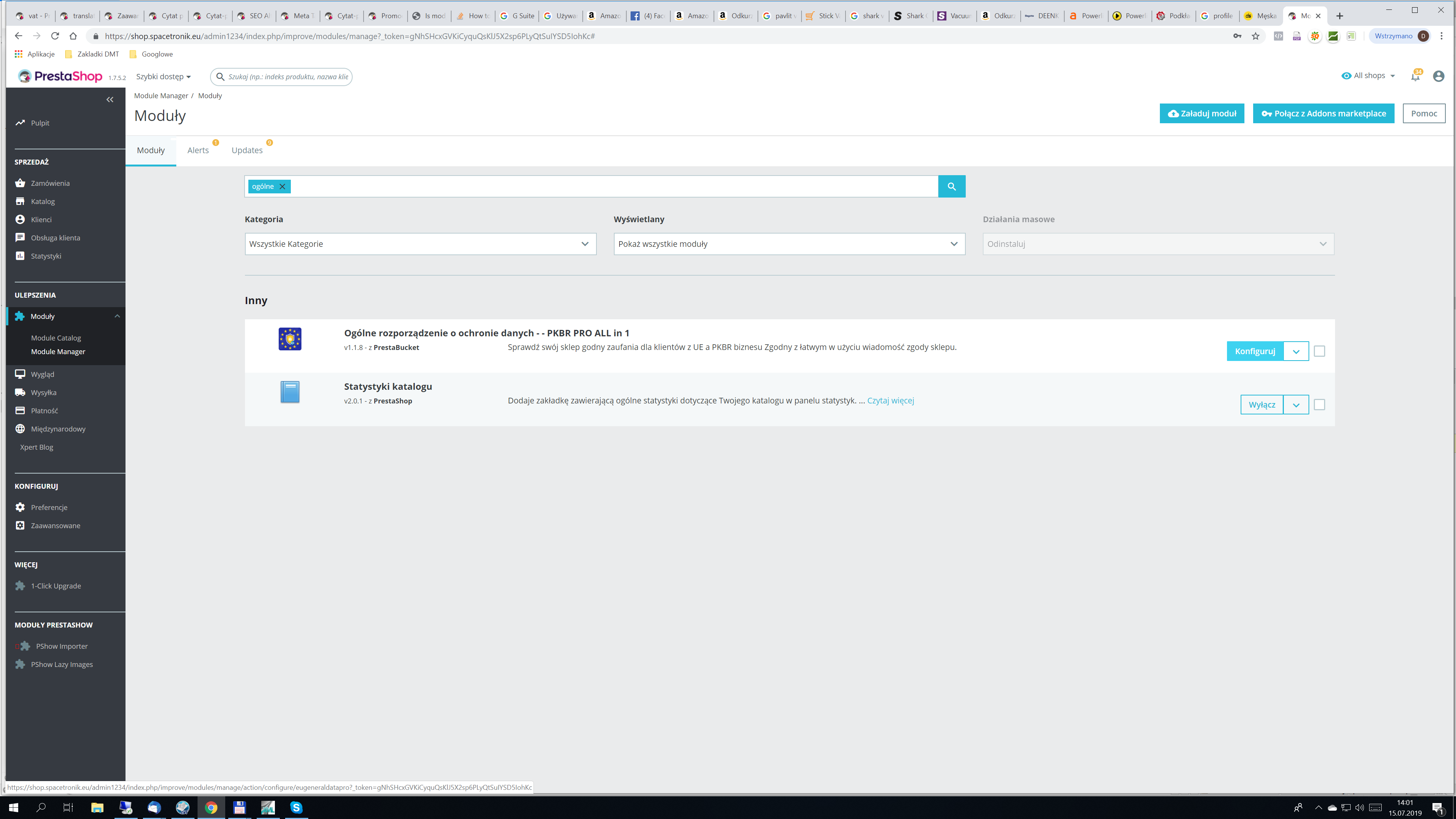
This module but not rememeber function becouse it do it my friend and he is on holiday
Spacetronik
on 15 Jul 2019
This issue can be fixed by updating lanuages in International -> translations.
I worked on this issue like 2-3 days and finally figured it out. It was taking 50 sec to load very simple shop and after updating language it started loading in 2 secs.
 beniwal
on 10 Oct 2019
beniwal
on 10 Oct 2019
@Spacetronik debug mode will not show anything, use Profiler on front-office...
Hello there, how is it possible to use the profiler on front-office ?
 simobenso
on 7 Jan 2020
simobenso
on 7 Jan 2020
@simobenso you need to set DEBUG_PROFILING to "true" in config/defines.inc.php
kpodemski
on 7 Jan 2020
This issue can be fixed by updating lanuages in International -> translations.
I worked on this issue like 2-3 days and finally figured it out. It was taking 50 sec to load very simple shop and after updating language it started loading in 2 secs.
Hello, what happens to languages doing the update?
 Betafer
on 22 Apr 2020
Betafer
on 22 Apr 2020
I have the same TTFB issue with my store on v1.7.5.1
Is there anything I can do to reduce the Add to cart?
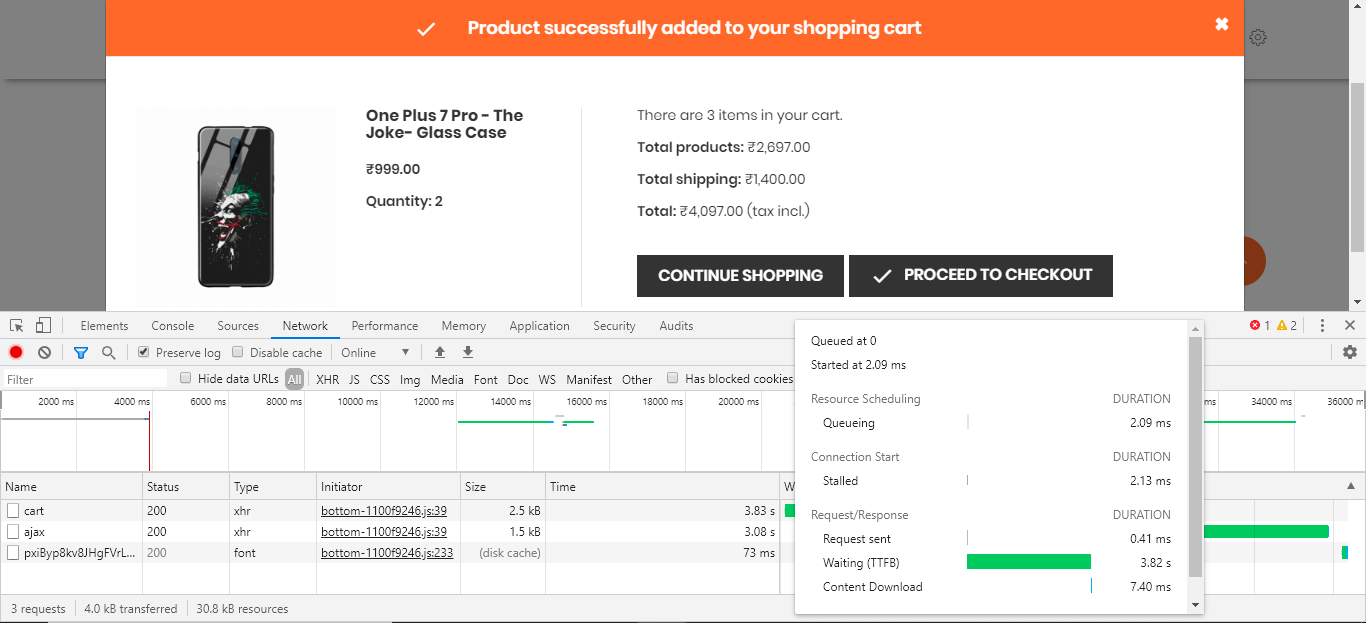
TIA,
Hitin
 hitinder
on 18 May 2020
hitinder
on 18 May 2020
Hi there,
When I set DEBUG_PROFILING to "true" I see a white screen on the Frontend. How can I find the error? When DEBUG_PROFILING is disabled it works. Can anyone help me with this?
Thanks in advance.
 IgorSerebryanskiy
on 15 Oct 2020
IgorSerebryanskiy
on 15 Oct 2020
Related issues
 zuk3975
·
3Comments
zuk3975
·
3Comments
 itisco
·
3Comments
itisco
·
3Comments
 Van-peterson
·
3Comments
Van-peterson
·
3Comments
 prestonBot
·
3Comments
prestonBot
·
3Comments
 wikao2
·
3Comments
wikao2
·
3Comments