Prestashop: Shipping part empty in BO when the order contains a virtual product
Describe the bug
I created two Carriers and set them to Free Shipping.
Carrier 1
Carrier 2
When I create a manual order, I choose Carrier 2 in "Delivery option" of Shipping part.
After created, in the order page, the wrong carrier is selected, Carrier 1.
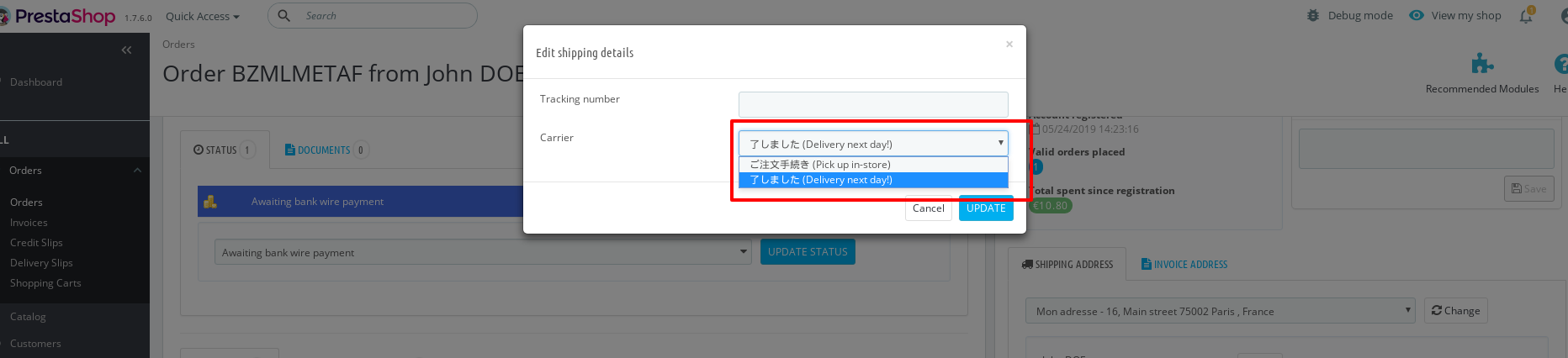
If I want "Edit shipping details", the carrier list is empty.
I already check zone/country selected for the carrier.
Additionnal information
PrestaShop version: 1.7.5.0
PHP version: 7.2
 BenTen
All 11 comments
Hi @BenTen,
Thanks for your report.
I manage to reproduce the issue with PS1.7.5.2 & PS1.7.6.beta1.
Steps to reproduce the issue:
- In the BO => Orders page => I created order from the BO with a virtual product => I selected any carrier
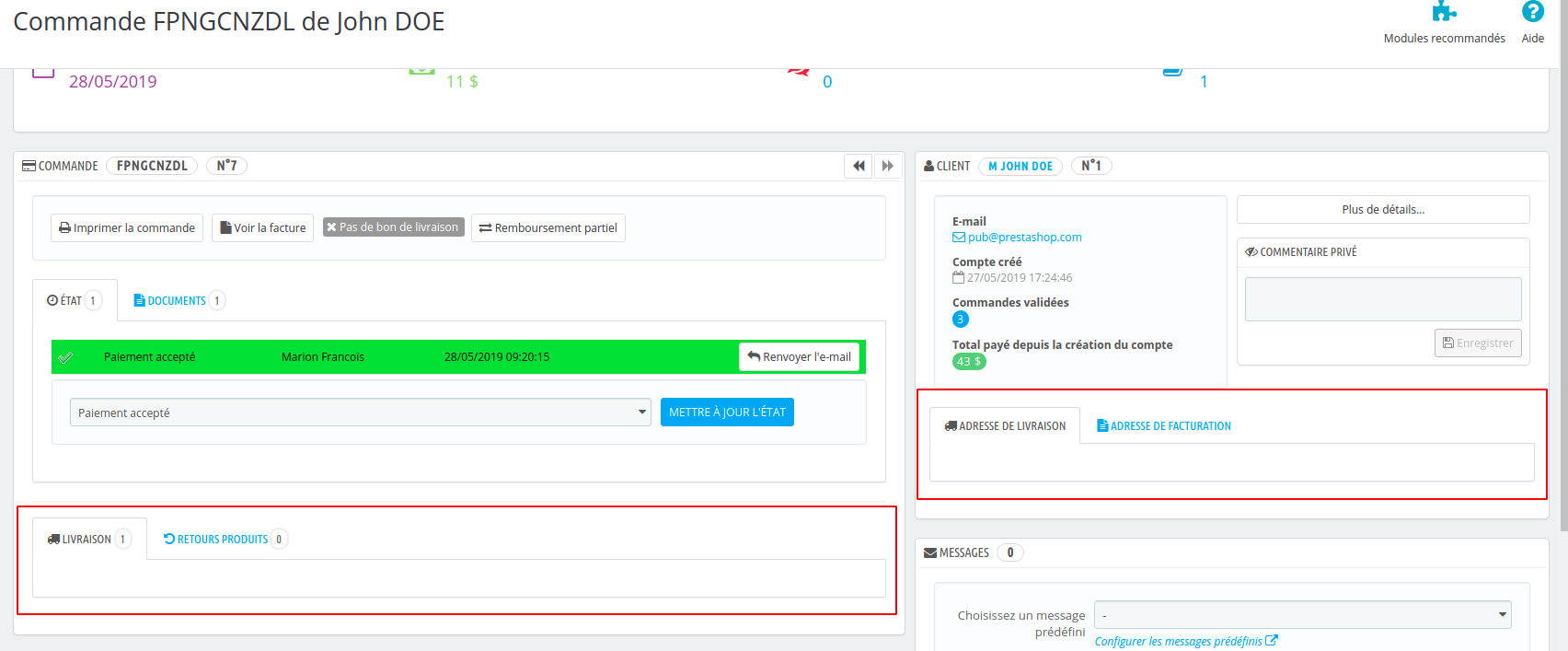
- The Shipping block is empty

https://drive.google.com/file/d/1Xd50E_pZ15eCeJELvSKznLmXalfayfbP/view
I’ll add this to the debug roadmap so that it’s fixed. If you have already fixed it on your end or if you think you can do it, please do send us a pull request!
Thanks!
 khouloudbelguith
on 14 May 2019
khouloudbelguith
on 14 May 2019
@khouloudbelguith I can't reproduce this issue with 1.7.6.x branch
https://drive.google.com/file/d/1-B9GOxlRkTZ1zxH1oyjwgJ4sGHBmKfSS/view?usp=sharing
 marionf
on 27 May 2019
marionf
on 27 May 2019
Hi @marionf,
I manage to reproduce this issue with PS1.7.5.2 / PS1.7.6.0 / 1.7.6.x when we add to the order a virtual product.
Thanks!
khouloudbelguith
on 27 May 2019
It's the same issue when you have a carrier not free and it happens only if the order contains virtual products, I updated your comment @khouloudbelguith
marionf
on 27 May 2019
@marionf In your video, we can see there is the carrier but if you try to click on "Edit" button to add a tracking number, do you have carrier list?
Btw, You didn't activate "Free Shipping" option when you create your order.
BenTen
on 27 May 2019
@BenTen it's not necessary to activate free shipping to reproduce the issue
Once the order is created, there isn't the edit button as there is no carrier displayed
marionf
on 28 May 2019
In virtual it seems there is no button.
But with normal product, the button is displayed.
If we click on "Edit" button to write a tracking number we can't select carrier.

PS 1.7.5.0
BenTen
on 28 May 2019
Hi @BenTen,
This is a different issue & in my case, it is OK
Thanks!
khouloudbelguith
on 28 May 2019
@khouloudbelguith Could you check if it's fixed with the migrated page on 1.7.7.x branch ?
marionf
on 16 Jan 2020
Hi @marionf,
It is OK with PS1.7.7.x

Since it is fixed, I will close the issue.
Thanks!
khouloudbelguith
on 16 Jan 2020
Thank you @khouloudbelguith !
marionf
on 16 Jan 2020
Related issues
 Fabuloops
·
3Comments
khouloudbelguith
·
3Comments
Fabuloops
·
3Comments
khouloudbelguith
·
3Comments
 hiousi
·
3Comments
hiousi
·
3Comments
 Van-peterson
·
3Comments
Van-peterson
·
3Comments
 wikao2
·
3Comments
wikao2
·
3Comments