Prestashop: It should not be possible to purchase a pack which requires more quantity of pack item than there is in stock
Describe the bug
It should not be possible to purchase a pack which requires more quantity of pack item than there is in stock.
To Reproduce
In Admin I have pack product.
In that Pack product I have added a combination product with quantity 100.
The combination product itself has less than 100 quantity availability (for example, 99).
Global setting for packs is to "Decrease both".
My Global Availability preference is "Deny orders" when out of stock.
_Result_:
It is possible to add to cart and purchase the pack.
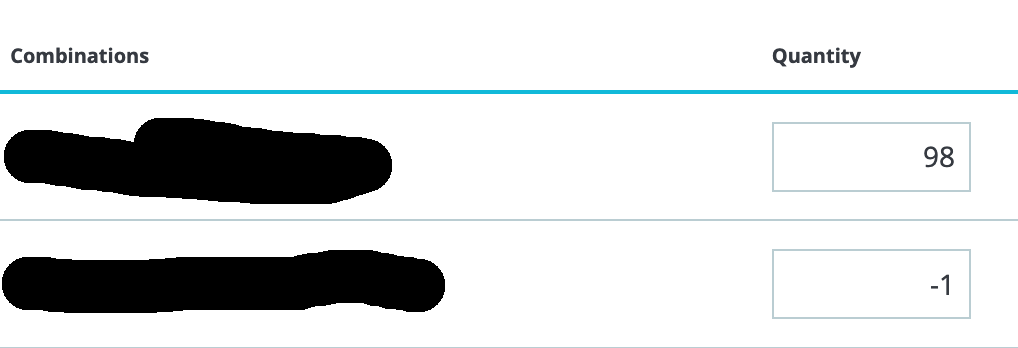
This results in my combination product having a negative quantity after the purchase. Check screenshot.
_Expected_:
It should not be possible to purchase the pack with this scenario.
Screenshot:
Additionnal information
PrestaShop version: 1.7.5.0
PHP version: 7.2.17
 robi-bobi
All 12 comments
Hi @robi-bobi,
Your ticket is a duplicate of #9671
So, I close it.
Thanks!
 khouloudbelguith
on 13 May 2019
khouloudbelguith
on 13 May 2019
Duplicate of #9671
khouloudbelguith
on 13 May 2019
Hi @khouloudbelguith
Thank you for quick reply.
I think my case is a bit different than the one described in #9671.
The #9671 explains some wrong quantities after the purchase, while I explain that the purchase should not be possible at all.
Or, is it that the underlying reason why this happen is the same?
robi-bobi
on 13 May 2019
Hi @robi-bobi,
Sorry, yes, it is not a duplicate of #9671, just similar.
But your issue is fixed in the PS1.7.6.0beta1.
I did not manage to reproduce the issue with PS1.7.6.0beta1
https://drive.google.com/file/d/1ESQaaiBQbaMcyoA95WTThMddoaVzqhMU/view
Thanks!
khouloudbelguith
on 13 May 2019
Hi @khouloudbelguith ,
I have found an issue with 1.7.6 as well.
Screengrab here:
(removed)
What happens, I think, is that the logic takes into account quantity for all combinations, while it should only check that of the selected combination in the pack product.
This is why when I have 7x Pack (which has 3x the item 1), that would result in 21 Item1 products being used. Since there are 4 combinations with 5 quantity each, it is only then that the logic says: Product available with different options.
What should happen instead is when I get to 2x of Pack product - the message should be shown.
robi-bobi
on 16 May 2019
Hi @robi-bobi,
Thanks for your feedback.
I manage to reproduce the issue with PS1.7.5.2 & PS1.7.6.0beta1
Steps to reproduce the issue:
- create a product P1 with 4 combinations PC1, PC2, PC3, PC4
- All these combinations have 5 quantity
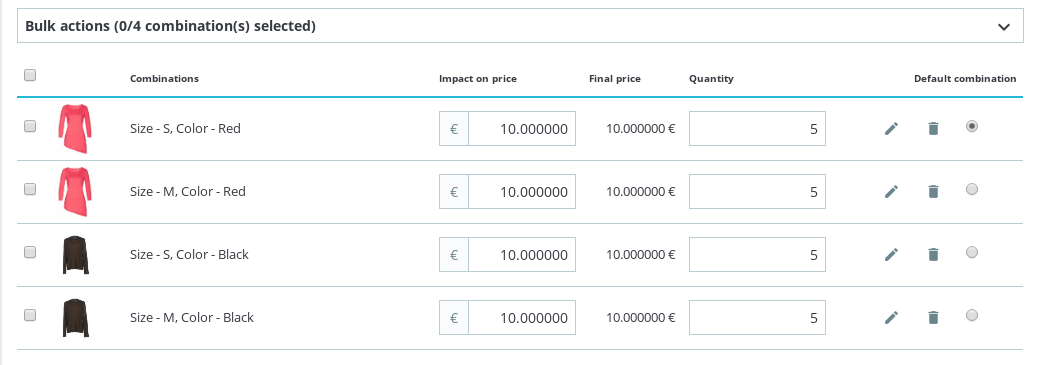
- Create a pack P2 of 3 products PC4 with quantity 50
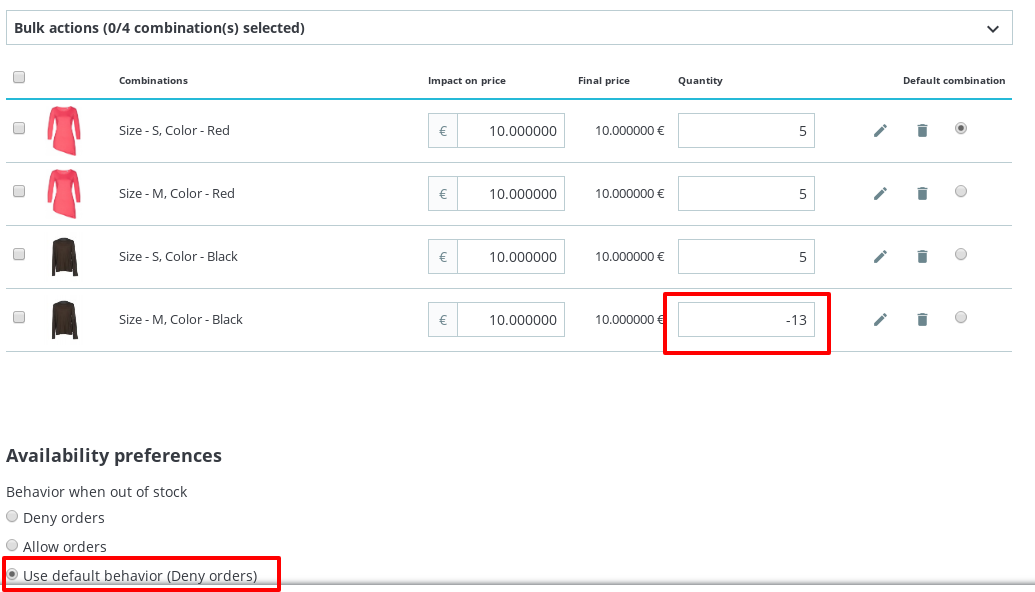
- In the Fo, you can add to the cart 6 pack
- complete your order
- Check your product P1 in the BO => quantity = -13
I’ll add this to the debug roadmap so that it’s fixed. If you have already fixed it on your end or if you think you can do it, please do send us a pull request!
Thanks!
khouloudbelguith
on 16 May 2019
Related to #9671
khouloudbelguith
on 16 May 2019
Is the debug roadmap public, I could not find it.
Can you let me know on when this is being planned for?
P.S. I am currently going through your documentation on how to contribute and are investigating the issue as well, but do not let that stop you from fixing it.
robi-bobi
on 20 May 2019
@robi-bobi, in this link https://github.com/PrestaShop/PrestaShop/projects, you can find our list of projects.
There are some major issues to solve before this one.
So, it will probably not solved right now.
But PrestaShop is an open source project so it can be solved before if someone submits a pull request to solve it.
Thanks!
khouloudbelguith
on 20 May 2019
I understand.
However, rough estimate would be good as well.
I'm trying to get to the bottom of this, but the logic is a bit scattered.
I think I have found one candidate for the origin of the issue.
In PREFIX_pack table, the quantity field contains the value that represents the SUM of all combinations of the pack item.
I believe it should only be the value of quantity of exact combination added.
robi-bobi
on 21 May 2019
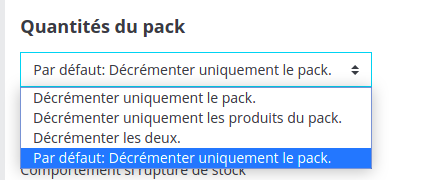
@khouloudbelguith In your example
What did you choose here ?
 marionf
on 22 May 2019
marionf
on 22 May 2019
Hi @marionf,
I used Decrement both.
Thanks!
khouloudbelguith
on 23 May 2019
Related issues
 nrcjea001
·
3Comments
nrcjea001
·
3Comments
 zuk3975
·
3Comments
zuk3975
·
3Comments
 itisco
·
3Comments
itisco
·
3Comments
 vincent-dp
·
3Comments
marionf
·
3Comments
vincent-dp
·
3Comments
marionf
·
3Comments