Prestashop: ModuleFrontController can not be found
Describe the bug
Implementing a ModuleFrontController in ones own module does not work. Either it produces a 404 error or shows the controllers sourcecode.
According to the docs and also some other modules as examples, the controllers' class should be CamelCase which would be TestFrontCtrlTestDisplayModuleFrontController for my
MCVE.
Using Context::getContext()->link->getModuleLink("testfrontctrl", "testdisplay", array('itemId' => 1337)) results in
http://localhost:8080/index.php?itemId=1337&fc=module&module=testfrontctrl&controller=testdisplay
which produces

and the following error:
PHP Fatal error: Class 'testfrontctrltestdisplayModuleFrontController' not found in /var/www/html/classes/controller/Controller.php on line 208, referer: http://localhost:8080/index.php
The error is somewhat similar to this.
Using a CamelCase'd link of
http://localhost:8080/index.php?itemId=1337&fc=module&module=TestFrontCtrl&controller=TestDisplay
produces
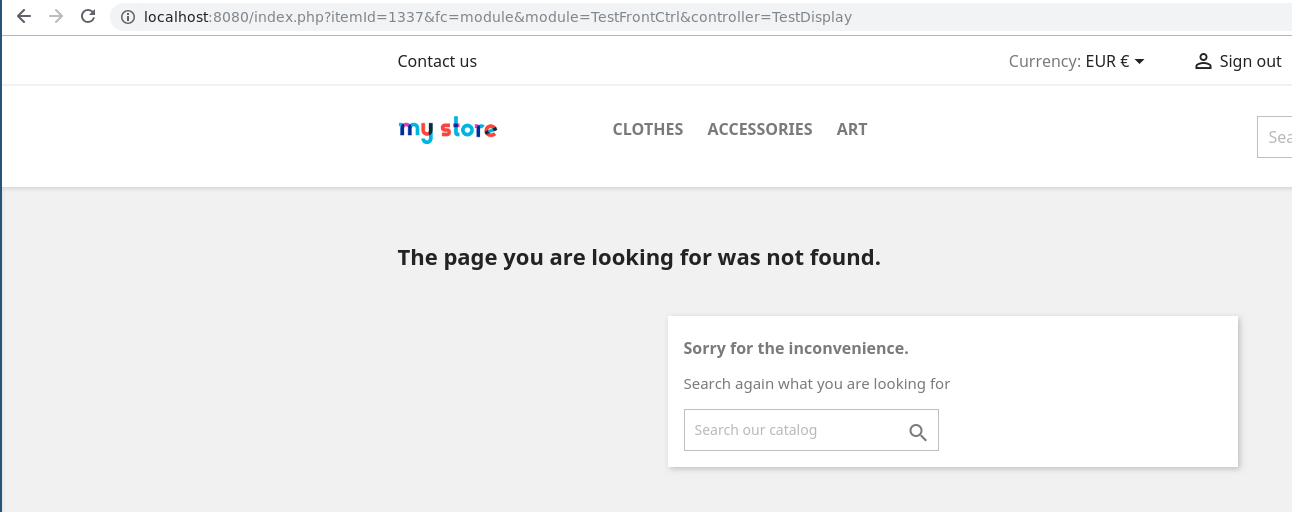
but no PHP error.
To Reproduce
Steps to reproduce the behavior:
- Load my MCVE
- Look at new link at displayHome() hook on mainpage and follow it
- Depending on the link used, see error 404 or the controllers source
Screenshots
If applicable, add screenshots or screenrecords to help explain your problem.
Additional information
PrestaShop version: 1.7.5.0 based on Symfony 3.4.19 from a docker container using prestashop/prestashop:1.7 against MariaDB in a docker container using mariadb/server:10.3
PHP version: 5.6.39
As a remark, i think the controllers documentation is missing that one is supposed to add the controllers in the __construct() of the module.
So how to implement a front controller within a module for PS 1.7.5 correctly?
 x29a
x29a
All 5 comments
Try with this
<?php
// testfrontctrl.php

if (!defined('_PS_VERSION_')) {
    exit;
}

class TestFrontCtrl extends Module
{
    public function __construct()
    {
        $this->name = 'testfrontctrl';
        $this->tab = 'front_office_features';
        $this->version = '1.0.0';
        $this->author = 'x29a';
        $this->need_instance = 0;
        $this->ps_versions_compliancy = array('min' => '1.7', 'max' => _PS_VERSION_);
        $this->bootstrap = true;

        $this->controllers = array('testdisplay');

        parent::__construct();

        $this->displayName = $this->l('Test Front Controllers');
        $this->description = $this->l('This module tests front controllers as described at https://github.com/PrestaShop/PrestaShop/issues/12301');

        $this->confirmUninstall = $this->l('Are you sure you want to uninstall the module?');
    }

    public function install()
    {
        return parent::install()
            && $this->registerHook('displayHome');
    }

    public function uninstall()
    {
        return parent::uninstall();
    }

    public function hookDisplayHome($params)
    {
        $this->context->smarty->assign(
            'moduleLink',
            $this->context->link->getModuleLink(
                $this->name,
                'testdisplay',
                array('itemId' => 1337)
            )
        );

        return $this->display(__FILE__, 'views/templates/hook/testfrontctrl.tpl');
    }
}
The classname of your controller must be TestFrontCtrlTestdisplayModuleFrontController
<?php
// controllers/front/testdisplay.php

class TestFrontCtrlTestdisplayModuleFrontController extends ModuleFrontController
{
    public function initContent()
    {
        echo 'passed itemId: ' . Tools::getValue('itemId');
        $this->context->smarty->assign(
            array(
                'itemId' => Tools::getValue('itemId'),
            ));

        $this->setTemplate('module:testfrontctrl/views/templates/front/testdisplay.tpl');

    }
}
 Matt75
on 25 Jan 2019
Matt75
on 25 Jan 2019
Hi @x29a,
I tried also with your module, I have an error
https://drive.google.com/file/d/1Q7mxvjG0hNfcZ0NLlsQTCpKO9GiprZ2i/view
Thanks!
 khouloudbelguith
on 25 Jan 2019
khouloudbelguith
on 25 Jan 2019
@khouloudbelguith Error due to use of php short tags, bad practice by the way
Matt75
on 25 Jan 2019
@Matt75 thanks a lot, with using <?php (the example modules do it exactly like this and the docu omits this part), the module name as camelcased like the class, only the first letter of the controller in upper case and registering the controller in the module it worked. I think all of this should be part of the official documentation!
x29a
on 25 Jan 2019
Hi @x29a,
Thanks for your feedback.
Feel free to open a new one when needed.
Thanks!
khouloudbelguith
on 29 Jan 2019
Related issues
 Prestaworks
·
3Comments
Prestaworks
·
3Comments
 esistgut
·
3Comments
esistgut
·
3Comments
 matks
·
3Comments
matks
·
3Comments
 zuk3975
·
3Comments
matks
·
3Comments
zuk3975
·
3Comments
matks
·
3Comments
Most helpful comment
Try with this
The classname of your controller must be TestFrontCtrlTestdisplayModuleFrontController