Prestashop: For a cart product line show both total with and without taxes
Hi everyone!
I used to work with PS1.6 and now I'm using the 1.7.5 one. I'm currently theming the shopping cart page and I want to show each product line total with both tax and without tax. The unit price is OK, the total is not.
My configuration for customers group is to display price with taxes (and if I change this, the problem happens on product page then). I've managed to show it both on product page and product listing, but not on cart product line.
The problem seems to be with CartPresenter.php, l. 129
        $rawProduct['total'] = $this->priceFormatter->format(
            $this->includeTaxes() ?
            $rawProduct['total_wt'] :
            $rawProduct['total']
        );
This test is "ok" because depending of my configuration, but in the end, I never got a 'total_without_tax'.
As I can't override adapters, how do I have the desired entry in my product?
Thanks for your help!
 tomablan
All 8 comments
Hi @tomablan,
In your product page, you can display the prices with taxes by editing the /Project_Folder/themes/classic/templates/catalog/_partials/product-prices.tpl
Replace this
{if $priceDisplay == 2}
        <p class="product-without-taxes">{l s='%price% tax excl.' d='Shop.Theme.Catalog' sprintf=['%price%' => $product.price_tax_exc]}</p>
      {/if}
by this
{*{if $priceDisplay == 2}*}
        <p class="product-without-taxes">{l s='%price% tax excl.' d='Shop.Theme.Catalog' sprintf=['%price%' => $product.price_tax_exc]}</p>
      {*{/if}*}
Thanks to check & feedback.
 khouloudbelguith
on 23 Jan 2019
khouloudbelguith
on 23 Jan 2019
Hi @khouloudbelguith and thanks for taking care !
The product page is completely OK for me as I've been able to display both prices with and without taxes.
The worry here is on Shopping Cart page, on a cart product line to have the total amount of the product with and without taxes. I could do this manually by doing $product.quantity * $product.price_with_reduction_without_tax but that's not good the good way as it doesn't respect cart rules...
tomablan
on 24 Jan 2019
Hi @tomablan,
I found some solutions for you:
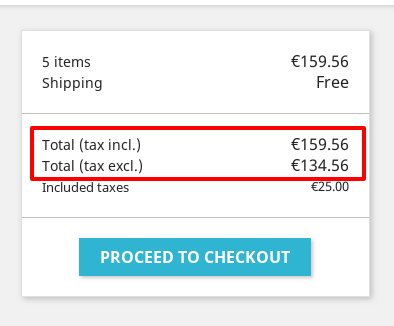

In the Project_PrestaShop/src/Adapter/Presenter/Cart/CartPresenter.php, you need to replace this:
'total' => array(
                'type' => 'total',
                'label' => $this->translator->trans('Total', array(), 'Shop.Theme.Checkout'),
                'amount' => $this->includeTaxes() ? $total_including_tax : $total_excluding_tax,
                'value' => $this->priceFormatter->format(
                    $this->includeTaxes() ? $total_including_tax : $total_excluding_tax
                ),
            ),
by this:
'total' => array(
                'type' => 'total',
                'label' => $this->translator->trans('Total', array(), 'Shop.Theme.Checkout'),
                'amount' => $this->includeTaxes() ? $total_including_tax : $total_excluding_tax,
                'value' => $this->priceFormatter->format(
                    $this->includeTaxes() ? $total_including_tax : $total_excluding_tax
                ),
                'valuexcluded' => $this->priceFormatter->format($total_excluding_tax),
                'labelexcluded' => $this->translator->trans('Total (tax excl.)', array(), 'Shop.Theme.Checkout'),
            ),
In the same file, you need to replace this:
$subtotals['products'] = array(
            'type' => 'products',
            'label' => $this->translator->trans('Subtotal', array(), 'Shop.Theme.Checkout'),
            'amount' => $totalCartAmount,
            'value' => $this->priceFormatter->format($totalCartAmount),
        );
By this:
$subtotals['products'] = array(
            'type' => 'products',
            'label' => $this->translator->trans('Subtotal', array(), 'Shop.Theme.Checkout'),
            'amount' => $totalCartAmount,
            'value' => $this->priceFormatter->format($totalCartAmount),
            //for subtotal
            'valuexcluded' => $this->priceFormatter->format($total_excluding_tax),
            'labelexcluded' => $this->translator->trans('Subtotal (tax excl.)', array(), 'Shop.Theme.Checkout'),
        );
In the file /Project_Folder/themes/your_theme/templates/checkout/_partials/cart-detailed-totals.tpl
You need to replace this:
<div class="card-block">
    <div class="cart-summary-line cart-total">
      <span class="label">{$cart.totals.total.label} {$cart.labels.tax_short}</span>
      <span class="value">{$cart.totals.total.value}</span>
    </div>
    <div class="cart-summary-line">
      <small class="label">{$cart.subtotals.tax.label}</small>
      <small class="value">{$cart.subtotals.tax.value}</small>
    </div>
  </div>
by this
<div class="card-block">
    <div class="cart-summary-line cart-total">
      <span class="label">{$cart.totals.total.label} {$cart.labels.tax_short}</span>
      <span class="value">{$cart.totals.total.value}</span>
    </div>

    <div class="cart-summary-line cart-total">
      <span class="label">{$cart.totals.total.labelexcluded}</span>
      <span class="value">{$cart.totals.total.valuexcluded}</span>
    </div>

    <div class="cart-summary-line">
      <small class="label">{$cart.subtotals.tax.label}</small>
      <small class="value">{$cart.subtotals.tax.value}</small>
    </div>
  </div>
In your file /Project_Folder/themes/your_theme/templates/checkout/_partials/cart-summary-totals.tpl
You need to replace this:
{block name='cart_summary_total'}
    <div class="cart-summary-line cart-total">
      <span class="label">{$cart.totals.total.label} {$cart.labels.tax_short}</span>
      <span class="value">{$cart.totals.total.value}</span>
    </div>
  {/block}
by this:
{block name='cart_summary_total'}
    <div class="cart-summary-line cart-total">
      <span class="label">{$cart.totals.total.label} {$cart.labels.tax_short}</span>
      <span class="value">{$cart.totals.total.value}</span>
    </div>
    <div class="cart-summary-line cart-total">
      <span class="label">{$cart.totals.total.labelexcluded}</span>
      <span class="value">{$cart.totals.total.valuexcluded}</span>
    </div>
  {/block}
In the file /Project_Folder/themes/your_theme/templates/checkout/_partials/cart-summary.tpl you need to replace:
{block name='cart_summary_subtotals'}
      {foreach from=$cart.subtotals item="subtotal"}
        {if $subtotal && $subtotal.type !== 'tax'}
          <div class="cart-summary-line cart-summary-subtotals" id="cart-subtotal-{$subtotal.type}">
            <span class="label">{$subtotal.label}</span>
            <span class="value">{$subtotal.value}</span>
          </div>
        {/if}
      {/foreach}
    {/block}
By this:
{block name='cart_summary_subtotals'}
      {foreach from=$cart.subtotals item="subtotal"}
        {if $subtotal && $subtotal.type !== 'tax'}
          <div class="cart-summary-line cart-summary-subtotals" id="cart-subtotal-{$subtotal.type}">
            <span class="label">{$subtotal.label}</span>
            <span class="value">{$subtotal.value}</span>
          </div>
    <div class="cart-summary-line cart-summary-subtotals" id="cart-subtotal-{$subtotal.type}">
          <span class="label">{$subtotal.labelexcluded}</span>
          <span class="value">{$subtotal.valuexcluded}</span>
    </div>
        {/if}
      {/foreach}
    {/block}
Thanks to check & feedback.
khouloudbelguith
on 24 Jan 2019
Hi @khouloudbelguith and thanks for having searched that. This part is ok too :)
I'm talking about this part : product total (quantity * price) detail without tax. By default, it's the tpl : /checkout/_partials/cart-detailed-product-line.tpl
See my attachement :

tomablan
on 24 Jan 2019
Hi @tomablan,
Please be aware that the GitHub should be used to report issues only. If you need help, you can ask on the Forum (https://www.prestashop.com/forums/), Gitter (https://gitter.im/PrestaShop/General) or Stack Overflow (https://stackoverflow.com/questions/tagged/prestashop).
Thanks for your understanding!
khouloudbelguith
on 8 Feb 2019
Not having a solution for this issue (because, yes, it's an issue), is not a proper way to close this thread, but anyway, I still think this should be in a default PrestaShop release, because as a regular developer, it's something I needed more than once, and that was ok in 1.6, so I think you should consider this as an improvement.
Anyway, I'll implement/fix this by my side. Sorry, the community.
tomablan
on 8 Feb 2019
@tomablan, in our market place, you can find some module to a dual display of prices tax excl. and tax incl
Thanks!
khouloudbelguith
on 8 Feb 2019
Hi @khouloudbelguith,
Thanks for your solution.
 eusxj
on 14 Nov 2019
eusxj
on 14 Nov 2019
Related issues
 nrcjea001
·
3Comments
nrcjea001
·
3Comments
 sandra2n
·
3Comments
sandra2n
·
3Comments
 hiousi
·
3Comments
hiousi
·
3Comments
 matks
·
3Comments
matks
·
3Comments
 Van-peterson
·
3Comments
Van-peterson
·
3Comments