Prestashop: Fresh install cannot access admin panel
Describe the bug
Fresh install prestashop 1.7.5, frontend works, but when I try to access admin I see (after enabling debug) this:
(1/1) FatalErrorExceptionCompile Error: Cannot declare class AppKernel, because the name is already in use
in AppKernel.php line 244
I've try to composer update - but doesn't help.
I'm using MAMP with PHP 7.1.20 (also check 7.2.8).
Screenshots

Additionnal information
PrestaShop version: 1.7.5
PHP version: 7.1.20
 djmassive
All 16 comments
Hi @djmassive,
Did you installed a stable version PS1.7.5.0 downloaded from our official link or did you cloned this project from GitHub?
Could you please follow this link: https://github.com/PrestaShop/php-ps-info
phppsinfo file provides an equivalent to the phpinfo() function that reports PrestaShop Requirements information about the PHP/MySQL/Apache environment and offers suggestions for improvement.
- Upload the file to the server. You should upload your file to the exact directory you want to test. Typically, this will be your httpdocs (/var/www/vhosts/example.com/httpdocs/) directory, although you can upload it to any subdirectory on your server as well. Use FTP to upload the file.
- Visit the page in your browser. If you uploaded it to your html directory, you should now visit http://www.example.com/phppsinfo.php, replacing example.com with your own domain name.
- Now you can view all of the information about PHP for your server for that particular directory.

Thanks to check and feedback.
 khouloudbelguith
on 23 Jan 2019
khouloudbelguith
on 23 Jan 2019
I downloaded zip file from presta website so it should be stable. When I notice that doesn't work, I downloaded composer.json from git and make composer update to check if this repairs namespaces - without result.

djmassive
on 23 Jan 2019
@djmassive, thanks for your feedback.
Could you please provide me the exact link downloaded from PrestaShop?
What is the exact Language/Country did you used during the installation?
Thanks!
khouloudbelguith
on 23 Jan 2019
I downloaded from this link:
https://www.prestashop.com/en/download.
I choose polish language and polish country.
Attached downloaded file (uploaded to my cloud because file is too big):
http://cloud.avatec.pl/index.php/s/D9VsmjEnYqQK6vK
djmassive
on 23 Jan 2019
@djmassive, I tried the file attached with Polish language / Poland country => OK.
https://drive.google.com/file/d/1gby828Rj9AhkRHt1Av93WklzKZhFqips/view
Thanks to check & feedback.
khouloudbelguith
on 23 Jan 2019
@khouloudbelguith Thank You for check. I also check this on my friends iMac - with MAMP (same problem). Later I will try to get latest pull from git.
This is video for whole process:
http://cloud.avatec.pl/index.php/s/NxJXlRvVKd6uT1e
edit:
I also try to rename admin folder to admin-dev - same error.
edit2:
I clone git repository, and make composer install - and ... it is working I can access Admin Panel (language set to English by default).
djmassive
on 23 Jan 2019
Hi @djmassive,
After the install is finished, could you please not only rename the admin folder also the install folder, check & feedback.
In the meantime, could you please provide us with the exact information about your Operating system, your browser (version),...
Thanks!
khouloudbelguith
on 24 Jan 2019
Hi @khouloudbelguith I've try to remove install and change admin folder name - nothing happens.
Mac OS Sierra 10.14.3
Safari 12.0.3 (14606.4.5) (also check latest Chrome and Firefox - but this error is 99% in php somewhere in namespaces I think).
MAMP: Version 5.1 (350)
PHP 7.1.20 also 7.2.8
Cache disabled
Using Apache
Mysql 5.7.23
djmassive
on 25 Jan 2019
@djmassive, Thank you for your report.
We'll first try to reproduce it with Mac OS and we'll come back to you if we need more information.
Thanks!
khouloudbelguith
on 25 Jan 2019
Hi,
I have a MacBookPro bu I cannot reproduce the issue with:
- MAMP 5.2
- PHP 7.2.10
I dont think this is related to MacOS though. Indeed this is a PHP error but it's very strange it happens.
@djmassive When I first installed PrestaShop, I did the following mistake: I had a vhost file with target Prestashop although my folder name was PrestaShop (the S capital). This caused class loading issues. Can you check this is not your case ?
 matks
on 25 Jan 2019
matks
on 25 Jan 2019
my httpd-vhosts.conf looks ok - everything is like on filesystem:
presta.local
ServerAdmin [email protected]
DocumentRoot "/Users/greg/sites/presta/"
ServerName presta.local
ServerAlias www.presta.local
ErrorLog "logs/www_error_log"
CustomLog "logs/www_access_log" common
127.0.0.1 presta.local (in hosts file)
I use this schema and this is the first time, that I have problem installing stable build of presta.
Folder /Users/greg/sites/presta - strangest things that latest version from git works. I don't known exactly how presta works in newest version, but it looks like namespace problem - somewhere.
My friend uses same version of mamp but use other schema - and the problem is the same like in my Mac.
Edit:
I will try delete my mamp and install it again, because installation on my localhost was very slowly while on external server runs fast.
djmassive
on 25 Jan 2019
I think this is problem with component of MAMP - I've installed latest version of mamp and this problem doesn't exists. So I think this thread can be closed.
djmassive
on 25 Jan 2019
Hi @djmassive,
Thanks for your feedback.
Since it is fixed, I close the issue, feel free to open a new one when needed.
Thanks!
khouloudbelguith
on 25 Jan 2019
Hi @khouloudbelguith, @matks - i found route to reproduce this error.
- Install Fresh MAMP
- Edit /etc/host file and add example 127.0.0.1 presta.dev
- Edit MAMP/conf/apache/httpd.conf and change:
a) line 206 AllowOverride None to AllowOverride All
b) line 575 (remove # before this line) (enable including vhost file) Edit /MAMP/conf/apache/extra/httpd-vhosts.conf and paste:
NameVirtualHost *:80
ServerAdmin [email protected]
DocumentRoot "/users/account/www/presta/"
ServerName presta.dev
ErrorLog "logs/www-error_log"
CustomLog "logs/www-access_log" common
where document root is set to folder with presta
- Run MAMP and set browser to presta.dev (before insert installation files)
- Install presta
- Try to run admin....
It is working only, without bellow route (fresh install via localhost without vhosts enabled).
Presta is the first php application that doesn't work that way.
Maybe this can help You to find what's wrong. I don't know how to start doing shop without local instance and tests.
Same problem on 1.7.5.1
djmassive
on 20 Feb 2019
Hi @djmassive,
As I understand, your issue is reproduced only with vhosts.
I tried with Debian 3.16.51-3, I created in the path /etc/apache2/sites-available/ a file projet.conf
<VirtualHost *:80>
    ServerName projet
    ServerAdmin webmaster@localhost
    DocumentRoot /projet
    <Directory "/projet/">
    Options FollowSymLinks Indexes MultiViews
    Require all granted
    AllowOverride All
    Allow from all
    </Directory>

    ErrorLog ${APACHE_LOG_DIR}/error.log
    CustomLog ${APACHE_LOG_DIR}/access.log combined
</VirtualHost>
In the file /etc/hosts
I added this line
127.0.1.1 projet
I reloaded the apache => now it is ok.
I can install PS1.7.5.0 & PS1.7.5.1 using a vhost.
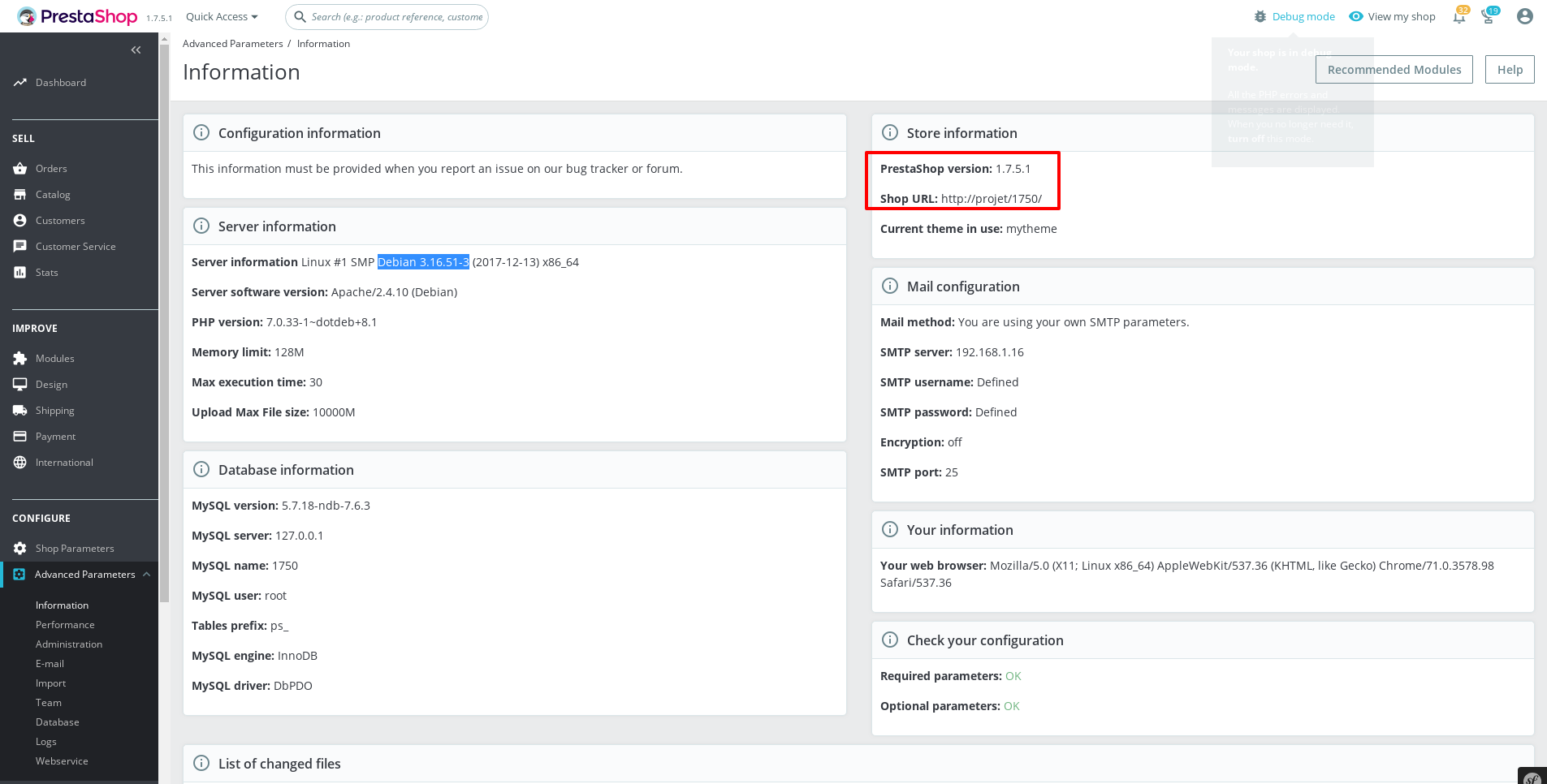
Thanks!
khouloudbelguith
on 20 Feb 2019
@khouloudbelguith i also try Your vhost - but without success (Require all granted give me 500 error). I also try to make domain like Yours without .dev - doesn't work.
Now I will try to install apache using bower - and try to run without mamp.
Ok. Now I don't understand nothing... on simple apache + php + mysql install using brew - same problem with vhost.
I've reinstall Mac OS and its look, like error was in my system. Now works ok.
djmassive
on 20 Feb 2019
Related issues
 Van-peterson
·
3Comments
Van-peterson
·
3Comments
 PrestaShark
·
3Comments
PrestaShark
·
3Comments
 wikao2
·
3Comments
wikao2
·
3Comments
 itisco
·
3Comments
itisco
·
3Comments
 hiousi
·
3Comments
hiousi
·
3Comments
Most helpful comment
I think this is problem with component of MAMP - I've installed latest version of mamp and this problem doesn't exists. So I think this thread can be closed.