Prestashop: Attribute name missing on Cart (order detail) page
Describe the bug
If attribute public name have a colon character (" : ") it disappeared from the product detailed list of the cart (order detail) page.
To Reproduce
- Go to : Back-office > Catalog > Attributes & Features > Attributes > Edit "Color"
- Add authorized character ":" at the end of public name
- Into FO add a product with color attribute to cart
- Into cart see the attribute name as disappeared
Reproduced into French and English languages.
Reproduced into versions 1.7.4.3 and 1.7.5.0.
Some others characters are unauthorized like "<>;=#{=". If colon character break the word in front-office, why it is authorized? Or why isn't it escaped?
Screenshots
Reproduced on PS 1.7.4.3:

And a fresh install of PS 1.7.5.0:

Additional information
PrestaShop version: 1.7.4.3 to 1.7.5.0
PHP version: 5.6 to 7.2
 Klemart3D
All 6 comments
Hi @Klemart3D,
Thanks for your report.
I manage to reproduce the issue with PS1.7.5.0 & PS1.7.4.
When I add : in the public name of an attribute, the attribute name will be not displayed in the cart page
NOK => 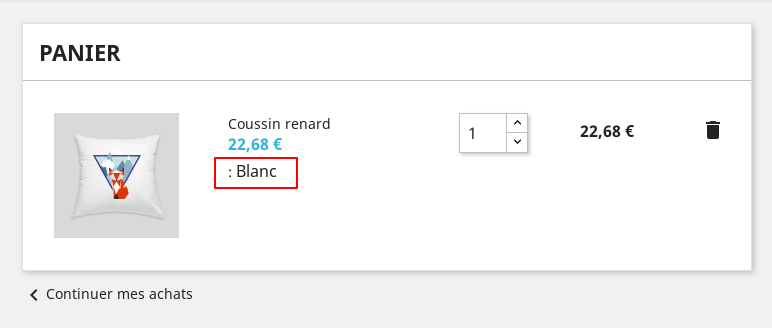
OK =>

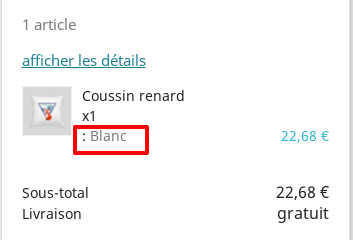
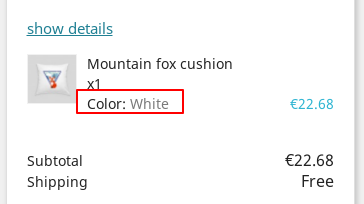
Also, the attribute name will be not displayed in the shopping cat block
NOK =>
OK =>
We will see how to fix it.
Thanks!
 khouloudbelguith
on 21 Jan 2019
khouloudbelguith
on 21 Jan 2019
/themes/classic/templates/checkout/_partials/cart-detailed-product-line.tpl
Line 71 : $attribute is empty, backend should return the attribute even if he has a ':' inside, fun fact is that product page is working with this
 NeOMakinG
on 31 Dec 2019
NeOMakinG
on 31 Dec 2019
...Or display a warning if admin is trying to insert an invalid character in attribute field
...Or auto-sanitize the field by removing invalid characters before to save it
...Or return to template the text field as is saved by user
Is there a lot of ways to fix this bug, but a lead dev must tell us first what would be the best practice to apply in this case...
Klemart3D
on 31 Dec 2019
Ping @PrestaShop/prestashop-core-developers
NeOMakinG
on 18 Feb 2020
It's rather a PM decision so I ping @PrestaShop/prestashop-product-team
My guess is that we should choose between them:
- Or display a warning if admin is trying to insert an invalid character in attribute field
- Or auto-sanitize the field by removing invalid characters before to save it
- Or escape the field on FO
 matks
on 18 Feb 2020
matks
on 18 Feb 2020
I'm all for "educating" users about valid characters. So IMO, your first idea is both the easiest and most useful.
 colinegin
on 19 Feb 2020
colinegin
on 19 Feb 2020
Related issues
 Van-peterson
·
3Comments
Van-peterson
·
3Comments
 marionf
·
3Comments
marionf
·
3Comments
 esistgut
·
3Comments
esistgut
·
3Comments
 centoasa
·
3Comments
centoasa
·
3Comments
 itisco
·
3Comments
itisco
·
3Comments