Prestashop: sales stats are not working
My shop is making sale everyday and the sales stats counter is always at 0
i have "stock" setting on prestashop , but i did de-activate invoices
can you explain how sales stats are working so i can pinpoint the issue.
Thanks.
 forkyboy
All 26 comments
Hi @forkyboy,
Thanks for your report.
I did not manage to reproduce the issue with PS1.7.5.0.
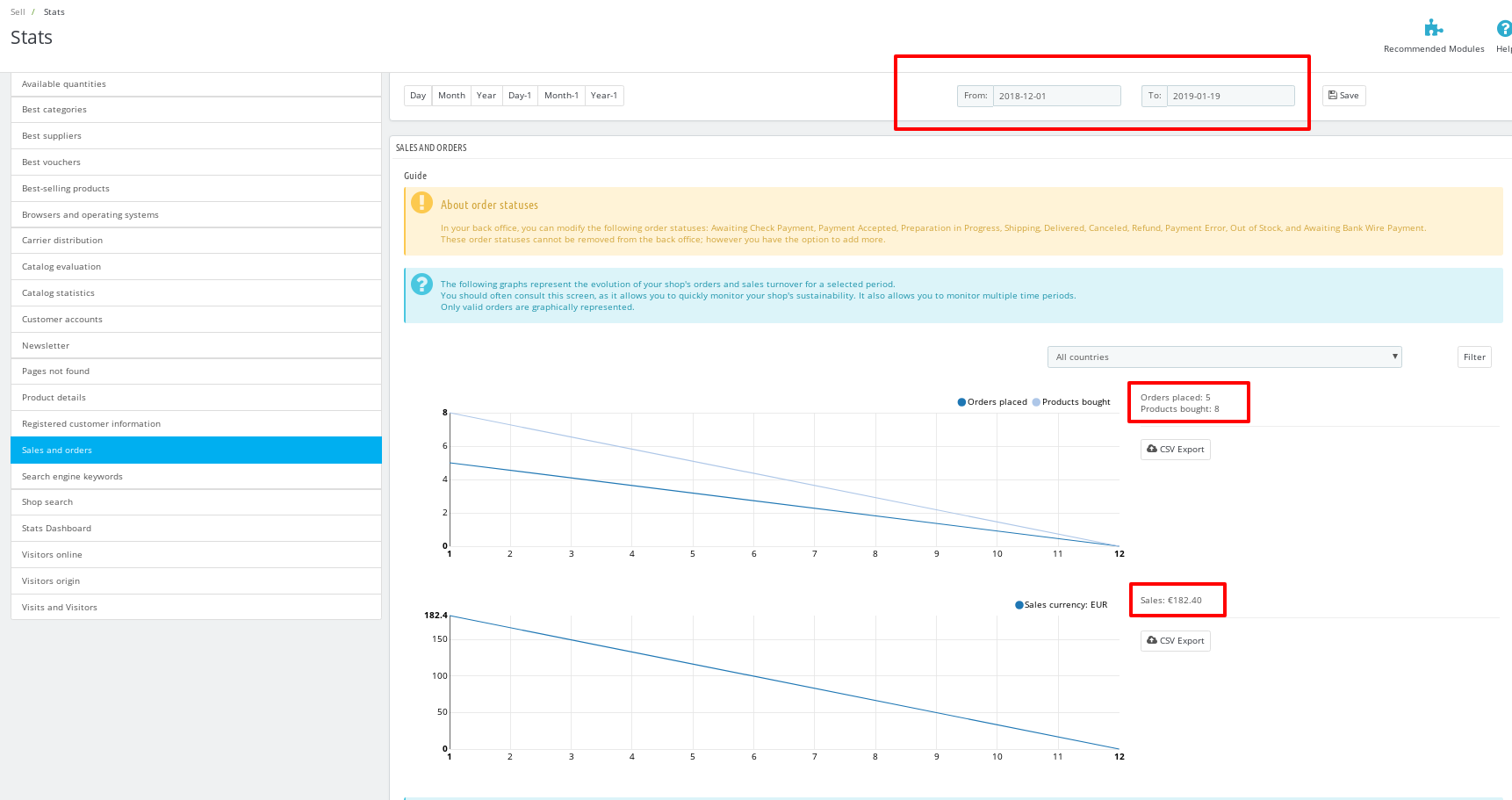
Did you have orders set as paid & validated from your BO?
Did you check the filter day?
Thanks!
 khouloudbelguith
on 10 Jan 2019
khouloudbelguith
on 10 Jan 2019
Hi khouloudbelguith
Yes i have order paid and validated,
my order goes to payment accepted them SHIPPED
Yes i have set the date
here is a screen shot, during this period i have made approx 5 order a day and they are not showing at all in stats
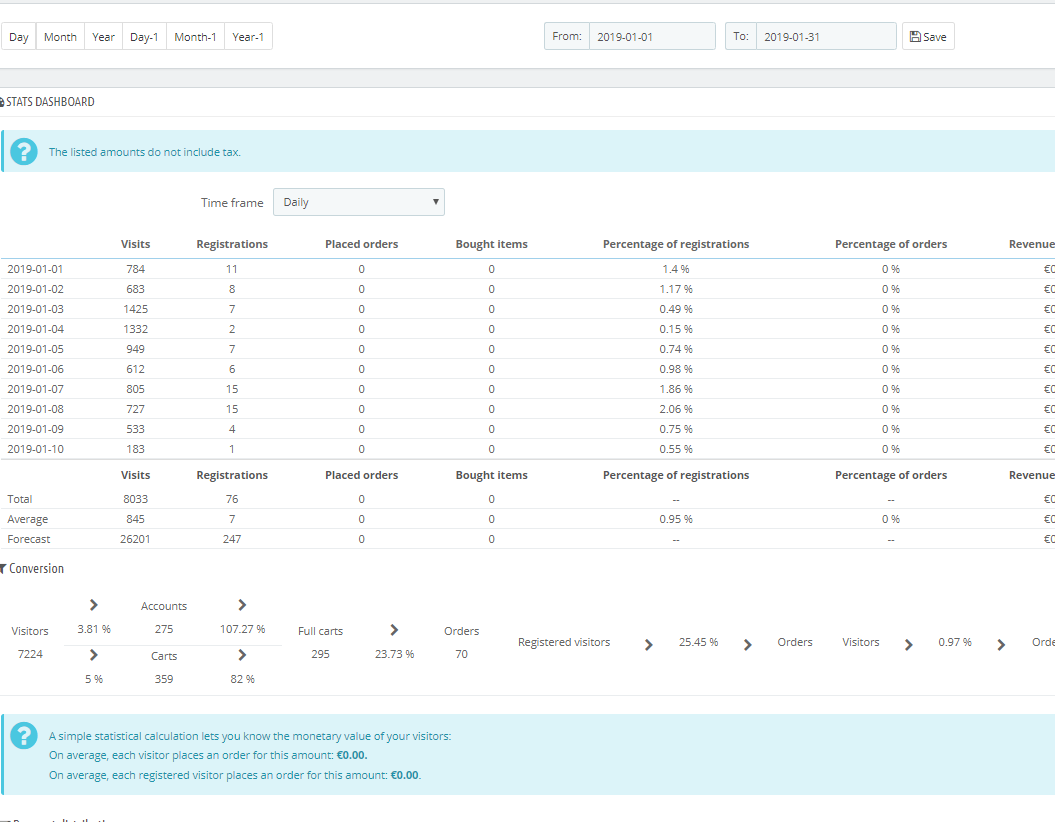
i really dont know where to look,
if someone can explain how sales stats works it can help me pinpointing the issue.
forkyboy
on 10 Jan 2019
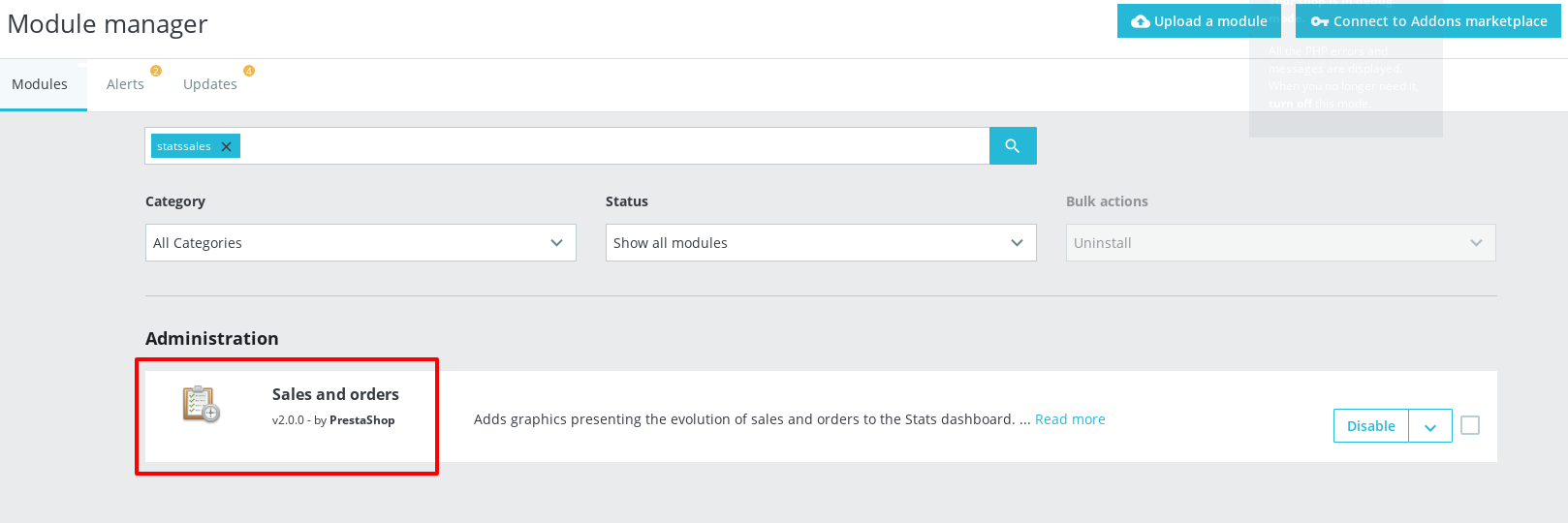
@forkyboy, in your BO => Installed modules page, thanks to check if the Sales and orders module is installed in your shop.
Thanks!
khouloudbelguith
on 10 Jan 2019
yes it is here and enabled , i have just reset it just in case
forkyboy
on 10 Jan 2019
@forkyboy, We need to retrieve the PHP error log and the debug mode report in order to find out what's wrong.
Thanks!
khouloudbelguith
on 10 Jan 2019
how do i do that ?
forkyboy
on 10 Jan 2019
@forkyboy, We need more details to understand how we can reproduce your issue:
- host
- server setup and configuration
- PrestaShop version (source)
- debug mode report
- PHP error logs
- apache error log
- javascript console log
- screenshots
Don't you know how to get this information? Please read the following article:
http://build.prestashop.com/howtos/misc/how-to-create-bug-report/
Thanks!
khouloudbelguith
on 10 Jan 2019
Hi,
I have a similar problem with PS 1.7.0.x and after upgrading to 1.7.4 or 1.7.5 the problem persits, so in order to reproduce the issue you must first come from 1.7.0, since all other instalations of 1.7.3 and up doesn't seems to have this behaviour.
I digged a little bit and my problem was that the orders are not considered by the stats(at any state possible) considered as order done (like if it weren't in the system, but you can still see the products/stock sold).
In the end I didn't mind so I couldn't find an error yet. I've tryied updating with 1 click module but doesn't help.
 ChineseNorris
on 10 Jan 2019
ChineseNorris
on 10 Jan 2019
ChineseChuckNorris,
you are right, i came from a similar pattern,
my stats used to works and stopped working after an update.
@khouloudbelguith
my boss dont want me to publish error log publicity.
sorry i cant help with that.
forkyboy
on 10 Jan 2019
Hi @forkyboy,
I tested with PrestaShop 1.7.0.0 & the statistics are OK.
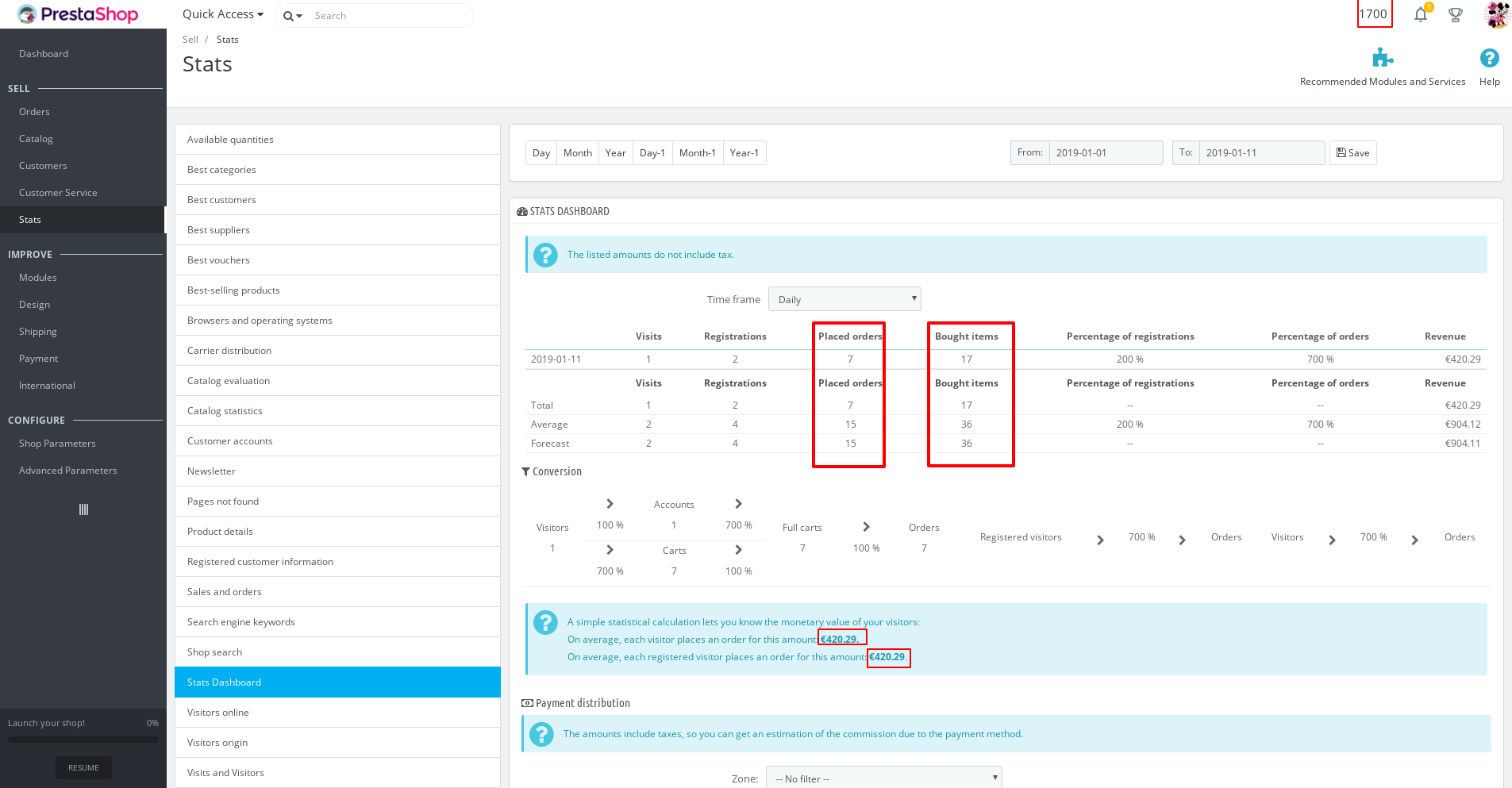
I made an upgrade from PS1.7.0.0 to PS1.7.5.0 => my stats are ok.
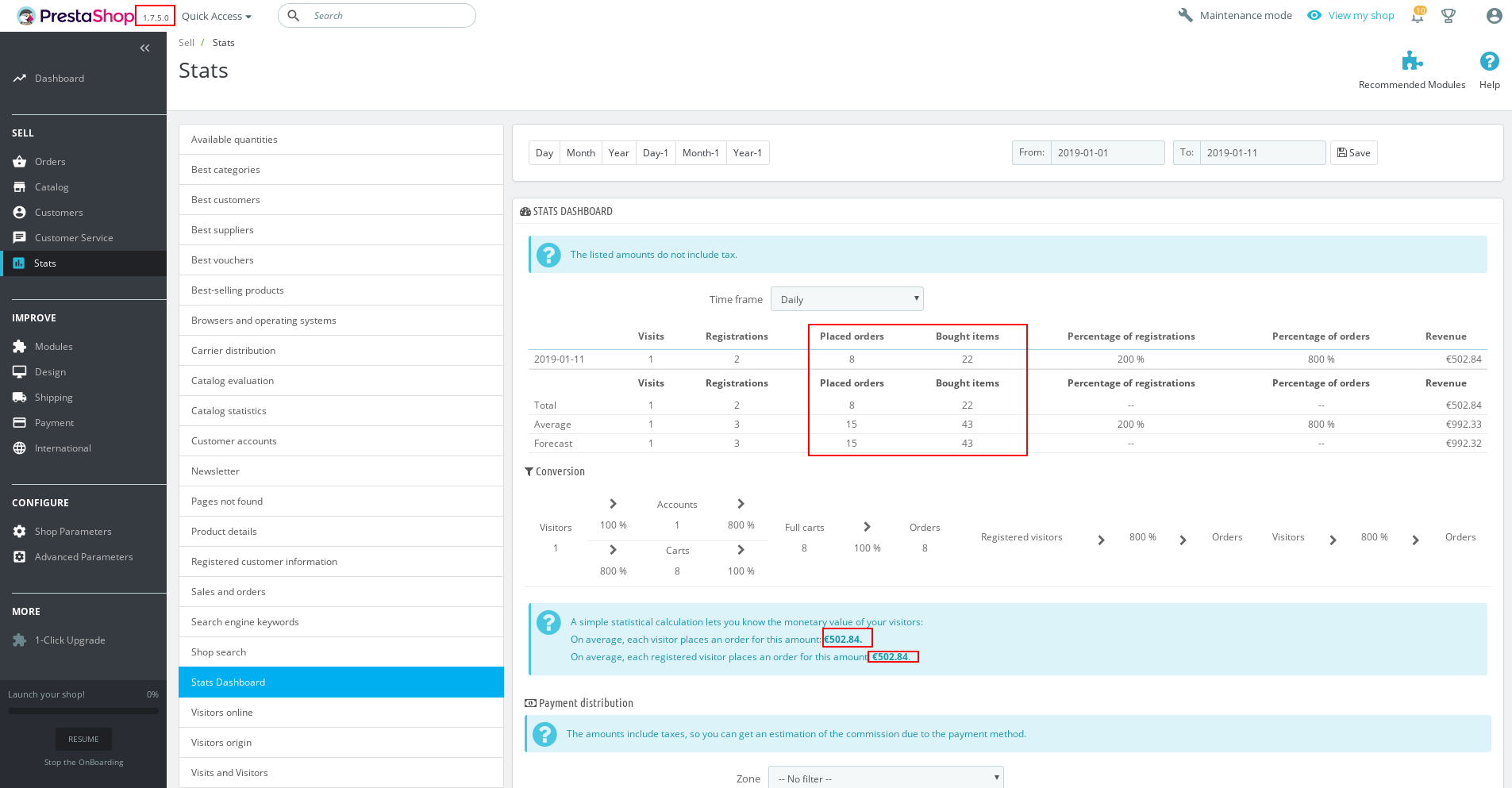
We need to retrieve the PHP error log and the debug mode report in order to find out what's wrong.
This is a public space.
You can provide me the log by email.
My address mail: khouloud.[email protected]
Let's be safe!
Thanks!
khouloudbelguith
on 11 Jan 2019
@khouloudbelguith sorry, I forgot to mention that the problen occurs in the graph shown in the index of the backoffice, the stats in the stats section I have the number of orders good but in "placed orders" is always to 0 (so, the system is not considering any of the orders placed as "order placed"
ChineseNorris
on 11 Jan 2019
@ChineseNorris, we need to retrieve the PHP error log and the debug mode report in order to find out what's wrong.
In mu case it is OK.
Thanks!
khouloudbelguith
on 11 Jan 2019
@khouloudbelguith funny thing is there is no php error or debuggable thing at all, since this is not "considered a bug", it's just that the system is not recording orders as "completed orders"
ChineseNorris
on 12 Jan 2019
@khouloudbelguith how do we do now ?
 mygitaccount2
on 15 Jan 2019
mygitaccount2
on 15 Jan 2019
@mygitaccount2, @ChineseNorris, without the PHP error log and the debug mode we could not find out what's wrong.
In my case, all stats are ok with fresh installation 1.7.5.0 & 1.7.0.0 & after upgrade also.
Despite our several trials, we could not reproduce your issue with the provided information.
It seems that your issue is not a PrestaShop's core bug but most likely a server configuration or customization problem.
I invite you to contact our support team: http://addons.prestashop.com/en/388-support to help you solve your issue.
Thanks!
khouloudbelguith
on 15 Jan 2019
Hello,
I've found a solution here:
https://www.prestashop.com/forums/topic/367885-dashboard-stats-are-empty-after-upgrading-to-1609/
From user @skorupa code here fixes the problem.
This worked for me, but I had invoices activated as well, but ended deactivating them, since i'm generating invoices externally.
Basically the fix is because my prestashop wasn't generating invoices properly, so that's why the date were always zero, creating orders as zero. The quick fix is change invoice_date for date_add in the stats.
@forkyboy @mygitaccount2
ChineseNorris
on 14 Feb 2019
thanks @ChineseNorris
i have tried and replace (removed) all content from "AdminStatsController.php "
by skorupa code , and all i get is a nice error 500 when opening the order page.
also i do not have the file he is refering to in
"And remember to delete /cache/class_index.php. That fix is cheking stats based on order add date and not invoice date"
can you help with that ?
forkyboy
on 14 Feb 2019
@forkyboy you don’t have to remove the content from the core file, you have to create a new document (AdminStatsController.php) at :
override/controllers/admin/AdminStatsController.php
And place the code there, clean the cache and check your stats
ChineseNorris
on 14 Feb 2019
Thx Chuck @ChineseNorris it worked !
forkyboy
on 15 Feb 2019
@khouloudbelguith
now you got all info . please re-open and push the fix ?
forkyboy
on 15 Feb 2019
@forkyboy, sorry but I did not manage to reproduce the issue with PS1.7.5.0 & PS1.7.0.0 as I said in my previous comment.
It is OK in my case.
Thanks for your understanding!
khouloudbelguith
on 15 Feb 2019
Hello @khouloudbelguith ,
The main problem with stats module is that won't work if invoices are turned off, for instance if you have a shop with an external invoice software.
This fix should be taken as an example for shops with invoice option disabled, since the query to retrieve the data is based on invoice date.
This is not urgent nor critical, but should be at least on the TO-DO list.
Best regards
ChineseNorris
on 24 Feb 2019
Hi @ChineseNorris,
But for the module dashtrends, it is necessary to regenerate invoices so the statistics will be displayed.
Thanks!
khouloudbelguith
on 25 Feb 2019
So @khouloudbelguith you leave it to the dev/community to override this for a pretty common wish (as I found - while researching this for some time - in many forum posts - since 2011)? Wouldn't it be more user-friendly to give the user an option?
 sebastian-marinescu
on 24 Sep 2020
sebastian-marinescu
on 24 Sep 2020
Hi @sebastian-marinescu,
This issue will be fixed on this ticket: #15319.
Your ticket is a duplicate of #15319
Thanks!
khouloudbelguith
on 25 Sep 2020
Duplicate of #15319
khouloudbelguith
on 25 Sep 2020
Related issues
 centoasa
·
3Comments
centoasa
·
3Comments
 itisco
·
3Comments
itisco
·
3Comments
 esistgut
·
3Comments
esistgut
·
3Comments
 Prestaworks
·
3Comments
Prestaworks
·
3Comments
 Van-peterson
·
3Comments
Van-peterson
·
3Comments