Prestashop: 1.7.5.0 - link widget - 500 Internal Server Error
Describe the bug
BO / Design / Link Widget - click and 500 Internal Server Error
Same when you click on Modules / Link List / Configure
I've unistalled Link List, cleared cache, installed again, no help, still the same - 500 Error
To Reproduce
Steps to reproduce the behavior:
- Go to 'BO'
- Click on 'Design / Link Widget'
- See error
Screenshots
If applicable, add screenshots or screenrecords to help explain your problem.
Additionnal information
PrestaShop version: 1.7.5.0
Link List version: 3.0.2
PHP version: 5.6.30
 mrabsinthe
All 36 comments
Hi @mrabsinthe,
Could you please provide us with more info? We need more details to understand how we can reproduce your issue:
- host
- server setup and configuration
- debug mode report
- PHP error logs
- apache error log
- javascript console log
- screenshots
Don't you know how to get this information? Please read the following article:
http://build.prestashop.com/howtos/misc/how-to-create-bug-report/
Thanks!
 khouloudbelguith
on 9 Jan 2019
khouloudbelguith
on 9 Jan 2019
Maybe this will help (if not, I can provide more info):
Server software version: LiteSpeed
PHP version: 5.6.30
Memory limit: 256M
Max execution time: 360
Upload Max File size: 128M


mrabsinthe
on 9 Jan 2019
@mrabsinthe, did you use a custom theme or the theme by default provided by PrestaShop?
Thanks!
khouloudbelguith
on 9 Jan 2019
No, current theme in use: classic
mrabsinthe
on 9 Jan 2019
@mrabsinthe, try to uninstall the ps_linklist module, remove the ps_linklist folder from your projectFolder/modules/, clear cache & try to install the new version of the ps_linklist.
Thanks!
khouloudbelguith
on 9 Jan 2019
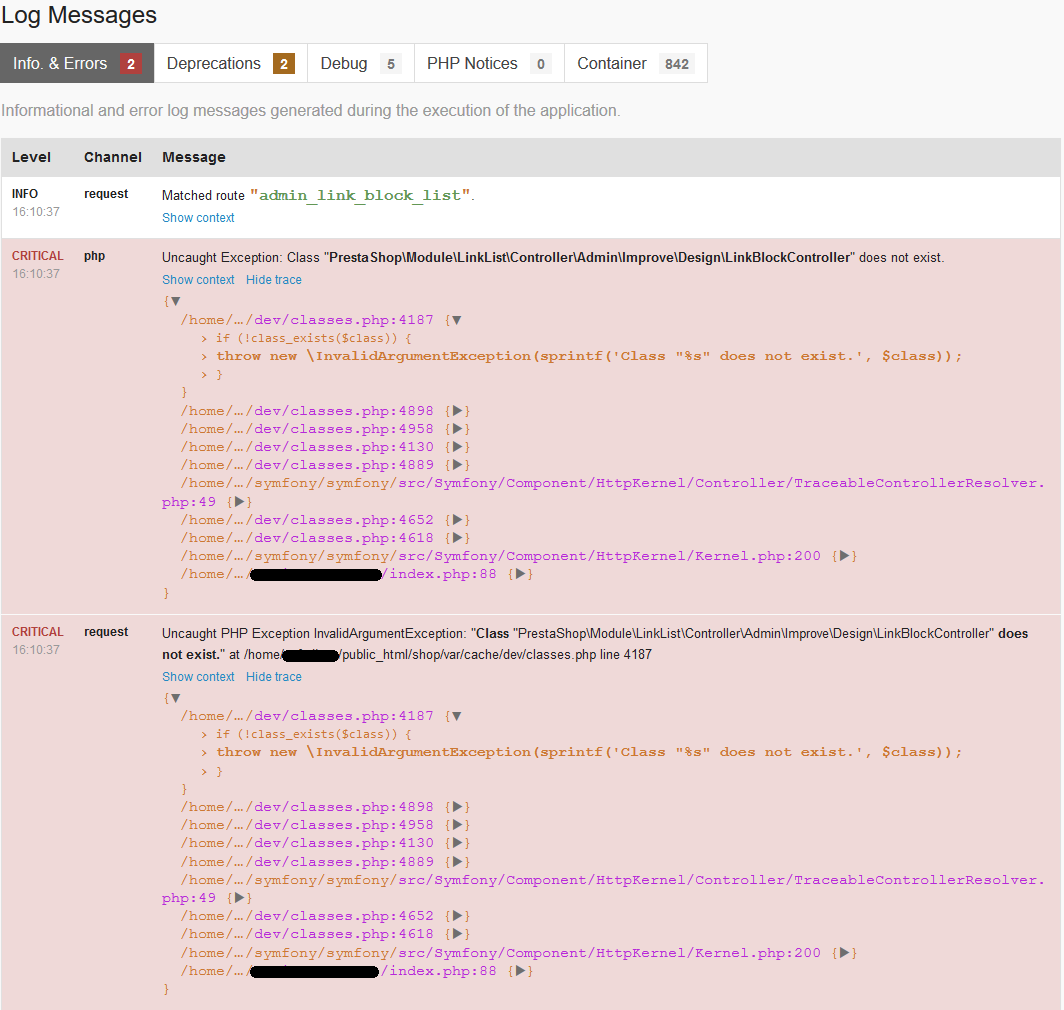
I did as you said, cleared cache from Advanced Parametres / Performance, also cleared my browser cache just in case and the error is still there:
mrabsinthe
on 9 Jan 2019
Hi @mrabsinthe,
Could you please try to clear cache manually by deleting all the folder into var/cache (prod & dev).
Thanks to check and feedback.
khouloudbelguith
on 10 Jan 2019
Hi @khouloudbelguith,
this is what I just did:
1/unistalled ps_linklist
2/deleted cache from BO as well as manually both folders (prod & dev)
3/double checked that no ps_linklist folder exists in /modules and /themes/classic/modules
4/installed ps_linklist again
5/clicked "configure"
6/and the result is: HTTP 500 Internal Server Error - Class "PrestaShop\Module\LinkList\Controller\Admin\Improve\Design\LinkBlockController" does not exist.
mrabsinthe
on 10 Jan 2019
Hi @mrabsinthe,
I discussed to our developer @jolelievre to try to reproduce the issue.
Thanks!
khouloudbelguith
on 10 Jan 2019
Hi @khouloudbelguith and @jolelievre and @marionf
I've been testing a trying to find a solution... Can you please try the following?
1/ fresh 1.7.5.0 installation - no custom modules, no theme - just classic - no modifications
2/ click Design / Link Widget - all is OK - no errors
3/ go to Module notifications / Updates
4/ Link List is available for upgrade v2.1.5 -> v3.0.2 - click Upgrade
5/ click Configure
6/ see the result - I have 500 Error
This issue has already been reported #11914 - I tried to install the ps_linklist from there but it is not possible to install - also 500 Error. And yes, I did clear the cache manually and deleted both folders ps_linklist:

mrabsinthe
on 11 Jan 2019
Hi, @mrabsinthe,
If you enable the debug mode, what the exact exception displayed?
Thanks!
khouloudbelguith
on 11 Jan 2019
The problem is with ps_linklist since v3.0.0 - none of them will install. 2.1.5 is installed correctly and working fine with no errors. I hope it helps. This is when trying to install v3.0.2 from github:

mrabsinthe
on 11 Jan 2019
@mrabsinthe, thanks for this clarifications.
Yes, when we clone ps_linklist from GitHub & we try to install it, we have issues.
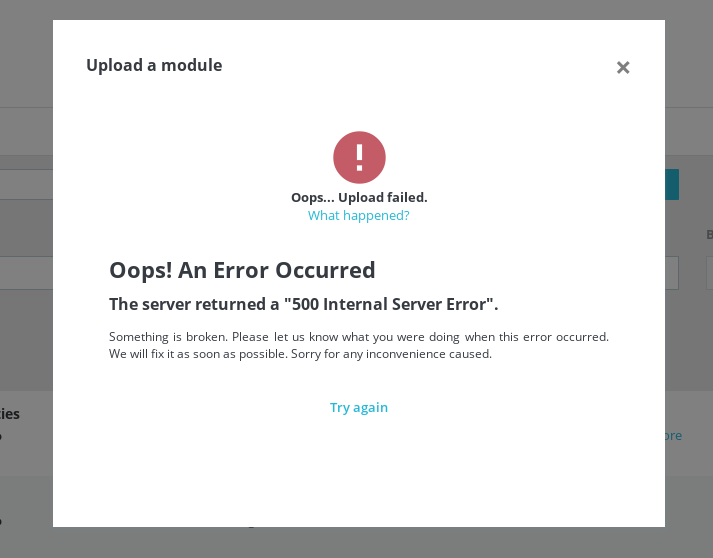
@jolelievre what do you think?
But, if we try to install ps_linklist from Module Catalog page, it is OK.
https://drive.google.com/file/d/1ryNroV6djE1a3jF2BbeWHvGaT5yTAwlF/view
Thanks!
khouloudbelguith
on 11 Jan 2019
The missing autoload is because vendors are not installed inside the module:
- If you cloned the module or installed it manually based on github sources you need to run
composer installinside the module (vendors are not versioned) - If you install it from 'Module Manager' you don't have this problem because the Addons platform installs and includes the vendor inside its archives
@mrabsinthe how did you install your module?
 jolelievre
on 11 Jan 2019
jolelievre
on 11 Jan 2019
@jolelievre, thanks!
For me, I can confirm that the installation of the ps_linklist module after running composer install& composer update is done successfully.
Thanks!
khouloudbelguith
on 11 Jan 2019
Just running composer install is enough (and best practice)
jolelievre
on 11 Jan 2019
That, unfortunately doesn't explain why we're receiving 500 Error when the ps_linklist is installed from Module Manager. Vanilla 1.7.5.0 with no additional modules nor custom theme:

mrabsinthe
on 11 Jan 2019
I can provide you with credentials to my test site if that would help so you can replicate the issue yourself.
mrabsinthe
on 11 Jan 2019
Hello, same issu for me ps_linklist 3.0.2 dont work and give me error:
Class "PrestaShop\Module\LinkList\Controller\Admin\Improve\Design\LinkBlockController" does not exist.
 fredalva
on 17 Jan 2019
fredalva
on 17 Jan 2019
Hi,
Despite our several trials, we could not reproduce your issue with the provided information.
It seems that your issue is not a PrestaShop's core bug but most likely a server configuration or customization problem.
I invite you to contact our support team: http://addons.prestashop.com/en/388-support to help you solve your issue.
Thanks for your understanding!
khouloudbelguith
on 17 Jan 2019
I have the same problem with link-widget in fresh install 1.7.5 without any modifications.
"Oops! An Error Occurred
The server returned a "500 Internal Server Error".
Something is broken. Please let us know what you were doing when this error occurred. We will fix it as soon as possible. Sorry for any inconvenience caused."
 kenjinx
on 17 Feb 2019
kenjinx
on 17 Feb 2019
Hi @kenjinx,
This issue is currently closed, can you open a new one with more information about your configuration.
Thanks!
khouloudbelguith
on 18 Feb 2019
I had the same problem on a installation. Key thing is that I was migrating a PS 1.6 shop into PS 1.7.5, and that means that I was copying the data from the old database to the brand new PS 1.7.5 installation.
Problem started after upgrading the module to version 3.0.2.
As the module didn't work, I made the changes needed directly on the ps_link_block* tables (remember this was a copy of the old shop tables)
I found that my old shop configuration was using CMS page ids that did no longer exist on the shop. Problem disappeared after saving a "correct" configuration making reference only to existing CMS page ids.
I am still unable to understand how an error like this can produce the debug output described here (I arrive to this ticket googling for the fatal exception).
Hope this could help.
KR
 jcarloscid
on 8 Mar 2019
jcarloscid
on 8 Mar 2019
Hi @jcarloscid,
Thanks for your feedback.
I found that my old shop configuration was using CMS page ids that did no longer exist on the shop.
So, to reproduce the issue, I need to delete a page cms before updating the module?
Thanks!
khouloudbelguith
on 11 Mar 2019
I haven't tried to reproduce the issue, so I cannot guarantee the effect.
I'd better copy the ps_link_block* tables from a shop on version 1.6 after removing the CMS page on that shop. That is more close to what I have experienced.
Regards.
jcarloscid
on 11 Mar 2019
@jcarloscid, thanks for your feedback.
ping @jolelievre what do you think?
Thanks!
khouloudbelguith
on 11 Mar 2019
Hello, I have same error, cant fixit

 jorgelopezowd
on 15 Mar 2019
jorgelopezowd
on 15 Mar 2019
Bonjour,
Same error, on fresh install, error only visible on one website of two configured identically on the same server.

Thanks
 thomasharko
on 16 Mar 2019
thomasharko
on 16 Mar 2019
1-Uninstall the module
2- Clears cahe smarty
3- Delete modules / ps_linklist
4 - Reinstall the module version v2.1.6
it works correctly
NO UPDATE THIS MODULE
 elcuartito
on 2 Apr 2019
elcuartito
on 2 Apr 2019
And no update
elcuartito
on 2 Apr 2019
Hello,
Same problem width a fresh installation of Prestashop 1.7.5.1 and module listlink version 3.0.2 'Class "PrestaShop\Module\LinkList\Controller\Admin\Improve\Design\LinkBlockController" does not exist.'
I had installed the version 2.1.6 and it works ... but there is no solution with the latest version of listlink ?
Regards
 AbLink-Sites-Internet
on 9 Apr 2019
AbLink-Sites-Internet
on 9 Apr 2019
Thomas,
Going back to 2.1.6 and removing cache works also for me.
Regards
thomasharko
on 11 Apr 2019
It's works for me too but i think it's not a real good issue ...
Regards
AbLink-Sites-Internet
on 11 Apr 2019
Hello,
sadly this doesn't solve the problem with the version3. I tried to reproduce the bug again without success.
Here's what I did:
- download the 1.7.5.1 version of prestashop from the website
- install new shop
- go to "Design > Link widget"
- it works fine (of course this is the version2 which is integrated with PS 175)
- got to module manager
- upgrade the module using the "Upgrade" button
- go back to "Design > Link widget"
- it works as well, the module has been updated no error nor exception
So I would like to know if you followed those steps or used another way to upgrade the module?
Thank you
jolelievre
on 11 Apr 2019
When you go in modules/ps_linklist does the vendor folder contain autoload.php and composer folder. If not you need to run composer install
Then manually remove the cache rm -fR var/cache/* and retry
jolelievre
on 11 Apr 2019
When i go in lazadasales.com have a lot of module prestashop
 victordarius26
on 25 May 2019
victordarius26
on 25 May 2019
Related issues
 zuk3975
·
3Comments
zuk3975
·
3Comments
 matks
·
3Comments
matks
·
3Comments
 sandra2n
·
3Comments
sandra2n
·
3Comments
 esistgut
·
3Comments
esistgut
·
3Comments
 rGaillard
·
3Comments
rGaillard
·
3Comments