Prestashop: Can't open module configure: 500 error after ps_linklist update to 3.0.2
Describe the bug
After updating prestashop to 1.7.5 I also updated Link List module to 3.0.2. Now I'm getting 500 error when I try to configure it in back office.
I've tried:
- reinstalling the module
- clearing the cache manually (it is disabled atm)
To Reproduce
Steps to reproduce the behavior:
- Update Link List from 2.. to 3.0.2
- Go to Modules -> Configure "Link List"
- See Error
Screenshots

Additionnal information
PrestaShop version: 1.7.5
Error stacktrace:
InvalidArgumentException:
Class "PrestaShop\Module\LinkList\Controller\Admin\Improve\Design\LinkBlockController" does not exist.

  at vendor/symfony/symfony/src/Symfony/Component/HttpKernel/Controller/ControllerResolver.php:180
  at Symfony\Component\HttpKernel\Controller\ControllerResolver->createController('PrestaShop\\Module\\LinkList\\Controller\\Admin\\Improve\\Design\\LinkBlockController::listAction')
     (vendor/symfony/symfony/src/Symfony/Component/HttpKernel/Controller/ContainerControllerResolver.php:63)
  at Symfony\Component\HttpKernel\Controller\ContainerControllerResolver->createController('PrestaShop\\Module\\LinkList\\Controller\\Admin\\Improve\\Design\\LinkBlockController::listAction')
     (vendor/symfony/symfony/src/Symfony/Bundle/FrameworkBundle/Controller/ControllerResolver.php:43)
  at Symfony\Bundle\FrameworkBundle\Controller\ControllerResolver->createController('PrestaShop\\Module\\LinkList\\Controller\\Admin\\Improve\\Design\\LinkBlockController::listAction')
     (vendor/symfony/symfony/src/Symfony/Component/HttpKernel/Controller/ControllerResolver.php:88)
  at Symfony\Component\HttpKernel\Controller\ControllerResolver->getController(object(Request))
     (vendor/symfony/symfony/src/Symfony/Component/HttpKernel/Controller/ContainerControllerResolver.php:41)
  at Symfony\Component\HttpKernel\Controller\ContainerControllerResolver->getController(object(Request))
     (vendor/symfony/symfony/src/Symfony/Component/HttpKernel/Controller/TraceableControllerResolver.php:49)
  at Symfony\Component\HttpKernel\Controller\TraceableControllerResolver->getController(object(Request))
     (vendor/symfony/symfony/src/Symfony/Component/HttpKernel/HttpKernel.php:134)
  at Symfony\Component\HttpKernel\HttpKernel->handleRaw(object(Request), 1)
     (vendor/symfony/symfony/src/Symfony/Component/HttpKernel/HttpKernel.php:68)
  at Symfony\Component\HttpKernel\HttpKernel->handle(object(Request), 1, false)
     (vendor/symfony/symfony/src/Symfony/Component/HttpKernel/Kernel.php:200)
  at Symfony\Component\HttpKernel\Kernel->handle(object(Request), 1, false)
     (admin772b6nbxw/index.php:88)
 MSiliunas
All 31 comments
Hi @MSiliunas,
Thanks for your report.
I did not manage to reproduce the issue with PS1.7.5.0.
The upgrade of the ps_linklist from v2.1.5 to 3.0.2 is done successfully.
I attached a video record.
https://drive.google.com/file/d/1HLGbBuToAG4Qy1_ZbfGaTKgcK1Kn5cKq/view
Could you please try to uninstall this module, clear cache & install it again.
Thanks to check & feedback.
 khouloudbelguith
on 24 Dec 2018
khouloudbelguith
on 24 Dec 2018
I have the same issue on a fresh PS 1.7.5.0 Prestashop installation.
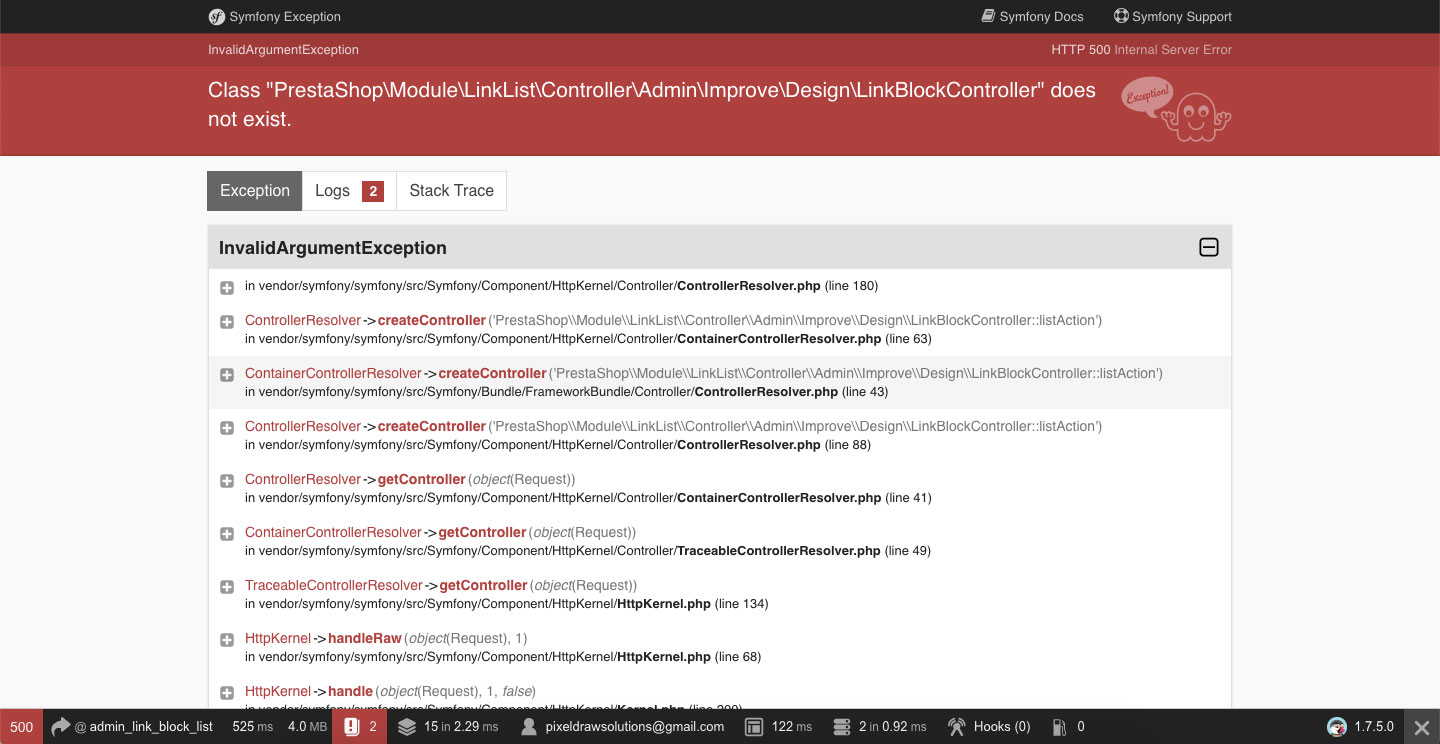
 pdsolutions
on 27 Dec 2018
pdsolutions
on 27 Dec 2018
Hi @pdsolutions,
What the exact version of the ps_linklist module did you use before the upgrade?
Thanks!
khouloudbelguith
on 27 Dec 2018
Hi khouloudbelguith,
Did you read my comment. I have the same issue on a fresh prestashop install v1. 7.5.0
So, this means that the version of @MSiliunas before update does not matter.
pdsolutions
on 27 Dec 2018
Hi @pdsolutions,
Sorry, but I did not manage to reproduce the issue with a fresh installation PS1.7.5.0.
I attached a video record.
Module manager • 1750.webm.zip
@marionf, did you manage to reproduce the issue?
Thanks!
khouloudbelguith
on 27 Dec 2018
@khouloudbelguith I can't reproduce
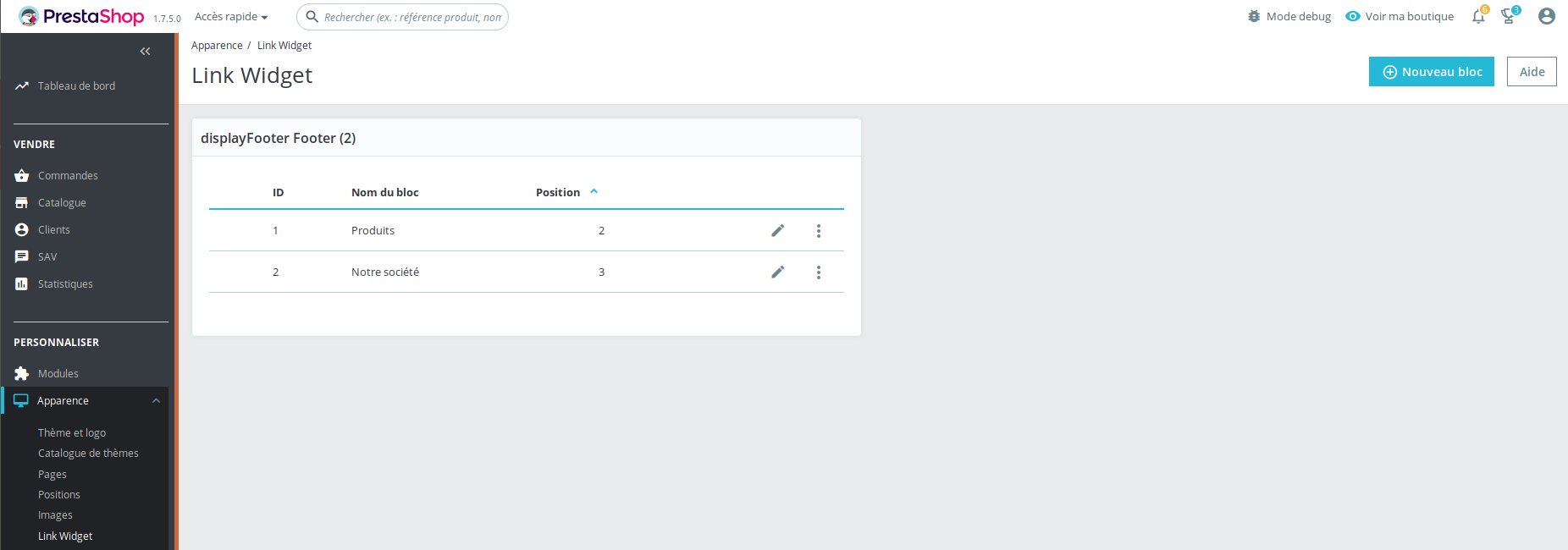
 marionf
on 27 Dec 2018
marionf
on 27 Dec 2018
@jolelievre any idea about this issue ?
marionf
on 27 Dec 2018
Hello,
I just tested it on another PS 1.7.5.0 installation and it works with the default template.
The problem of @MSiliunas and mine is that we don't use the default template. I think the problem is more related to the template than prestashop core.
Here i attach my video installing and testing the link widget on a brand new PS 1.7.5.0, then i install the template and it fails.
https://tienda.termprotect.es/linkwidget.mp4
Thanks
pdsolutions
on 27 Dec 2018
Hi @pdsolutions,
I tried with other different themes but I did not manage to reproduce the issue.
I attached a video record.
https://drive.google.com/file/d/1fpTVdimchlQL_SMOPp8pHc_GlTVgXKkP/view
As it's not the default theme, provided by Prestashop, we can't do anything with this.
You should contact the theme author via your addons.prestashop.com account, they are the only ones to help you with it.
Thanks!
khouloudbelguith
on 27 Dec 2018
@khouloudbelguith Sorry for late response.
I'm using Classic theme by PrestaShop (v 1.0.0). So it's not a problem with the theme (I suppose).
What I didn't mention is that I use 1-Click Upgrade for PS upgrade.
MSiliunas
on 2 Jan 2019
Hi @MSiliunas,
Despite our several trials, we could not reproduce your issue with the provided information, so we closed the issue.
In your case, try to uninstall the ps_linklist module, remove the ps_linklist folder from your projectFolder/modules/, clear cache & try to install the new version of the ps_linklist.
Thanks!
khouloudbelguith
on 2 Jan 2019
@khouloudbelguith I've tried uninstalling, clearing cache, manually deleting files and installing newest version downloaded directly from github. Didn't work. I've downloaded the 2.1.5 version and it works again.
MSiliunas
on 6 Jan 2019
Hi @MSiliunas,
I cloned this module from Github
ps_linklist.zip
It is the latest version of ps_linklist module, thanks to check with it!
khouloudbelguith
on 7 Jan 2019
@MSiliunas maybe your problem is linked to the absence of vendor
If you go in modules/ps_linklist/vendor is the folder empty?
If it you need to run composer install because the module was probably installed manually from the sources and they don't include vendors
If you install from the Module Manager you don't have this problem
 jolelievre
on 11 Jan 2019
jolelievre
on 11 Jan 2019
Ive already checked and the vendors were installed. Ive tried installing
via manager and manually. It was the same. Currently ive installed the
older version.
On Fri, Jan 11, 2019, 14:04 jolelievre <[email protected] wrote:
@MSiliunas https://github.com/MSiliunas maybe your problem is linked to
the absence of vendorIf you go in modules/ps_linklist/vendor is the folder empty?
If it you need to run composer install because the module was probably
installed manually from the sources and they don't include vendors
If you install from the Module Manager you don't have this problem—
You are receiving this because you were mentioned.
Reply to this email directly, view it on GitHub
https://github.com/PrestaShop/PrestaShop/issues/11914#issuecomment-453496569,
or mute the thread
https://github.com/notifications/unsubscribe-auth/AGn2MUURXOY5RQNAthBN1aOqXU-EGO8eks5vCH2zgaJpZM4Zf-6T
.
MSiliunas
on 11 Jan 2019
Ok so it seems to be a different problem from https://github.com/PrestaShop/PrestaShop/issues/12085
jolelievre
on 11 Jan 2019
Do you have access to command line? If so you can try these commands at the root of the project:
php ./bin/console debug:router and check if admin_link_block_list, admin_link_block_create, ... are present
php ./bin/console debug:container | grep prestashop.module.link_block to see if the module's services are present
jolelievre
on 11 Jan 2019
Same issue as @MSiliunas , clean installation, no issues with older version 2.1.5. Installed via manager, modules/ps_linklist/vendor is not empty, composer folder is there as well as autoload.php
Uncaught Exception: Class "PrestaShop\Module\LinkList\Controller\Admin\Improve\Design\LinkBlockController" does not exist.
as well as:
Uncaught PHP Exception InvalidArgumentException: "Class "PrestaShop\Module\LinkList\Controller\Admin\Improve\Design\LinkBlockController" does not exist." at /home/xxx/public_html/store/var/cache/dev/classes.php line 4187
All screenshots below:
 mrabsinthe
on 17 Jan 2019
mrabsinthe
on 17 Jan 2019

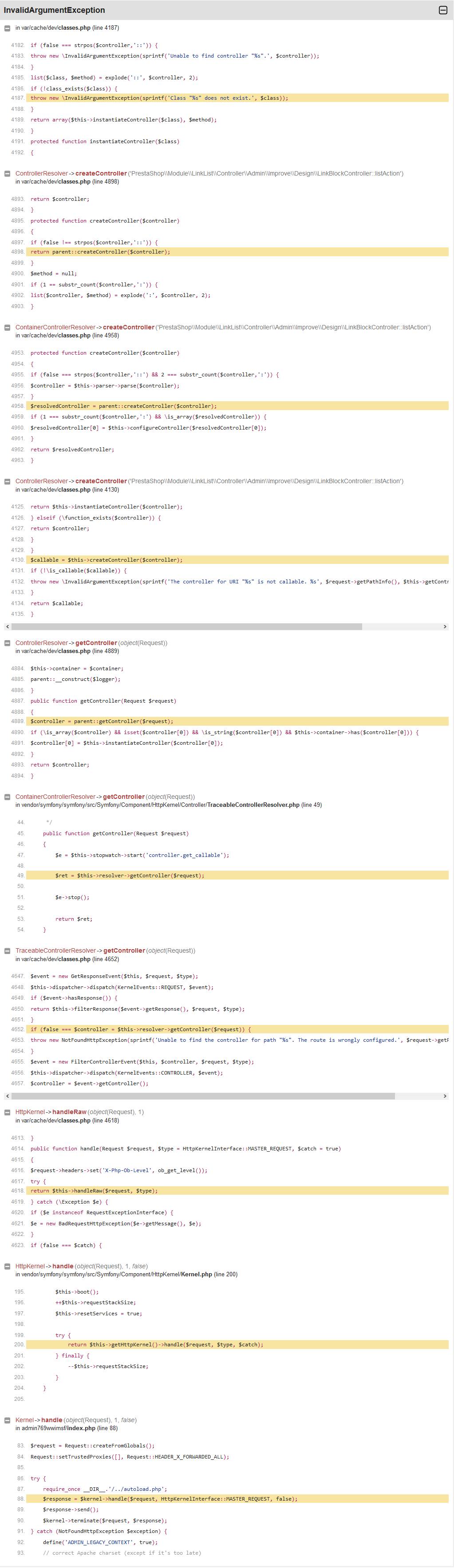
mrabsinthe
on 17 Jan 2019
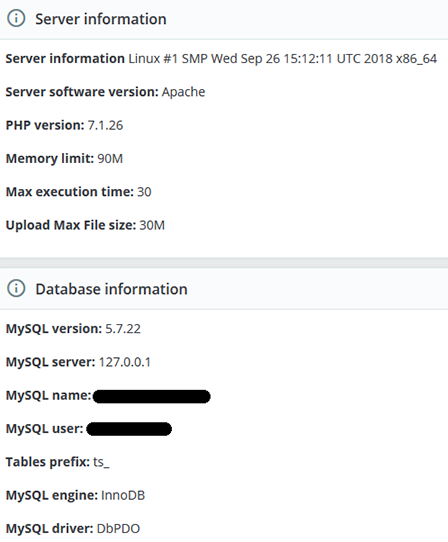
Perhaps PHP related...? I have managed to test two identical 1.7.5 clean installations on two different servers. Only one of them is working fine after ps_linklist update to v3.0.2., have a look:
This one has 500 error:
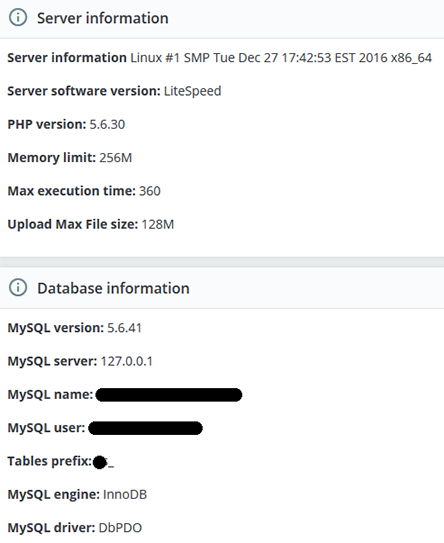
And this one is working just fine:
mrabsinthe
on 18 Jan 2019
Hi @mrabsinthe, Thanks for your feedback.
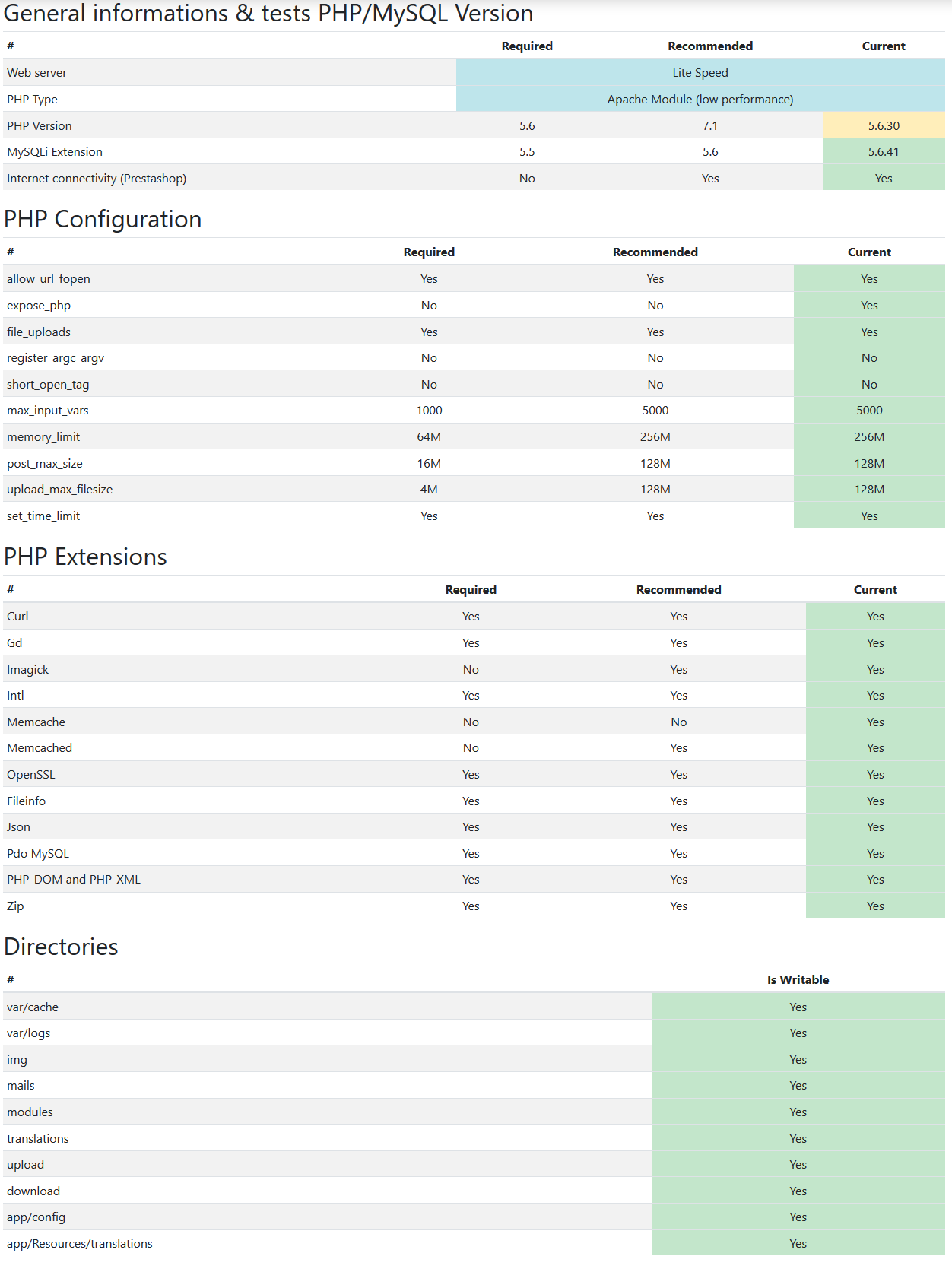
Could you please follow this link: https://github.com/PrestaShop/php-ps-info & check with your first server information.
phppsinfo file provides an equivalent to the phpinfo() function that reports PrestaShop Requirements information about the PHP/MySQL/Apache environment and offers suggestions for improvement.
- Upload the file to the server. You should upload your file to the exact directory you want to test. Typically, this will be your httpdocs (/var/www/vhosts/example.com/httpdocs/) directory, although you can upload it to any subdirectory on your server as well. Use FTP to upload the file.
- Visit the page in your browser. If you uploaded it to your html directory, you should now visit http://www.example.com/phppsinfo.php, replacing example.com with your own domain name.
- Now you can view all of the information about PHP for your server for that particular directory.

Thanks to check and feedback.
khouloudbelguith
on 18 Jan 2019
Sure, here it is for the server with 500 error:
mrabsinthe
on 18 Jan 2019
I'm gonna try with PHP 5.6 to see if it's related
jolelievre
on 18 Jan 2019
I tried a fresh install of PS 1744 on an environment with PHP 5.6
After upgrade I had a 500 on prod env when accessing Link Widget (on debug mode it works fine)
After removal of cache rm -fR var/cache/* and cache:clear commands it works fine:
php -d memory_limit=-1 ./bin/console cache:clear
php -d memory_limit=-1 ./bin/console cache:clear --env=prod
I'm sorry I'm still unable to reproduce your problem.
jolelievre
on 18 Jan 2019
Hi,
It is OK for me also.
PHP version: 5.6.32.
I tried a fresh installation 1.7.5.0, after upgrade of the module ps_linklist from 2.1.5 to 3.0.2, when accessing Link Widget => it is OK (debug mode in my case is disabled => working)
https://drive.google.com/file/d/1Cb25IlYYO6ol3R4fhIHUIp7KY0eCadQI/view
Thanks!
khouloudbelguith
on 18 Jan 2019
Hi @MSiliunas,
Despite our several trials, we could not reproduce your issue with the provided information.
It seems that your issue is not a PrestaShop's core bug but most likely a server configuration or customization problem.
I invite you to contact our support team: http://addons.prestashop.com/en/388-support to help you solve your issue.
Thanks!
khouloudbelguith
on 11 Feb 2019
Me too. I got the same problem
I understand that khouloudbelguith says they cannot reproduce the problem. The issue is it looks like it is not only a few people are having the same issue. If you google "prestashop link list module 3.0.2", there are more people are having this issue on this like https://github.com/PrestaShop/PrestaShop/issues/12085
 leungda
on 3 Apr 2019
leungda
on 3 Apr 2019
Got the same problem.
php ./bin/console debug:container | grep prestashop.module.link_block is returning nothing.
reinstalling didn't help.
 netdrag
on 11 Apr 2019
netdrag
on 11 Apr 2019
When you go in modules/ps_linklist does the vendor folder contain autoload.php and composer folder. If not you need to run composer install
Then manually remove the cache and retry rm -fR var/cache/*
jolelievre
on 11 Apr 2019
Yes it contains the files. I installed the module through the module manager in prestashop.
Server is nginx with php 7.0. I started with prestashop 1.7.1 and am now on prestashop 1.7.5.1 but have that problem only on one installation. all others work as expected.
netdrag
on 11 Apr 2019
I had the same problem and it was due to nginx configuration. Following directive solves the problems (the "modules" allowed path):
location ~ /(international|_profiler|module|modules|common|product|feature|attribute|improve|sell|supplier|combination|specific-price|configure|api|stock|security|translations|_wdt)/(.*)$ {
try_files $uri $uri/ /index.php?q=$uri&$args /admin-ecofestes/index.php$is_args$args;
}
 dtamajon
on 28 Feb 2020
dtamajon
on 28 Feb 2020
Related issues
 zuk3975
·
3Comments
zuk3975
·
3Comments
 vincent-dp
·
3Comments
vincent-dp
·
3Comments
 sandra2n
·
3Comments
sandra2n
·
3Comments
 wikao2
·
3Comments
wikao2
·
3Comments
 Fabuloops
·
3Comments
Fabuloops
·
3Comments